

💡 AWS IAM is one of the complicated services from AWS and a critical one you must understand in order to build things securely on AWS.
In this thread, we will cover the basic things you need to get started.
In this thread, we will cover the basic things you need to get started.
Thread Overview
1. IAM Introduction (Users, Groups, Policies, Roles)
2. IAM Policies
3. IAM MFA
4. IAM Password Policies
5. IAM Credentials Report
6. IAM Access Advisor
7. Guidelines and best practices
1. IAM Introduction (Users, Groups, Policies, Roles)
2. IAM Policies
3. IAM MFA
4. IAM Password Policies
5. IAM Credentials Report
6. IAM Access Advisor
7. Guidelines and best practices
{1/7} IAM Introduction
AWS Identity Access Management(IAM) is a web service from AWS that you can use to control permission or access of AWS resources.
It is a global service, you don't need to select a region while working, and it is free of cost.
AWS Identity Access Management(IAM) is a web service from AWS that you can use to control permission or access of AWS resources.
It is a global service, you don't need to select a region while working, and it is free of cost.
{1/7} The main components of IAM include Users, Groups, Policies & Roles. Users are physical persons and groups are groups of users. Users can be grouped based on their needs. For e.g. developers can be grouped in a developers group.
{2/7} IAM Policies
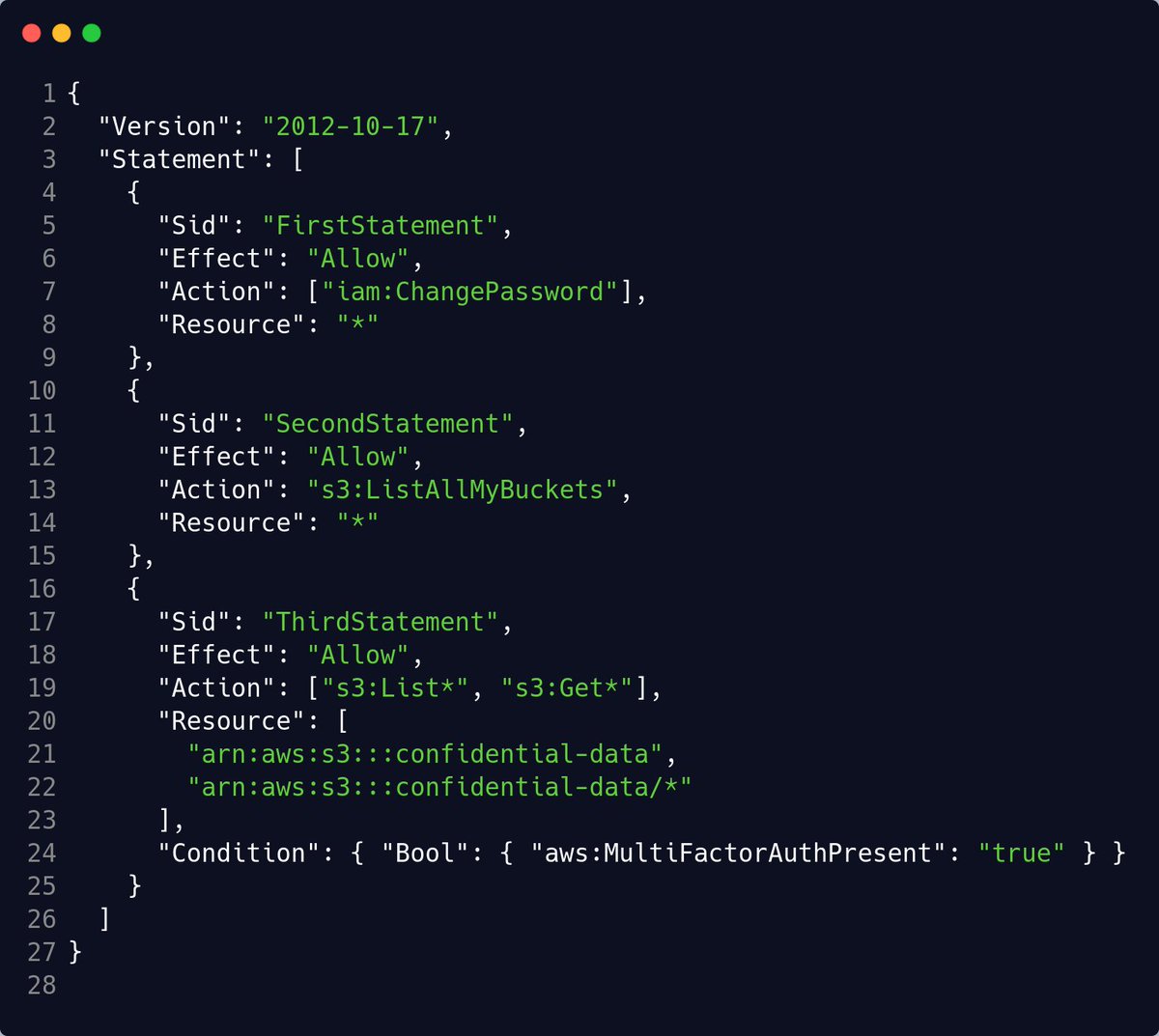
IAM Policies is a JSON document that defines a set of permission for making requests to AWS services and can be used by IAM Users, Groups, and IAM Roles.
IAM Policies looks something like this:
IAM Policies is a JSON document that defines a set of permission for making requests to AWS services and can be used by IAM Users, Groups, and IAM Roles.
IAM Policies looks something like this:
{3/7} IAM MFA
IAM Multifactor Authentication (MFA) adds an extra layer to account security. Make sure you always enable it when you first open an AWS account. It helps to Enable multi-factor authentication (MFA) for the root user to improve security.
IAM Multifactor Authentication (MFA) adds an extra layer to account security. Make sure you always enable it when you first open an AWS account. It helps to Enable multi-factor authentication (MFA) for the root user to improve security.
{4/7} IAM Password Policies
A password policy is a set of rules that define the type of password an IAM user can set.
A password policy is a set of rules that define the type of password an IAM user can set.
{5/7} IAM Credintials Report
You can generate and download a credential report that lists all users in your account and the status of their various credentials, including passwords, access keys, and MFA devices.
You can generate and download a credential report that lists all users in your account and the status of their various credentials, including passwords, access keys, and MFA devices.
{5/7} You can get a credential report from the AWS Management Console, the AWS SDKs and Command Line Tools, or the IAM API.
{6/7} IAM access Advisor
Access Advisor shows the services that a user can access and when those services were last accessed. You can review the data to remove unused permissions. Because you MUST follow the least privilege principle.
Access Advisor shows the services that a user can access and when those services were last accessed. You can review the data to remove unused permissions. Because you MUST follow the least privilege principle.
{7/7} Guidelines and best practices (Summary)
- Don't use the root account except for account setup
- One physical user = one IAM user (do not share credentials)
- Assign users to groups and assign permission to groups
- Create strong password policies
- Don't use the root account except for account setup
- One physical user = one IAM user (do not share credentials)
- Assign users to groups and assign permission to groups
- Create strong password policies
- Enable MFA to your AWS account
- Never Share credentials
- Audit permission of your account with the IAM credentials Report
- Never Share credentials
- Audit permission of your account with the IAM credentials Report
Loading suggestions...