

OK. Time to learn to code. Python here we come.
#100DaysOfCode
Professional in 100 days it says. So should have my billion-dollar app idea up and running this year.
#100DaysOfCode
Professional in 100 days it says. So should have my billion-dollar app idea up and running this year.

Previous experience:
- I was something of a wizz at BASIC when I was 11
- Have been known to unleash a little VBA in my Excel sheets
- Bought "Learn C++ in 24 hours" book about 20yrs ago and didn't read it
So lets just stay I'm one step up from absolute beginner.
- I was something of a wizz at BASIC when I was 11
- Have been known to unleash a little VBA in my Excel sheets
- Bought "Learn C++ in 24 hours" book about 20yrs ago and didn't read it
So lets just stay I'm one step up from absolute beginner.
Day 1 ✅
print()
input()
Using variables
len(x) for length of string
\n new line
\" for printing quotation marks
print()
input()
Using variables
len(x) for length of string
\n new line
\" for printing quotation marks
Day 2 ✅
print("Hello"[3])
Float
True & False
str(x), int(x) to convert type
print(type(x))
2**3 = 2^3
round(x,2)
Dividing gives floating point
Floor division 8//3 gives integer
x += 2 adds to x
f-string: print(f"Age = {age}yrs")
x="{:.2f}".format(x) forces 2dp
print("Hello"[3])
Float
True & False
str(x), int(x) to convert type
print(type(x))
2**3 = 2^3
round(x,2)
Dividing gives floating point
Floor division 8//3 gives integer
x += 2 adds to x
f-string: print(f"Age = {age}yrs")
x="{:.2f}".format(x) forces 2dp
Day 3 ✅
if/elif/else:
As many elif as want & don't need to finish with an else
= assigns, == compares
!= not equal
Modulo - x%y gives remainder
/ ignores next letter in string
not X - reverses True/False
lower()
count()
use 3 single ' in print to print anything -> '''
if/elif/else:
As many elif as want & don't need to finish with an else
= assigns, == compares
!= not equal
Modulo - x%y gives remainder
/ ignores next letter in string
not X - reverses True/False
lower()
count()
use 3 single ' in print to print anything -> '''
Day 4 ✅
import random
random.randint(1,100)
random.random() -> float 0 to 1
list1=["a","b","c"]
print(list1[0]) -> a
[-1] last on list
.append("d")
.extend(["e","f","g"])
.split(",") splits ordered string
len(x) # of things on list
random.choice(x) picks off list
Nested lists
import random
random.randint(1,100)
random.random() -> float 0 to 1
list1=["a","b","c"]
print(list1[0]) -> a
[-1] last on list
.append("d")
.extend(["e","f","g"])
.split(",") splits ordered string
len(x) # of things on list
random.choice(x) picks off list
Nested lists
Day 5 ✅
For loops
sum(x), max(x), min(x) on lists
For x in range(1,11) goes from 1 to 10
For x in range(4,21,3) goes from 4 to 20 in increments of 3
x=list(s) turns string to list
random.shuffle(s) shuffles a list
pword=[] to start a list
Can do For loop on list
For loops
sum(x), max(x), min(x) on lists
For x in range(1,11) goes from 1 to 10
For x in range(4,21,3) goes from 4 to 20 in increments of 3
x=list(s) turns string to list
random.shuffle(s) shuffles a list
pword=[] to start a list
Can do For loop on list
Day 6 ✅
Creating your own functions (def) and calling them
While loops
Using True/False in While loops
Using not or !=
Flow charts are useful
Indentation (apparently 4 spaces is best, but I feel like I'm a tab kinda guy):
Creating your own functions (def) and calling them
While loops
Using True/False in While loops
Using not or !=
Flow charts are useful
Indentation (apparently 4 spaces is best, but I feel like I'm a tab kinda guy):

Day 7 ✅
if/in & for/in on lists
Can do *not in* in an if statement.
if x not in word_list:
for number in number_list:
(also works on strings)
+= to add an element to a list, instead of .append
import lists etc from files by:
from my_dictionary import word_list
Made hangman!
if/in & for/in on lists
Can do *not in* in an if statement.
if x not in word_list:
for number in number_list:
(also works on strings)
+= to add an element to a list, instead of .append
import lists etc from files by:
from my_dictionary import word_list
Made hangman!

Day 8 ✅
Functions with inputs
Create functions with multiple parameters that you can pass in when you call them.
def stock(ticker,px)
[dets of function here]
stock(ticker=TSLA,px=990)
letter_location=alphabet_list.index("E") to pull out position in a list (4)
Functions with inputs
Create functions with multiple parameters that you can pass in when you call them.
def stock(ticker,px)
[dets of function here]
stock(ticker=TSLA,px=990)
letter_location=alphabet_list.index("E") to pull out position in a list (4)
Day 9 ✅
Dictionary elements identified by their key
capitals={"Egypt":"Cairo"}
capitals["Egypt"]="Cairo"
For thing in capitals:
print(thing) -> country
print(capitals[thing]) -> capital
Can nest mixes of lists & dicts in a dictionary OR a list
.append(new_dict) to lists
Dictionary elements identified by their key
capitals={"Egypt":"Cairo"}
capitals["Egypt"]="Cairo"
For thing in capitals:
print(thing) -> country
print(capitals[thing]) -> capital
Can nest mixes of lists & dicts in a dictionary OR a list
.append(new_dict) to lists
Day 10 ✅
Functions can return result
Send multiple inputs to a function
"return" ends function
def my_function(n1,n2):
return n1+n2
answer=my_function(n1,n2)
Docstrings - add description to your functions by enclosing text in triple " at start """xyz"""
Built a calculator
Functions can return result
Send multiple inputs to a function
"return" ends function
def my_function(n1,n2):
return n1+n2
answer=my_function(n1,n2)
Docstrings - add description to your functions by enclosing text in triple " at start """xyz"""
Built a calculator
Day 11 ✅
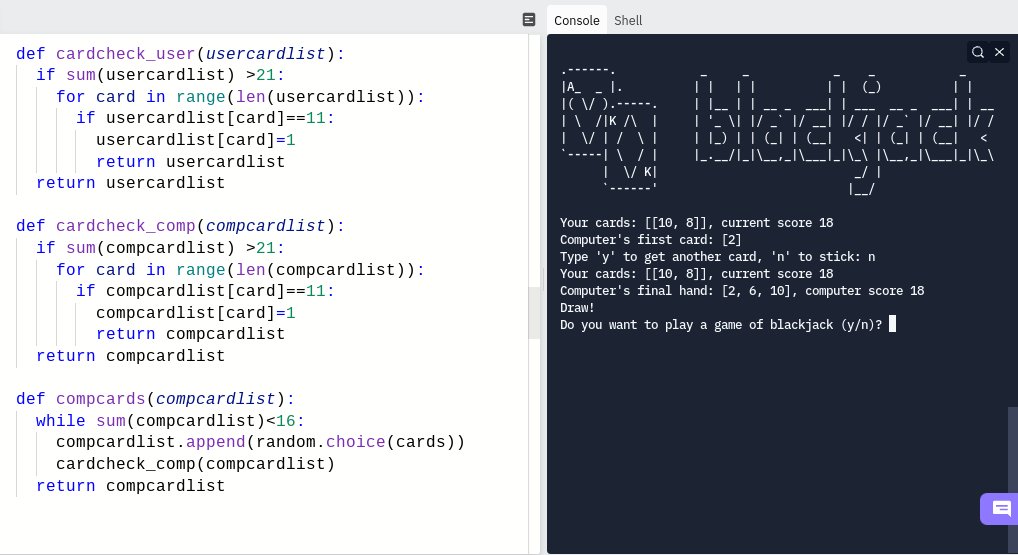
Made a Blackjack game! 🃏♠♥♣♦
Made a Blackjack game! 🃏♠♥♣♦
Day 12 ✅
namespace - anything you give a name to, like variable/function
Global/Local scope
Creating a variable in a loop doesn't contain it, it's still global
In a function, can:
global my_variable
return my_variable+3
Good practise to use CAPITAL_LETTERS for constants
namespace - anything you give a name to, like variable/function
Global/Local scope
Creating a variable in a loop doesn't contain it, it's still global
In a function, can:
global my_variable
return my_variable+3
Good practise to use CAPITAL_LETTERS for constants
Day 13 ✅
Debugging
Use Thonny or Python Tutor to step through code execution line by line
Use print liberally to check values of variables/lists etc as code executes
Describe the problem
Reproduce the bug
Be the computer
Fix errors
Run often
Use StackOverflow
Debugging
Use Thonny or Python Tutor to step through code execution line by line
Use print liberally to check values of variables/lists etc as code executes
Describe the problem
Reproduce the bug
Be the computer
Fix errors
Run often
Use StackOverflow
Day 14 ✅
Made a Higher/Lower guessing game
Mainly involved manipulating dictionaries & lists, loops, creating and calling functions
🚩🚩🚩 for recording of a laptop screen with mobile, but I couldn't screenshot cos it's locked content! 🤪
Not quite ready for Twitch yet...
Made a Higher/Lower guessing game
Mainly involved manipulating dictionaries & lists, loops, creating and calling functions
🚩🚩🚩 for recording of a laptop screen with mobile, but I couldn't screenshot cos it's locked content! 🤪
Not quite ready for Twitch yet...

Day 15 ✅
Installing proper Python, PyCharm
Total nightmare getting working on Chromebook (Windows was fine)
Tons of shortcuts
Linter/PEP 8 style guide
Refactor/rename
.get()
.2f rounding
TODO tracking
Made virtual coffee machine
Long day. Endlessly googling issues...
Installing proper Python, PyCharm
Total nightmare getting working on Chromebook (Windows was fine)
Tons of shortcuts
Linter/PEP 8 style guide
Refactor/rename
.get()
.2f rounding
TODO tracking
Made virtual coffee machine
Long day. Endlessly googling issues...
Day 16 ✅
Object Oriented Programming
Classes, methods, attributes
Make object from Class by my_car=CarBlueprint()
my_car.seats(5) calls method
my_car.fuel = 8 taps into attribute
Classes in PascalCase
Var/funcs in snake_case
PyPi to add packages
Frustrating day 🤯
Object Oriented Programming
Classes, methods, attributes
Make object from Class by my_car=CarBlueprint()
my_car.seats(5) calls method
my_car.fuel = 8 taps into attribute
Classes in PascalCase
Var/funcs in snake_case
PyPi to add packages
Frustrating day 🤯

Day 17 ✅
Constructer - aka initializing, setting something to their starting values
class Car:
def __init__(self, stuff):
#initialize attributes <- whatever here will be done every time an object created
Code -> Auto-indent
Made a quiz using opentdb.com
Constructer - aka initializing, setting something to their starting values
class Car:
def __init__(self, stuff):
#initialize attributes <- whatever here will be done every time an object created
Code -> Auto-indent
Made a quiz using opentdb.com

Day 18 ✅
from x import * <- imports everything, but try to avoid, not obvious what Class a thing comes from
colorgram.py RGB colors from image
Tuples - like a list but CANNOT be changed
my_tuple=(1,3,8)
my_list(my_tuple) <- create list from tuple
Made a 🐢 move!
from x import * <- imports everything, but try to avoid, not obvious what Class a thing comes from
colorgram.py RGB colors from image
Tuples - like a list but CANNOT be changed
my_tuple=(1,3,8)
my_list(my_tuple) <- create list from tuple
Made a 🐢 move!

Day 19 ✅
Higher order functions: a fn that can work with other fn's. Can put a fn in a fn.
Key capture:
screen.listen
.onkey()
.textinput()
Each thing made from a Class is an instance
Create multiple instances & put in list to manipulate
Made an Etch-a-sketch & turtle race!
Higher order functions: a fn that can work with other fn's. Can put a fn in a fn.
Key capture:
screen.listen
.onkey()
.textinput()
Each thing made from a Class is an instance
Create multiple instances & put in list to manipulate
Made an Etch-a-sketch & turtle race!

Day 20 ✅
screen.tracer(0) turns off drawing updates
screen.update() turns them back on
import time
time.sleep(7) for delay
More Class,
self (feeling a bit lost on this one),
__init__,
methods
Made snake! Finishing in tomorrow's lesson. *Cannot* get title on window to work!!
screen.tracer(0) turns off drawing updates
screen.update() turns them back on
import time
time.sleep(7) for delay
More Class,
self (feeling a bit lost on this one),
__init__,
methods
Made snake! Finishing in tomorrow's lesson. *Cannot* get title on window to work!!

Day 21 ✅
Class inheritance
class Fish(Animal):
def _init_(self):
super()._init_()
Slicing Lists/Tuples
piano_note[2:5] -> CDE
[2:] -> CDEFG
[:5] -> ABCDE
[2:5:2] -> CDE
[::2] every 2nd item
[::-1] gives list in reverse
FINISHED SNAKE! 🐍 I'm prob worth more than Nokia now.
Class inheritance
class Fish(Animal):
def _init_(self):
super()._init_()
Slicing Lists/Tuples
piano_note[2:5] -> CDE
[2:] -> CDEFG
[:5] -> ABCDE
[2:5:2] -> CDE
[::2] every 2nd item
[::-1] gives list in reverse
FINISHED SNAKE! 🐍 I'm prob worth more than Nokia now.

Day 22 ✅
Breaking down problems
Putting separate bits of code/objects in their own classes/tabs
Still feel a bit shaky on using variables across different functions/classes.
Made Pong! Took bloody hours...
Breaking down problems
Putting separate bits of code/objects in their own classes/tabs
Still feel a bit shaky on using variables across different functions/classes.
Made Pong! Took bloody hours...

Day 23 ✅
Unbelievably frustrating when you're given a challenge to complete, you think yeah there's nothing here I don't know how to do, and then you can't do a single bloody thing!
Took forever, needed help, but made a basic Frogger. Fk this sh*t 🙈🤣
Unbelievably frustrating when you're given a challenge to complete, you think yeah there's nothing here I don't know how to do, and then you can't do a single bloody thing!
Took forever, needed help, but made a basic Frogger. Fk this sh*t 🙈🤣

Day 24 ✅
with open("me.txt", mode="r") as file1:
x = file1.read()
.write("text")
mode w overwrites, a=append
Open file that doesn't exist with mode=w, will create file
./ is current directory
../../ will go UP 2 folders
/ not \
.readlines
.replace
.strip
with open("me.txt", mode="r") as file1:
x = file1.read()
.write("text")
mode w overwrites, a=append
Open file that doesn't exist with mode=w, will create file
./ is current directory
../../ will go UP 2 folders
/ not \
.readlines
.replace
.strip
Day 25 ✅
.csv data
import csv/pandas
x=pandas.read_csv(file)
x["car"] or x.car
x.to_dict()
x["car"].to_list()
x[x.car=="BMW]
pandas.dataframe()
data.to_csv("myfile.csv")
Made a guessing game!
.csv data
import csv/pandas
x=pandas.read_csv(file)
x["car"] or x.car
x.to_dict()
x["car"].to_list()
x[x.car=="BMW]
pandas.dataframe()
data.to_csv("myfile.csv")
Made a guessing game!
![Day 25 ✅
.csv data
import csv/pandas
x=https://t.co/0OunDHDTvR_csv(file)
x["car"] or https://t.co/...](https://pbs.twimg.com/media/FLgu9VvWYAIWdaT.jpg)
Day 26 ✅
List comprehension
Using [new_element for .. in .. if ..]
eg. square_evens = [n**2 for n in numbers if n%2=0]
new_dict = {word:len(word) for word in word_list if ... }
.items() to loop through columns
.iterrows() to loop through rows
Another long day..
List comprehension
Using [new_element for .. in .. if ..]
eg. square_evens = [n**2 for n in numbers if n%2=0]
new_dict = {word:len(word) for word in word_list if ... }
.items() to loop through columns
.iterrows() to loop through rows
Another long day..

Day 27 ✅
GUI's & Tkinter
Layout Managers
.pack()
.place()
.grid()
*args allow unlimited arguments, in tuple form
**kwargs = KeyWord Arguments, in dictionary form
.config()
.get()
.Label()
Widgets - buttons, spinbox, check button, radio buttons, listbox
Lots of info today.
GUI's & Tkinter
Layout Managers
.pack()
.place()
.grid()
*args allow unlimited arguments, in tuple form
**kwargs = KeyWord Arguments, in dictionary form
.config()
.get()
.Label()
Widgets - buttons, spinbox, check button, radio buttons, listbox
Lots of info today.
Day 28 ✅
canvas.itemconfig()
window.mainloop() at end
import time
window.after() for delays
PhotoImage() converts to png which is only file python takes
GUI programs are event-driven
Python has dynamic typing (variables can change type)
var = None, assigns variable no value
canvas.itemconfig()
window.mainloop() at end
import time
window.after() for delays
PhotoImage() converts to png which is only file python takes
GUI programs are event-driven
Python has dynamic typing (variables can change type)
var = None, assigns variable no value

Day 29 ✅
.insert(index,string)
.delete(0,END) deletes from 1st to last char
columnspan
tkMessageBox need to explicitly import
GoTo -> Implementation, can see code for it
"#".join(list) joins list into string, with # (or whatever) between each element
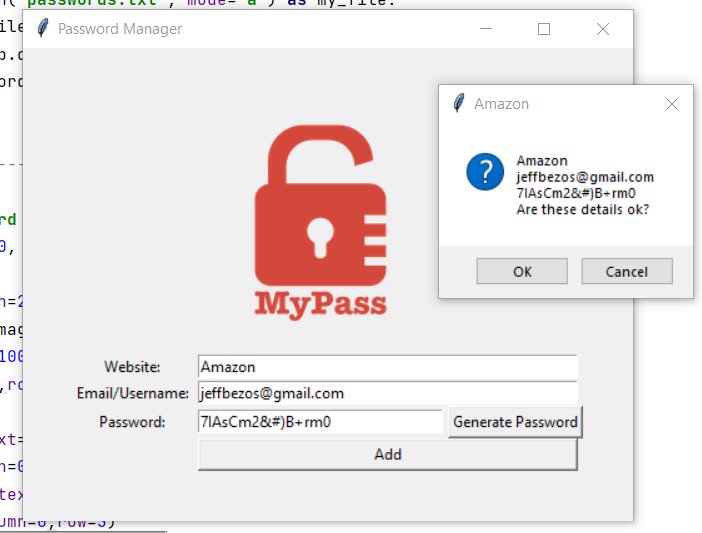
Made a Password Manager!
.insert(index,string)
.delete(0,END) deletes from 1st to last char
columnspan
tkMessageBox need to explicitly import
GoTo -> Implementation, can see code for it
"#".join(list) joins list into string, with # (or whatever) between each element
Made a Password Manager!
Day 30 ✅
Errors, exception handling, and JSON data.
try:
except:
else:
finally:
KeyError, FileNotFoundError, IndexError
json.dump()
json.load()
json.update(indent=4) makes data in file readable
Interesting stuff today. Added search functionality to my Password Manager 😎
Errors, exception handling, and JSON data.
try:
except:
else:
finally:
KeyError, FileNotFoundError, IndexError
json.dump()
json.load()
json.update(indent=4) makes data in file readable
Interesting stuff today. Added search functionality to my Password Manager 😎

Day 31 ✅
Built French-to-English flashcards
Good practice of concepts from previous lessons
- create window
- create a canvas from a pic file, add labels & buttons, .itemconfig
- call functions after timer delay
- cancel timer
- read/write .csv files, manipulate dictionaries
Built French-to-English flashcards
Good practice of concepts from previous lessons
- create window
- create a canvas from a pic file, add labels & buttons, .itemconfig
- call functions after timer delay
- cancel timer
- read/write .csv files, manipulate dictionaries

Day 32 ✅
Email & SMTP
import smtplib
connection=smtplib.SMTP("smtp.gmail.com")
connection.sendmail()
import datetime
datetime.now()
pythonanywhere.com to host/run code
Voodoo-level stuff today, from a simple bit of code I can send & schedule emails!!
Email & SMTP
import smtplib
connection=smtplib.SMTP("smtp.gmail.com")
connection.sendmail()
import datetime
datetime.now()
pythonanywhere.com to host/run code
Voodoo-level stuff today, from a simple bit of code I can send & schedule emails!!

Day 33 ✅
API's
API Endpoint is just url for data
Pulls data as JSON
Can send parameters with API request
import requests
requests.get(url="..")
data = response.json()
Pulled the location of Space Station @ api.open-notify.org, now emails me if it's overhead AND dark!!
API's
API Endpoint is just url for data
Pulls data as JSON
Can send parameters with API request
import requests
requests.get(url="..")
data = response.json()
Pulled the location of Space Station @ api.open-notify.org, now emails me if it's overhead AND dark!!
Day 34 ✅
import html
html.unescape()
# gets rid of HTML character entries like "
Python Type Hints - declare variable type when creating
Tkinter buttons can be (state="disabled")
Can't use time.sleep() delays when using window.mainloop() as it's constantly checking
import html
html.unescape()
# gets rid of HTML character entries like "
Python Type Hints - declare variable type when creating
Tkinter buttons can be (state="disabled")
Can't use time.sleep() delays when using window.mainloop() as it's constantly checking
A third of the way there already. Not so bad.
"Success doesn't come from what you do occasionally. It comes from what you do consistently." 👊🏼
"Success doesn't come from what you do occasionally. It comes from what you do consistently." 👊🏼
Day 35 ✅
API Keys
Authentification
Environment Variables (these feel confusing)
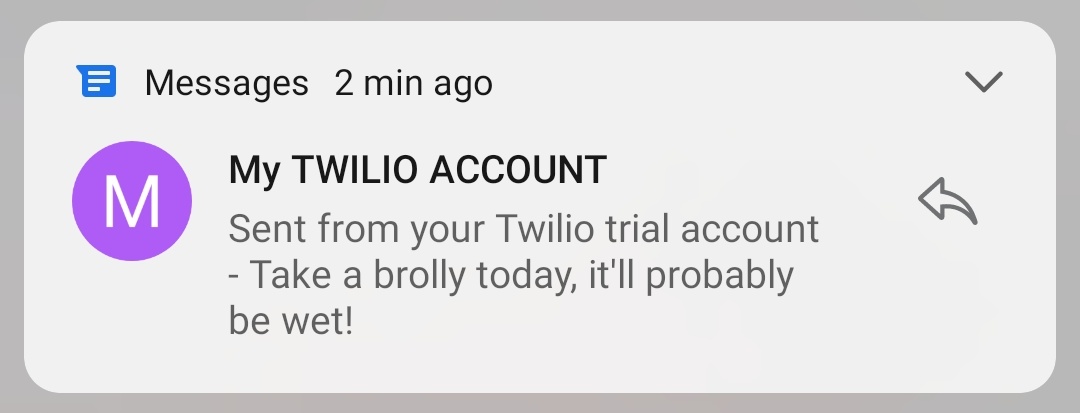
Used a weather API to see if it will rain, made a $TWLO a/c, & scheduled with Python Anywhere to send myself an SMS if it'll rain.
And now I know what a Twilio is!
API Keys
Authentification
Environment Variables (these feel confusing)
Used a weather API to see if it will rain, made a $TWLO a/c, & scheduled with Python Anywhere to send myself an SMS if it'll rain.
And now I know what a Twilio is!
Day 36 ✅
With very few hints other than being pointed toward some API's,
- pulled in stock price data
- tapped into a news API on that stock and returned the top news stories
- then using Twilio API, had it SMS me the top 3 articles and the stock move
😎
With very few hints other than being pointed toward some API's,
- pulled in stock price data
- tapped into a news API on that stock and returned the top news stories
- then using Twilio API, had it SMS me the top 3 articles and the stock move
😎

Day 37 ✅
Advanced API authentication and POST/PUT/DELETE requests
requests.get() -> gets data via API
.post() -> puts data into something
.put() -> changes data
.delete()
datetime.strftime() -> string format time, eg "%Y%m%d" formats as yyyymmdd
Using "input" in parameters
Advanced API authentication and POST/PUT/DELETE requests
requests.get() -> gets data via API
.post() -> puts data into something
.put() -> changes data
.delete()
datetime.strftime() -> string format time, eg "%Y%m%d" formats as yyyymmdd
Using "input" in parameters

Day 38 ✅
Learned to post to Google Sheets with Sheety
params is only for GET requests, use json= for POST/PUT
use headers= for API keys/passwords as that's encrypted
import os
os.environ["API_KEY"] to set environment variable
os.getenv or os.environ.get("API_KEY") to get it
Learned to post to Google Sheets with Sheety
params is only for GET requests, use json= for POST/PUT
use headers= for API keys/passwords as that's encrypted
import os
os.environ["API_KEY"] to set environment variable
os.getenv or os.environ.get("API_KEY") to get it
Day 39 ✅
From a simple spreadsheet, searched tequila.kiwi.com flight API for airport codes and 6 months of flights..any under my max price, I'd have it text me via Twilio. Neat.
Unbelievably long and frustrating day, code feels like it's held together with duct tape! 🙈
From a simple spreadsheet, searched tequila.kiwi.com flight API for airport codes and 6 months of flights..any under my max price, I'd have it text me via Twilio. Neat.
Unbelievably long and frustrating day, code feels like it's held together with duct tape! 🙈

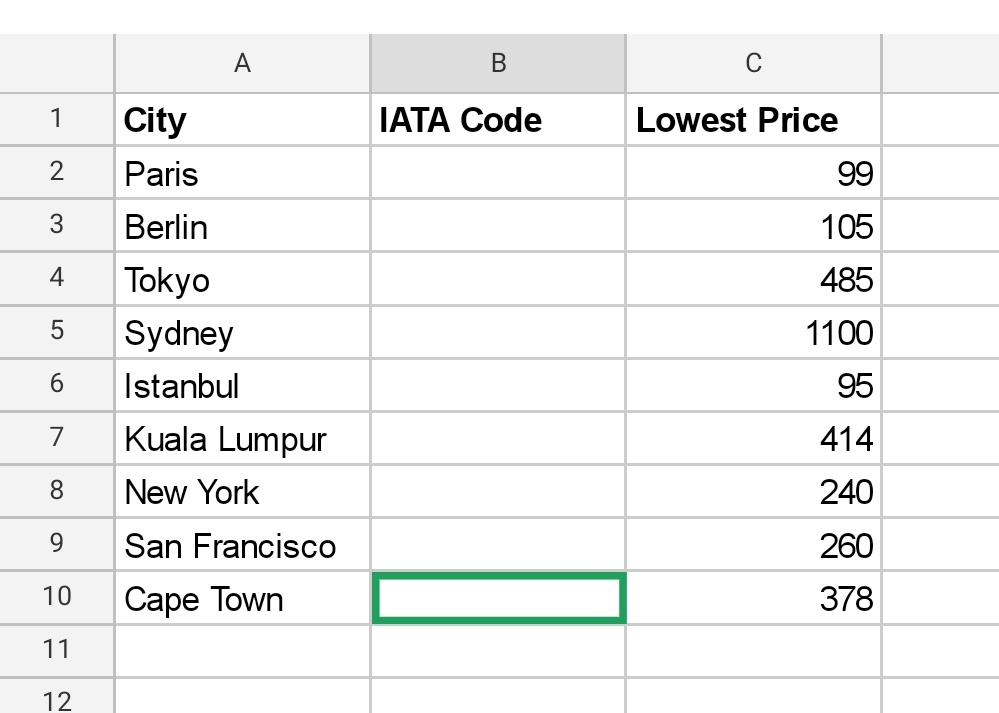
Day 40 ✅
Expanded yesterday's flight project.
Took names/emails as inputs, posted to Google Sheet, added exception handling when no flights found, emailed results
(utf-8) encoded but couldn't get it to display "£" correctly in email
Not entirely comfortable with objects yet
Expanded yesterday's flight project.
Took names/emails as inputs, posted to Google Sheet, added exception handling when no flights found, emailed results
(utf-8) encoded but couldn't get it to display "£" correctly in email
Not entirely comfortable with objects yet

Day 41 ✅
HTML
atom & codepen editors
<h1> to <h6>
<hr size="3"> hr is element, size is attribute
meta tags tells browser how to display
<i> vs <em> latter tells browser to stress it
<ul> or <ol>
<li>
<img source=url alt="text">
<a href=url>MyText</a>
HTML
atom & codepen editors
<h1> to <h6>
<hr size="3"> hr is element, size is attribute
meta tags tells browser how to display
<i> vs <em> latter tells browser to stress it
<ul> or <ol>
<li>
<img source=url alt="text">
<a href=url>MyText</a>
Day 42 ✅
Forms and Tables in HTML
Nowadays use CSS and JS to style/action
<form action="mailto:...">
<input type="xx"> loads of diff input types available
Joined GitHub, uploaded my files to a repository and published my site to the web. Feel like a real coder now!
Forms and Tables in HTML
Nowadays use CSS and JS to style/action
<form action="mailto:...">
<input type="xx"> loads of diff input types available
Joined GitHub, uploaded my files to a repository and published my site to the web. Feel like a real coder now!

Day 43 ✅
Intro to CSS
External CSS, in css/styles.css folder, apply to every page
Chrome Developer Tools for de-bugging
Can overrule CSS file by writing directly in eg <body>
/*comments here*/
Tag, Class and ID selectors
psuedo-class :hover to change state when active
👍🏻
Intro to CSS
External CSS, in css/styles.css folder, apply to every page
Chrome Developer Tools for de-bugging
Can overrule CSS file by writing directly in eg <body>
/*comments here*/
Tag, Class and ID selectors
psuedo-class :hover to change state when active
👍🏻
Day 44 ✅
Insanely long day, learnt so much CSS, such as:
<span>
display:
<div>
Box Model (margin padding border)
visibility:
Static and relative positioning, absolute affects flow
float:
clear:
Fonts - font-family, embedding, dynamic sizing, px em rem %
Insanely long day, learnt so much CSS, such as:
<span>
display:
<div>
Box Model (margin padding border)
visibility:
Static and relative positioning, absolute affects flow
float:
clear:
Fonts - font-family, embedding, dynamic sizing, px em rem %

Day 45 ✅
Web Scraping
soup=BeautifulSoup()
Parser tells what language (eg HTML)
soup.find_all(name="a", id=".." class_="..")
Can drill into html element, soup.select_one=("p a")
/robots.txt on any url will tell you what site scraping they allow
Cool stuff 😎
Web Scraping
soup=BeautifulSoup()
Parser tells what language (eg HTML)
soup.find_all(name="a", id=".." class_="..")
Can drill into html element, soup.select_one=("p a")
/robots.txt on any url will tell you what site scraping they allow
Cool stuff 😎

Day 46 ✅
Spotify!
- Generate url for Billboard Top 100 songs for any date
- Scrape the HTML for song titles
- Spotify developer dashboard, OAuth and Spotipy module to search for song codes and add to a new playlist
Long & hard day, just didn't work at the last step 🤷 🙁
Spotify!
- Generate url for Billboard Top 100 songs for any date
- Scrape the HTML for song titles
- Spotify developer dashboard, OAuth and Spotipy module to search for song codes and add to a new playlist
Long & hard day, just didn't work at the last step 🤷 🙁

Day 47 ✅
Web scraped a product on Amazon to monitor price changes, and if it drops under a certain price, sends me an email with the details.
Crazy what you can do with just a few lines of code! This is actually useful, I'm gonna set it up for my regular purchases (ie. whisky)
Web scraped a product on Amazon to monitor price changes, and if it drops under a certain price, sends me an email with the details.
Crazy what you can do with just a few lines of code! This is actually useful, I'm gonna set it up for my regular purchases (ie. whisky)

Day 48 ✅
Selenium webdriver - doing stuff to a webpage.
Hours of faff figuring out getting the file in the right $PATH
But v cool how you can do anything to any element...bot farms are easy.
driver.find_element()
XPATH
CSS_SELECTORS
Auto click links & fill in search boxes.
Selenium webdriver - doing stuff to a webpage.
Hours of faff figuring out getting the file in the right $PATH
But v cool how you can do anything to any element...bot farms are easy.
driver.find_element()
XPATH
CSS_SELECTORS
Auto click links & fill in search boxes.

Day 49 ✅
Practiced more selenium website manipulation by having a program:
- log in to LinkedIn
- search for jobs with parameters I've defined
- save all those jobs and follow the companies
Kinda cool, although was awkward trying to get just the right element on the page.
Practiced more selenium website manipulation by having a program:
- log in to LinkedIn
- search for jobs with parameters I've defined
- save all those jobs and follow the companies
Kinda cool, although was awkward trying to get just the right element on the page.

Day 50 ✅
Made a Tinder auto-swiper!
Was a little finicky selecting the right links/logins/swipe, but learnt new CSS selection tricks + handling popups...& had to get sign-off from wife to create a fake account 😀
Don't worry, if you can't program, you can make one like this:
Made a Tinder auto-swiper!
Was a little finicky selecting the right links/logins/swipe, but learnt new CSS selection tricks + handling popups...& had to get sign-off from wife to create a fake account 😀
Don't worry, if you can't program, you can make one like this:

Half-way through, that took 55 days.
Hasn't always been easy to find the time, but really the main sacrifice has been not binge-watching Netflix...not so bad really 🤷
“Some people want it to happen, some wish it would happen, others make it happen.” – Michael Jordan
Hasn't always been easy to find the time, but really the main sacrifice has been not binge-watching Netflix...not so bad really 🤷
“Some people want it to happen, some wish it would happen, others make it happen.” – Michael Jordan
Day 51 ✅
Made a Twitter bot!
Created a class with some functions, had it load a webpage to speed-test my internet, then log into Twitter and send a tweet with the details.
Ridic easy to send tweets with just a couple lines of code. So many things I could do with this... 🤔
Made a Twitter bot!
Created a class with some functions, had it load a webpage to speed-test my internet, then log into Twitter and send a tweet with the details.
Ridic easy to send tweets with just a couple lines of code. So many things I could do with this... 🤔
Day 52 ✅
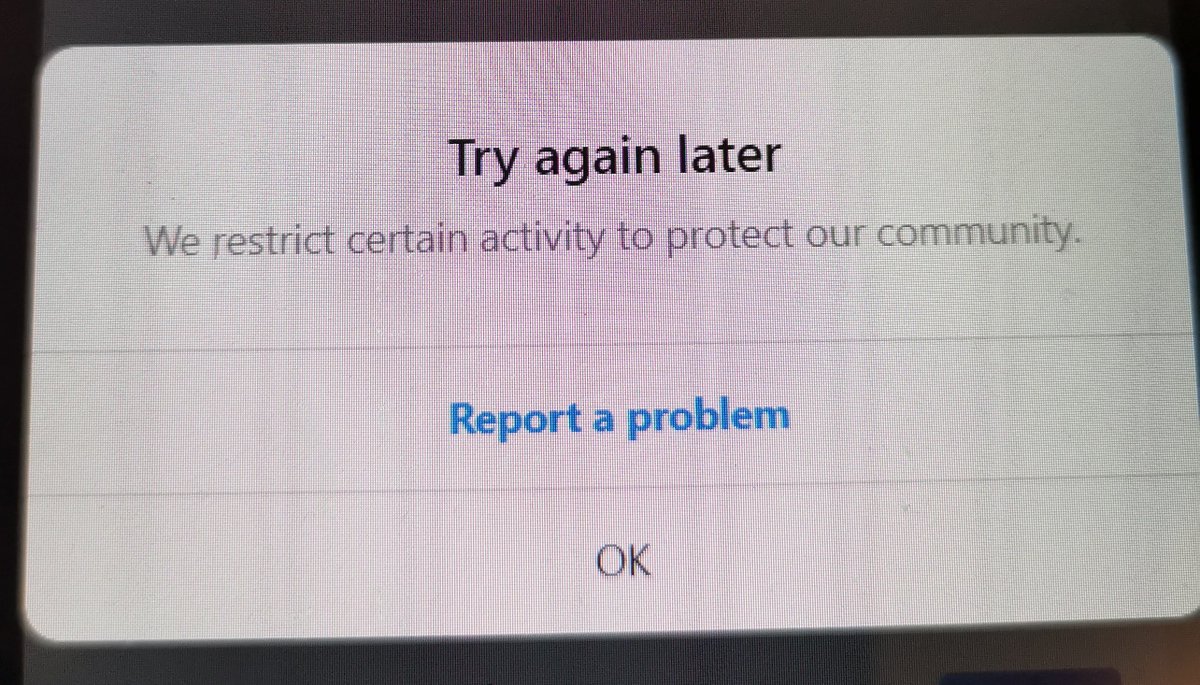
Instagram auto-follower!
With an input of which Instagram-Finfluencer to use, the program logged onto Insta, opened the followers of that person, and clicked FOLLOW on all their followers
Despite using random time intervals, Insta eventually figured I was a bot tho..
Instagram auto-follower!
With an input of which Instagram-Finfluencer to use, the program logged onto Insta, opened the followers of that person, and clicked FOLLOW on all their followers
Despite using random time intervals, Insta eventually figured I was a bot tho..
Day 53 ✅
Built a program that pulls in property data from Rightmove with custom filters, pulls up Google Forms, fills in dets of each property and saves it to a Google sheet.
Not too hard, picked up more tricks for finding web elements on a page in BeautifulSoup & Selenium.
Built a program that pulls in property data from Rightmove with custom filters, pulls up Google Forms, fills in dets of each property and saves it to a Google sheet.
Not too hard, picked up more tricks for finding web elements on a page in BeautifulSoup & Selenium.
Day 54 ✅
Backend Web Development
Intro to Flask
Command Line Interface - shell/kernel/cd/dir
Python functions are 1st-class objects, can be passed around
Nested functions - can return functions
Decorator functions
@ app.route('/')
The / part is for homepage.
Backend Web Development
Intro to Flask
Command Line Interface - shell/kernel/cd/dir
Python functions are 1st-class objects, can be passed around
Nested functions - can return functions
Decorator functions
@ app.route('/')
The / part is for homepage.
Day 55 ✅
HTML/URL parsing in Flask
@ app.route('/<name>/<int:num>')
def greet(name):
return f"Hi {num}"
Flask accepts html in return
def x:
return <h1>Yo!</h1>
Decorators with *args & *kwargs
def sum(fn):
def wrap(*args, *kwargs):
If arg[0]=1:
fn()
return wrap
HTML/URL parsing in Flask
@ app.route('/<name>/<int:num>')
def greet(name):
return f"Hi {num}"
Flask accepts html in return
def x:
return <h1>Yo!</h1>
Decorators with *args & *kwargs
def sum(fn):
def wrap(*args, *kwargs):
If arg[0]=1:
fn()
return wrap

Day 56 ✅
Rendering HTML/Static files & using website templates
Flask is a FRAMEWORK, so gotta follow rules eg. HTML must go in folder called "templates"
Can download html templates and add into your file, then fix code links.
Can edit html directly on Chrome then save file👌
Rendering HTML/Static files & using website templates
Flask is a FRAMEWORK, so gotta follow rules eg. HTML must go in folder called "templates"
Can download html templates and add into your file, then fix code links.
Can edit html directly on Chrome then save file👌
Day 57 ✅
URL building/templating with Jinja in Flask
Use {{ }} to evaluate code in html
<h1>5*6</h1> output "5*6"
<h1>{{ 5*6 }}</h1> output "30"
{% %} use this in html for multi-line code
Dynamically add url for server function:
<a href="{{url_for('get_blog', x=3)}}">
URL building/templating with Jinja in Flask
Use {{ }} to evaluate code in html
<h1>5*6</h1> output "5*6"
<h1>{{ 5*6 }}</h1> output "30"
{% %} use this in html for multi-line code
Dynamically add url for server function:
<a href="{{url_for('get_blog', x=3)}}">
Day 58 ✅
Bootstrap framework: built responsive website for web&mobile
Wireframing (Balsamiq)
Tons of CSS, @ media rule, combining selectors
Codeply
z-index
Code refactoring
Crazy long, 5hrs+ of videos = 20hrs+ work, took 5 days
Got demoralized, life got in the way, but done!
Bootstrap framework: built responsive website for web&mobile
Wireframing (Balsamiq)
Tons of CSS, @ media rule, combining selectors
Codeply
z-index
Code refactoring
Crazy long, 5hrs+ of videos = 20hrs+ work, took 5 days
Got demoralized, life got in the way, but done!

Day 59 ✅
Created a blog site, added styles.
Moving header and footer out to separate files, then
{% include "header.html" %} in your pages
render_template("index.html", name=my_var)
Keep programming out of HTML if poss, and within .py/server files
Created a blog site, added styles.
Moving header and footer out to separate files, then
{% include "header.html" %} in your pages
render_template("index.html", name=my_var)
Keep programming out of HTML if poss, and within .py/server files
Day 60 ✅
Forms
HTML:
<form action="/login" method="POST">
<label>Email<\label>
<input type="text" name="email" id="email">
<input type="submit">
</form>
FLASK SERVER:
@ app.route('/login', methods=["GET," POST"])
if request.method="POST":
request.form.get('email')
Forms
HTML:
<form action="/login" method="POST">
<label>Email<\label>
<input type="text" name="email" id="email">
<input type="submit">
</form>
FLASK SERVER:
@ app.route('/login', methods=["GET," POST"])
if request.method="POST":
request.form.get('email')
Day 61 ✅
FLASK-WTF (WTForms)
Validators
StringField(..)
form.xx.data
form.xx.label
Template Inheritance
{% extends "base.html" %}
{% block content %}
{% endblock %}
Super Blocks
{% super() %}
{{ wtf.quick_forms(form) }}
{% import *bootstrap/wtf.html" as wtf %}
FLASK-WTF (WTForms)
Validators
StringField(..)
form.xx.data
form.xx.label
Template Inheritance
{% extends "base.html" %}
{% block content %}
{% endblock %}
Super Blocks
{% super() %}
{{ wtf.quick_forms(form) }}
{% import *bootstrap/wtf.html" as wtf %}

Day 62 ✅
More Flask, WTForms, Bootstrap & CSV
Read from CSV file, built a form page to add to the CSV, built table to display data.
Mostly reinforcing of existing learning, so long and difficult 🤯
“The greater the difficulty, the more glory in surmounting it."
- Epictetus
More Flask, WTForms, Bootstrap & CSV
Read from CSV file, built a form page to add to the CSV, built table to display data.
Mostly reinforcing of existing learning, so long and difficult 🤯
“The greater the difficulty, the more glory in surmounting it."
- Epictetus
Day 63 ✅
Databases with SQLite, SQLAlchemy, DB Browser
TABLE is like excel tab, FIELD is like column heading
Database relationships mapped to objects
my_list=db.session.query(X).all()
request.form('id')
request.args.get('id')
db.session.commit()
Book.query.filter_by(..)
Databases with SQLite, SQLAlchemy, DB Browser
TABLE is like excel tab, FIELD is like column heading
Database relationships mapped to objects
my_list=db.session.query(X).all()
request.form('id')
request.args.get('id')
db.session.commit()
Book.query.filter_by(..)
So, I spent 3 full days unable to get it to create a database. It gave no helpful error codes. I googled endlessly, read every Q&A on the course, tried every combination of code.
I nearly went mad.
Turned out to be a typo - I'd written SQUAlchemy instead of SQLAlchemy 🙈
I nearly went mad.
Turned out to be a typo - I'd written SQUAlchemy instead of SQLAlchemy 🙈

Day 64 ✅
Made a "Top Movies" site
Used Flask, SQL, Jinja, WTForms...called an API for movie data including images...manipulated database to edit/add/delete/re-sort
Don't know if I'm getting slower, course getting harder, or I'm doing it more thoroughly, but took a while..
Made a "Top Movies" site
Used Flask, SQL, Jinja, WTForms...called an API for movie data including images...manipulated database to edit/add/delete/re-sort
Don't know if I'm getting slower, course getting harder, or I'm doing it more thoroughly, but took a while..

Day 65 ✅
Web Design School
Colour Theory🌈
Typography - Serif/sans-serif
Old v modern fonts
Font moods
Contrasts
UI Design - Hierarchy, Layout, Alignment, White Space, Audience
UX Design - Simplicity, Consistency, Reading Patterns, F & Z-Layout
@canva is cool, made this:
Web Design School
Colour Theory🌈
Typography - Serif/sans-serif
Old v modern fonts
Font moods
Contrasts
UI Design - Hierarchy, Layout, Alignment, White Space, Audience
UX Design - Simplicity, Consistency, Reading Patterns, F & Z-Layout
@canva is cool, made this:

Day 66 - Building API's
RESTful routing
API's return JSON not HTML, use jsonify()
Turn object to dictionary, then jsonify
POSTMAN to test API's. Send requests, auto-create the documentation, add args, can send as a form, etc
PUT v PATCH - replace part of an entry only
RESTful routing
API's return JSON not HTML, use jsonify()
Turn object to dictionary, then jsonify
POSTMAN to test API's. Send requests, auto-create the documentation, add args, can send as a form, etc
PUT v PATCH - replace part of an entry only
Day 67 ✅
Made an improved blog site, using a database.
Flask CKEditor package to make HTML content, & Jinja safe filter
Good practice of more Flask routing, database objects, WTForms, auto-populating forms
Now understand
.validate_on_request() vs request.method=="POST"
Made an improved blog site, using a database.
Flask CKEditor package to make HTML content, & Jinja safe filter
Good practice of more Flask routing, database objects, WTForms, auto-populating forms
Now understand
.validate_on_request() vs request.method=="POST"
Day 68 ✅
Authentication with Flask
Encryption & Hashing - Salting, Salt rounds
Keeping a user logged in
generate_password_hash()
send_from_directory()
current_user.is_authenticated
@ login_manager.user_loader
UserMixin
Flash messages
Horrible day, so hard...
Authentication with Flask
Encryption & Hashing - Salting, Salt rounds
Keeping a user logged in
generate_password_hash()
send_from_directory()
current_user.is_authenticated
@ login_manager.user_loader
UserMixin
Flash messages
Horrible day, so hard...
Day 69 ✅
Expanded blog project by adding users, and learning about relational databases
_ _ tablename _ _ = "users"
.first() on db query returns result object, otherwise get query object
user_loader
@ wraps(f)
ForeignKey
relationship= ...
back_populates
Complete torture 🙈
Expanded blog project by adding users, and learning about relational databases
_ _ tablename _ _ = "users"
.first() on db query returns result object, otherwise get query object
user_loader
@ wraps(f)
ForeignKey
relationship= ...
back_populates
Complete torture 🙈

Day 70 ✅
Deploying my own website
Git, GitHub, Heroku hosting, gunicorn
Version control locally with git, git-bash
Working Directory->Staging Area->Local Repository->Remote Repository(GitHub)
Commit & Push
Rollback
Master branch
.gitignore
Postgres db
Amazing stuff! 😎
Deploying my own website
Git, GitHub, Heroku hosting, gunicorn
Version control locally with git, git-bash
Working Directory->Staging Area->Local Repository->Remote Repository(GitHub)
Commit & Push
Rollback
Master branch
.gitignore
Postgres db
Amazing stuff! 😎
Day 71 ✅
Data Exploration with Pandas & Google Colab
NaN- Not A Number
Clean data with df.dropna()
clean_df['<column>'].idxmax()
Get row with .loc[x]
Only prints last line unless wrap in print(..)
Subtract/insert/sort/mean() on columns
groupby() like pivot tables
Easy👍🏻
Data Exploration with Pandas & Google Colab
NaN- Not A Number
Clean data with df.dropna()
clean_df['<column>'].idxmax()
Get row with .loc[x]
Only prints last line unless wrap in print(..)
Subtract/insert/sort/mean() on columns
groupby() like pivot tables
Easy👍🏻
Day 72 ✅
Data visualisation with Mathplotlib, styling charts
Can use FOR loop across eg. columns
Chain .rolling().mean() to smooth time-series
Convert str to date with .to_datetime
.pivot(), I've always been terrible with pivot tables in Excel..
.fillna, isna data cleaning
Data visualisation with Mathplotlib, styling charts
Can use FOR loop across eg. columns
Chain .rolling().mean() to smooth time-series
Convert str to date with .to_datetime
.pivot(), I've always been terrible with pivot tables in Excel..
.fillna, isna data cleaning

Day 73 ✅
More Pandas data
.nunique()
.value_counts()
Slice DataFrames df[:-2]
.groupby('year').agg({'parts':pd.Series.mean})
Line charts with separate y-axes
ax1=plt.gca()
ax2=twinx()
ax1.plot(..)
.scatter() & .bar() charts
Merge DataFrames on same name columns
.rename()
More Pandas data
.nunique()
.value_counts()
Slice DataFrames df[:-2]
.groupby('year').agg({'parts':pd.Series.mean})
Line charts with separate y-axes
ax1=plt.gca()
ax2=twinx()
ax1.plot(..)
.scatter() & .bar() charts
Merge DataFrames on same name columns
.rename()
Day 74 ✅
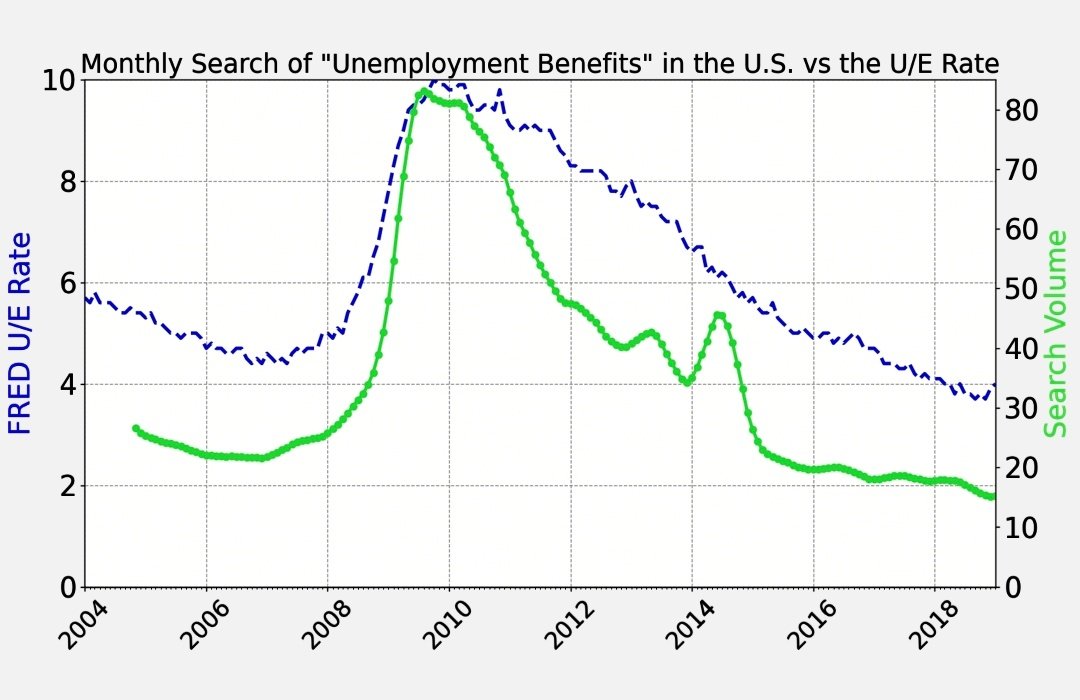
Analysing Google Trends data with charts using:
- Google Colab
- Pandas
- Matplotlib
- .csv files
Re-sampling time series
.resample('M', on='DATE').last()
.describe()
plt.figure()
.show()
Locators & TickMarks on charts
Grid/Line formatting
Made stuff like this:
Analysing Google Trends data with charts using:
- Google Colab
- Pandas
- Matplotlib
- .csv files
Re-sampling time series
.resample('M', on='DATE').last()
.describe()
plt.figure()
.show()
Locators & TickMarks on charts
Grid/Line formatting
Made stuff like this:
Day 75 ✅
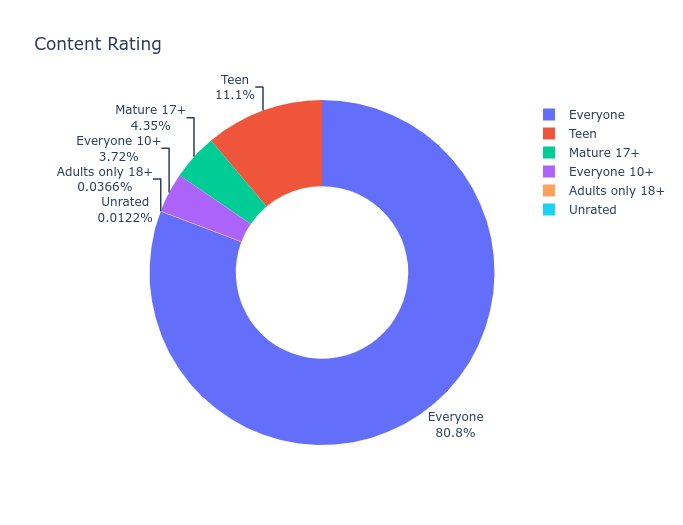
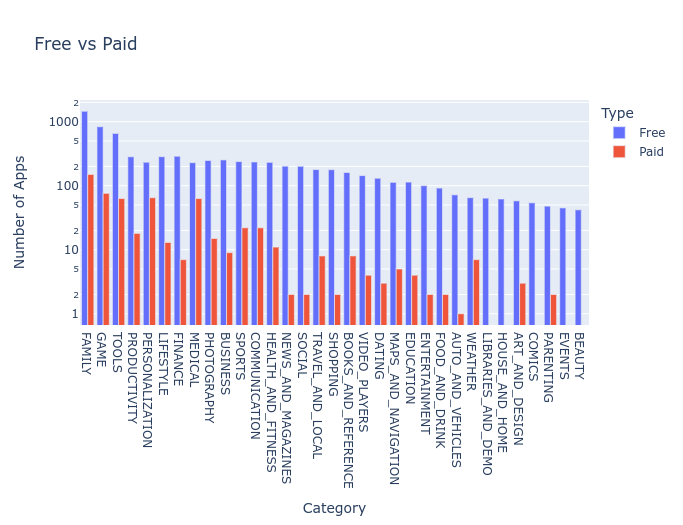
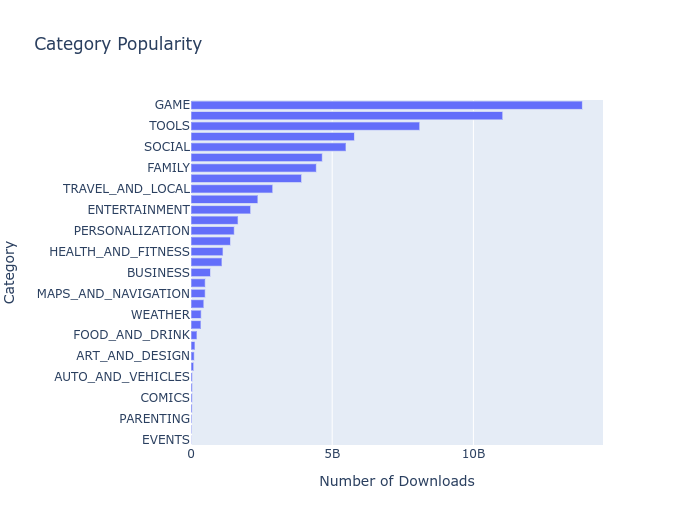
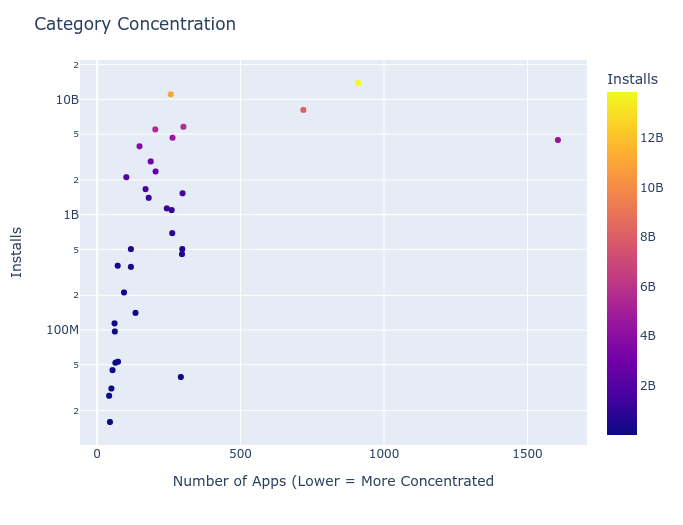
Analysing App Store Data, using Plotly to make charts
.drop() to remove rows/columns
.drop_duplicates()
px.pie .box .bar .scatter
.show()
Nested column data
Long long day 😴 ... made lots of cool charts 📊📉🥧 like these:
Analysing App Store Data, using Plotly to make charts
.drop() to remove rows/columns
.drop_duplicates()
px.pie .box .bar .scatter
.show()
Nested column data
Long long day 😴 ... made lots of cool charts 📊📉🥧 like these:
Day 76 ✅
NumPy and N-dimensional arrays
Pandas is built on top of NumPy
m1 @ m2 to multiply matrices
vector - 1D
matrix - 2D
tensor - 3D+
.ndim
.arange()
.flip()
.linspace()
img = Image.open(my_file)
img_array = np.array(img)
plt.imshow(img_array)
NumPy and N-dimensional arrays
Pandas is built on top of NumPy
m1 @ m2 to multiply matrices
vector - 1D
matrix - 2D
tensor - 3D+
.ndim
.arange()
.flip()
.linspace()
img = Image.open(my_file)
img_array = np.array(img)
plt.imshow(img_array)
Day 77 ✅
Seaborn Data Visualization
Filter on multiple conditions:
df.loc[(df.a>0) & (df.b !=0)]
Or .query()
sns.regplot() for linear regressions
scikit-learn
Create LinearRegression object
regression.fit(X,y)
Y-intercept .intercept_
Slope .coef
R-sqd .score(X,y)
Seaborn Data Visualization
Filter on multiple conditions:
df.loc[(df.a>0) & (df.b !=0)]
Or .query()
sns.regplot() for linear regressions
scikit-learn
Create LinearRegression object
regression.fit(X,y)
Y-intercept .intercept_
Slope .coef
R-sqd .score(X,y)

Day 78 ✅
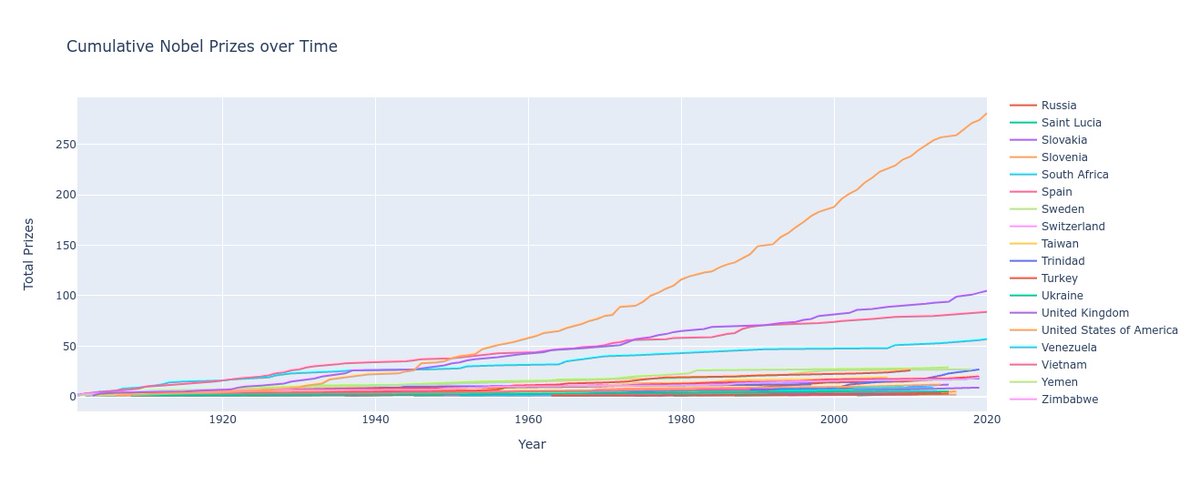
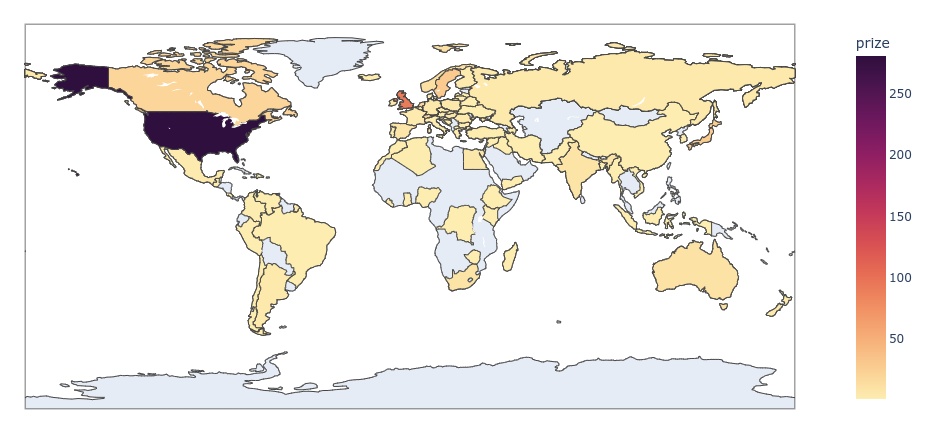
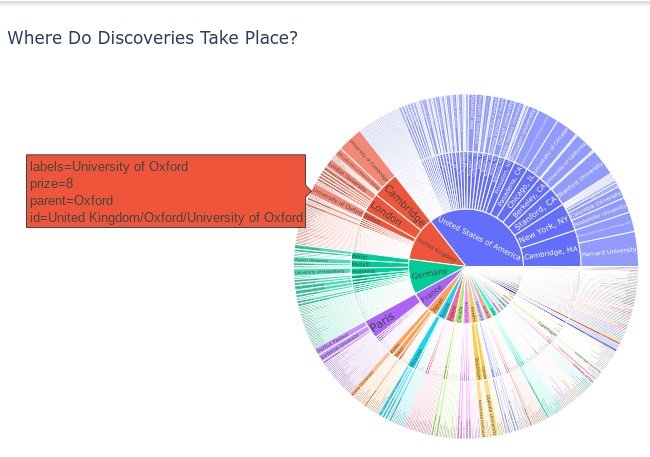
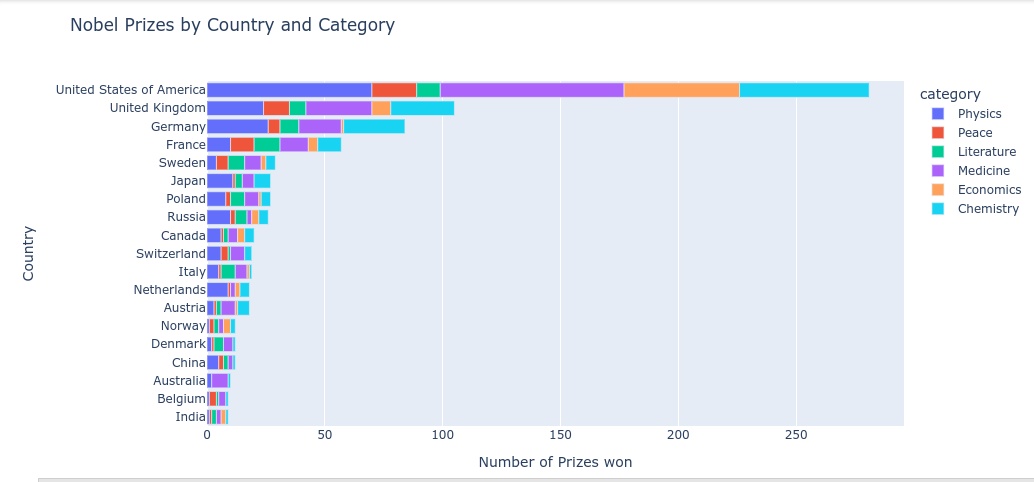
Data Analysis on Nobel Prizes
Dealing with NaN values, converting series data types, donut and bar charts, rolling averages in time series data, trendlines, choropleth to display data on maps,
Sunburst charts, histograms
Long hard day 😵😭🤯, made charts like these:
Data Analysis on Nobel Prizes
Dealing with NaN values, converting series data types, donut and bar charts, rolling averages in time series data, trendlines, choropleth to display data on maps,
Sunburst charts, histograms
Long hard day 😵😭🤯, made charts like these:
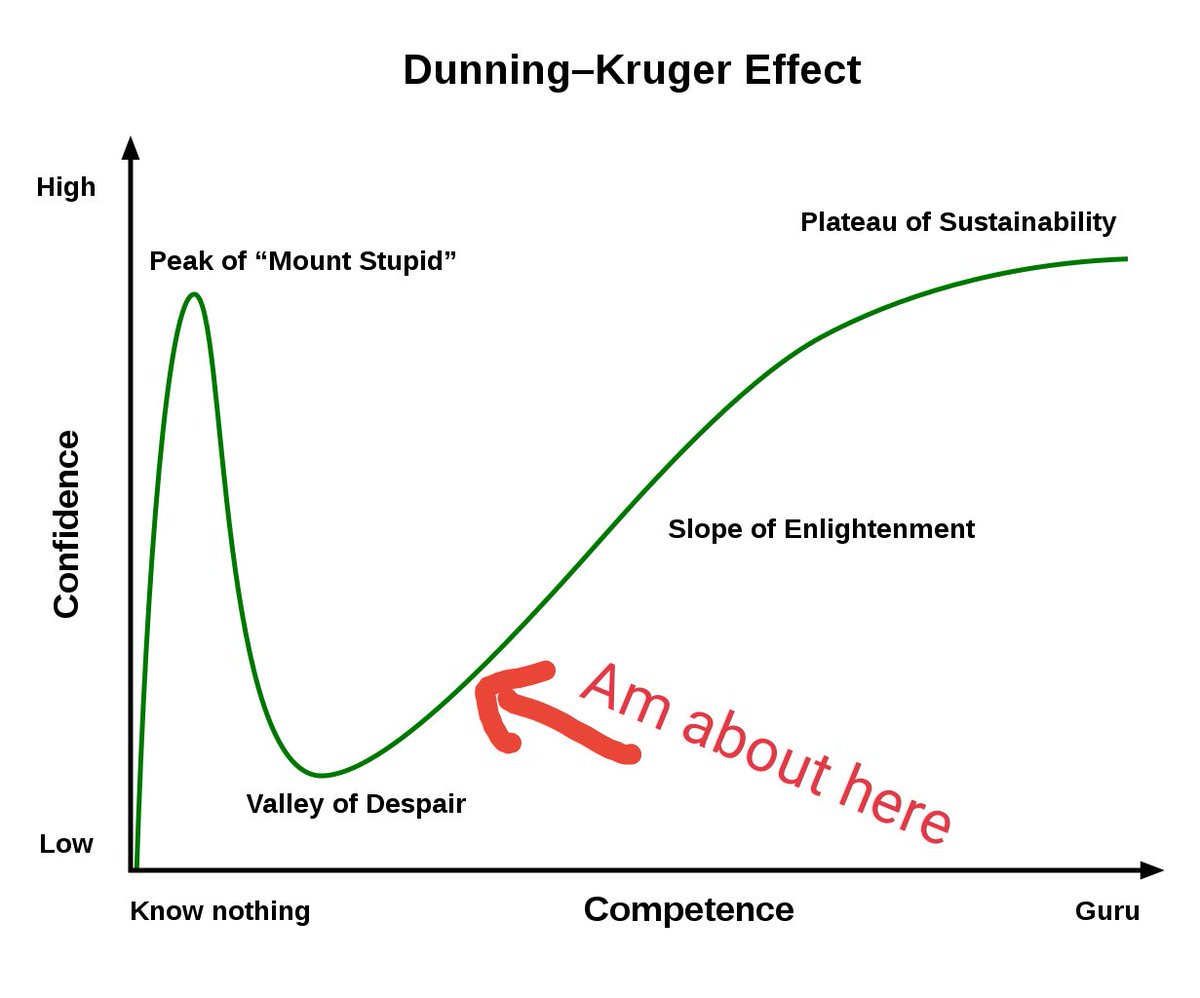
Well, after #100DaysOfCode I got this far. Not bad.
A few insane "days" that took 3-5 days to do...a couple lessons where I just got plain stuck. But always felt like progress, and did it every day.
Looking forward to finishing so I can get started working on my own ideas.
A few insane "days" that took 3-5 days to do...a couple lessons where I just got plain stuck. But always felt like progress, and did it every day.
Looking forward to finishing so I can get started working on my own ideas.
Day 79 ✅
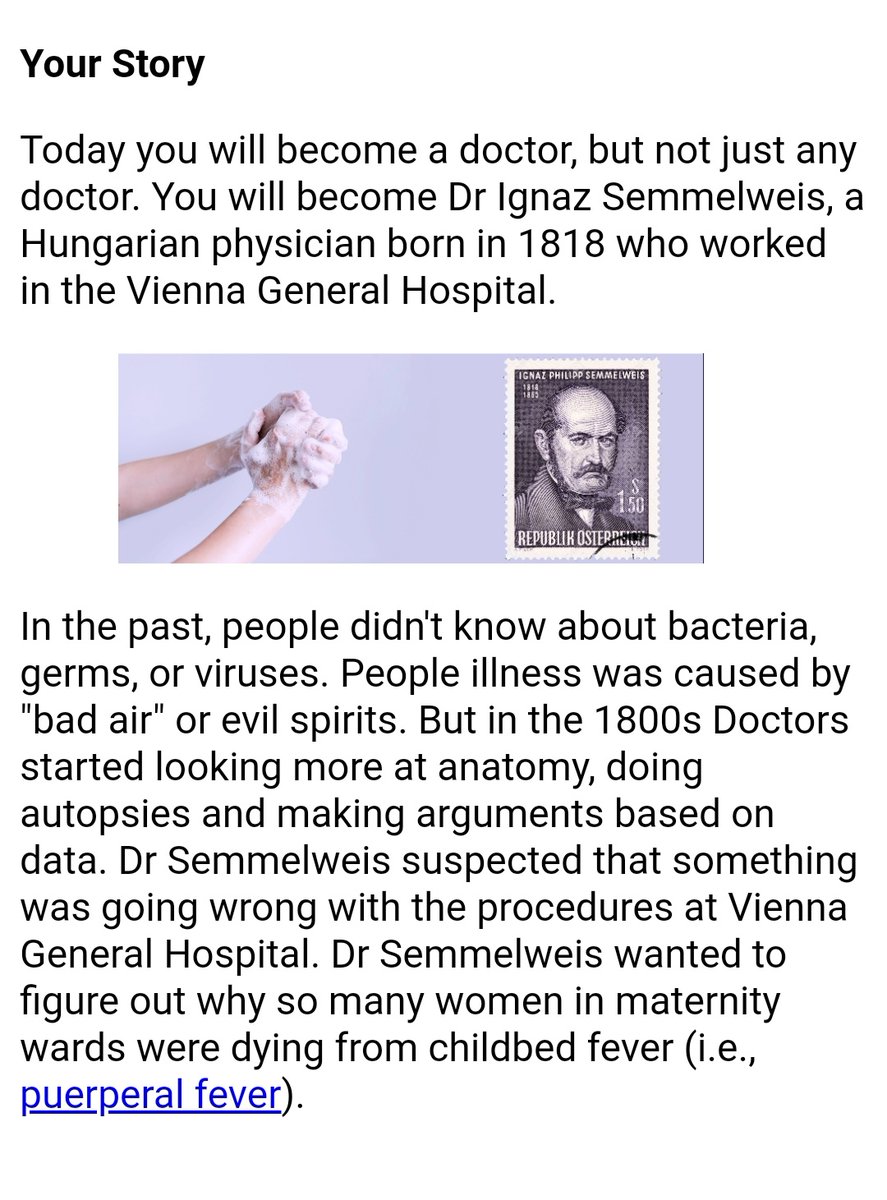
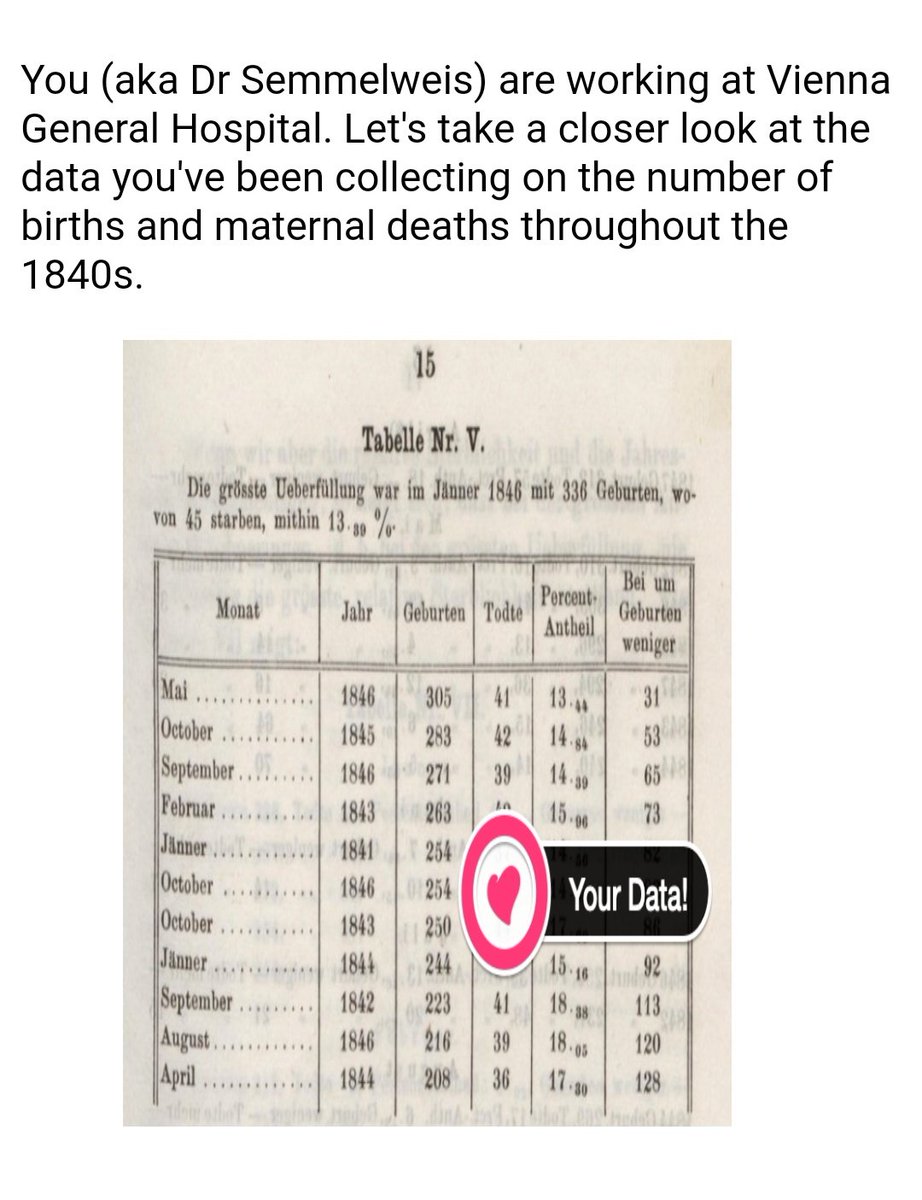
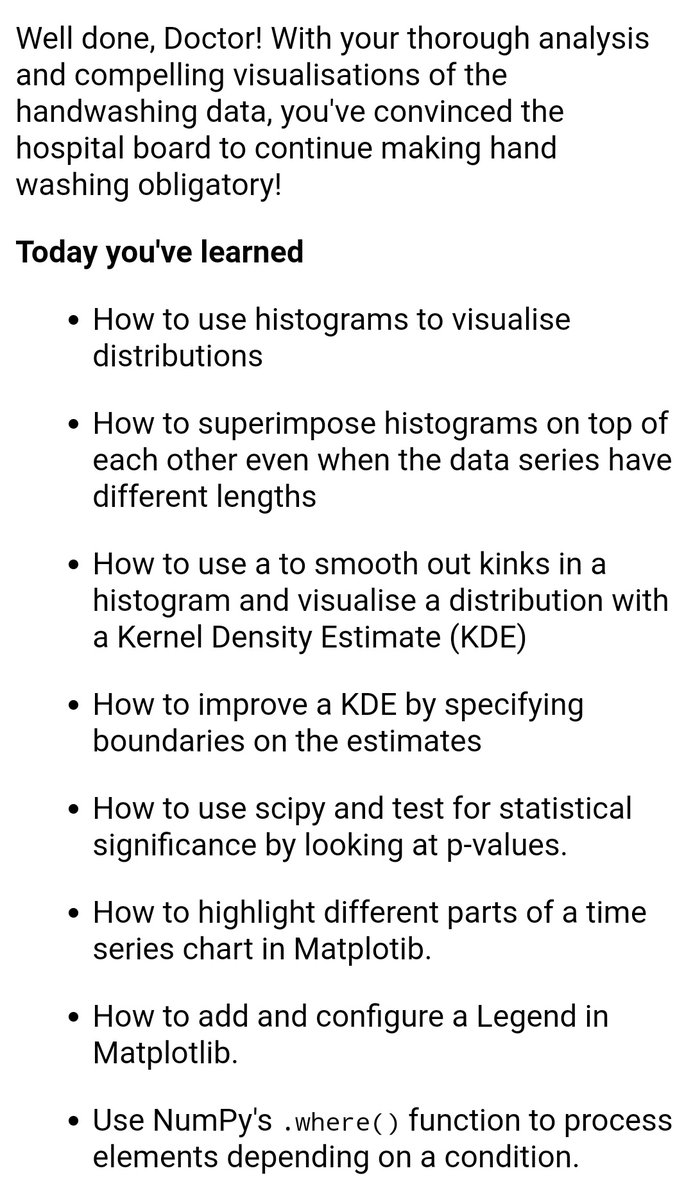
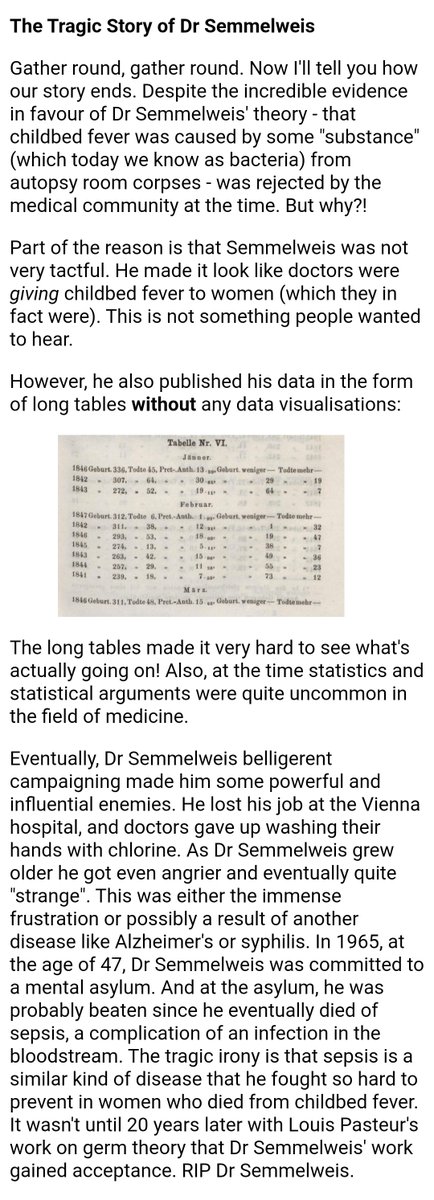
Analysing childbirth data from a Vienna hospital 1841-1849
Mostly revision in Google Colab.
Matplotlib charts, configuring ticks, rolling averages, histograms, histnorm
.set_index()
np.where()
Kernel Density Estimate
T-test & p-value, for statistical significance
Analysing childbirth data from a Vienna hospital 1841-1849
Mostly revision in Google Colab.
Matplotlib charts, configuring ticks, rolling averages, histograms, histnorm
.set_index()
np.where()
Kernel Density Estimate
T-test & p-value, for statistical significance
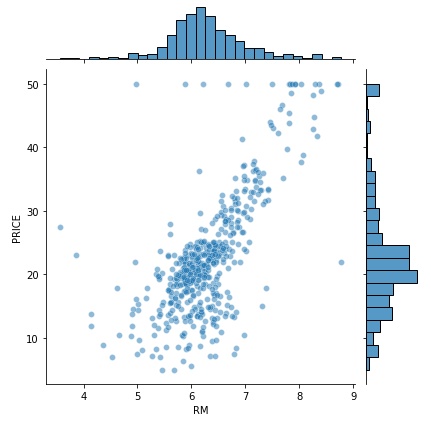
Day 80 ✅
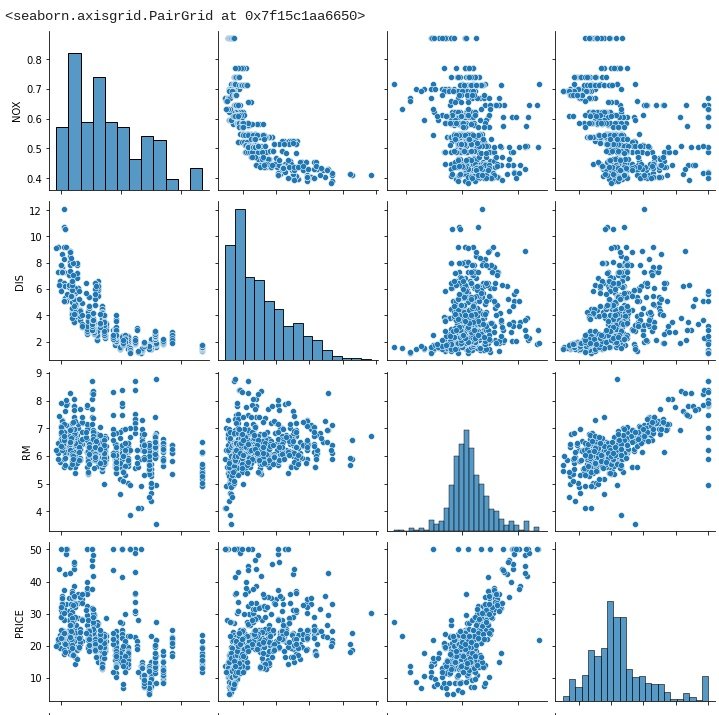
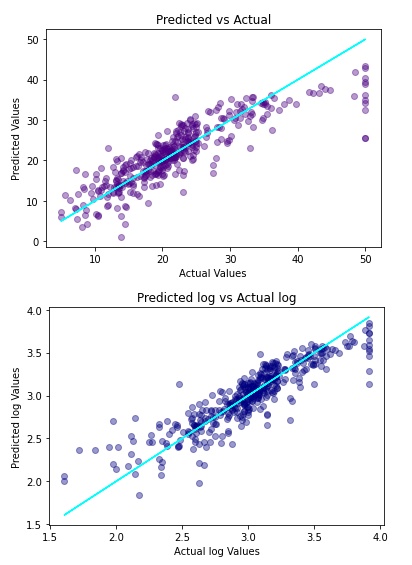
Analysing house price data
Splitting data for training and testing
.train_test_split()
Multivariable regression
Coefficients, residuals, r-sq, skew, mean
Using logs, estimating with model
sns.pairplot()
.jointplot()
Interesting stuff but bit of a struggle!
Analysing house price data
Splitting data for training and testing
.train_test_split()
Multivariable regression
Coefficients, residuals, r-sq, skew, mean
Using logs, estimating with model
sns.pairplot()
.jointplot()
Interesting stuff but bit of a struggle!

Day 81 ✅
The last 20 days are all "Professional Portfolio Projects"
You're given something to do, and zero help or code. All about using what's been learned so far (plus lots of Googling/Stack Overflow!)
Today - build a text to Morse Code convertor.
Nothing too hard 👍🏻
The last 20 days are all "Professional Portfolio Projects"
You're given something to do, and zero help or code. All about using what's been learned so far (plus lots of Googling/Stack Overflow!)
Today - build a text to Morse Code convertor.
Nothing too hard 👍🏻

Day 82 ✅
Build & deploy a website with portfolio of what I've learnt so far.
Damn, it's like I can't remember a single thing.
Built something basic in Atom with HTML/CSS, torture uploading to Github (Gh), Heroku now doesn't work with Gh, so deployed through Gh directly.
Build & deploy a website with portfolio of what I've learnt so far.
Damn, it's like I can't remember a single thing.
Built something basic in Atom with HTML/CSS, torture uploading to Github (Gh), Heroku now doesn't work with Gh, so deployed through Gh directly.

Day 83 ✅
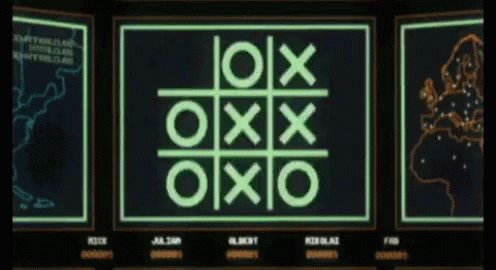
Build a text-based Tic Tac Toe game.
Pretty easy, took a while as just a few awkward bits like checking for a win...but nothing difficult.
Built my computer "AI" using random numbers to pick each move 😎
Reminds me, must watch War Games with eldest boy.
Build a text-based Tic Tac Toe game.
Pretty easy, took a while as just a few awkward bits like checking for a win...but nothing difficult.
Built my computer "AI" using random numbers to pick each move 😎
Reminds me, must watch War Games with eldest boy.
Day 84 ✅
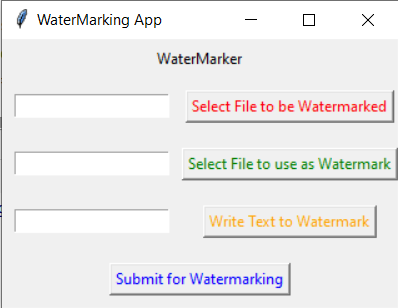
Build an app to watermark an image.
Bit slow on this, half-revision on tkinter and how to build a GUI, and half new stuff using PIL/pillow image editing library.
Now can select any image, and can watermark with any other image, or just use text. Pretty cool.
Build an app to watermark an image.
Bit slow on this, half-revision on tkinter and how to build a GUI, and half new stuff using PIL/pillow image editing library.
Now can select any image, and can watermark with any other image, or just use text. Pretty cool.
Day 85 ✅
Build a speed typing test app
More tkinter stuff, getting/clearing text from entry boxes/labels, moving the focus, reading from files, calling a function after a delay (tho struggled passing variables around functions).
Could have jazzed it up more but got lazy. Meh.
Build a speed typing test app
More tkinter stuff, getting/clearing text from entry boxes/labels, moving the focus, reading from files, calling a function after a delay (tho struggled passing variables around functions).
Could have jazzed it up more but got lazy. Meh.

Day 86 ✅
Build Breakout!
Steve Wozniak built this originally in 1976, so I'm a few years behind him in my coding...
Good practice on using classes/objects. Had a horrible bug that took ages to sort, my stupid mistake of course!
Could def spend a lot more time improving this.
Build Breakout!
Steve Wozniak built this originally in 1976, so I'm a few years behind him in my coding...
Good practice on using classes/objects. Had a horrible bug that took ages to sort, my stupid mistake of course!
Could def spend a lot more time improving this.

Day 87 ✅
Build & deploy a website to rate/add/delete cafes
Absolute bloody torture. Lost from the outset, so much work to make progress. At least was good practice on Flask, Jinja, Heroku, GitHub, databases, favicons, forms...and reading a million answers on Stack Overflow 😭
Build & deploy a website to rate/add/delete cafes
Absolute bloody torture. Lost from the outset, so much work to make progress. At least was good practice on Flask, Jinja, Heroku, GitHub, databases, favicons, forms...and reading a million answers on Stack Overflow 😭

Day 88 ✅
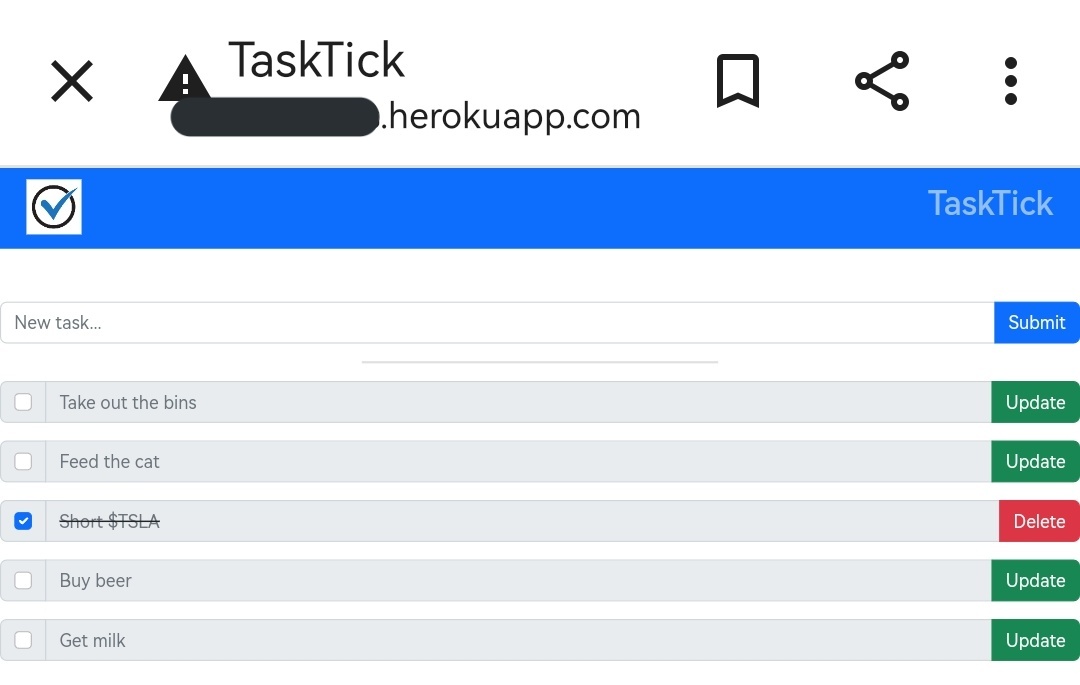
Build a task manager website.
Stumbled around lost for ages, amazing the little things you don't know you don't know, until something goes wrong. Lots of Flask/HTML, some Bootstrap.
Again couldn't switch database from SQLite to Postgres when deploying on Heroku, argh
Build a task manager website.
Stumbled around lost for ages, amazing the little things you don't know you don't know, until something goes wrong. Lots of Flask/HTML, some Bootstrap.
Again couldn't switch database from SQLite to Postgres when deploying on Heroku, argh
Day 89 ✅
Build a disappearing text app. If you stop typing for a few seconds, it vanishes!
Not too difficult, but spent time getting more comfortable with tkinter, listening for key presses, adding frames/widgets etc
Here's a better version than mine:
squibler.io
Build a disappearing text app. If you stop typing for a few seconds, it vanishes!
Not too difficult, but spent time getting more comfortable with tkinter, listening for key presses, adding frames/widgets etc
Here's a better version than mine:
squibler.io
Day 90 ✅
Turn PDFs into audio files
This was v cool and surprisingly easy...uses python libraries to rip text from a pdf, you turn that text into a string then either post to an audio API or run through a python engine
Turned some free Project Gutenberg 📙's into audiobooks
Turn PDFs into audio files
This was v cool and surprisingly easy...uses python libraries to rip text from a pdf, you turn that text into a string then either post to an audio API or run through a python engine
Turned some free Project Gutenberg 📙's into audiobooks
Day 91 ✅
Pick out the top 10 colours from an uploaded image.
Wasn't too tricky, but numerous bugs that took a ton of googling. Used PIL & numpy on the image to turn into an array of RGB values, which could then be counted.
Felt like didn't do it well, kinda frustrating.
Pick out the top 10 colours from an uploaded image.
Wasn't too tricky, but numerous bugs that took a ton of googling. Used PIL & numpy on the image to turn into an array of RGB values, which could then be counted.
Felt like didn't do it well, kinda frustrating.

Day 92 ✅
Build a web crawler to pull out data of interest and write to a csv file
Used BeautifulSoup on a TripAdvisor article on the best fish and chip shops in town, pulled out the ranking and a quote about each one, and wrote to csv file.
Simples.
Build a web crawler to pull out data of interest and write to a csv file
Used BeautifulSoup on a TripAdvisor article on the best fish and chip shops in town, pulled out the ranking and a quote about each one, and wrote to csv file.
Simples.


Day 94 ✅
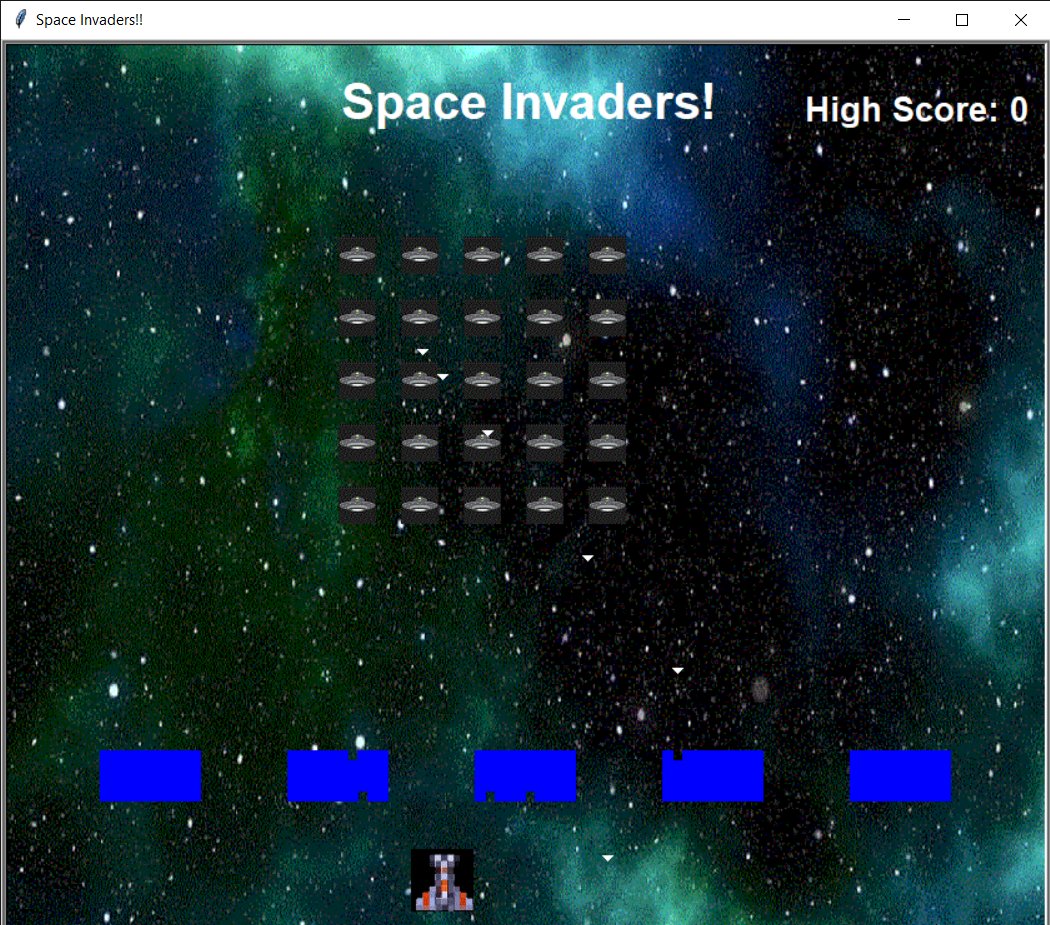
Build Space Invaders! 👾
Used Python Turtle 🐢, good practice on objects, passing around local/global variables...wasted *hours* trying to convert transparent PNG images to GIF format 🙈
Program ran soooo slow, unsure if it's my sh*tty laptop or too many IF loops 🤷
Build Space Invaders! 👾
Used Python Turtle 🐢, good practice on objects, passing around local/global variables...wasted *hours* trying to convert transparent PNG images to GIF format 🙈
Program ran soooo slow, unsure if it's my sh*tty laptop or too many IF loops 🤷
Day 95 ✅
Use any API to build something interesting
Built a cocktail website 🍹 Get random drinks, or select your fav ingredients
My HTML/Bootstrap still sucks, but pleased with the rest of what I'm doing. I'd like to share my website link, but dunno how to stay anon 🤷
Use any API to build something interesting
Built a cocktail website 🍹 Get random drinks, or select your fav ingredients
My HTML/Bootstrap still sucks, but pleased with the rest of what I'm doing. I'd like to share my website link, but dunno how to stay anon 🤷

Day 96 ✅
Build an eCommerce site, with user login and ability to take real payments
Hit the wall here...so many things I really didn't know well enough meant this took a MONTH to get through 🙈
Used Stripe for payments & built a joke NFT/JPEG site 🤡
rightclicksave.herokuapp.com
Build an eCommerce site, with user login and ability to take real payments
Hit the wall here...so many things I really didn't know well enough meant this took a MONTH to get through 🙈
Used Stripe for payments & built a joke NFT/JPEG site 🤡
rightclicksave.herokuapp.com

Day 96 (cont'd)
This took so much work, but finally feel comfortable with:
- creating & manipulating databases/classes
- handling forms
- flask-Login
- environment variables
- Bootstrap (although still not great)
Still can't get postgres database working on Heroku 🤷
This took so much work, but finally feel comfortable with:
- creating & manipulating databases/classes
- handling forms
- flask-Login
- environment variables
- Bootstrap (although still not great)
Still can't get postgres database working on Heroku 🤷

Day 97 ✅
Automate something!
Built a program to play Wordle
Hosted on pythonanywhere, it runs just before midnight if you hadn't played that day, and emails you the result.
The Wordle logic was surprisingly tricky, and I learned to handle cookies to login and avoid captchas.
Automate something!
Built a program to play Wordle
Hosted on pythonanywhere, it runs just before midnight if you hadn't played that day, and emails you the result.
The Wordle logic was surprisingly tricky, and I learned to handle cookies to login and avoid captchas.

Day 98 ✅
Analyze Space Race csv data, using Colab
Absolute torture, exhausting. Eventually comfortable with groupby, cleaning dataframes, merge...not good with rolling averages, still don't know when to use Plotly, matplotlib or seaborn, my overall charting skills are abysmal.
Analyze Space Race csv data, using Colab
Absolute torture, exhausting. Eventually comfortable with groupby, cleaning dataframes, merge...not good with rolling averages, still don't know when to use Plotly, matplotlib or seaborn, my overall charting skills are abysmal.
Day 99 ✅
Analyze police shootings csv data
Was ok, maybe I'm getting the hang of it
👍🏻 setting index, sort, filtering, inverting, labelling, renaming, twin axes
👎🏻 rolling averages, date handling
Data from washingtonpost.com, but they have way prettier charts than me!
Analyze police shootings csv data
Was ok, maybe I'm getting the hang of it
👍🏻 setting index, sort, filtering, inverting, labelling, renaming, twin axes
👎🏻 rolling averages, date handling
Data from washingtonpost.com, but they have way prettier charts than me!
Day 100 ✅
Analyse US Youth Survey Earnings data:
nlsinfo.org
Running linear regressions on a large data set, checking coefficients & residuals. Extending that to Multivariable, using regr object to make predictions.
Took a while to get my head round this 🤯🤓😎
Analyse US Youth Survey Earnings data:
nlsinfo.org
Running linear regressions on a large data set, checking coefficients & residuals. Extending that to Multivariable, using regr object to make predictions.
Took a while to get my head round this 🤯🤓😎

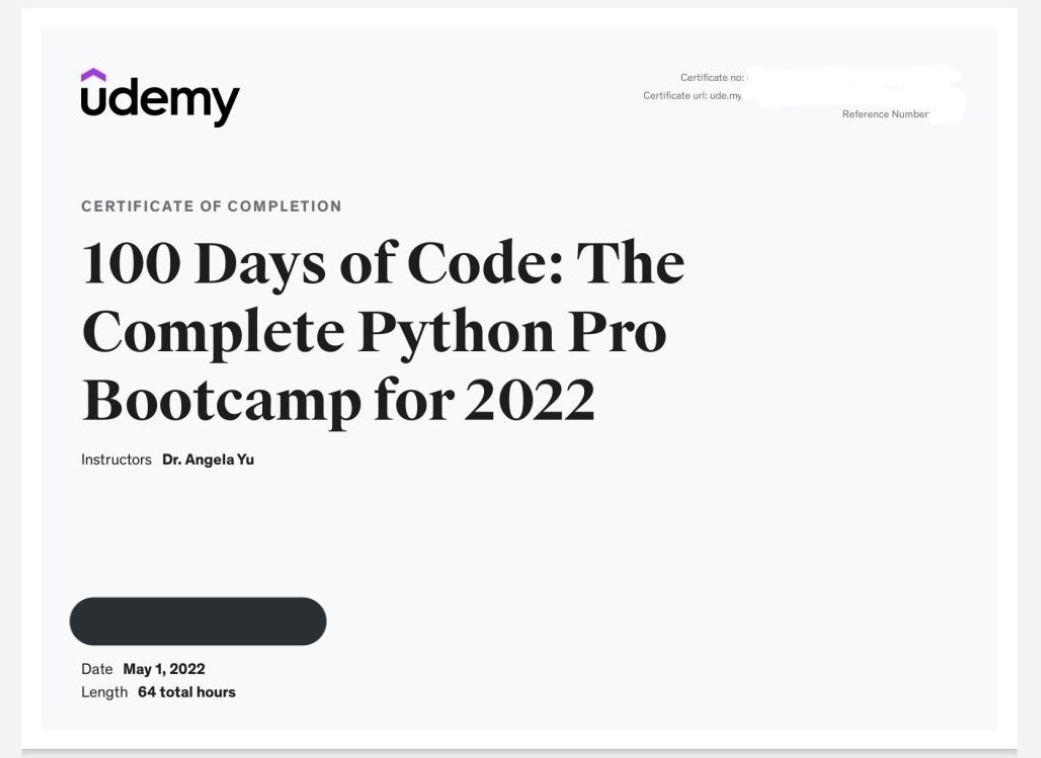
It was all worth it. Coding ~every day for 8 months, doing every tutorial, every project. Never quitting until each day done. MrsCC with words of encouragement such as "are you on that fkn laptop again". The sheer hell of sorting bugs/errors via endless googling.
#100DaysOfCode
#100DaysOfCode
Loading suggestions...