

Diagram below illustrates the steps.
1. Bob enters a URL into the browser and hits Enter. In this example, the URL is composed of 4 parts:
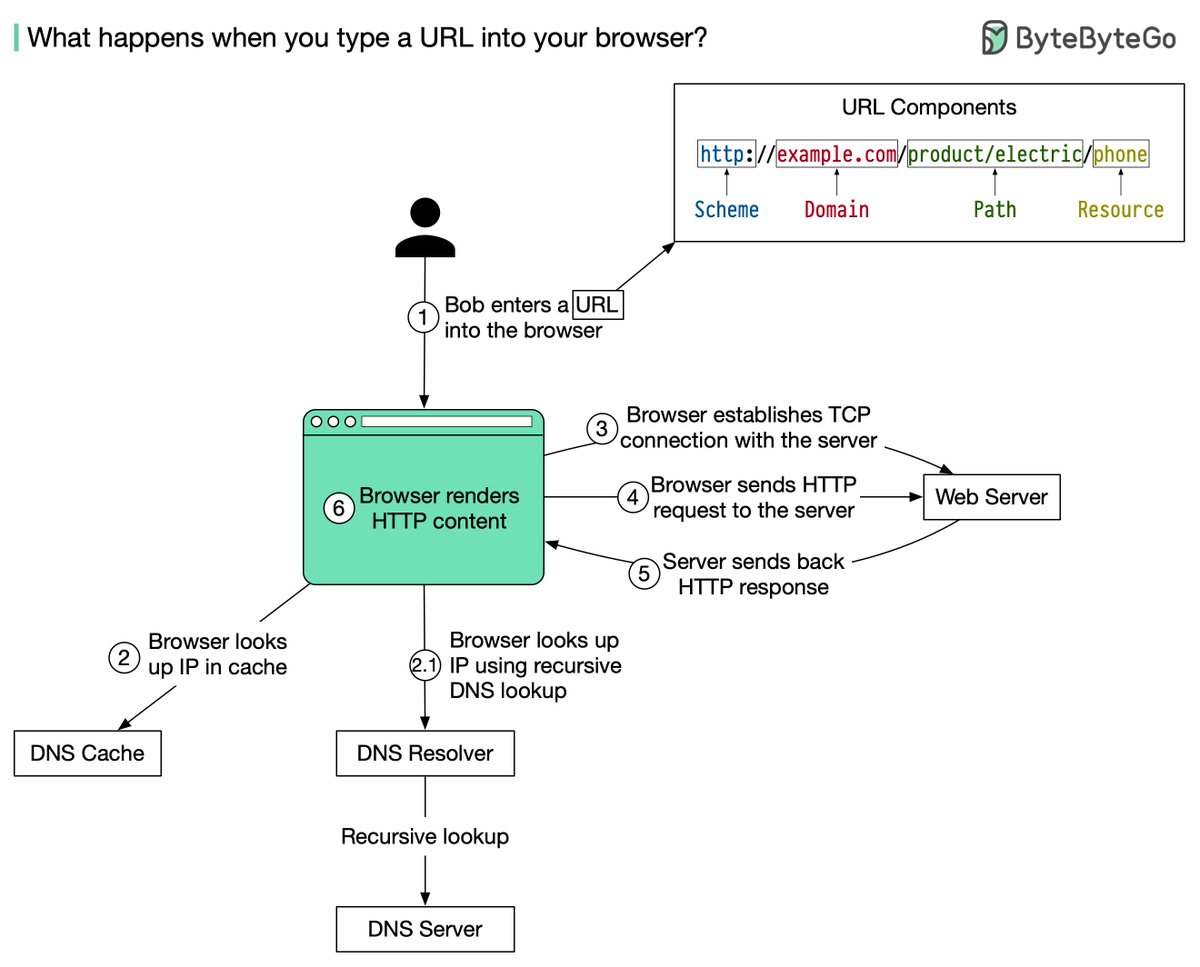
🔹 domain - 𝒆𝒙𝒂𝒎𝒑𝒍𝒆.𝒄𝒐𝒎. This is the domain name of the site.
🔹 path - 𝒑𝒓𝒐𝒅𝒖𝒄𝒕/𝒆𝒍𝒆𝒄𝒕𝒓𝒊𝒄. It is the path on the server to the requested resource: phone.
2. The browser looks up the IP address for the domain with a domain name system (DNS) lookup. To make the lookup process fast, data is cached at different layers: browser cache, OS cache, local network.
4. The browser sends a HTTP request to the server. The request looks like this:
𝘎𝘌𝘛 /𝘱𝘩𝘰𝘯𝘦 𝘏𝘛𝘛𝘗/1.1
𝘏𝘰𝘴𝘵: 𝘦𝘹𝘢𝘮𝘱𝘭𝘦.𝘤𝘰𝘮
𝘋𝘢𝘵𝘦: 𝘚𝘶𝘯, 30 𝘑𝘢𝘯 2022 00:01:01 𝘎𝘔𝘛
𝘚𝘦𝘳𝘷𝘦𝘳: 𝘈𝘱𝘢𝘤𝘩𝘦
𝘊𝘰𝘯𝘵𝘦𝘯𝘵-𝘛𝘺𝘱𝘦: 𝘵𝘦𝘹𝘵/𝘩𝘵𝘮𝘭; 𝘤𝘩𝘢𝘳𝘴𝘦𝘵=𝘶𝘵𝘧-8
<!𝘋𝘖𝘊𝘛𝘠𝘗𝘌 𝘩𝘵𝘮𝘭>
<𝘩𝘵𝘮𝘭 𝘭𝘢𝘯𝘨="𝘦𝘯">
𝘏𝘦𝘭𝘭𝘰 𝘸𝘰𝘳𝘭𝘥
</𝘩𝘵𝘮𝘭>
6. Browser renders HTML
More from this author
Diagram as Code: 6 𝐰𝐚𝐲𝐬 to turn code into beautiful architecture diagrams 👇👇👇 https://t.co/RQN820kGjL
𝐖𝐡𝐚𝐭 𝐀𝐫𝐞 𝐭𝐡𝐞 𝐆𝐫𝐞𝐞𝐧𝐞𝐬𝐭 𝐏𝐫𝐨𝐠𝐫𝐚𝐦𝐦𝐢𝐧𝐠 𝐋𝐚𝐧𝐠𝐮𝐚𝐠𝐞𝐬? The study below runs 10 benchmark problems in 28 languages [1]. It measures the runtime, memory usage, a...
Why is the credit card called “𝐭𝐡𝐞 𝐦𝐨𝐬𝐭 𝐩𝐫𝐨𝐟𝐢𝐭𝐚𝐛𝐥𝐞 product in banks”? How does VISA/Mastercard make money? The diagram below shows the economics of t...
What happens behind the scenes when we 𝐬𝐡𝐨𝐩 𝐨𝐧𝐥𝐢𝐧𝐞? . . Disclaimer: I have limited knowledge of the eCommerce system. The diagram below is based on my...
Recent Threads
taekook taguan ng anak au wherein jk received a surprising gift from their xmas party… [ christmas special 🎄] https://t.co/WY3C450KpV

@HitWithAHeart I hear him before I see him. The weight of his steps on the stairs. Slower than usual. Measured. Like he’s already bracing for whatev...

(1/7) I'm not going to do a full trailer breakdown for Zach Cregger's Resident Evil film, since we have an early form of the script you can place a lo...

Nikola Jokic is 0-6 against 50+ win teams in the playoffs. https://t.co/l5hCeVCoUj

Uni is a fighter! https://t.co/AXkBVFJ2My

Triggered girl at comedy show… https://t.co/z1BC2qG7Rd

Popular Threads
DON'T ARGUE WITH DONKEYS (Fable) The donkey said to the tiger: - "The grass is blue". The tiger replied: - "No, the grass is green." The discussion...

Here's 40 TikTok hooks that could make you go viral. (Not in any particular order) //THREAD//

These are the 41 most powerful tenants of Tateism for a man to live by. Wether you are Christian, Muslim; It doesn’t matter if you are strong, weak...

Winning the Chevening Scholarship + 12 Strong Samples of the Chevening Essay There are four important Essays on the Chevening Scholarship application...

Top-40 Footballers with Most Goal Contributions (Goals + Assists) in history. [ A MEGA THREAD ] https://t.co/gAb3QcqdYQ

1. There are more people added on the list of arrests and executions of famous people but no further intel is available at this time. ARRESTS and EXE...
