

What's the best way to store your own personal digital data for the long run?
I've been trying to answer this question for a while, allow me to share. Here's a 🧵
I've been trying to answer this question for a while, allow me to share. Here's a 🧵

Let's first set boundaries:
- Data: 2Tb
- Time horizon: 20 years
- Reasonable price: max 200$ per year in today's dollars
- Data stored in 👉 3 different locations for disaster recovery
We will discuss threat models along the way.
- Data: 2Tb
- Time horizon: 20 years
- Reasonable price: max 200$ per year in today's dollars
- Data stored in 👉 3 different locations for disaster recovery
We will discuss threat models along the way.
What are the available options?
- Hard Drives
- SSD drives / Flash memories
- Tapes
- DVDs/Blu-ray disks
- Cloud storage: Box, Google Drive, DropBox...
- Cloud object storage: S3, Google Storage, Azure Storage...
Let's dive in. 🕵️
- Hard Drives
- SSD drives / Flash memories
- Tapes
- DVDs/Blu-ray disks
- Cloud storage: Box, Google Drive, DropBox...
- Cloud object storage: S3, Google Storage, Azure Storage...
Let's dive in. 🕵️
Hard Drives
✅: Cheap and compact
❌: Power up once a year. Data needs to be refreshed (as in: rewritten) once a year.
💰: 2TB is on average 80$. We will need 9: 3 for initial storage, 6 as replacements. Potentially we are looking at 720$ (in today's dollars) over 20 years.
✅: Cheap and compact
❌: Power up once a year. Data needs to be refreshed (as in: rewritten) once a year.
💰: 2TB is on average 80$. We will need 9: 3 for initial storage, 6 as replacements. Potentially we are looking at 720$ (in today's dollars) over 20 years.
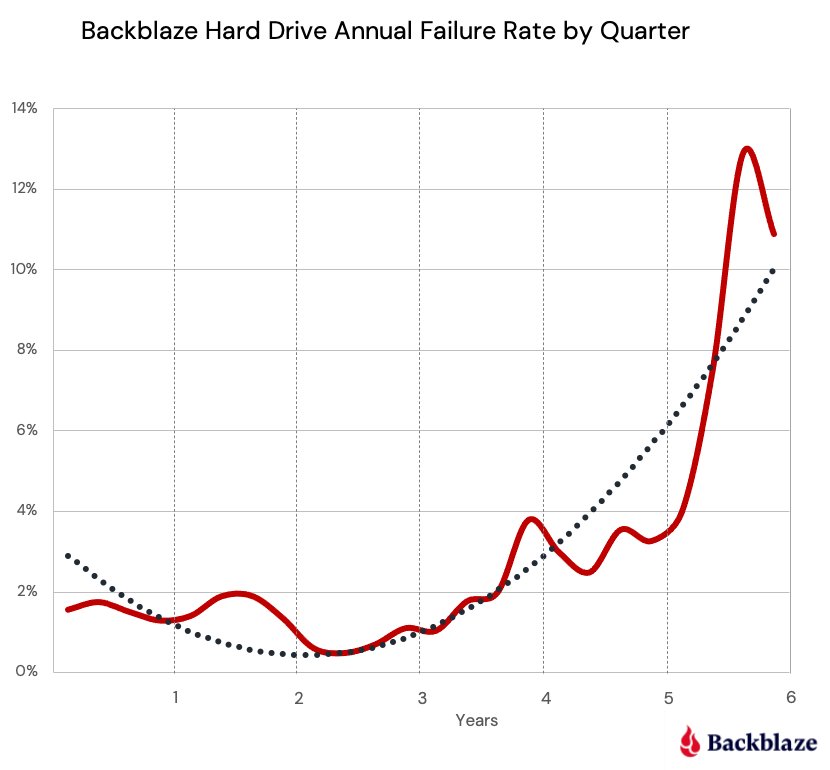
👍Hard Drives are a reasonable choice. Average data retention is 9-20 years, usually though the mechanical part is the first to fail. Median lifespan of a generic hard drive is 6.7 years. We have to power them up and refresh yearly over 3 sites... Are we going to do it? 🤔
SSDs
✅: No moving parts
❌: Retention varies wildly from <1 to 5 years, they lose data faster than HDDs. Still need to be powered up regularly and are temperatura sensitive
💰: 2TB is on average 150$. We will need 12: 3 + 9 as replacements for a total of 1800$ over 20 years
✅: No moving parts
❌: Retention varies wildly from <1 to 5 years, they lose data faster than HDDs. Still need to be powered up regularly and are temperatura sensitive
💰: 2TB is on average 150$. We will need 12: 3 + 9 as replacements for a total of 1800$ over 20 years
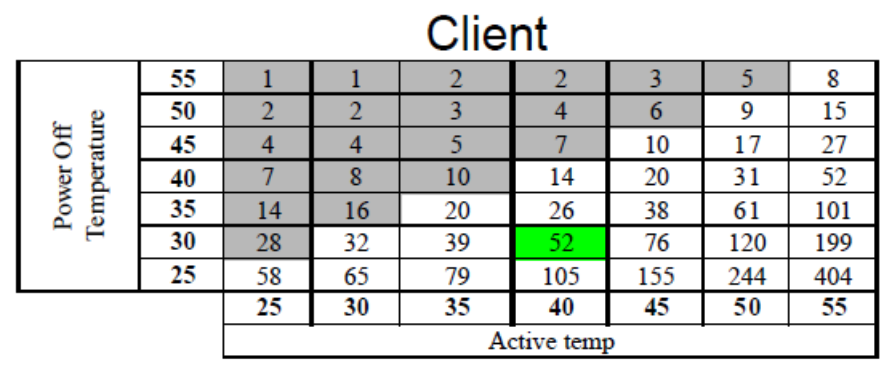
👎Common NAND based SSDs suffer from electron leakage. They lose charge if left unpowered and they're temperature sensitive. The chart below shows the number of weeks of retention at a given temperature (Celsius degrees) for an SSD used 8/h day. Probably not the best choice.
Tapes
✅: Long data retention, up to 30 years
❌: Expensive setup, relatively bulky, susceptible to wear and tear, require appropriate storage
💰: An LTO-6 reader (2.5Tb) is about 2000$, we will need 3 cartridges for a total of 2090$ over 20 years
✅: Long data retention, up to 30 years
❌: Expensive setup, relatively bulky, susceptible to wear and tear, require appropriate storage
💰: An LTO-6 reader (2.5Tb) is about 2000$, we will need 3 cartridges for a total of 2090$ over 20 years
👎Tapes do not seem the best choice outside the enterprise. Data access is slow, storage requirements are important as temperature and dust play a factor in data retention. Plus maintaining a working setup for a tape reader is not straightforward.
DVD/BR
✅: Cheap, very long retention time, 20 to 50 yrs for a DVD
❌: Low capacity (8.5Gb for DL DVD and 50Gb for DL BR), susceptible to wear and tear
💰: Blu-ray writer is about 120$, we will need 120 DL BR (480$) for 2TB over 3 sites, total: 600$
✅: Cheap, very long retention time, 20 to 50 yrs for a DVD
❌: Low capacity (8.5Gb for DL DVD and 50Gb for DL BR), susceptible to wear and tear
💰: Blu-ray writer is about 120$, we will need 120 DL BR (480$) for 2TB over 3 sites, total: 600$
👍If properly stored, DVDs and BR disks have insane retention. The downside is the number of disks, yes there are other options like BD-XL, but retention drops with more layers. Ultimately not a bad choice if space is not an issue or if data is in the order of 100s of GBs

Cloud Storage
✅: Easy access from everywhere, no need for manual redundancy
❌: Data is encrypted on-rest but not in-app, relatively expensive
💰: 2TB cost 120$/yr or 2400$ over 20 years in today's dollars (certainly more considering all factors, but bear with me)
✅: Easy access from everywhere, no need for manual redundancy
❌: Data is encrypted on-rest but not in-app, relatively expensive
💰: 2TB cost 120$/yr or 2400$ over 20 years in today's dollars (certainly more considering all factors, but bear with me)
🤌Cloud storage is the most convenient and expensive option. Versioning removes the burden of creating multiple backups, so data could be recovered even after a #ransomware infection. Obviously an attacker with access to the device will also have full access to the data.
Over 20 years it's hard to work under the assumption that no one will gain access either to the account or the owner's device, but there's another aspect.
Providers scan data, either looking for malicious files or to perform specific content detection.
Providers scan data, either looking for malicious files or to perform specific content detection.
Who knows in 20 years how the scope of such interventions will change? Also, cloud data can be handed over after a law enforcement request and a gag order will prevent a notification of access. Depending on where we live, this can be an essential factor. Which leads us to...
Cloud Object Storage (S3 + KMS)
✅: Data confidentiality (with a caveat) + accessibility
❌: Requires some coding or CLI skills
💰: 2TB S3 Glacier Instant + KMS: ~200$ yr (assuming 50GB retrieved yearly) or ~4000$ over 20 years
✅: Data confidentiality (with a caveat) + accessibility
❌: Requires some coding or CLI skills
💰: 2TB S3 Glacier Instant + KMS: ~200$ yr (assuming 50GB retrieved yearly) or ~4000$ over 20 years
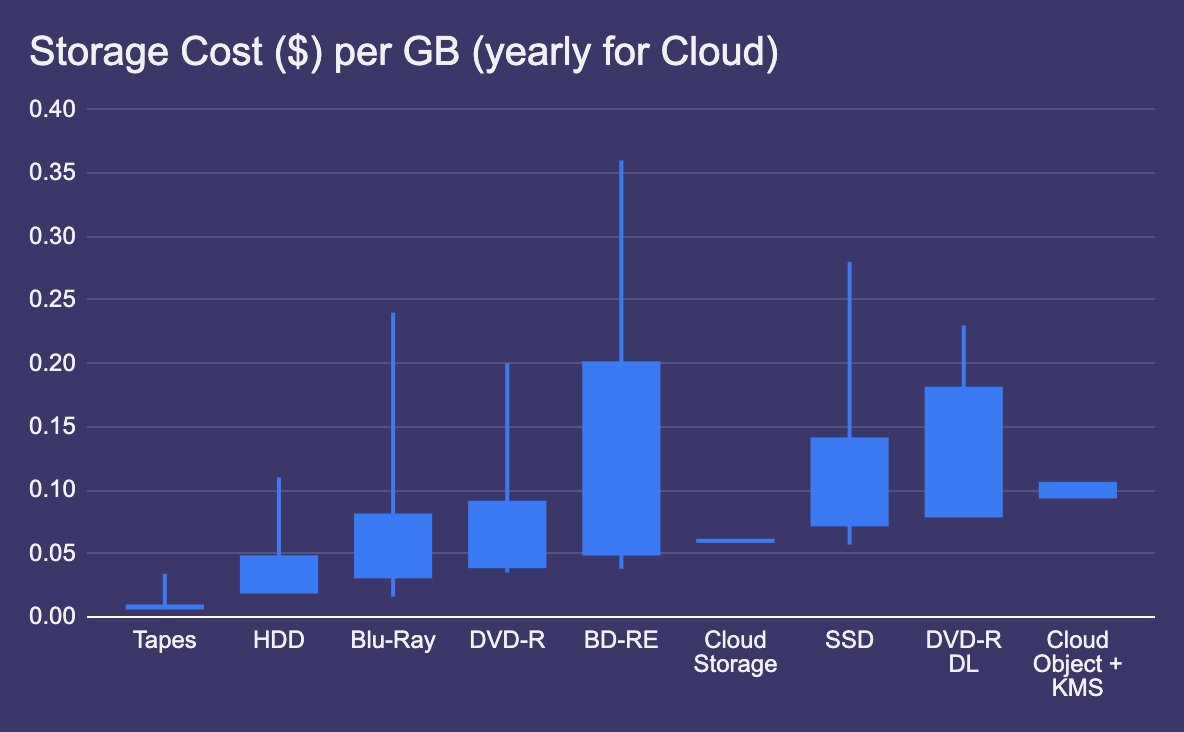
🤌 Calculating S3 costs is tricky, there are several options to reduce the impact (sometimes significantly), here we assume that we want to access our data without waiting hours for the retrieval. The upside of such a setup is the ability to encrypt data sent to a bucket
Data remains protected from unwanted inspections, an attacker would have to compromise AWS credentials to access the KMS resources.
Amazon - similarly to others - maintains a quorum based system to access keys, so stored data can still be accessed by a government.
Amazon - similarly to others - maintains a quorum based system to access keys, so stored data can still be accessed by a government.
But we have options...
For who's willing to shell out 12.000$/yr it is possible to take advantage of a CloudHSM to handle the encryption keys.
The HSM guarantees keys remain inaccessible to the provider, ensuring the highest level of confidentiality you might expect.
For who's willing to shell out 12.000$/yr it is possible to take advantage of a CloudHSM to handle the encryption keys.
The HSM guarantees keys remain inaccessible to the provider, ensuring the highest level of confidentiality you might expect.
An important consideration: 20 years is enough time that a breakthrough in ⚛️ Quantum Computing is likely.
Assuming AES remains quantum-resistant, TLS with support for Kyber (quantum-safe) is available. Though it only make sense for accessing keys on a CloudHSM instead of a KMS.
Assuming AES remains quantum-resistant, TLS with support for Kyber (quantum-safe) is available. Though it only make sense for accessing keys on a CloudHSM instead of a KMS.
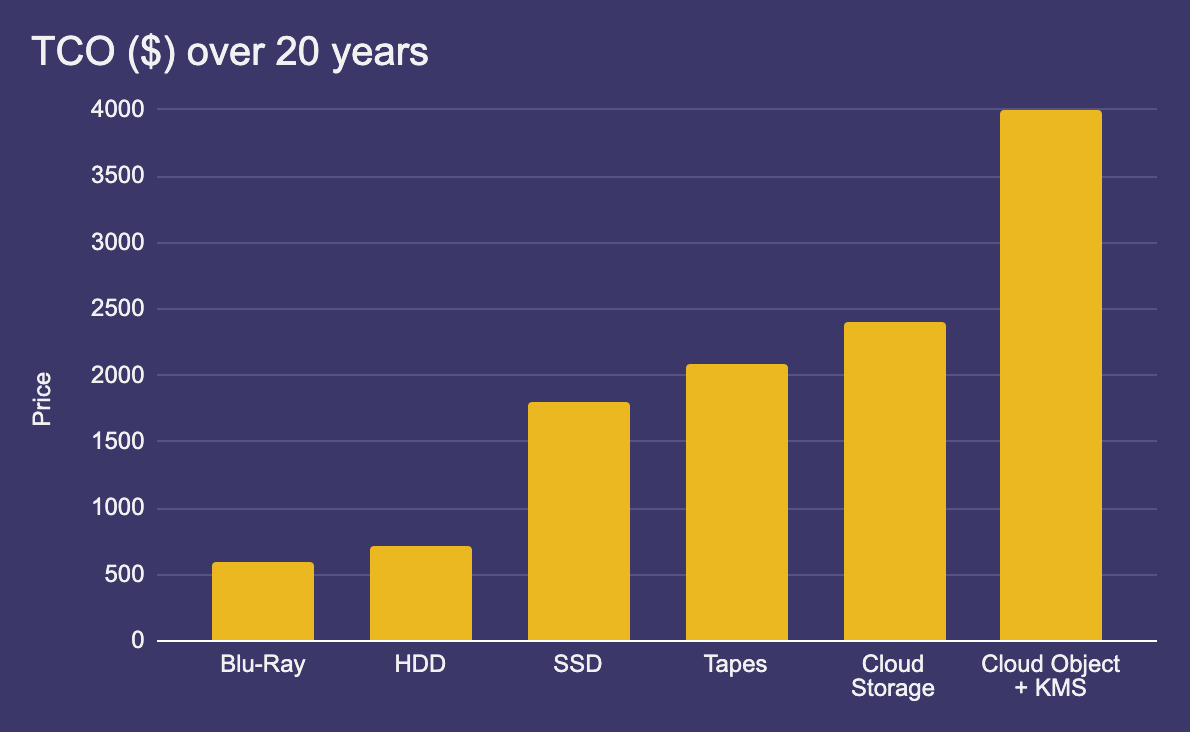
In conclusion:
- Blu-Ray (encrypted): if it's not a lot of data
- HDDs (encrypted): if you plan to be diligent on yearly data refresh and power-ons
- Cloud + KMS: if you do require privacy + availability
I haven't touched encryption on offline backups for the sake of brevity
- Blu-Ray (encrypted): if it's not a lot of data
- HDDs (encrypted): if you plan to be diligent on yearly data refresh and power-ons
- Cloud + KMS: if you do require privacy + availability
I haven't touched encryption on offline backups for the sake of brevity
And we are done! Pheww. Please let me know if you notice anything wrong, I had to work around a lot of assumptions to keep the thread manageable. H/T to @gedigi
Loading suggestions...