

How do you time your Python 🐍 code?
Many say that Python is slow… 🐌
But we'll use the module timeit to show Python can be quite fast! 🚀
Many say that Python is slow… 🐌
But we'll use the module timeit to show Python can be quite fast! 🚀

The module timeit provides a function timeit that you can use to time pieces of code.
The simplest use case is to determine what piece of code is faster among a couple of alternatives.
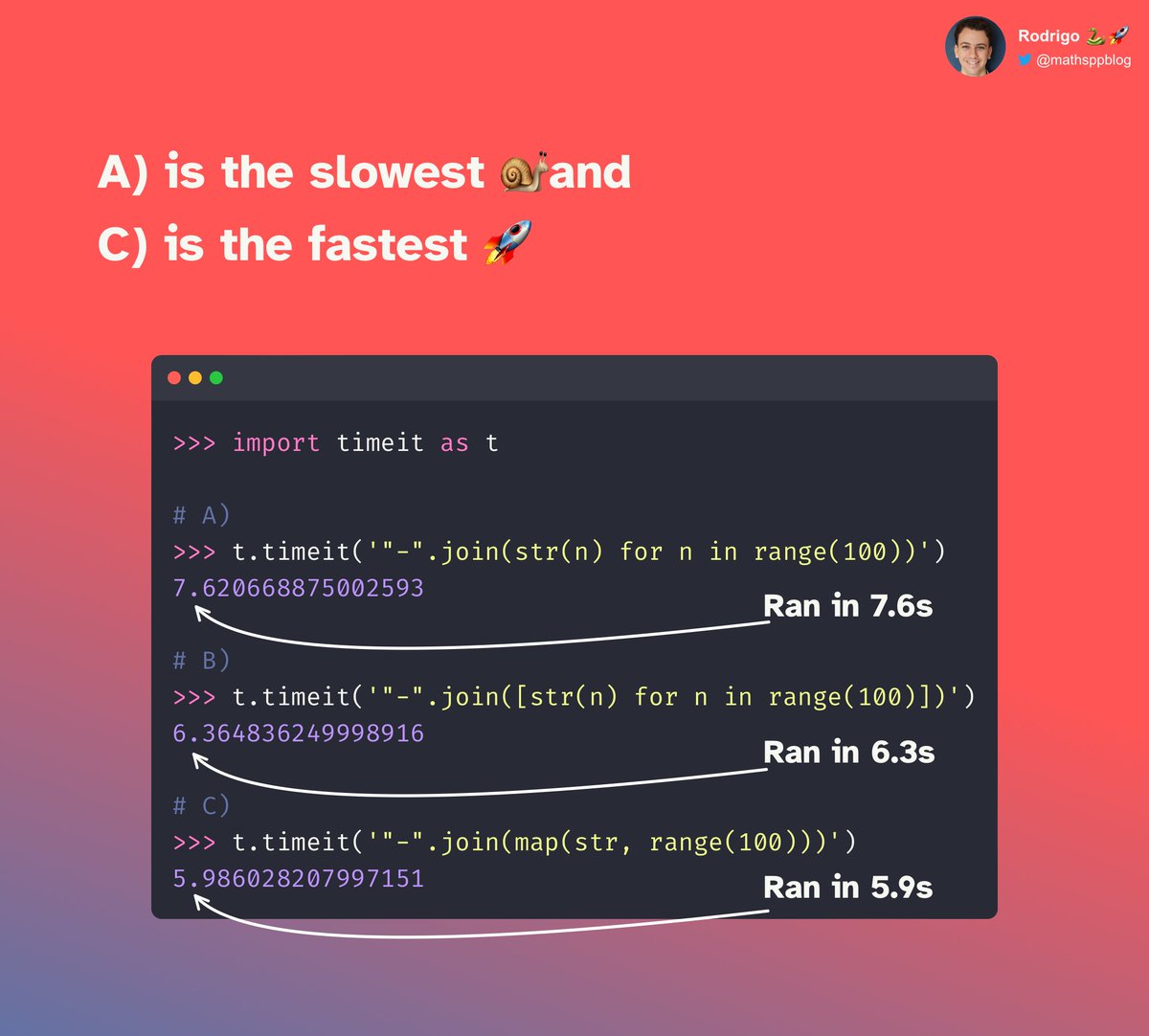
For example, from the 3 options below, which one do you think will be faster?
The simplest use case is to determine what piece of code is faster among a couple of alternatives.
For example, from the 3 options below, which one do you think will be faster?

We can open the REPL and quickly find out.
The function timeit.timeit expects a string with code to run and time.
When it finishes, it shows how much time it took (in seconds) 👇
But wait, those tiny pieces of code took over 5 seconds to run?!
The function timeit.timeit expects a string with code to run and time.
When it finishes, it shows how much time it took (in seconds) 👇
But wait, those tiny pieces of code took over 5 seconds to run?!
Hell no!
Figuring out how much time it takes to run a specific piece of code is hard!
One of the issues with benchmarking is that your PC is doing OTHER things while also running your code, right?
So, if you just ran your code once, what could happen?
Figuring out how much time it takes to run a specific piece of code is hard!
One of the issues with benchmarking is that your PC is doing OTHER things while also running your code, right?
So, if you just ran your code once, what could happen?
If you got unlucky, a program could hog all of your CPU and your code would appear slow!
So, timeit will run your code a LOT of times and it will count the time it takes to run everything.
There is also another reason timeit will repeat the code.
Can you see what it is?
So, timeit will run your code a LOT of times and it will count the time it takes to run everything.
There is also another reason timeit will repeat the code.
Can you see what it is?
For tiny snippets of code like this, the code runs SO FAST that the computer hardly has precision to time it just once.
So, yeah, those are two main reasons why timeit runs your code a lot of times.
But how many times?
So, yeah, those are two main reasons why timeit runs your code a lot of times.
But how many times?
If you use the timeit CLI, it will try to pick a sensible number of times to run your code…
But if you are using the Python interface (like I am), it will run your code 1 MILLION times.
That's a lot if you have slow(er) code…
So, how do you change that number?
But if you are using the Python interface (like I am), it will run your code 1 MILLION times.
That's a lot if you have slow(er) code…
So, how do you change that number?
The function timeit.timeit accepts a parameter number.
It is responsible for determining how many times your code runs.
Below, you can see I changed it to 10,000 👇
You can also see that another program tried to mess with my timing results!
It is responsible for determining how many times your code runs.
Below, you can see I changed it to 10,000 👇
You can also see that another program tried to mess with my timing results!

So, when you want to time your Python 🐍 code, you can use the function timeit.timeit.
Recall that it will run your code (in a string) 1 MILLION times, so use number if you want to run slower code.
And remember that benchmarking is very hard! 🎯
Recall that it will run your code (in a string) 1 MILLION times, so use number if you want to run slower code.
And remember that benchmarking is very hard! 🎯
That's it for now! 🚀
If you enjoyed this thread:
👉 follow me @mathsppblog for more Python 🐍 knowledge; and
👉 retweet the tweet below to share this thread with your audience!
I'll see you around. 👋
If you enjoyed this thread:
👉 follow me @mathsppblog for more Python 🐍 knowledge; and
👉 retweet the tweet below to share this thread with your audience!
I'll see you around. 👋
Loading suggestions...