

Knowing how to locate files in your filesystem is crucial for a developer or sysadmin.
Here are 7 Linux command-line tools to help you quickly and easily search files on your system:
Here are 7 Linux command-line tools to help you quickly and easily search files on your system:
1. fdfind
fd is a program that searches your filesystem for entries. It is an easy, quick, and user-friendly alternative to find.
fd is a program that searches your filesystem for entries. It is an easy, quick, and user-friendly alternative to find.
While it does not intend to support all of the find's powerful functionality, it does provide reasonable defaults for the vast majority of use cases:
🔗 buff.ly
$ fdfind --type f log
🔗 buff.ly
$ fdfind --type f log


2. fzf
fzf is an abbreviation for fuzzy finder. Fzf is a tiny, lightning-fast command-line tool that allows you to quickly search for and open files in Linux.
fzf is an abbreviation for fuzzy finder. Fzf is a tiny, lightning-fast command-line tool that allows you to quickly search for and open files in Linux.
It is portable, has no dependencies, and has a flexible layout with a Vim/Neovim plugin, key bindings, and fuzzy auto-completion support.
🔗 github.com
🔗 github.com

It is portable, has no dependencies, and has a flexible layout with a Vim/Neovim plugin, key bindings, and fuzzy auto-completion support.
🔗 github.com
🔗 github.com

3. plocate
plocate is a newer, much faster locate.
It searches the system for all files that match the specified pattern (or all of the patterns if multiple are given). This is accomplished through the use of an index created by the updatedb cmd:
$ plocate logs.txt --limit 5
plocate is a newer, much faster locate.
It searches the system for all files that match the specified pattern (or all of the patterns if multiple are given). This is accomplished through the use of an index created by the updatedb cmd:
$ plocate logs.txt --limit 5

4. find
find is a powerful, frequently used command-line utility that locates files based on some user-specified criteria and either outputs the pathname of each found item or performs an action on each matched object .....
find is a powerful, frequently used command-line utility that locates files based on some user-specified criteria and either outputs the pathname of each found item or performs an action on each matched object .....
if the action is requested, for example, deleting the found items or listing its permissions.
$ find --type f --name log.txt -exec ls {} +
$ find --type f --name log.txt -exec ls {} +

5. which
which returns the pathnames of the files (or links) that would be run in the current environment if its inputs were supplied as commands in a POSIX-compliant shell.
which returns the pathnames of the files (or links) that would be run in the current environment if its inputs were supplied as commands in a POSIX-compliant shell.
It accomplishes this by searching every directory in the $PATH environment variable for executable files that match the names of the inputs. Path names are not canonicalized.
$ which -a echo
$ which -a echo

6. whereis
In Linux, the whereis command is used to locate a program's binary, source, and manual page files. This command looks for files in a certain list of places (binary file directories, man page directories, and library directories).
In Linux, the whereis command is used to locate a program's binary, source, and manual page files. This command looks for files in a certain list of places (binary file directories, man page directories, and library directories).
It is typically used to locate program executables, man pages, and configuration files:
$ whereis echo
$ whereis echo

7. locate
Like the find command, the locate command is a commonly used command-line tool for quickly searching files by their names.
Like the find command, the locate command is a commonly used command-line tool for quickly searching files by their names.
But, it is more efficient and faster than find because, instead of looking through the file system when a user performs a file search operation (like find does), locate searches a database that stores bits and sections of files and their respective file system paths.
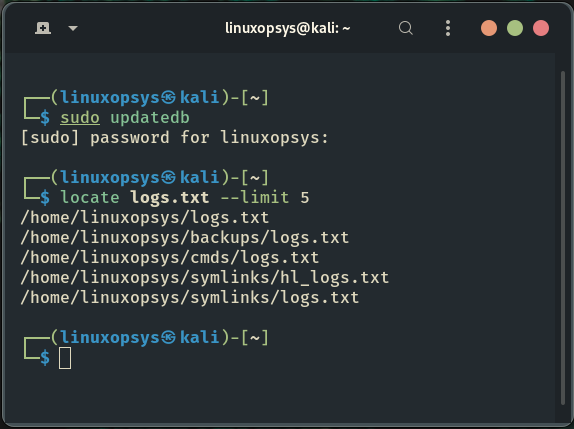
Like plocate command, this database can be updated using the updatedb command. The updatedb command might take time to complete its execution.
$ sudo updatedb
$ locate logs.txt --limit 5
$ sudo updatedb
$ locate logs.txt --limit 5
This information should be sufficient to help you save time by starting to search for files like a pro on your Linux system.
That's all! Thank you for getting this far. I hope you find this thread useful.
That's all! Thank you for getting this far. I hope you find this thread useful.
If you found this thread valuable:
1. Toss us a follow for more daily threads on Linux, sysadmin, and DevOps → @linuxopsys
2. Like and RT the first tweet so other Linux folks can find it too.
1. Toss us a follow for more daily threads on Linux, sysadmin, and DevOps → @linuxopsys
2. Like and RT the first tweet so other Linux folks can find it too.
Loading suggestions...