

Build RESTful API with FastAPI (with code snippets)
In this thread, we'll learn how to create a REST API for TODO App in Python using FastAPI. @FastAPI
A Thread 🧵👇
In this thread, we'll learn how to create a REST API for TODO App in Python using FastAPI. @FastAPI
A Thread 🧵👇

1. Install FastAPI
The first step is to install FastAPI using pip
The first step is to install FastAPI using pip

2. Create Hello World in @FastAPI
create main .py file with the below code.
create main .py file with the below code.

3. Run the live server
Use the below command to start the live server.
the server will be running at localhost:8000 by default
Use the below command to start the live server.
the server will be running at localhost:8000 by default

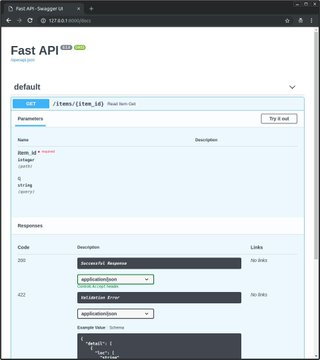
4. Check out Interactive API docs
Go to http://127.0.0.1:8000/docs and you will see Interactive API documentation provided by Swagger UI
Go to http://127.0.0.1:8000/docs and you will see Interactive API documentation provided by Swagger UI
5. Add Your First Model in FastAPI
Now the real fun starts 🤩
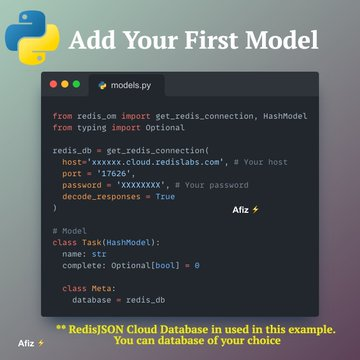
In this example, I have RedisJSON database. You can use the database of your choice.
Please note that redis_om module needs to be installed for connecting with RedisJSON.
Now the real fun starts 🤩
In this example, I have RedisJSON database. You can use the database of your choice.
Please note that redis_om module needs to be installed for connecting with RedisJSON.
6. Implement GET method:
List all the Tasks from the database
List all the Tasks from the database

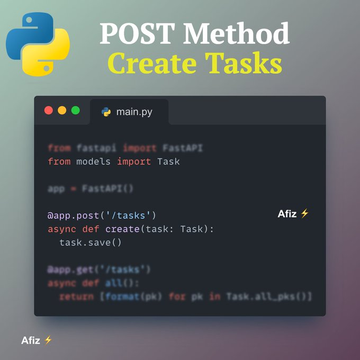
7. Implement POST method: Adding Tasks
Add this code to your main .py
Add this code to your main .py
8. Implement PUT method: Update Task
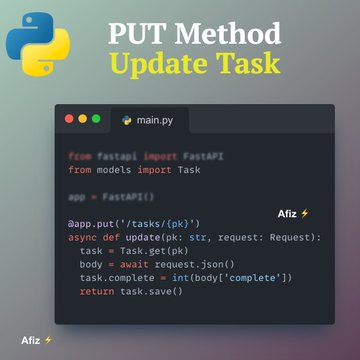
Add the below code to main. py to include PUT method
Add the below code to main. py to include PUT method
9. Implement the DELETE method: Delete Task
Add the below code to main. py to include the DELETE method
Add the below code to main. py to include the DELETE method

10. All together:
After putting all the code together, we should be able to see the interactive API docs at localhost:8000/docs.
After putting all the code together, we should be able to see the interactive API docs at localhost:8000/docs.

Loading suggestions...