

Tired of copy-pasting from ChatGPT?
I've got an alternative that's 10x better.
And the best part? You can use it anywhere!
Here's how to use GPT-4 on any app or website:
I've got an alternative that's 10x better.
And the best part? You can use it anywhere!
Here's how to use GPT-4 on any app or website:
Introducing Flot AI, the ultimate AI copilot powered by ChatGPT.
Sign-up at: flot.ai
Sign-up at: flot.ai
Use ChatGPT Anywhere with a Shortcut Pop-up:
→ Pop up ChatGPT on any app, doc, or website with a simple shortcut, enhancing your workflow effortlessly.
→ Pop up ChatGPT on any app, doc, or website with a simple shortcut, enhancing your workflow effortlessly.

Use ChatGPT in Email:
→ Select and reply to emails effortlessly with AI-enhanced suggestions.
→ Select and reply to emails effortlessly with AI-enhanced suggestions.

Use ChatGPT in Google Docs, Microsoft Word & Notion:
→ Organize your ideas, and generate titles, taglines, outlines, and copy with ease.
→ Organize your ideas, and generate titles, taglines, outlines, and copy with ease.
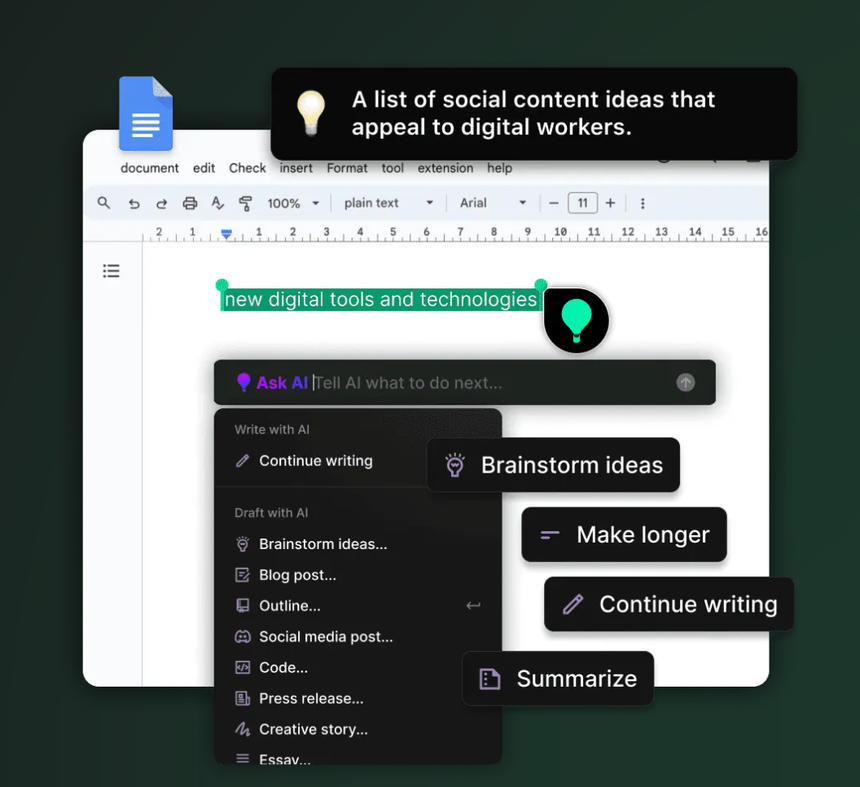
Use ChatGPT in Web Browser:
→ Summarize articles and gain AI insights on complex topics as you browse.
→ Summarize articles and gain AI insights on complex topics as you browse.

Use ChatGPT for Multilingual Translation:
→ Instantly translate text in over 200 languages across any platform.
→ Instantly translate text in over 200 languages across any platform.

Use ChatGPT in X/Facebook/Linkedin
→ Create engaging posts and respond to comments swiftly with AI-powered assistance.
→ Create engaging posts and respond to comments swiftly with AI-powered assistance.

Use ChatGPT for Changing Tone:
→ Select and adapt the tone of your text to suit different audiences or contexts.
→ Select and adapt the tone of your text to suit different audiences or contexts.

Use ChatGPT in Slack/Teams:
→ Enjoy smooth conversations with AI-assisted responses across any chat app.
→ Enjoy smooth conversations with AI-assisted responses across any chat app.

Use ChatGPT for Improving Writing:
→ Refine and polish your text to convey your message more effectively.
→ Refine and polish your text to convey your message more effectively.

Use ChatGPT for Essay Writing:
→ Input your title and watch as an entire essay unfolds before you.
→ Input your title and watch as an entire essay unfolds before you.

Powered by ChatGPT & GPT-4, Flot AI is your personalized AI whenever and wherever you type or select text.
😎 We dare you to find somewhere it doesn't work.
Give it a try today for FREE at 👉 Flot.ai flot.ai
😎 We dare you to find somewhere it doesn't work.
Give it a try today for FREE at 👉 Flot.ai flot.ai

flot.ai/?via=Alfaiz
Flot.ai - No.1 AI Copilot for All Apps, Docs and Websites
Use ChatGPT anywhere you type or select without copy-pasting. Ask AI to write, improve, paraphrase,...

Flot.ai
Flot.ai - No.1 AI Copilot for All Apps, Docs and Websites
Use ChatGPT anywhere you type or select without copy-pasting. Ask AI to write, improve, paraphrase,...
I hope you've found this thread helpful.
Follow me @imAlfaiz for more.
Like/Repost the quote below if you can:
Follow me @imAlfaiz for more.
Like/Repost the quote below if you can:
Loading suggestions...