

ChatGPT can analyze and optimize your X account.
If you want to grow on X, you need to try this.
Here's how to do it in 5 simple steps (bookmark for future reference):
If you want to grow on X, you need to try this.
Here's how to do it in 5 simple steps (bookmark for future reference):

First off, I did a similar tutorial a couple of months back.
Since then, capabilities have been upgraded, and Code Interpreter no longer exists (it's called Advanced Data Analysis now).
Here's the old guide, in case you want to take a look: x.com
Since then, capabilities have been upgraded, and Code Interpreter no longer exists (it's called Advanced Data Analysis now).
Here's the old guide, in case you want to take a look: x.com
Step 1: Download insights (data) from your X account.
This is a big change from the last tutorial.
It can take up to 24 hours to get this data from X, but I provide a faster option in the next step.
This is a big change from the last tutorial.
It can take up to 24 hours to get this data from X, but I provide a faster option in the next step.

Step 1.5: The faster option to get data.
If you don't want to wait for X to get your entire data, you can export certain months from Twitter Analytics.
If you don't want to wait for X to get your entire data, you can export certain months from Twitter Analytics.

Step 2: Feed data to Advanced Data Analysis
Next, we feed our X data into Advanced Data Analysis.
This feature is only for paying ChatGPT users.
The only other free workaround is claude.ai.
Next, we feed our X data into Advanced Data Analysis.
This feature is only for paying ChatGPT users.
The only other free workaround is claude.ai.


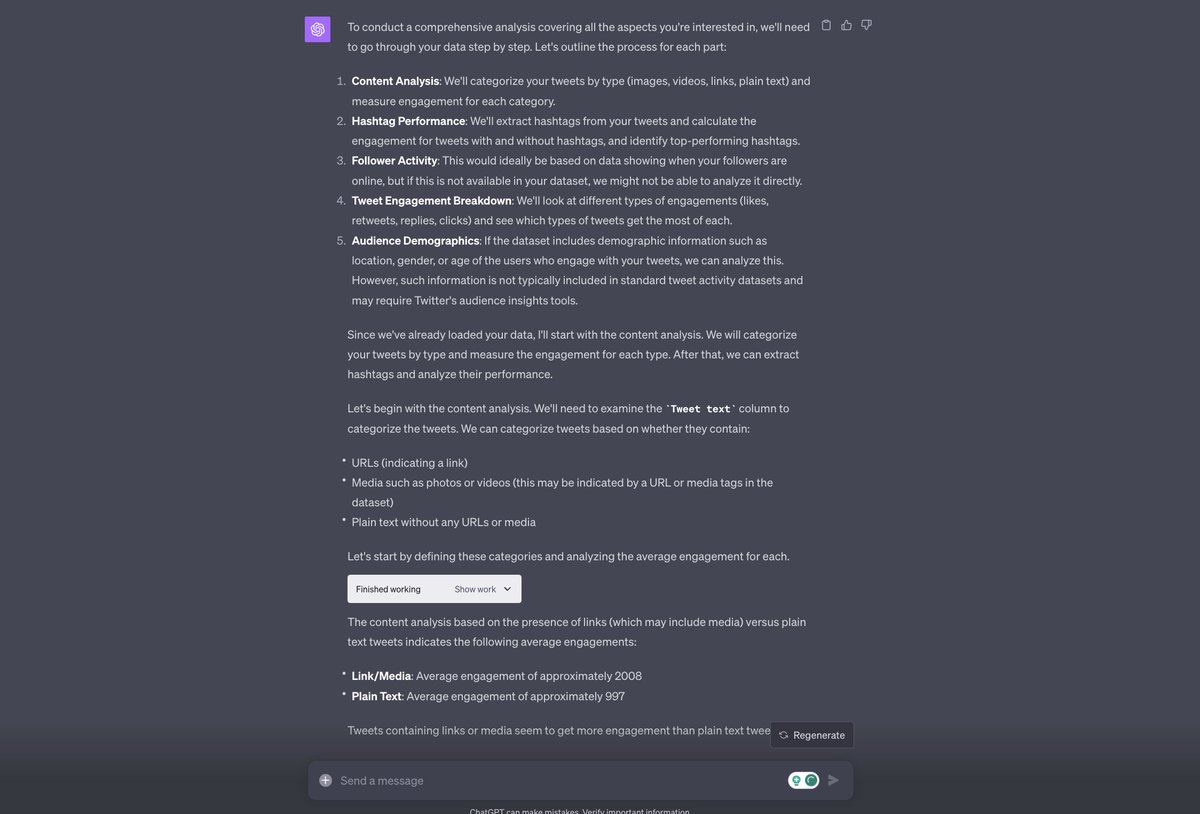
Step 3: Start getting insights on your data.
Here are some things to try:
-What's the best time to post for max engagement?
-What are the hottest keywords for my account?
-What is the best niche I should post about?
Here are some things to try:
-What's the best time to post for max engagement?
-What are the hottest keywords for my account?
-What is the best niche I should post about?

Step 4: The ultimate insight
Here's the best use case of them all, in my opinion.
Ask ChatGPT: "Based on my analytics, how can I improve my account to maximize reach?"
You will be shocked by how good this advice is!
Here's the best use case of them all, in my opinion.
Ask ChatGPT: "Based on my analytics, how can I improve my account to maximize reach?"
You will be shocked by how good this advice is!
If you found this useful, you'll love my Advanced ChatGPT guide.
It includes 1000+ best ChatGPT prompts, 100+ AI tools, and 25+ AI tool tutorials just like this one.
I'm auto-sending it free for a limited time to new subscribers for my AI newsletter: therundown.ai
It includes 1000+ best ChatGPT prompts, 100+ AI tools, and 25+ AI tool tutorials just like this one.
I'm auto-sending it free for a limited time to new subscribers for my AI newsletter: therundown.ai


By using ChatGPT to analyze X data, you can get massive insights to start maximizing your engagement.
Follow me @rowancheung for more AI tutorials.
If you found this useful, feel free to like/retweet/comment to share with friends 👇
Follow me @rowancheung for more AI tutorials.
If you found this useful, feel free to like/retweet/comment to share with friends 👇
Loading suggestions...