

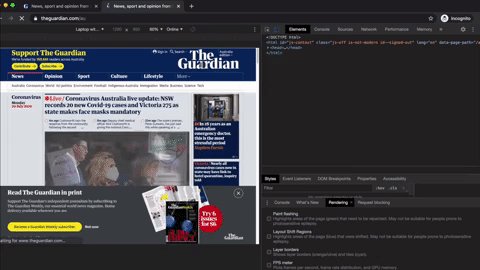
Favourite feature in Chrome Dev Tools right now: see regions impacted by CLS (a Core Web Vital):
CMD+Shift+N (Incognito) > CMD+Shift+C (Inspect) > Performance > Rendering > Layout Shift Regions > CMD+Shift+E (record) > Event Log > Filter by 'shift'
Pinpoint where shifts occur.
CMD+Shift+N (Incognito) > CMD+Shift+C (Inspect) > Performance > Rendering > Layout Shift Regions > CMD+Shift+E (record) > Event Log > Filter by 'shift'
Pinpoint where shifts occur.

Context: Cumulative Layout Shift is a Core Web Vital, which will be a ranking input for Google Search (both regular results + Top Stories) starting 2021.
News publishers are notorious for having ads causing shifts. Often a UX tradeoff for ad revenue. Need to consider the options
News publishers are notorious for having ads causing shifts. Often a UX tradeoff for ad revenue. Need to consider the options
Lol came across this (very obvious) job ad when looking for the banner ad causing the shift. Ads on ads on ads.
More details: once you have the timestamp for where a CLS is being triggered (i.e. the "start time"), you need to go from there. Look at the frames and locate close to that spot, then click. You'll then be able to narrow in even further. Here's an example:
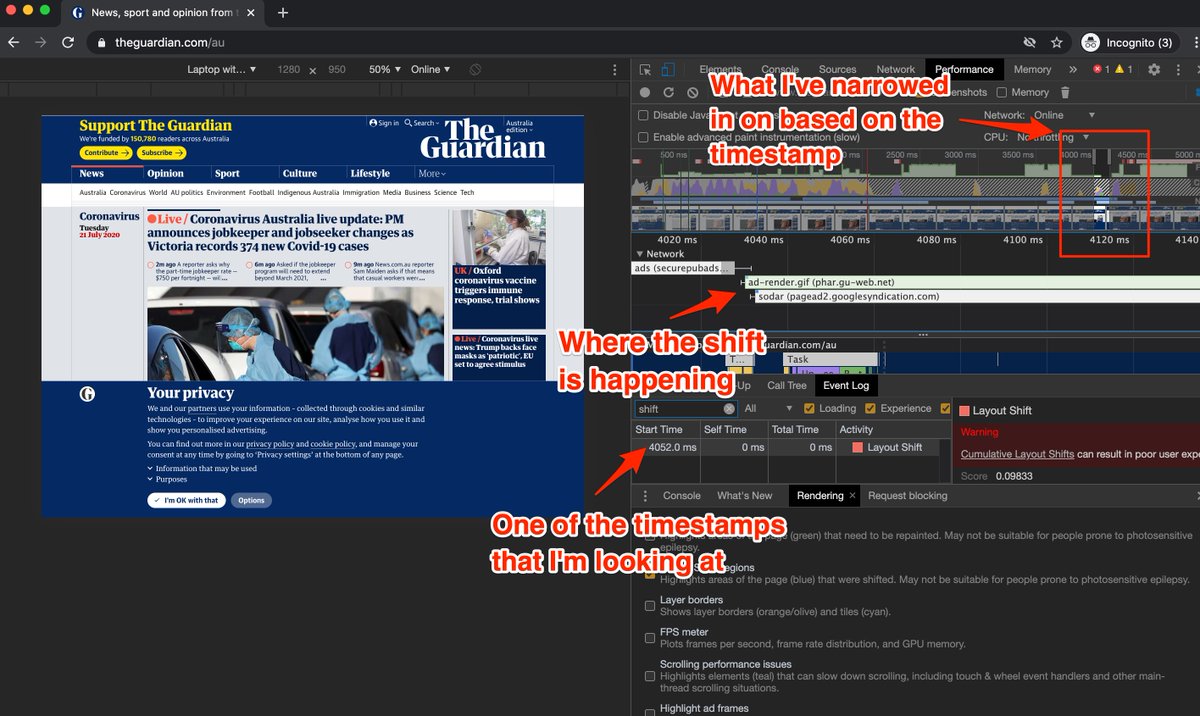
Am still learning, so there's likely better ways of doing this. What would be awesome is if you could click on a timestamp (where it says 4052ms), then that takes you directly to the right spot. Think this needs to be done manually...?
Loading suggestions...