

🔵 CSS Animation Overview 🔵
CSS Animations make animating web UI elements simple. You can achieve many animations without needing any JS or external packages and can be done straight away with vanilla CSS.
Let's break down CSS animations. 👇 🧵
CSS Animations make animating web UI elements simple. You can achieve many animations without needing any JS or external packages and can be done straight away with vanilla CSS.
Let's break down CSS animations. 👇 🧵
🔶 Quick Note 🔶
Before we jumping into the thread, I just want to ask a small favour.🙏
It takes me a lot of time to produce content so I would love it if you would consider retweeting the 1st tweet so as many people as possible can see it.
Thank you😄
Before we jumping into the thread, I just want to ask a small favour.🙏
It takes me a lot of time to produce content so I would love it if you would consider retweeting the 1st tweet so as many people as possible can see it.
Thank you😄
1️⃣ Keyframes
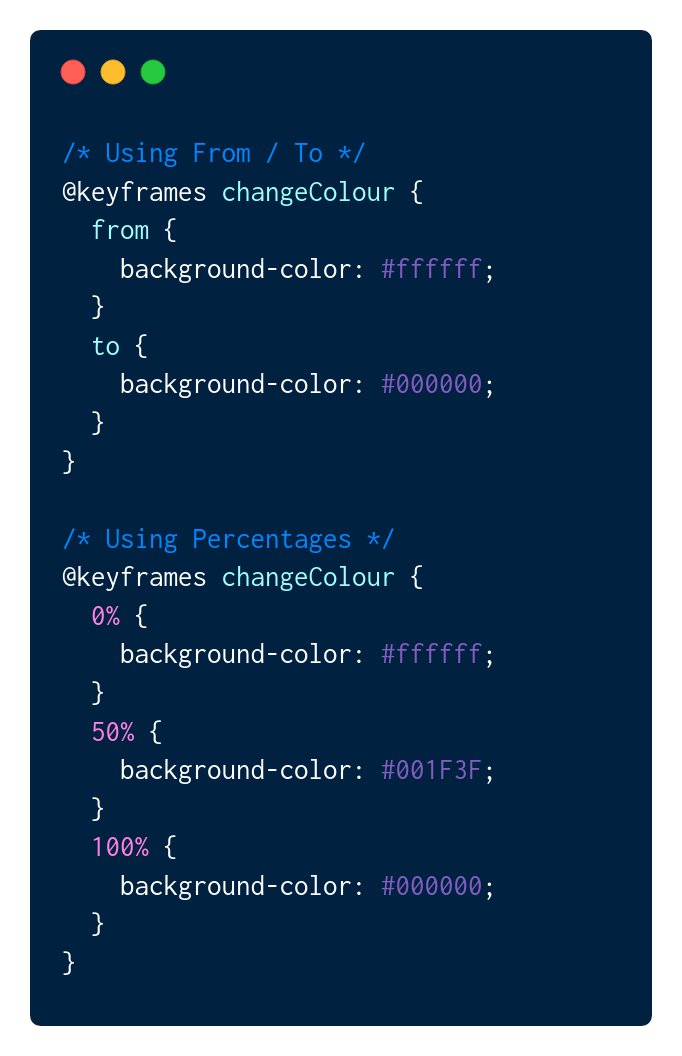
All CSS animations start with defining keyframes, before an element can be animated we need to define what the animation will be.
This is done using keyframes with either percentages or from/to.
All CSS animations start with defining keyframes, before an element can be animated we need to define what the animation will be.
This is done using keyframes with either percentages or from/to.
2️⃣ Applying to an element
Once we have our animation defined we can apply it to an element in one of two ways:
👉 animation-name
👉 animation shorthand syntax
We'll come back to the shorthand syntax later, first let's look at all the properties.
Once we have our animation defined we can apply it to an element in one of two ways:
👉 animation-name
👉 animation shorthand syntax
We'll come back to the shorthand syntax later, first let's look at all the properties.

⭐ animation-name
This property declares the name of keyframe we are going to apply to the element.
See the previous tweet for an example.
Read More:
🔗 developer.mozilla.org
This property declares the name of keyframe we are going to apply to the element.
See the previous tweet for an example.
Read More:
🔗 developer.mozilla.org
⭐ animation-duration
This property declares the length of time in either seconds or milliseconds to complete one cycle of the animation.
E.G.
animation-duration: 500ms;
animation-duration: 5s;
Read more:
🔗 developer.mozilla.org
This property declares the length of time in either seconds or milliseconds to complete one cycle of the animation.
E.G.
animation-duration: 500ms;
animation-duration: 5s;
Read more:
🔗 developer.mozilla.org
⭐ animation-timing-function
This property establishes the acceleration curve for the animation to use.
E.G.
animation-timing-function: ease-in;
animation-timing-function: linear;
See a full list:
🔗 developer.mozilla.org
This property establishes the acceleration curve for the animation to use.
E.G.
animation-timing-function: ease-in;
animation-timing-function: linear;
See a full list:
🔗 developer.mozilla.org
⭐ animation-delay
As the name suggests this property allows you to add delay to the start of the animation.
By default, animations will start immediately but this property allows you to change that.
E.G.
animation-delay: 1s;
Read More:
🔗 developer.mozilla.org
As the name suggests this property allows you to add delay to the start of the animation.
By default, animations will start immediately but this property allows you to change that.
E.G.
animation-delay: 1s;
Read More:
🔗 developer.mozilla.org
⭐ animation-direction
Allows you to state if the animation will play in reverse, normally or change on each run (alternate).
E.G.
animation-direction: alternate;
Read More:
🔗 developer.mozilla.org
Allows you to state if the animation will play in reverse, normally or change on each run (alternate).
E.G.
animation-direction: alternate;
Read More:
🔗 developer.mozilla.org
⭐ animation-iteration-count
This property allows you to specify how many times the animation should run or can be infinite if you don't want it to stop.
E.G.
animation-iteration-count: infinite;
animation-iteration-count: 5;
Read More:
🔗 developer.mozilla.org
This property allows you to specify how many times the animation should run or can be infinite if you don't want it to stop.
E.G.
animation-iteration-count: infinite;
animation-iteration-count: 5;
Read More:
🔗 developer.mozilla.org
⭐ animation-fill-mode
This property controls the styles that apply to the element after the animation is finished.
If you animate an element to grow this controls if it stays grown after or not.
E.G.
animation-fill-mode: both;
Read More:
🔗 developer.mozilla.org
This property controls the styles that apply to the element after the animation is finished.
If you animate an element to grow this controls if it stays grown after or not.
E.G.
animation-fill-mode: both;
Read More:
🔗 developer.mozilla.org
⭐ animation-play-state
Controls the current play status of the animation. Can be toggled between play and pause.
E.G.
animation-play-state: running;
animation-play-state: paused;
Read More:
🔗 developer.mozilla.org
Controls the current play status of the animation. Can be toggled between play and pause.
E.G.
animation-play-state: running;
animation-play-state: paused;
Read More:
🔗 developer.mozilla.org
⭐ animation shorthand
Animation shorthand syntax can control all of the above properties in one.
E.G.
animation: 3s ease-in 1s infinite reverse both running <NAME>;
or
duration | easing-function | delay | iteration-count | direction | fill-mode | play-state | name
Animation shorthand syntax can control all of the above properties in one.
E.G.
animation: 3s ease-in 1s infinite reverse both running <NAME>;
or
duration | easing-function | delay | iteration-count | direction | fill-mode | play-state | name
4️⃣ Helpful Resources
Below are 2 resources that are extremely helpful for understanding animations and it's properties.
The CSS Tricks Article also contains a good CodePen you can play around on.
CSS Tricks Article: css-tricks.com
MDN: developer.mozilla.org
Below are 2 resources that are extremely helpful for understanding animations and it's properties.
The CSS Tricks Article also contains a good CodePen you can play around on.
CSS Tricks Article: css-tricks.com
MDN: developer.mozilla.org
I hope you found this thread helpful, if you did please consider:
❤️ Liking the tweets in this thread.
🔄 Retweeting the first tweet.
👤 Following me ( @MrConerMurphy ) for more content.
❤️ Liking the tweets in this thread.
🔄 Retweeting the first tweet.
👤 Following me ( @MrConerMurphy ) for more content.
Loading suggestions...