

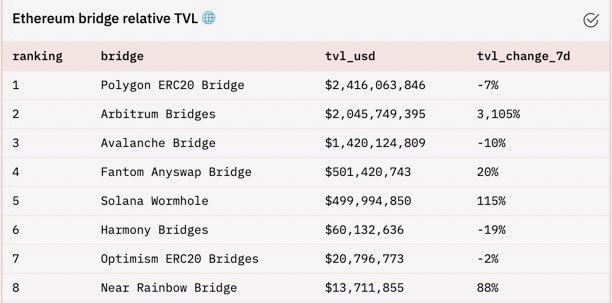
Arbitrum One is seeing incredible growth since its launch, recently skyrocketing its way to the #2 spot in TVL for #Ethereum bridges.
Want to get started in the fastest growing Layer 2 on $ETH?
Here’s how:
Want to get started in the fastest growing Layer 2 on $ETH?
Here’s how:
Step 1. Download web3 wallet
Just like Ethereum, Arbitrum is a network meaning you will have to configure your web 3 wallet in order to connect to dapps
You can do this with wallets such as Metamask, and you’ll need to be holding eth
Just like Ethereum, Arbitrum is a network meaning you will have to configure your web 3 wallet in order to connect to dapps
You can do this with wallets such as Metamask, and you’ll need to be holding eth
Step 2. Add the Arbitrum One network
>Click on the Metamask extension
>Click “Ethereum Mainnet” network
>Click Custom RPC and enter the following:
>Click on the Metamask extension
>Click “Ethereum Mainnet” network
>Click Custom RPC and enter the following:

Step 3. Switch from Arbitrum One back to Ethereum
Once you’ve added the Arbitrum Network, you will need to switch back to $ETH Mainnet
The network will be displayed at the top of your Metamask
Once you’re on Ethereum Mainnet, head to bridge.arbitrum.io
Once you’ve added the Arbitrum Network, you will need to switch back to $ETH Mainnet
The network will be displayed at the top of your Metamask
Once you’re on Ethereum Mainnet, head to bridge.arbitrum.io

Step 4. Deposit tokens from L1
On the Arbitrum Bridge, enter the amount of tokens you wish to bridge over then click “Deposit” & follow the prompts in Metamask (this step will require a small fee for gas)
On the Arbitrum Bridge, enter the amount of tokens you wish to bridge over then click “Deposit” & follow the prompts in Metamask (this step will require a small fee for gas)

Step 5. Wait about 10 minutes for you funds to arrive
After the deposit is made, there will be a link to the transaction on the bottom of the page where you can view its status.
Make sure you switch back to arbitrum network in order to see your funds when they arrive
After the deposit is made, there will be a link to the transaction on the bottom of the page where you can view its status.
Make sure you switch back to arbitrum network in order to see your funds when they arrive
Step 6. Explore the dapps
A comprehensive list of dapps on Arbitrum can be found at:
portal.arbitrum.one
Some of the most popular dapps deployed on Arbitrum are sushi, Uniswap, and hop protocol
A comprehensive list of dapps on Arbitrum can be found at:
portal.arbitrum.one
Some of the most popular dapps deployed on Arbitrum are sushi, Uniswap, and hop protocol
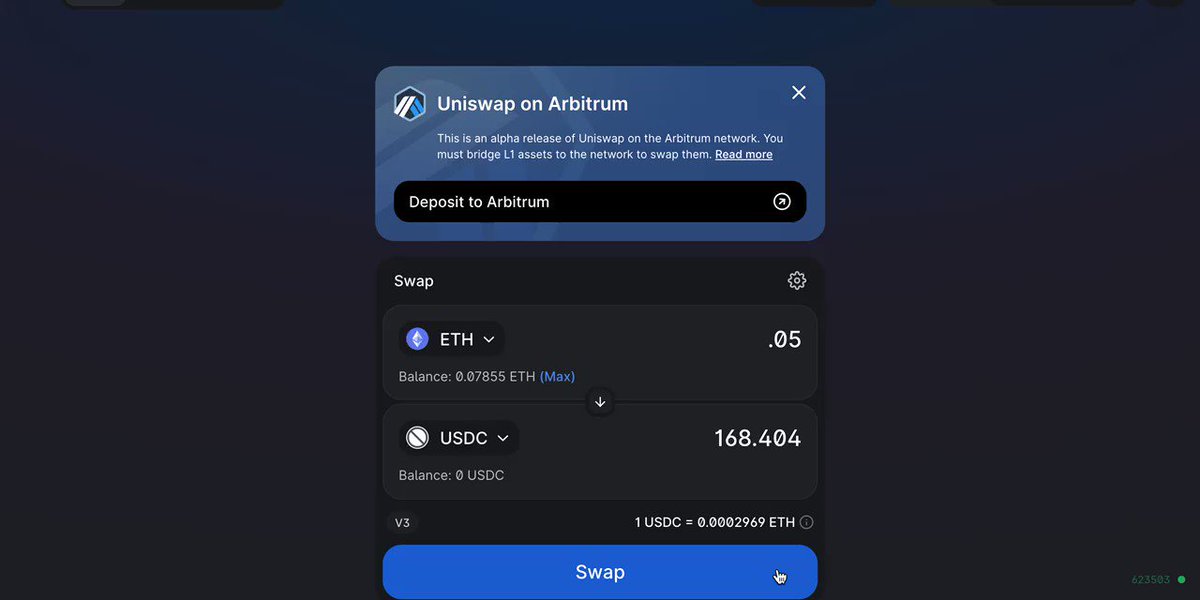
Since i’m sure some are curious, here’s what a transaction looks like using Arbitrum on uniswap
Instant finality & .0019 $ETH ($6.5) fee!
Instant finality & .0019 $ETH ($6.5) fee!
Loading suggestions...