

Are you using solid color background?🙄
Let's upgrade it with beautiful CSS gradients ✨
Mega thread🧵👇
Let's upgrade it with beautiful CSS gradients ✨
Mega thread🧵👇
1️⃣ What is the gradient?
CSS gradient allows you to create anything from a smooth gradient between two colors, right up to impressive mixing and multiple gradients.
Gradient makes the background more attractive than a solid color.
CSS gradient allows you to create anything from a smooth gradient between two colors, right up to impressive mixing and multiple gradients.
Gradient makes the background more attractive than a solid color.
We all know about Instagram but did you notice that the Instagram logo is also a gradient.
The genius is in its simplicity.✨
The genius is in its simplicity.✨

2️⃣ Types of gradients?
There is three gradient function in CSS.
◼ Linear Gradient
◼ Radial gradient
◼ Conic gradient
Let's talk about each type in more detail.✨
There is three gradient function in CSS.
◼ Linear Gradient
◼ Radial gradient
◼ Conic gradient
Let's talk about each type in more detail.✨
✨ Linear Gradient -
A linear gradient starts at one point and changes along a straight line to the endpoint.
The direction of the linear gradient can be up/down, left/right, or diagonal.
To create a linear gradient you must define at least two-color.
A linear gradient starts at one point and changes along a straight line to the endpoint.
The direction of the linear gradient can be up/down, left/right, or diagonal.
To create a linear gradient you must define at least two-color.
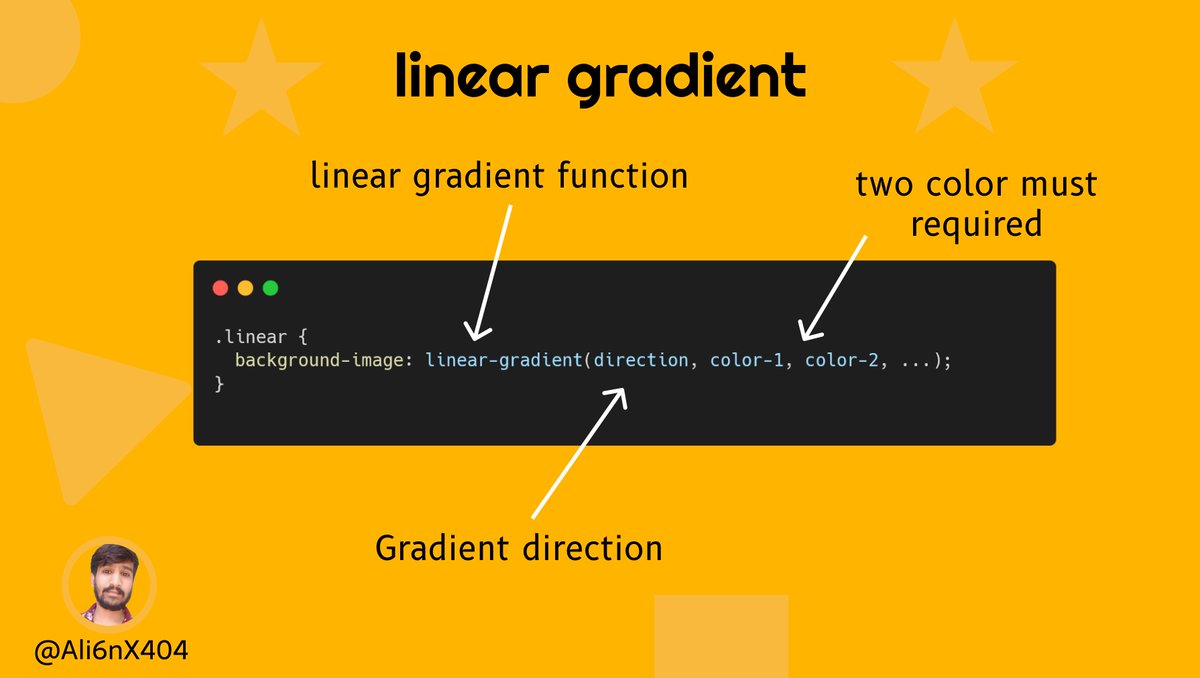
◼ Basic linear gradient -
To create the most basic gradient you just need to specify two-color.
Two colors are the minimum required but you can have color as much as you want.
Without specifying angle will consider top-to-bottom.
Example👇
To create the most basic gradient you just need to specify two-color.
Two colors are the minimum required but you can have color as much as you want.
Without specifying angle will consider top-to-bottom.
Example👇
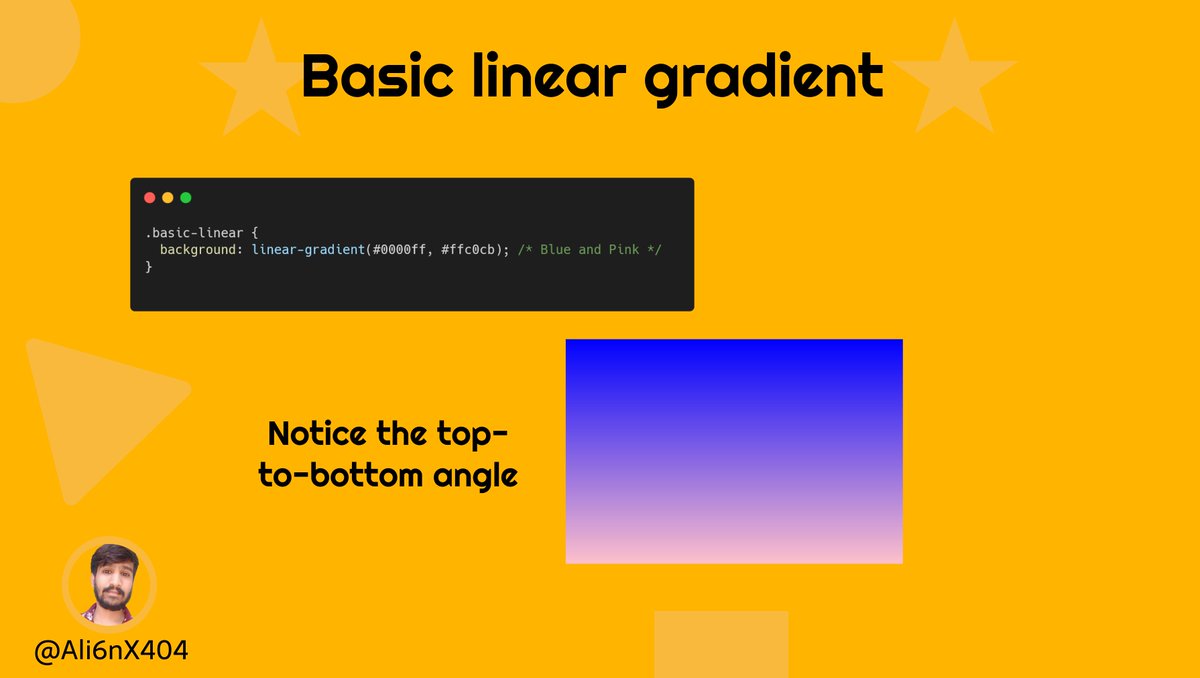
◼ Changing direction of Gradient -
The values are "to top", "to bottom", "to left", and "to right" used to change direction.
even we're free to use both the horizontal side (left or right), and the vertical side (top or bottom) after "to".
👇
The values are "to top", "to bottom", "to left", and "to right" used to change direction.
even we're free to use both the horizontal side (left or right), and the vertical side (top or bottom) after "to".
👇
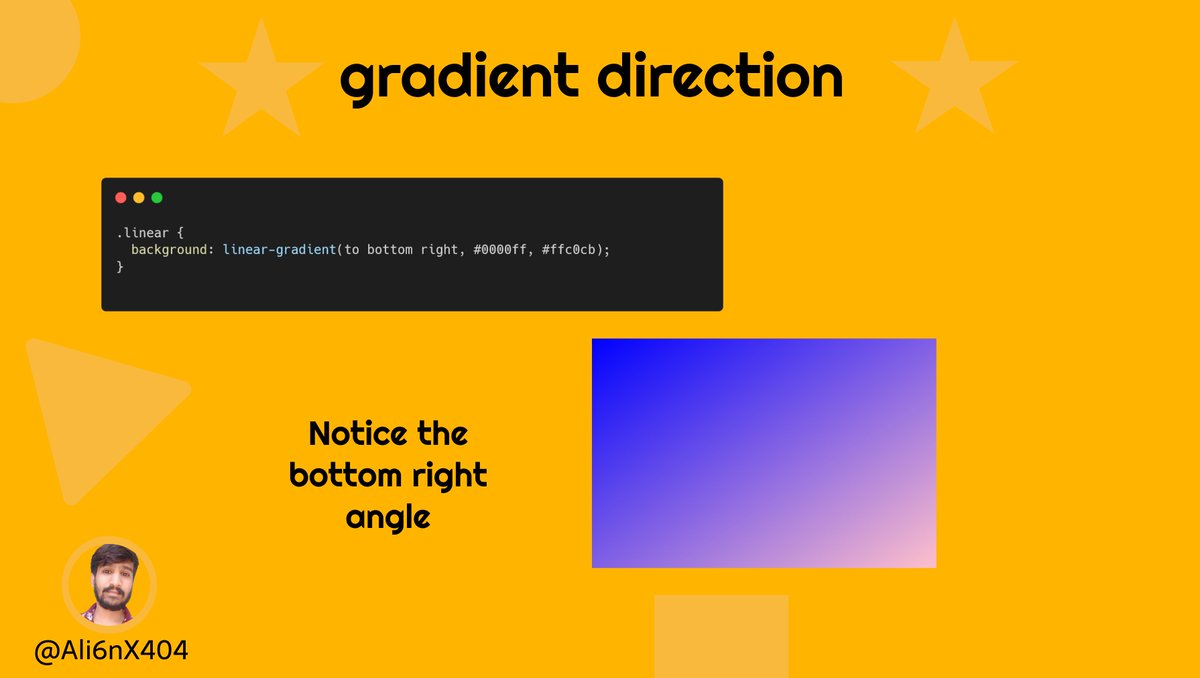
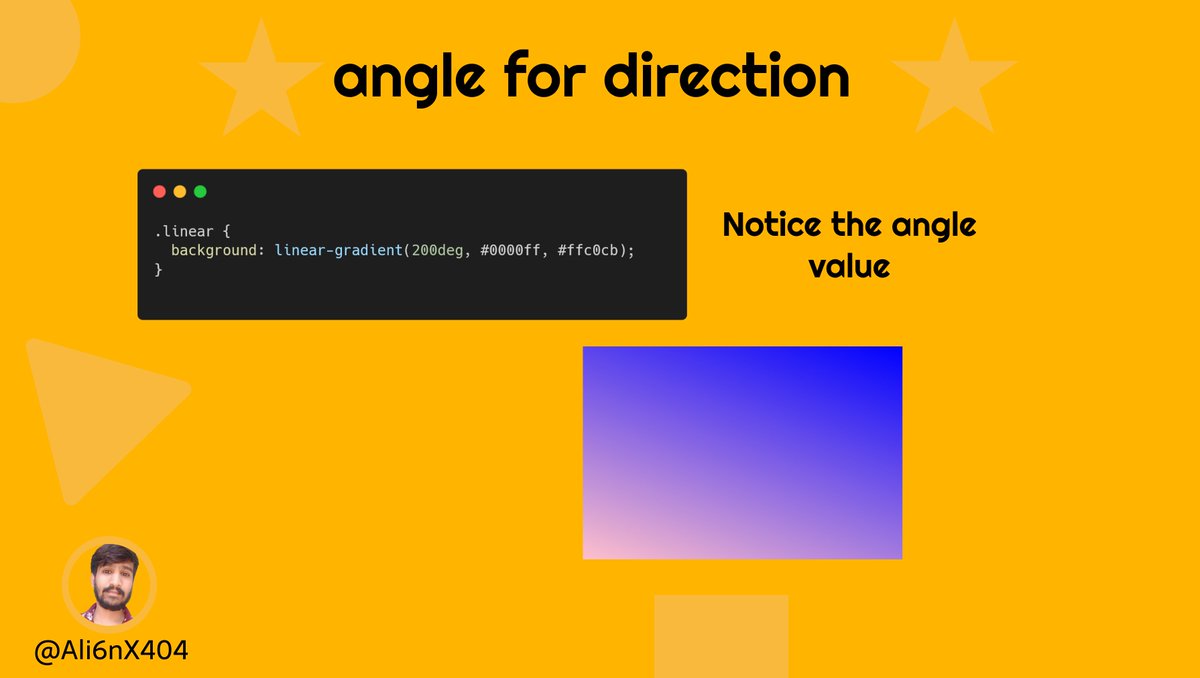
◼ Angle for changing direction -
We Are free to use an angle unit to specify the direction of the gradient.
The values are equivalent -
to top - 0deg,
to bottom - 180deg,
to left - 270deg,
to right - 90deg.
you can also use other angle units.
We Are free to use an angle unit to specify the direction of the gradient.
The values are equivalent -
to top - 0deg,
to bottom - 180deg,
to left - 270deg,
to right - 90deg.
you can also use other angle units.
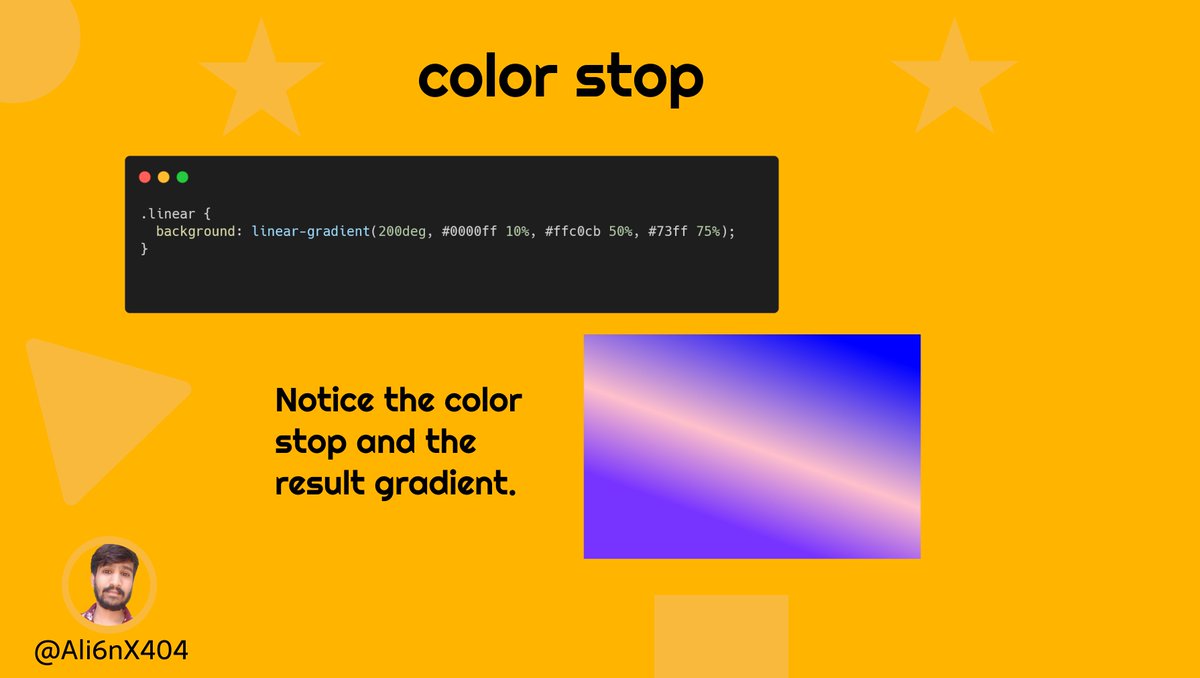
◼ Color stop -
One thing we didn't talk about as of now is "color-stop".
Color stops are the colors you want to render smooth transitions among.
A color-stop value, followed by one or two optional stop positions. in percentage or in length.
One thing we didn't talk about as of now is "color-stop".
Color stops are the colors you want to render smooth transitions among.
A color-stop value, followed by one or two optional stop positions. in percentage or in length.
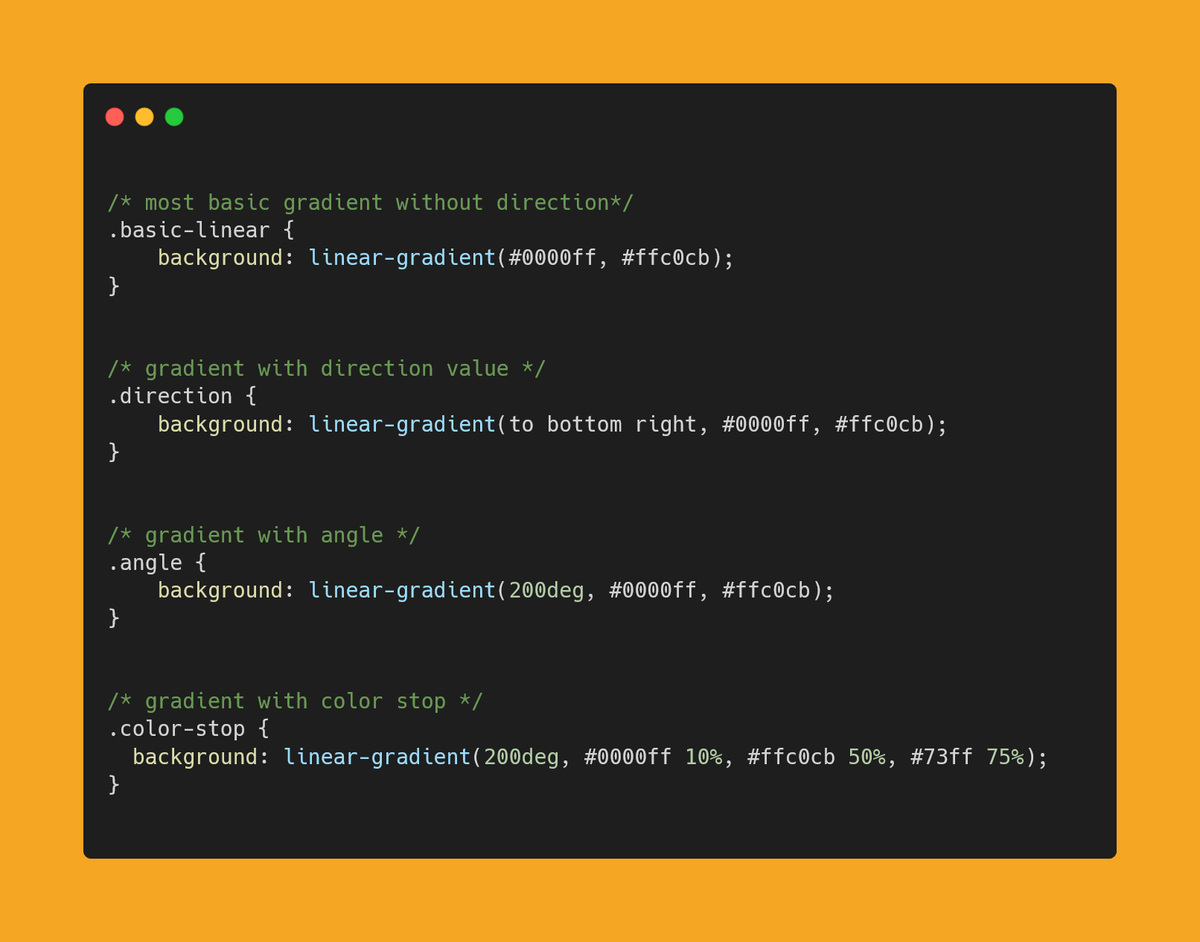
◼ Code Example at one place 👇
✨ Radial gradient -
A radial gradient starts from a central point and radiates outwards towards the outer endpoint.
A radial gradient starts from a central point and radiates outwards towards the outer endpoint.
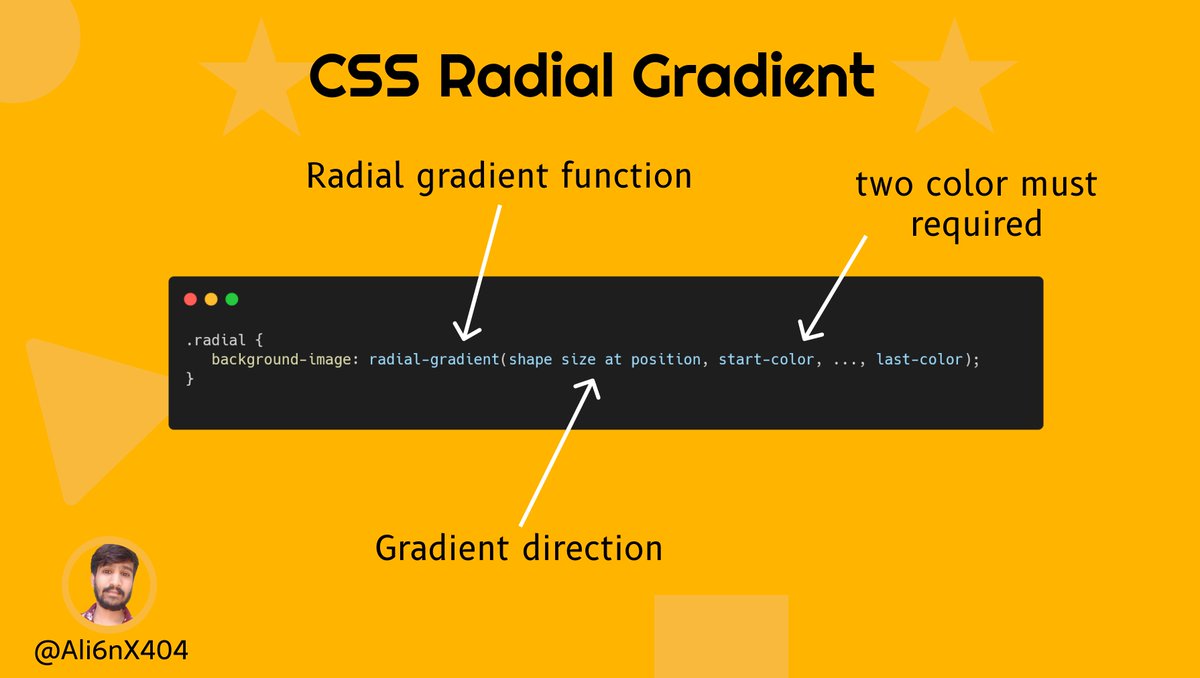
◼ Before we move further let's discuss some key terms -
- Size
- Shape
- Position
- color-stop ( Same as linear one )
Let's dive deeper 👇
- Size
- Shape
- Position
- color-stop ( Same as linear one )
Let's dive deeper 👇
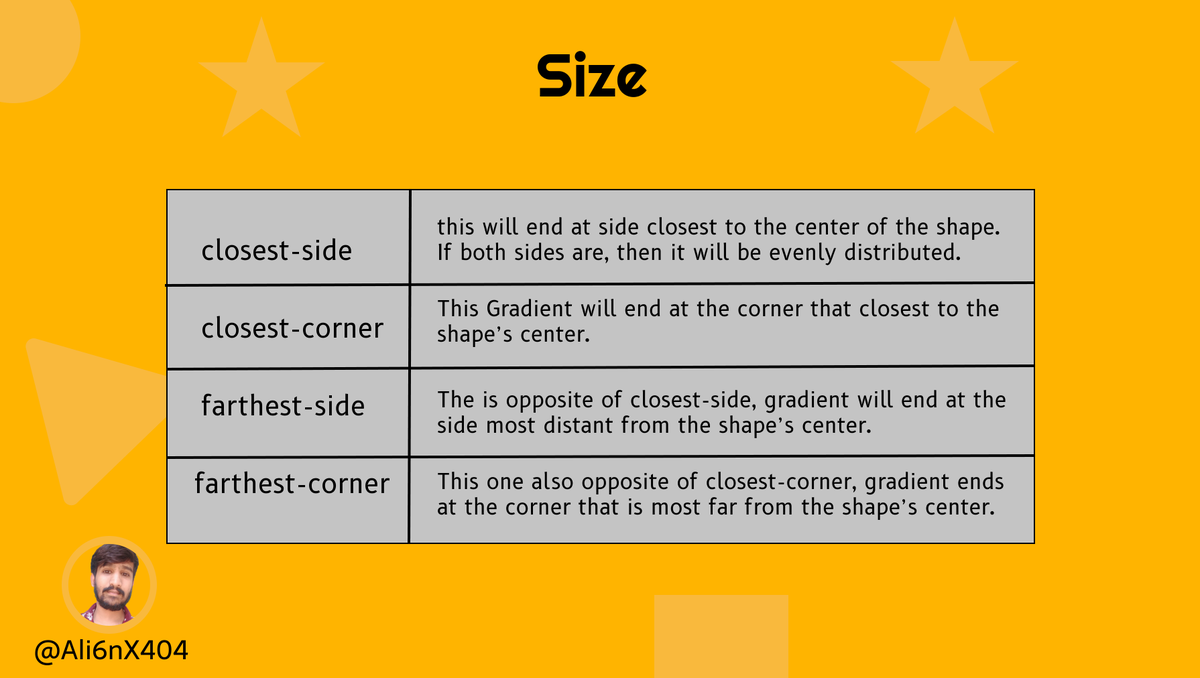
✔ size -
The size influences the ending shape of the gradient by taking the shape value you determined and instructing the gradient where to end.
⚡ closest-side
⚡ closest-corner
⚡ farthest-side
⚡ farthest-corner ( default one )
Detailed explanation 👇
The size influences the ending shape of the gradient by taking the shape value you determined and instructing the gradient where to end.
⚡ closest-side
⚡ closest-corner
⚡ farthest-side
⚡ farthest-corner ( default one )
Detailed explanation 👇
✔ Shape -
This determines the shape of the gradient, and because we’re talking about radial gradients,
they’re limited to being circular in nature.
Your shapes will be between an ellipse or a circle.
This determines the shape of the gradient, and because we’re talking about radial gradients,
they’re limited to being circular in nature.
Your shapes will be between an ellipse or a circle.
✔ Position -
This works the same way it does on background-position, So, keywords like “top,” “right,” “left,” and “center” will work here.
You can even use a combination like, “top center.”
1/2
This works the same way it does on background-position, So, keywords like “top,” “right,” “left,” and “center” will work here.
You can even use a combination like, “top center.”
1/2
We can also specify an exact position using a numeric value, including the percentage.
Default is center center.
2/2
Default is center center.
2/2
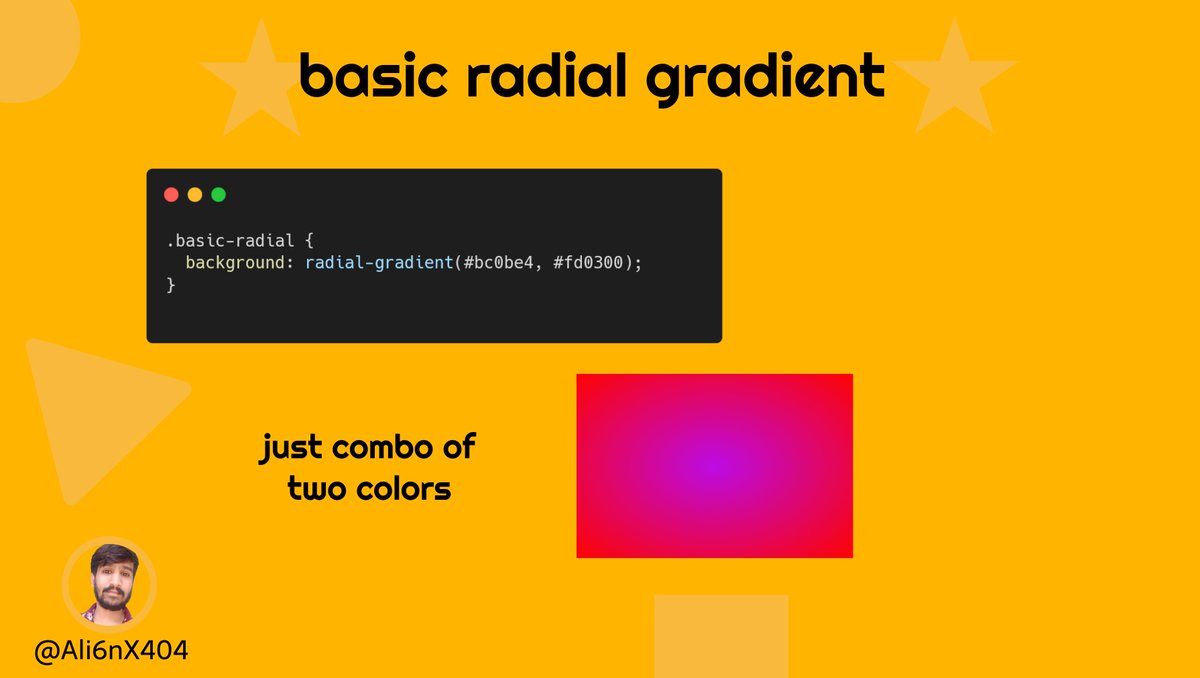
◼ Basic Radial gradient -
To create the most basic gradient you just need to specify two-color.
Two colors are the minimum required but you can have color as much as you want.
All others are default values because we are just specifying colors.
To create the most basic gradient you just need to specify two-color.
Two colors are the minimum required but you can have color as much as you want.
All others are default values because we are just specifying colors.
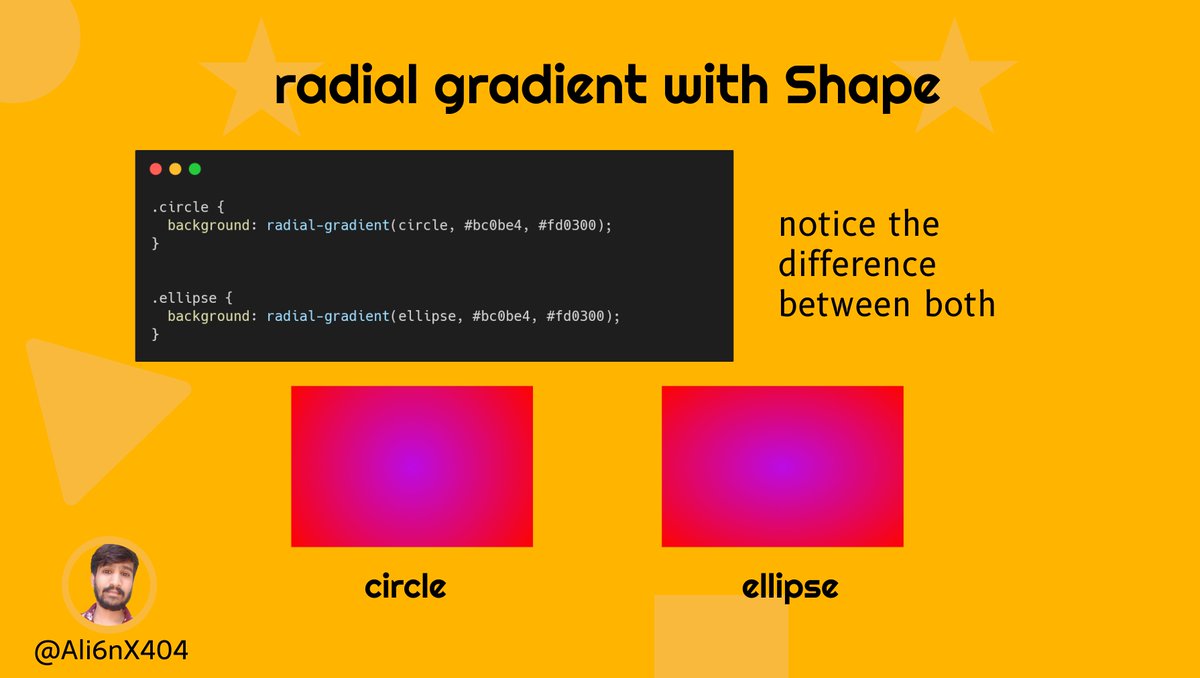
◼ shaping of radial gradient -
we already discussed shape and we have 2 values an ellipse or a circle.
Let's see example of both 👇
we already discussed shape and we have 2 values an ellipse or a circle.
Let's see example of both 👇
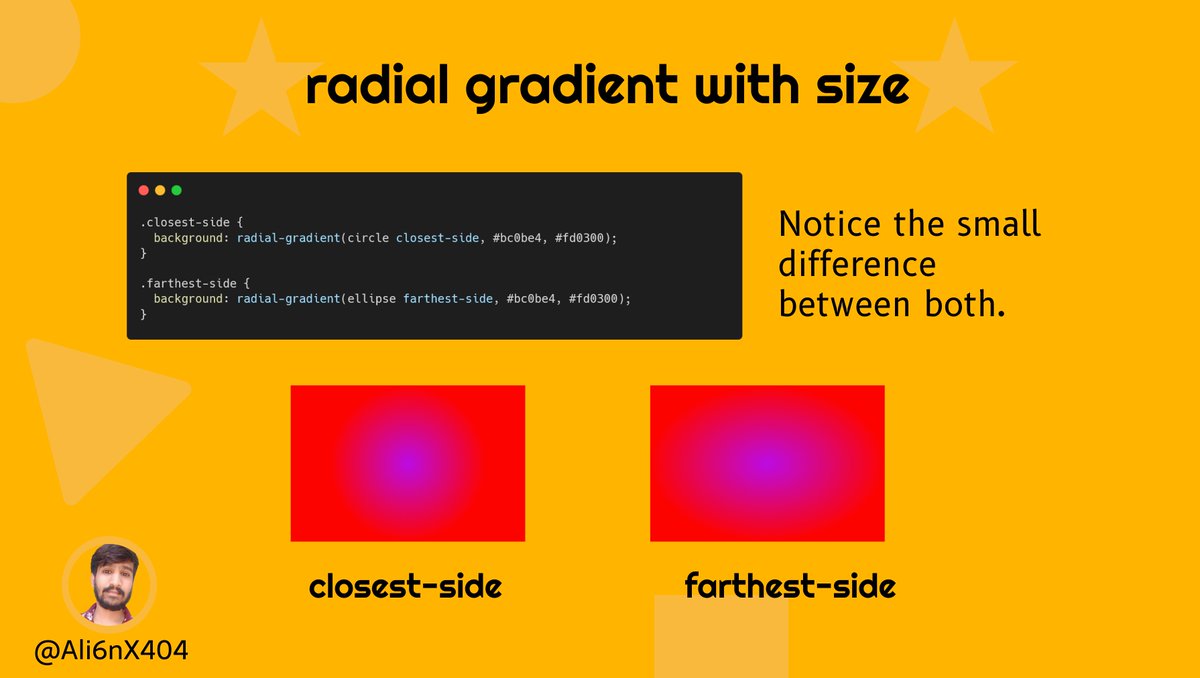
◼ Sizing of radial gradients -
we already discussed all the sizing values, let's see one or two values in the example.
for better understanding play with all values.
example 👇
we already discussed all the sizing values, let's see one or two values in the example.
for better understanding play with all values.
example 👇
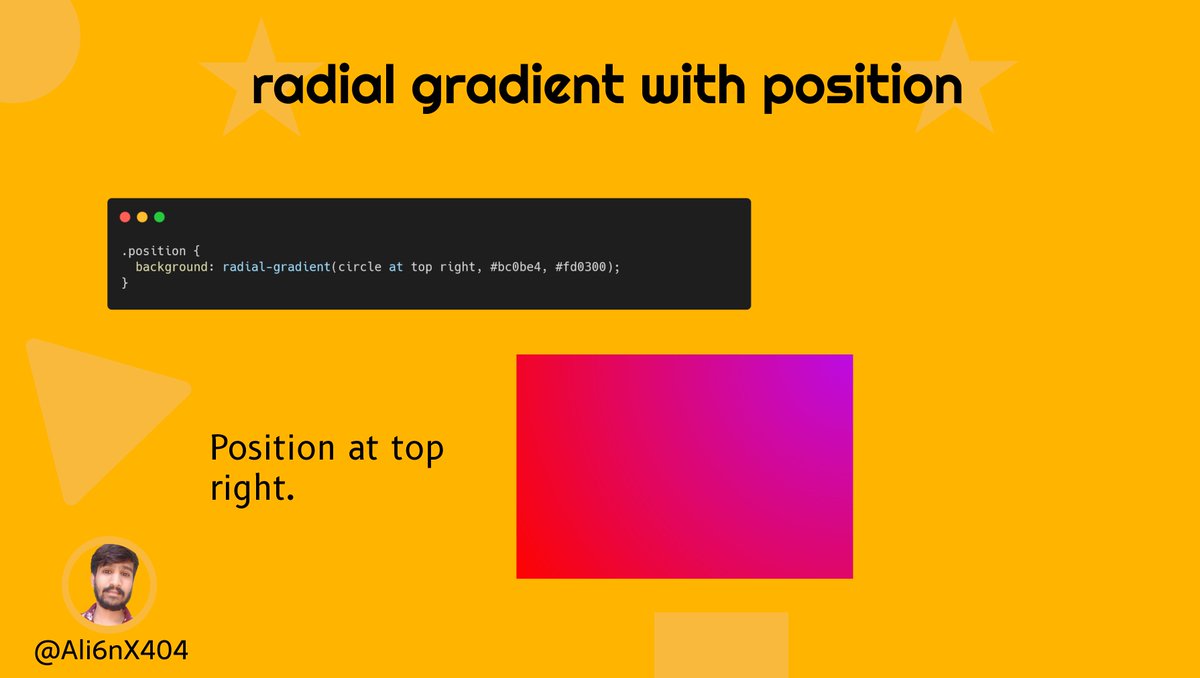
◼ Changing Position -
We already talked about the positioning of the gradient.
A radial gradient doesn’t have to start at the default center. It can specify a certain point.
example 👇
We already talked about the positioning of the gradient.
A radial gradient doesn’t have to start at the default center. It can specify a certain point.
example 👇
✨Conic gradient -
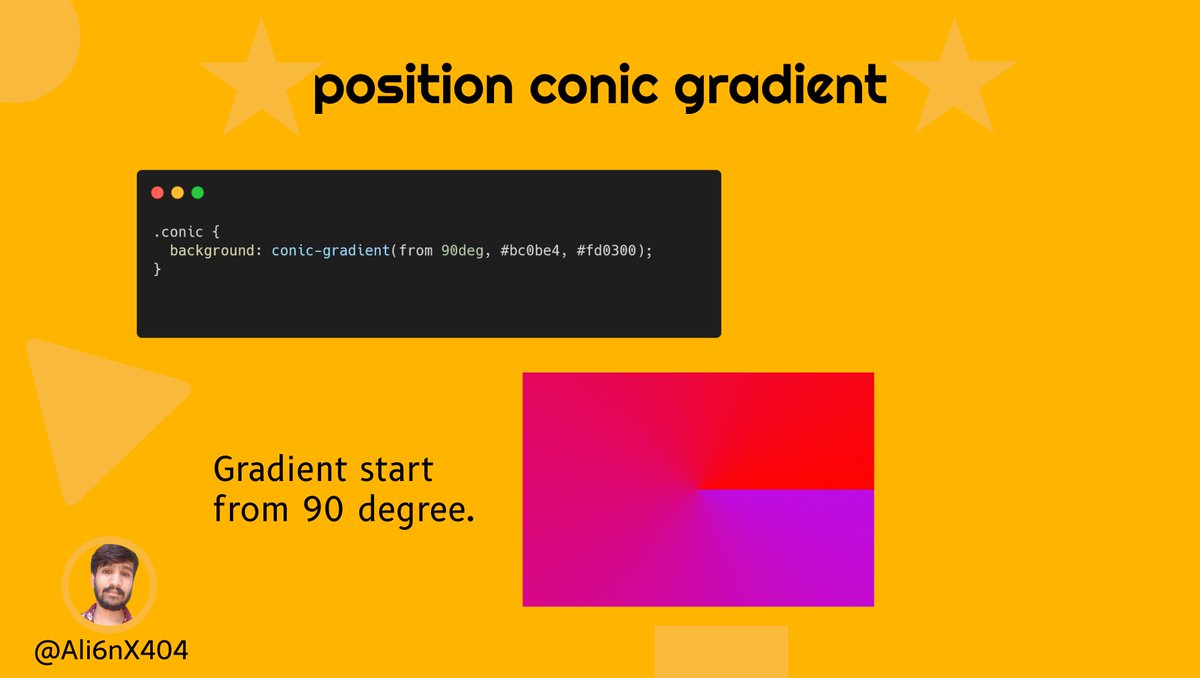
A conic gradient has a center point in your box and starts from the top and goes around in a 360-degree circle.
The conic-gradient function accepts the position and angle arguments.
By default, the angle is 0 degrees which starts at the top, in the center
A conic gradient has a center point in your box and starts from the top and goes around in a 360-degree circle.
The conic-gradient function accepts the position and angle arguments.
By default, the angle is 0 degrees which starts at the top, in the center
Above we already talked about position or angle, so let's see some examples.
👇👇
👇👇
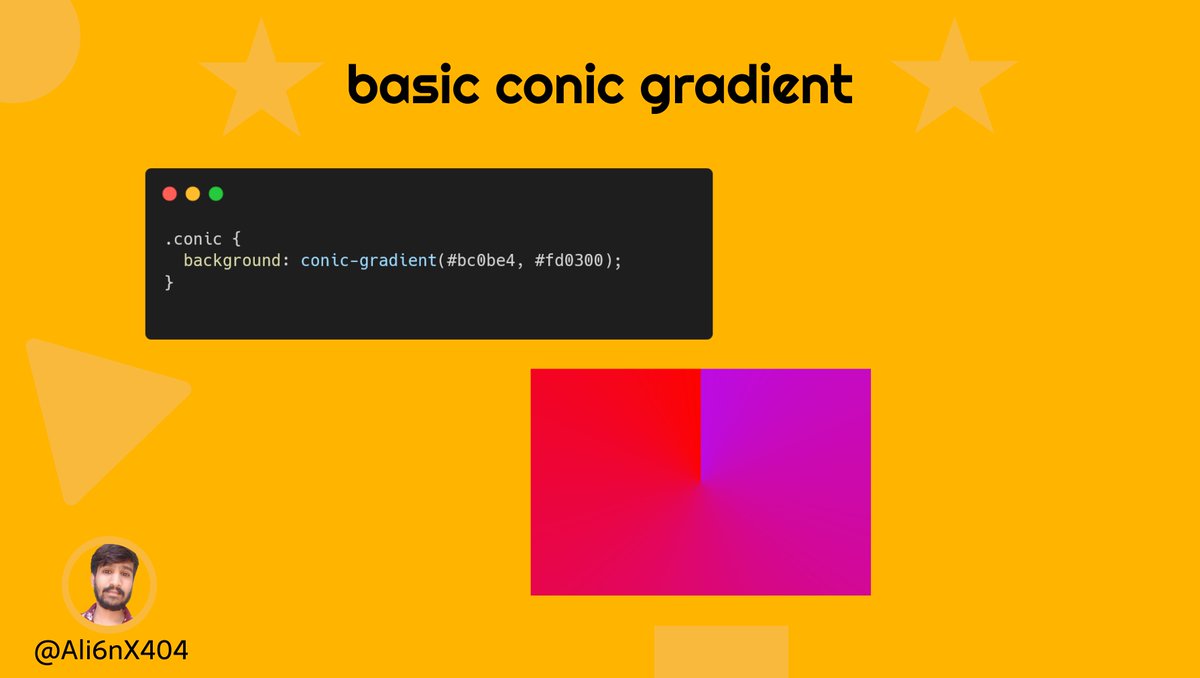
◼ basic conic gradient -
As like linear and radial gradients, all we need to create a conic gradient are two colors.
As like linear and radial gradients, all we need to create a conic gradient are two colors.
◼ Positioning -
Wait there is still a lot left to share but I think it's enough now 😎
but still, I have some other resources to make gradient creation easy.🤩
Let's check 👇
but still, I have some other resources to make gradient creation easy.🤩
Let's check 👇


I know this thread is huge and it's not easy to remember all the things.🧐
So just hit the bookmark and save it for future reference.😍
So just hit the bookmark and save it for future reference.😍
And that's it. I tried my best to explain gradients.
If you like this thread, drop a like and retweet, means a lot to me 💛
If you like this thread, drop a like and retweet, means a lot to me 💛

Loading suggestions...