

NumPy for Data Science 📊 🔥
A Mega Thread 🧵👇
A Mega Thread 🧵👇
NumPy stands for Numerical Python that is one of the most fundamental libraries in Python. You must have a solid grasp of NumPy to be a better Data Scientist.
So, let's get started!
So, let's get started!
🟠 Creating Arrays
🔶 Basic ndarrays
🔹 np.array()
- Create an array.
- You can also specify the data type.
🔶 Basic ndarrays
🔹 np.array()
- Create an array.
- You can also specify the data type.

🔶 Evenly Spaced ndarrays
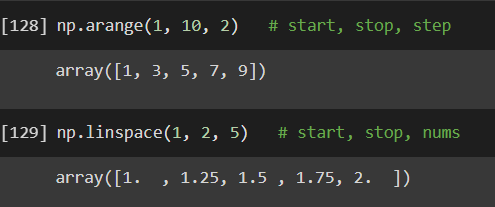
🔹 np.arange(start, end, step)
- Create an array between two numbers(start and end) with a given step size.
- Interval: [start, end) --> Excludes last number
🔹 np.arange(start, end, step)
- Create an array between two numbers(start and end) with a given step size.
- Interval: [start, end) --> Excludes last number
🔹 np.linspace(start, end, num)
- Create an array of total num elements between two numbers(start and end).
- Interval: [start, end] --> Includes last number
- Create an array of total num elements between two numbers(start and end).
- Interval: [start, end] --> Includes last number
🔶 Miscellaneous
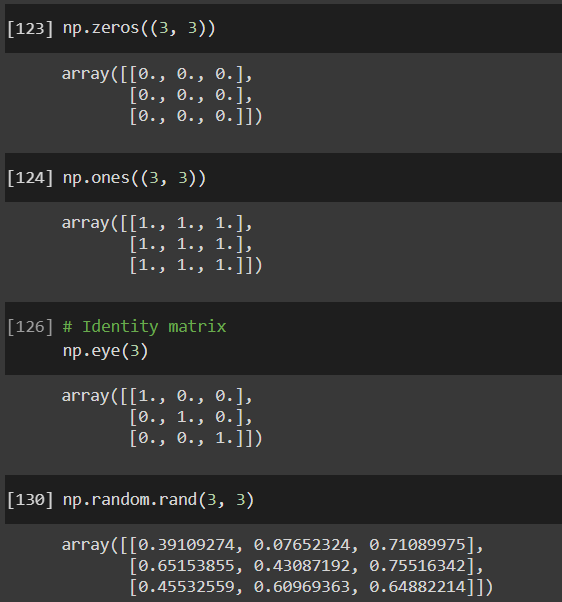
🔹 np.zeros(shape)
- Create an array of all 0s.
🔹 np.ones(shape)
- Create an array of all 1s.
🔹 np.eye(shape)
- Create an Identity matrix.
🔹 np.random.rand(shape)
- Create an array with random values.
🔹 np.zeros(shape)
- Create an array of all 0s.
🔹 np.ones(shape)
- Create an array of all 1s.
🔹 np.eye(shape)
- Create an Identity matrix.
🔹 np.random.rand(shape)
- Create an array with random values.
🟠 Reshaping Arrays
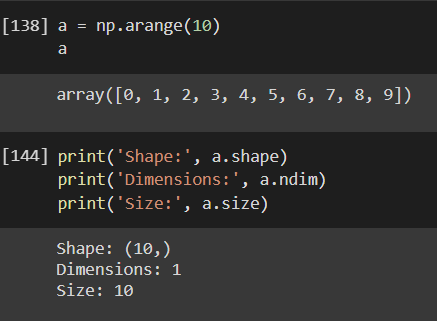
🔹 .shape
- Return shape of an array.
🔹 .ndim
- Return dimension of an array. (1, 2, 3, etc.)
🔹 .size
- Return the size of an array.
- Size is the total number of elements in an array.
Note: The above three are attributes and not the methods.
🔹 .shape
- Return shape of an array.
🔹 .ndim
- Return dimension of an array. (1, 2, 3, etc.)
🔹 .size
- Return the size of an array.
- Size is the total number of elements in an array.
Note: The above three are attributes and not the methods.
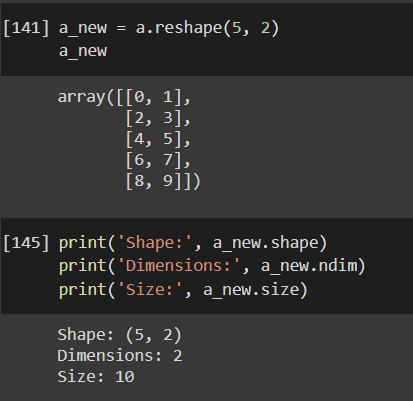
🔹 np.reshape(a, new_shape)
- Changes the shape of an array without changing the data.
- Changes the shape of an array without changing the data.
🟠 Flattening Arrays
🔹 np.flatten()
- Flattens an array (Convert Multidimensional arrays into single-dimensional)
🔹 np.ravel()
- Flattens an array (Convert Multidimensional arrays into single-dimensional)
🔹 np.flatten()
- Flattens an array (Convert Multidimensional arrays into single-dimensional)
🔹 np.ravel()
- Flattens an array (Convert Multidimensional arrays into single-dimensional)
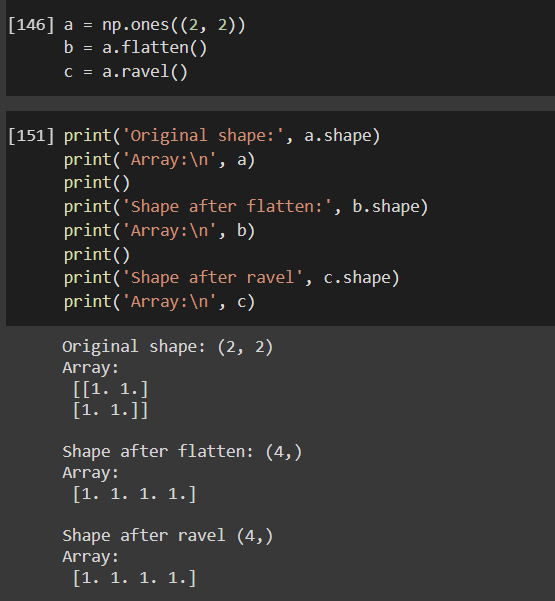
🔶 Difference between flatten() and ravel()
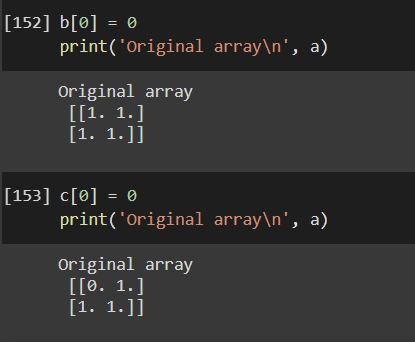
- flatten() returns a copy of the original array and ravel() returns a reference to the original array. Any changes made to the array returned from ravel() will be reflected in the original array but this will not be true for flatten()
- flatten() returns a copy of the original array and ravel() returns a reference to the original array. Any changes made to the array returned from ravel() will be reflected in the original array but this will not be true for flatten()
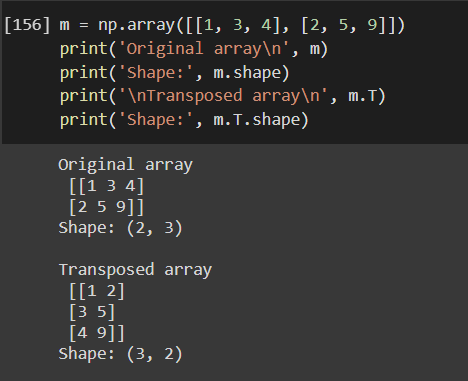
🟠 Transposing Arrays
🔹 .T
- Return transposed array (Swaps rows and columns).
- It also changes the shape.
🔹 .T
- Return transposed array (Swaps rows and columns).
- It also changes the shape.
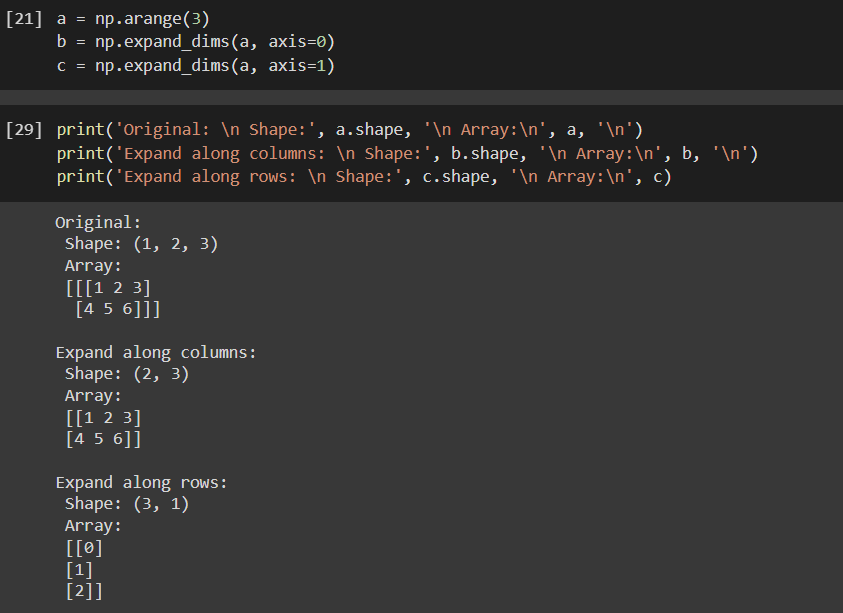
🟠 Squeezing and Expanding
🔹 np.expand_dims()
- Add a new axis to an array along the specified axis.
🔹 np.expand_dims()
- Add a new axis to an array along the specified axis.
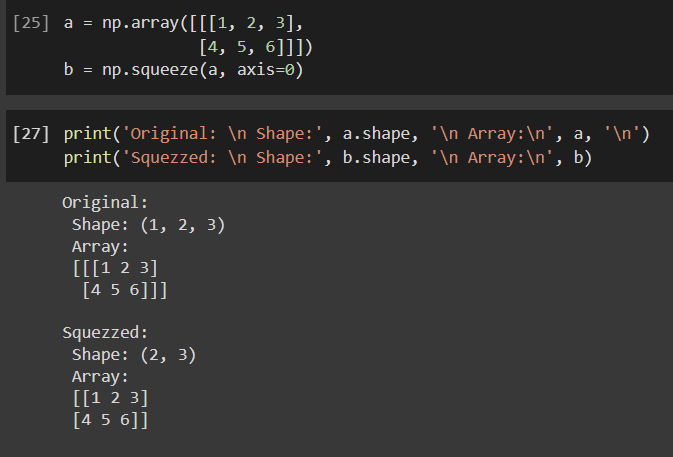
🔹 np.squeeze()
- Remove axis of length one from an array.
- Remove axis of length one from an array.
🟠 Slicing and Indexing
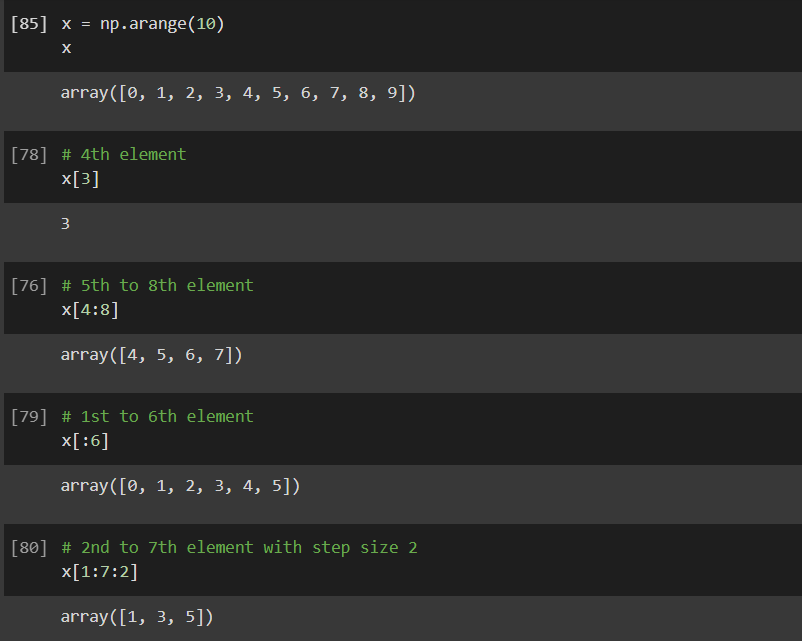
🔶 1D arrays
- Work in a pretty similar fashion to the list indexing and slicing.
🔶 1D arrays
- Work in a pretty similar fashion to the list indexing and slicing.
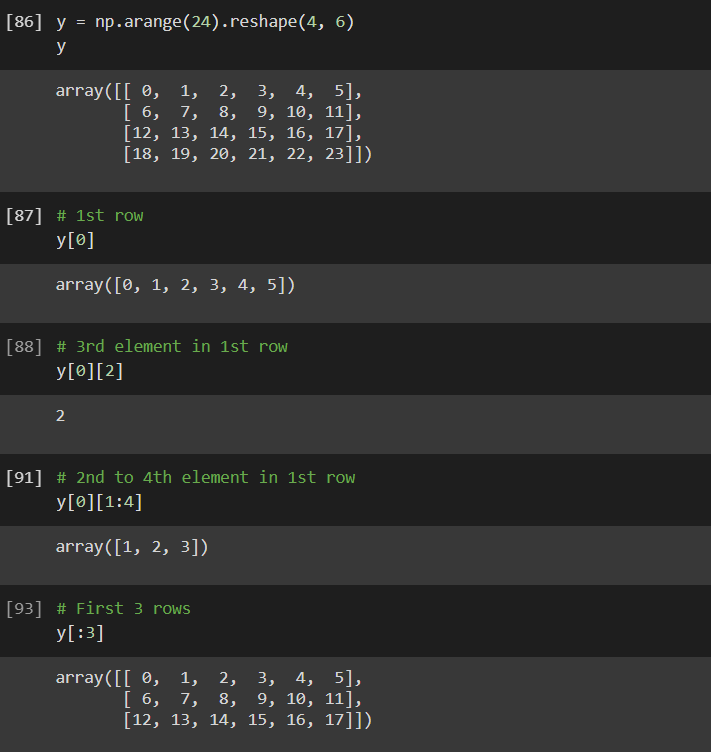
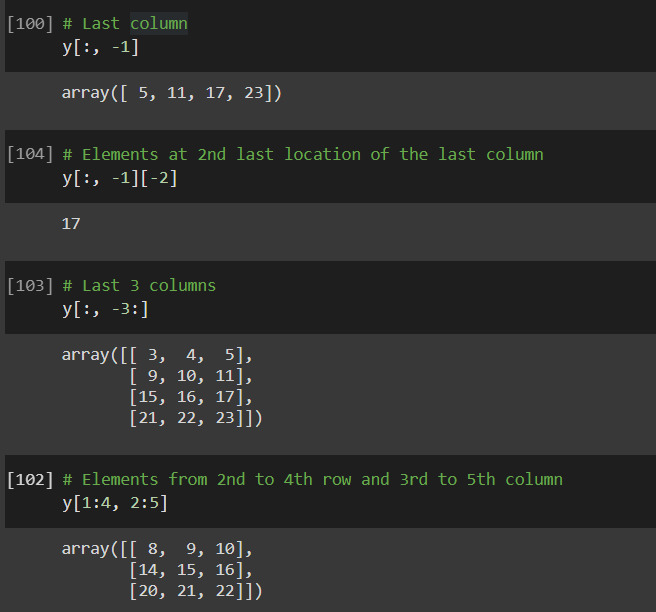
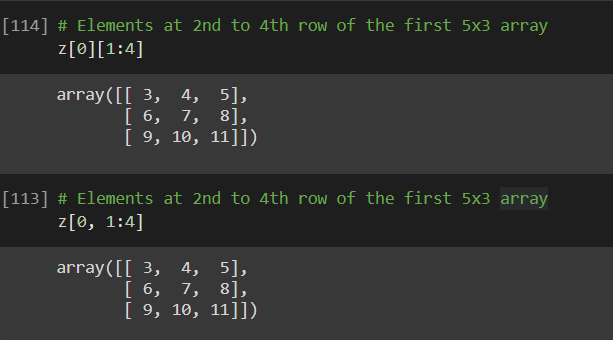
🔶 2D arrays
- It is an array of arrays.
- It is an array of arrays.
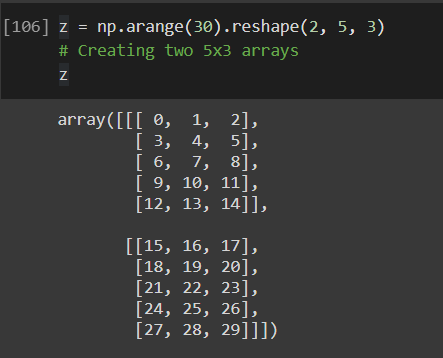
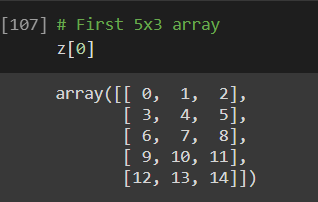
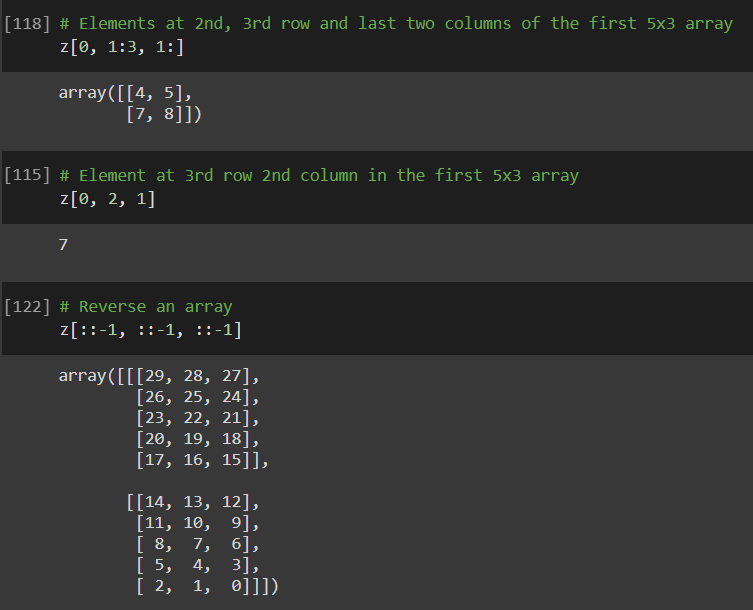
🔶 3D arrays
- It can be thought of as an n 2-dimensional array.
- It can be thought of as an n 2-dimensional array.
🟠 Stacking and Concatenating
🔹 np.vstack()
- Combines arrays vertically and thus increases the total rows.
🔹 np.hstack()
- Combines arrays horizontally and thus increases the total columns.
🔹 np.vstack()
- Combines arrays vertically and thus increases the total rows.
🔹 np.hstack()
- Combines arrays horizontally and thus increases the total columns.

🔹 np.concatenate()
- Concatenate arrays along the specified axis.
- Concatenate arrays along the specified axis.

🟠 Broadcasting
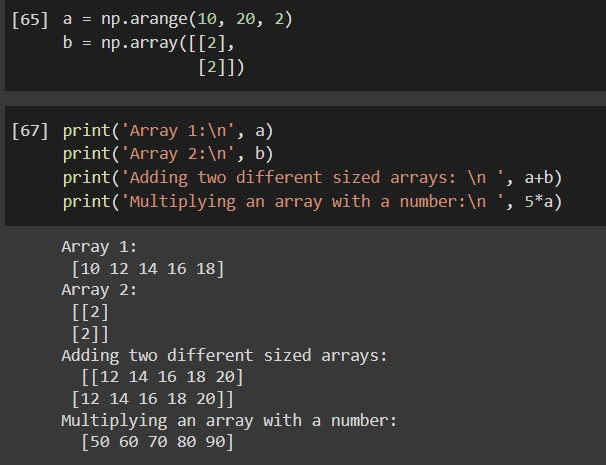
- It lets you perform arithmetics operations between arrays of different sizes or between an array and a scaler number! woohoo!
- Hypothetically, it stretches a smaller array to match the shape of a larger array.
- It lets you perform arithmetics operations between arrays of different sizes or between an array and a scaler number! woohoo!
- Hypothetically, it stretches a smaller array to match the shape of a larger array.
🟠 Maths with NumPy
🔶 Basic Arithmetic Operations
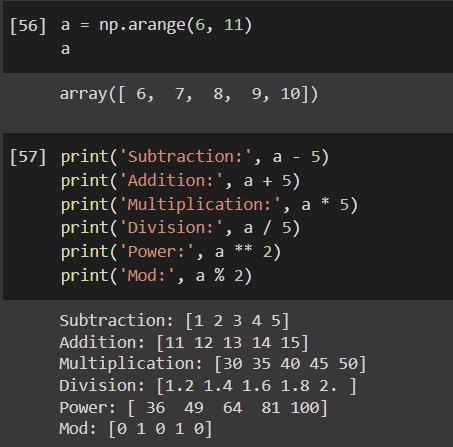
- With the power of Broadcasting, you can perform all the basic arithmetic operations as shown below.
🔶 Basic Arithmetic Operations
- With the power of Broadcasting, you can perform all the basic arithmetic operations as shown below.
🔶 Statistical
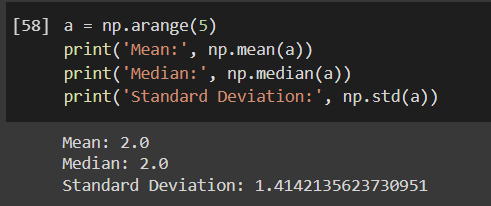
🔹 np.mean(a, axis)
- Return the mean of an array along the specified axis.
🔹 np.median(a, axis)
- Return the median of an array along the specified axis.
🔹 np.std(a, axis)
- Return the standard deviation of an array along the specified axis.
🔹 np.mean(a, axis)
- Return the mean of an array along the specified axis.
🔹 np.median(a, axis)
- Return the median of an array along the specified axis.
🔹 np.std(a, axis)
- Return the standard deviation of an array along the specified axis.
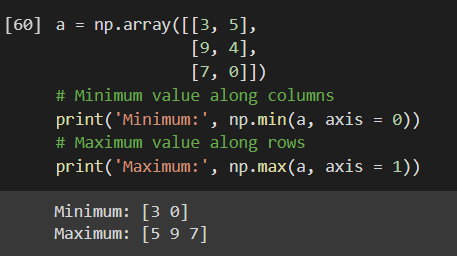
🔹 np.min(a, axis)
- Return the minimum value of an array along the specified axis.
🔹 np.max(a, axis)
- Return the maximum value of an array along the specified axis.
- Return the minimum value of an array along the specified axis.
🔹 np.max(a, axis)
- Return the maximum value of an array along the specified axis.
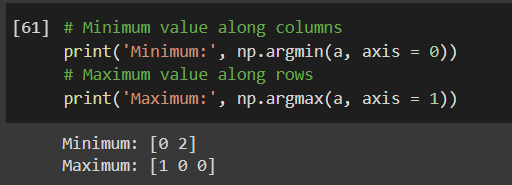
🔹 np.argmin(a, axis)
- Return an index of the minimum value of an array along the specified axis.
🔹 np.argmax(a, axis)
- Return an index of the maximum value of an array along the specified axis.
- Return an index of the minimum value of an array along the specified axis.
🔹 np.argmax(a, axis)
- Return an index of the maximum value of an array along the specified axis.
Did I miss something important?
Let me know in the comments section below 👇
Let me know in the comments section below 👇
Enjoyed the thread? Make sure to
1. Follow me @HarshDhamecha3
2. Retweet this.
3. Turn on notification to never miss out on threads on Python, Machine Learning, and Data Science.
Have a great day, See you soon.
1. Follow me @HarshDhamecha3
2. Retweet this.
3. Turn on notification to never miss out on threads on Python, Machine Learning, and Data Science.
Have a great day, See you soon.
Loading suggestions...