

📚 AWS 1x1 - 𝗔𝗣𝗜 𝗚𝗮𝘁𝗲𝘄𝗮𝘆
Learn about its capabilities & why it's more than just a simple front door for your serverless application ↓
Learn about its capabilities & why it's more than just a simple front door for your serverless application ↓
𝗧𝗵𝗿𝗲𝗮𝗱 𝗢𝘃𝗲𝗿𝘃𝗶𝗲𝘄 🧵
• Introduction
• The Basics
• Authorizers
• Usage Plans
• Validation
• Proxy Resources, Proxy Integrations & Service Proxies
• Error Handling
• Handling Responses
• API Types
• Monitoring
• Pricing
{ 1 | 32 }
• Introduction
• The Basics
• Authorizers
• Usage Plans
• Validation
• Proxy Resources, Proxy Integrations & Service Proxies
• Error Handling
• Handling Responses
• API Types
• Monitoring
• Pricing
{ 1 | 32 }
𝗜𝗻𝘁𝗿𝗼𝗱𝘂𝗰𝘁𝗶𝗼𝗻
It's easy to think of API Gateway just as an HTTP mediator between a client and an internal AWS service like Lambda.
But there's more to explore as it offers a lot of valuable features.
{ 2 | 32 }
It's easy to think of API Gateway just as an HTTP mediator between a client and an internal AWS service like Lambda.
But there's more to explore as it offers a lot of valuable features.
{ 2 | 32 }
𝗧𝗵𝗲 𝗕𝗮𝘀𝗶𝗰𝘀
API Gateway consists of three major parts:
• Request Flow
• Integration
• Response Flow
The integration is the most important element, as it contains what the client actually wants to do. It can be for example a Lambda function.
{ 3 | 32 }
API Gateway consists of three major parts:
• Request Flow
• Integration
• Response Flow
The integration is the most important element, as it contains what the client actually wants to do. It can be for example a Lambda function.
{ 3 | 32 }
The 𝗥𝗲𝗾𝘂𝗲𝘀𝘁 𝗙𝗹𝗼𝘄 is everything that happens before the integration is triggered, like authentication and authorization processing or request validation.
The 𝗥𝗲𝘀𝗽𝗼𝗻𝘀𝗲 𝗙𝗹𝗼𝘄 is everything that comes after the integration, like transformations.
{ 4 | 32 }
The 𝗥𝗲𝘀𝗽𝗼𝗻𝘀𝗲 𝗙𝗹𝗼𝘄 is everything that comes after the integration, like transformations.
{ 4 | 32 }
𝗔𝘂𝘁𝗵𝗼𝗿𝗶𝘇𝗲𝗿𝘀
If you want to protect some routes of your API you can make use of Authorizers.
This will protect your downstream services & also allow forwarding of a security context, like the details of the authenticated user.
{ 5 | 32 }
If you want to protect some routes of your API you can make use of Authorizers.
This will protect your downstream services & also allow forwarding of a security context, like the details of the authenticated user.
{ 5 | 32 }
There are different Authorizer types for this step which all look at some aspects of the request to identify the caller & either allow or reject the request.
• default JWT
• Cognito User Pool
• IAM permission-based
• custom Lambda function
{ 6 | 32 }
• default JWT
• Cognito User Pool
• IAM permission-based
• custom Lambda function
{ 6 | 32 }
𝗗𝗲𝗳𝗮𝘂𝗹𝘁 𝗝𝗪𝗧 𝗔𝘂𝘁𝗵𝗼𝗿𝗶𝘇𝗲𝗿
If you're using an identity provider that supports OAuth2 & OpenID (for example Auth0), this is a great option to have a central access control that doesn't require any operations on your side.
{ 7 | 32 }
If you're using an identity provider that supports OAuth2 & OpenID (for example Auth0), this is a great option to have a central access control that doesn't require any operations on your side.
{ 7 | 32 }
You basically only need to add the URL of the OpenID configuration endpoint which returns all needed details to AWS that are needed to validate signatures of 𝗝son 𝗪eb 𝗧okens
If the signature is valid & the token is not expired, a security context will be created
{ 8 | 32 }
If the signature is valid & the token is not expired, a security context will be created
{ 8 | 32 }
This context will contain details from the token payload like the claims and scopes.
You can additionally define which route does accept which scopes - without needing to write any code.
Everything is solely about configuration.
{ 9 | 32 }
You can additionally define which route does accept which scopes - without needing to write any code.
Everything is solely about configuration.
{ 9 | 32 }
You can also define your own 𝗰𝘂𝘀𝘁𝗼𝗺 𝗟𝗮𝗺𝗯𝗱𝗮 𝗔𝘂𝘁𝗵𝗼𝗿𝗶𝘇𝗲𝗿 𝗳𝘂𝗻𝗰𝘁𝗶𝗼𝗻.
This function will receive the authorization token. You can do your own validation & return your own authorization context which will be forwarded by API Gateway.
{ 10 | 32 }
This function will receive the authorization token. You can do your own validation & return your own authorization context which will be forwarded by API Gateway.
{ 10 | 32 }
𝗨𝘀𝗮𝗴𝗲 𝗣𝗹𝗮𝗻𝘀
API keys can be used as a method for rate limiting and throttling certain clients at your API. Define rules about clients:
• max number of requests per second
• max number of requests over a certain time period (=> a quota)
{ 11 | 32 }
API keys can be used as a method for rate limiting and throttling certain clients at your API. Define rules about clients:
• max number of requests per second
• max number of requests over a certain time period (=> a quota)
{ 11 | 32 }
𝗩𝗮𝗹𝗶𝗱𝗮𝘁𝗶𝗼𝗻
You can define validation rules directly at the Gateway level, which comes with two benefits:
• it reduces the number of invocations for your integrations
• saving boilerplate code at the integration
{ 12 | 32 }
You can define validation rules directly at the Gateway level, which comes with two benefits:
• it reduces the number of invocations for your integrations
• saving boilerplate code at the integration
{ 12 | 32 }
Requests that fail the validation are not forwarded to the backend integration, which therefore saves invocation.
Also, your validation rules on the Gateway will save you code for validations at your backend integration.
{ 13 | 32 }
Also, your validation rules on the Gateway will save you code for validations at your backend integration.
{ 13 | 32 }
Validation of 𝗣𝗮𝗿𝗮𝗺𝗲𝘁𝗲𝗿𝘀
Define requirements for your API like needed query parameters or headers. If they are not provided by the client, the API Gateway will return an HTTP 400 Bad Request response with a message listing the missing parameters.
{ 14 | 2 }
Define requirements for your API like needed query parameters or headers. If they are not provided by the client, the API Gateway will return an HTTP 400 Bad Request response with a message listing the missing parameters.
{ 14 | 2 }
Validation of 𝗥𝗲𝗾𝘂𝗲𝘀𝘁 𝗕𝗼𝗱𝗶𝗲𝘀
In addition to validating query strings and headers, you can also choose to have dedicated models for your incoming request payloads.
A model defines what content type is accepted and how the body has to contain.
{ 15 | 32 }
In addition to validating query strings and headers, you can also choose to have dedicated models for your incoming request payloads.
A model defines what content type is accepted and how the body has to contain.
{ 15 | 32 }
For the body, you define required fields and the types, like 𝘀𝘁𝗿𝗶𝗻𝗴 or 𝗶𝗻𝘁𝗲𝗴𝗲𝗿.
All of your validation rules need to be attached to the method request step in the request flow.
{ 16 | 32 }
All of your validation rules need to be attached to the method request step in the request flow.
{ 16 | 32 }
Let's have a quick wrap up about the different types of '𝗽𝗿𝗼𝘅𝘆' you'll find in correlation with API Gateway:
• Proxy Resource/Method
• Proxy Integration
• Service Proxy
{ 17 | 32 }
• Proxy Resource/Method
• Proxy Integration
• Service Proxy
{ 17 | 32 }
A 𝗣𝗿𝗼𝘅𝘆 𝗥𝗲𝘀𝗼𝘂𝗿𝗰𝗲 enables you to bind different HTTP requests to a single integration.
Example:
/api/customers/{𝗶𝗱}
It will bind calls to
• /api/customers/05d02cea
• /api/customers/a8de
• /api/customers/8d32a88dd1
{ 18 | 32 }
Example:
/api/customers/{𝗶𝗱}
It will bind calls to
• /api/customers/05d02cea
• /api/customers/a8de
• /api/customers/8d32a88dd1
{ 18 | 32 }
You can extend the proxy indicator with a + to capture all values that come after.
For the example:
/api/{𝗽𝗿𝗼𝘅𝘆+}
Will match
• /api/customers
• /api/customers/05d02cea/addresses
... and everything else that's under /𝗮𝗽𝗶.
{ 19 | 32 }
For the example:
/api/{𝗽𝗿𝗼𝘅𝘆+}
Will match
• /api/customers
• /api/customers/05d02cea/addresses
... and everything else that's under /𝗮𝗽𝗶.
{ 19 | 32 }
𝗣𝗿𝗼𝘅𝘆 𝗜𝗻𝘁𝗲𝗴𝗿𝗮𝘁𝗶𝗼𝗻𝘀
The important part: the actual integration with a backend service.
There are two types:
• Lambda proxy: forwarding your request to a Lambda function
• HTTP proxy: forwarding the entire request to an HTTP endpoint.
{ 20 | 32 }
The important part: the actual integration with a backend service.
There are two types:
• Lambda proxy: forwarding your request to a Lambda function
• HTTP proxy: forwarding the entire request to an HTTP endpoint.
{ 20 | 32 }
The benefit of using one of those proxy integrations is that you don't require any transformations with mapping templates using the 𝗩elocity 𝗧emplate 𝗟anguage (VTL).
{ 21 | 32 }
{ 21 | 32 }
𝗔𝗪𝗦 𝗦𝗲𝗿𝘃𝗶𝗰𝗲 𝗣𝗿𝗼𝘅𝘆 𝗜𝗻𝘁𝗲𝗴𝗿𝗮𝘁𝗶𝗼𝗻𝘀
It's also possible to integrate your API Gateway to another AWS service like DynamoDB, e.g. to insert items.
This is useful for simple data ingestion services which then don't require any maintenance.
{ 22 | 32 }
It's also possible to integrate your API Gateway to another AWS service like DynamoDB, e.g. to insert items.
This is useful for simple data ingestion services which then don't require any maintenance.
{ 22 | 32 }
𝗘𝗿𝗿𝗼𝗿 𝗛𝗮𝗻𝗱𝗹𝗶𝗻𝗴
As your request can get rejected for various reasons (missing or invalid Authentication Token, the payload does not match our model, ...), you may want to define how errors are handled and how they are returned to the client.
{ 23 | 32 }
As your request can get rejected for various reasons (missing or invalid Authentication Token, the payload does not match our model, ...), you may want to define how errors are handled and how they are returned to the client.
{ 23 | 32 }
API Gateway has a set of default 𝗿𝗲𝘀𝗽𝗼𝗻𝘀𝗲 𝘁𝘆𝗽𝗲𝘀 indicating different types of errors.
They contain:
• response type, parameters & templates
• the status code
You're able to overwrite those to adapt to your own needs.
{ 24 | 32 }
docs.aws.amazon.com
They contain:
• response type, parameters & templates
• the status code
You're able to overwrite those to adapt to your own needs.
{ 24 | 32 }
docs.aws.amazon.com
A common stumbling block is for example that there are by default not CORS headers return for rejected requests, which will lead to errors in frontends that you can't easily handle.
Custom response parameters allow you to define those headers for error responses.
{ 25 | 32 }
Custom response parameters allow you to define those headers for error responses.
{ 25 | 32 }
𝗛𝗮𝗻𝗱𝗹𝗶𝗻𝗴 𝗥𝗲𝘀𝗽𝗼𝗻𝘀𝗲𝘀
If you're not using a proxy integration, we need to define integration responses
Those are the counterpart to our integration request in the request flow and transform the backend responses into something API Gateway can handle
{ 26 | 32 }
If you're not using a proxy integration, we need to define integration responses
Those are the counterpart to our integration request in the request flow and transform the backend responses into something API Gateway can handle
{ 26 | 32 }
This is also done by using the VTL. Additionally, we also need to determine if our integration request was successful or if it returned an error - also finding out which exact error occurred.
{ 27 | 32 }
{ 27 | 32 }
The last step that follows (also only if not using Lambda or HTTP proxy integrations) is the method response.
They are needed to define:
• the response status code
• the response body
that will be returned to the client.
{ 28 | 32 }
They are needed to define:
• the response status code
• the response body
that will be returned to the client.
{ 28 | 32 }
𝗠𝗼𝗻𝗶𝘁𝗼𝗿𝗶𝗻𝗴
CloudWatch contains a lot of default metrics for our API Gateways.
These include:
• number of HTTP 4xx and 5xx responses
• execution & integration errors
• integration latency
Besides that, you can enable API GW to write logs to CloudWatch
{ 29 | 32 }
CloudWatch contains a lot of default metrics for our API Gateways.
These include:
• number of HTTP 4xx and 5xx responses
• execution & integration errors
• integration latency
Besides that, you can enable API GW to write logs to CloudWatch
{ 29 | 32 }
𝗣𝗿𝗶𝗰𝗶𝗻𝗴
For the first 12 months, you'll get 1m of API calls per month for free.
It also includes 1m messages & 750k connection minutes for WebSockets.
For more:
• HTTP APIs: $1.2/m requests
• REST APIs: $3.5/m requests
• Sockets: $1.1/m messages
{ 30 | 32 }
For the first 12 months, you'll get 1m of API calls per month for free.
It also includes 1m messages & 750k connection minutes for WebSockets.
For more:
• HTTP APIs: $1.2/m requests
• REST APIs: $3.5/m requests
• Sockets: $1.1/m messages
{ 30 | 32 }
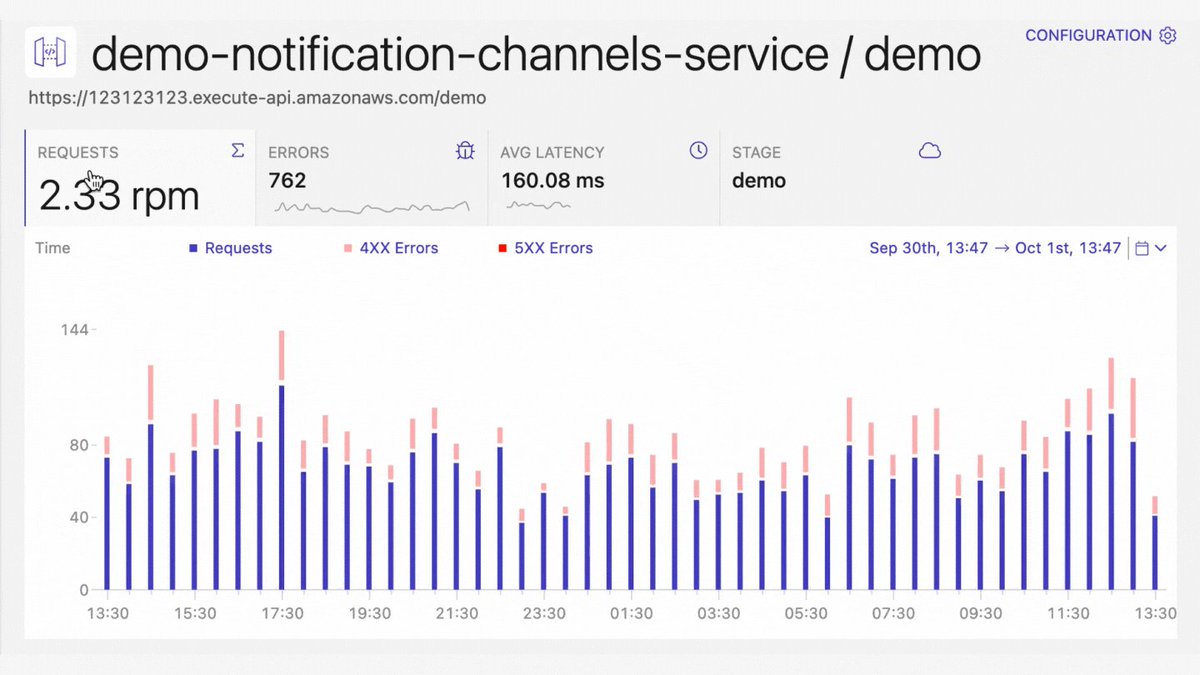
You may also leverage third-party tools like Dashbird.io for enhanced monitoring of your API Gateways.
It gives you a real-time overview of all API executions, detects errored requests within them, and lets you quickly identify the root cause.
{ 31 | 32 }
It gives you a real-time overview of all API executions, detects errored requests within them, and lets you quickly identify the root cause.
{ 31 | 32 }
That's it for API Gateway.
𝗖𝗿𝗲𝗱𝗶𝘁𝘀 go to an awesome post by @alexbdebrie
To be honest: I learned a lot here, even though I already knew most things about API Gateway! 🎉
It's a must-read & covers even more details! 📚
alexdebrie.com
{ 32 | 32 }
𝗖𝗿𝗲𝗱𝗶𝘁𝘀 go to an awesome post by @alexbdebrie
To be honest: I learned a lot here, even though I already knew most things about API Gateway! 🎉
It's a must-read & covers even more details! 📚
alexdebrie.com
{ 32 | 32 }
Thank you for reading to the end!
If you've enjoyed this, ♻️ or ♥️ the initial post so other's can see it too.
Also, follow me & @thedashbird if you're interested in regular cloud & serverless content 🌤 🙌
If you've enjoyed this, ♻️ or ♥️ the initial post so other's can see it too.
Also, follow me & @thedashbird if you're interested in regular cloud & serverless content 🌤 🙌
Loading suggestions...