

I recently finished the daunting task of reporting my NFT taxes. If you’re a Degen like me, this is a grueling and confusing process, and other guides on the internet make it seem much simpler than it really is. For these reasons, I put together this How-To tax thread 👇 1/20
1/20 The first step is choosing a crypto tax software. I somewhat arbitrarily picked @koinly based on a few reviews. I did not compare and contrast it with other crypto tax software, as that’s beyond the scope of this thread. I am sure the others work great as well.
2/20 To understand NFT taxes, you have to know that there are multiple SEPARATE taxable events. Key ones are:
1.Buying an NFT = taxable event for your *crypto*
2.Selling an NFT = taxable event for your *NFT*
3.Wrapping/unwrapping Crypto = taxable event for your *crypto*.
1.Buying an NFT = taxable event for your *crypto*
2.Selling an NFT = taxable event for your *NFT*
3.Wrapping/unwrapping Crypto = taxable event for your *crypto*.
3/20 We’ll start with point 1. Buying an NFT is taxable for your CRYPTO, because you’re converting crypto (ETH in this example) into another asset (NFT). So, every NFT transaction calculates a new capital loss/gain on your existing ETH. This is NOT the same as the tax on the NFT.
4/20 Eg if you bought 10 ETH at a cost basis of 2000 USD, and then bought an NFT that cost 10 ETH when ETH is 3,000 USD, you have a capital gain of 10*1000 = 10000 USD. Even if you sell your NFT for 10.0 ETH (a 0 USD gain on the NFT), you still owe the capital gain on the ETH.
5/20 If you then buy another NFT for 10 ETH, but the value of ETH has dropped from 3000 to 2500 USD, you are taking a capital loss of 10*500=5000 USD. With hundreds of NFT transactions, you slowly reset the cost basis of your ETH portfolio to near the current market value of ETH.
6/20 Similarly, wrapping/unwrapping ETH also triggers a capital gain/loss relative to your overall cost basis. This is where crypto tax software is immensely helpful, as the software will reconcile all of these taxable events for a running capital gains/loss total on the CRYPTO.
7/20 You also have capital gains/losses on the NFT itself, separate from the crypto capital gains/losses. This is calculated using the difference between the USD value of the buy and sell price of the NFT.
8/20 So, how do you figure all of this out? For Koinly I performed the following steps: 1. Import wallets -> crypto (not NFT) taxes automatically calculated 2. Manually enter buy/sell price of NFTs. 3. Enter all airdrops. Next, I'll elaborate on these steps.
9/20 Import ALL of your wallets (Coinbase, CB Pro, MM, etc.) into Koinly. This can be done securely without providing access to these wallets. Koinly had good guides on how to do this (koinly.io). Your crypto capital gains/losses are then calculated (not your NFTs).
10/20 Manually enter all of your NFT transactions. Sorry Degens, this is where you need to apply elbow grease. The way I did this was the following. I opened my “Activity” tab in Open Sea, and then filtered “event type” by “Sales”. This displays all of your OpenSea sales.
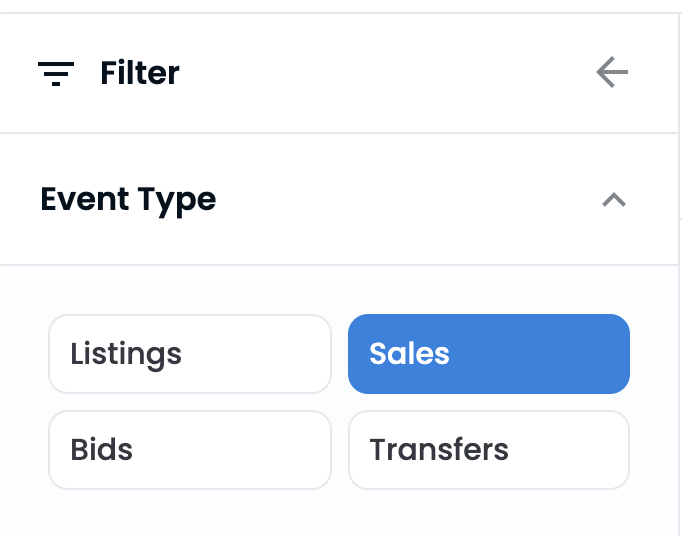
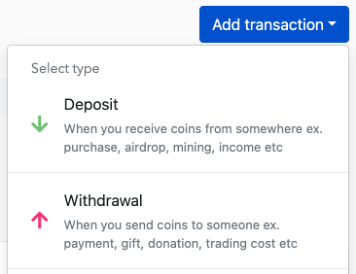
11/20 I then went through and entered the buy and sell price in USD into Koinly. To enter the buy price, go to the transaction tab in Koinly, hit “add transaction” and choose “Deposit”.
12/20 Enter the date of the purchase, choose the relevant wallet, and optionally add a description or the Etherescan TxHash to keep track of the entries.
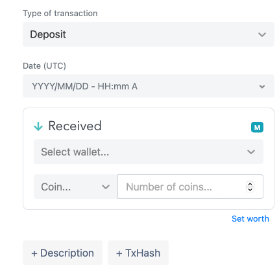
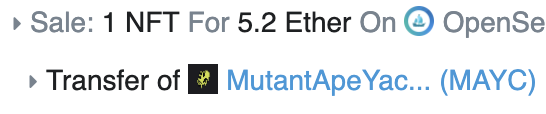
13/20 Next, enter the “Coin” and “Number”. For “Coin”, choose the relevant Token abbreviation that shows up on Etherscan. For example, for a Mutant Ape, you can see the Token on Etherscan as “MAYC”. Make sure to use the exact same “Coin” choice for all items in a collection.
14/20 For “number”, this is the number of NFTs in that transaction, which is typically “1”, unless you minted multiple in one transaction. Finally, the “set worth” is the USD value of your transaction on the day that you purchased it. This can be seen on Etherscan.
15/20 Take care to ensure you choose “Value on Day of transaction” rather than “current value” on etherscan. For your total cost basis, you can add the “transaction fee” to the “value”, to get your net cost basis. This is what you want to enter into the “Set Worth” on Koinly.
16/20 To enter the sell price, hit “add transaction” and choose “Withdrawal”. Enter all of the same information as above. Be careful when entering “Set Worth”, because Etherscan only shows the total sale, not the portion that was transferred to you after royalties.
17/20 Eg If I sold an NFT for 5.1 ETH, etherscan will display 5.1 ETH as the “Value”. However, after royalties, I only received 4.7175 ETH. To calculate true sale price (“set worth”), I multiply 4.7175 ETH by the USD price of ETH the day of the sale (located on the Etherscan).

18/20 Rinse and repeat this process for all your NFTs, and Koinly will accurately calculate your capital gains based on your buy and sell price. Finally, manually enter any airdrops (SOS, LOOKS, X2Y2, etc.), which are counted as income by the IRS.
19/20 Congratulations! Go grab a drink. To generate a final report, go to Tax Report Form 8949 and Schedule D. If you use an accountant, these are the forms and information that they will need.

20/20 Corollary: I made some assumptions for this thread: Short term gains only and I did not factor in “Approve token” costs to sell NFTs on OpenSea. These are (small) costs that could be subtracted from your final sale price. Finally, none of this is financial advice 😀.
Update: I reached out to Koinly to see if they could provide a Degen Discount to make this process a little less stressful. When I bought the software for my own taxes I couldn't find any discount codes online, so I'm happy to share 20% off with everyone:
koinly.io
koinly.io
Loading suggestions...