

📣 Massive JavaScript Resource Collection 📣
All 37 JavaScript Array methods (current & experimental) explained in images 👇
All 37 JavaScript Array methods (current & experimental) explained in images 👇
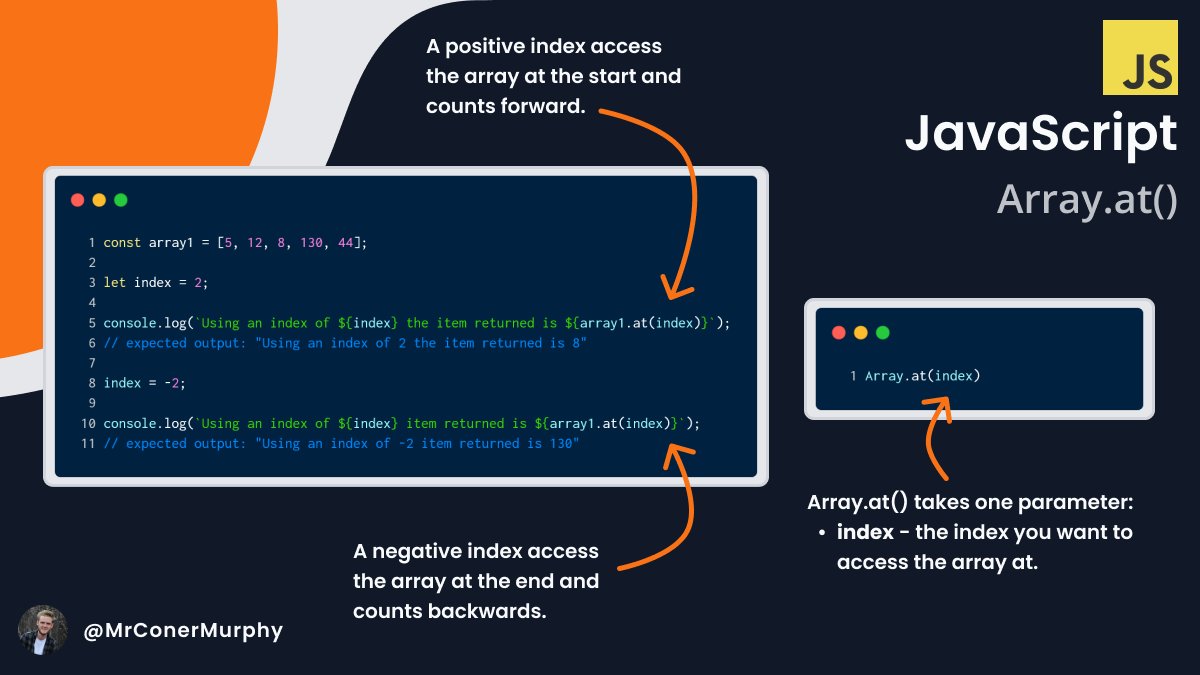
1️⃣ Array .at()
.at() lets us access elements in an Array by providing an index.
Both positive and negative ones are supported. 👇
.at() lets us access elements in an Array by providing an index.
Both positive and negative ones are supported. 👇
2️⃣ Array .concat()
This method lets us join multiple arrays into one while leaving the original one untouched.
New arrays are added to the end of the previous ones. 👇
This method lets us join multiple arrays into one while leaving the original one untouched.
New arrays are added to the end of the previous ones. 👇

3️⃣ Array .copyWithin()
.copyWithin() let's copy elements within an array to another location within that array. 👇
.copyWithin() let's copy elements within an array to another location within that array. 👇

4️⃣ Array .entries()
.entries() returns a key/value pair for each index in the array, we can then loop through the iterator using a for...of loop. 👇
.entries() returns a key/value pair for each index in the array, we can then loop through the iterator using a for...of loop. 👇

5️⃣ Array .every()
.every() lets us test every value in an array against a provided function, if they all pass it returns true, otherwise false. 👇
.every() lets us test every value in an array against a provided function, if they all pass it returns true, otherwise false. 👇

6️⃣ Array .fill()
.fill() lets us fill either an entire array or part of one with a given value. 👇
.fill() lets us fill either an entire array or part of one with a given value. 👇

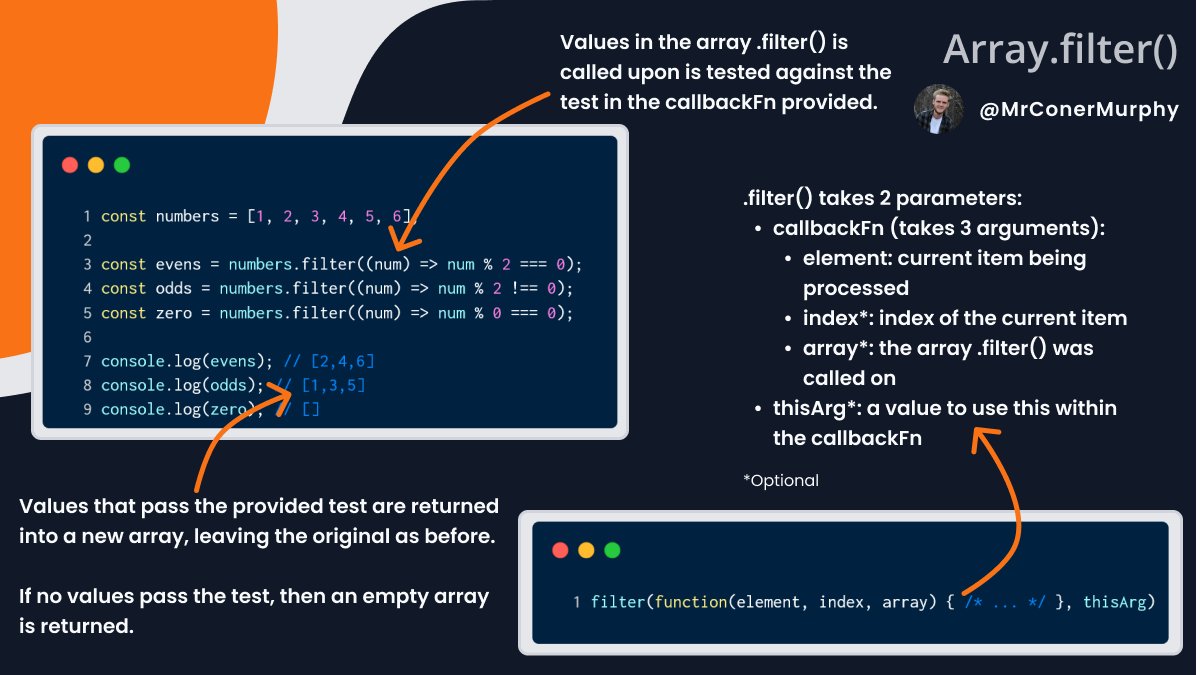
7️⃣ Array .filter()
.filter() allows us to filter an array to only the values that pass a provided test function. 👇
.filter() allows us to filter an array to only the values that pass a provided test function. 👇
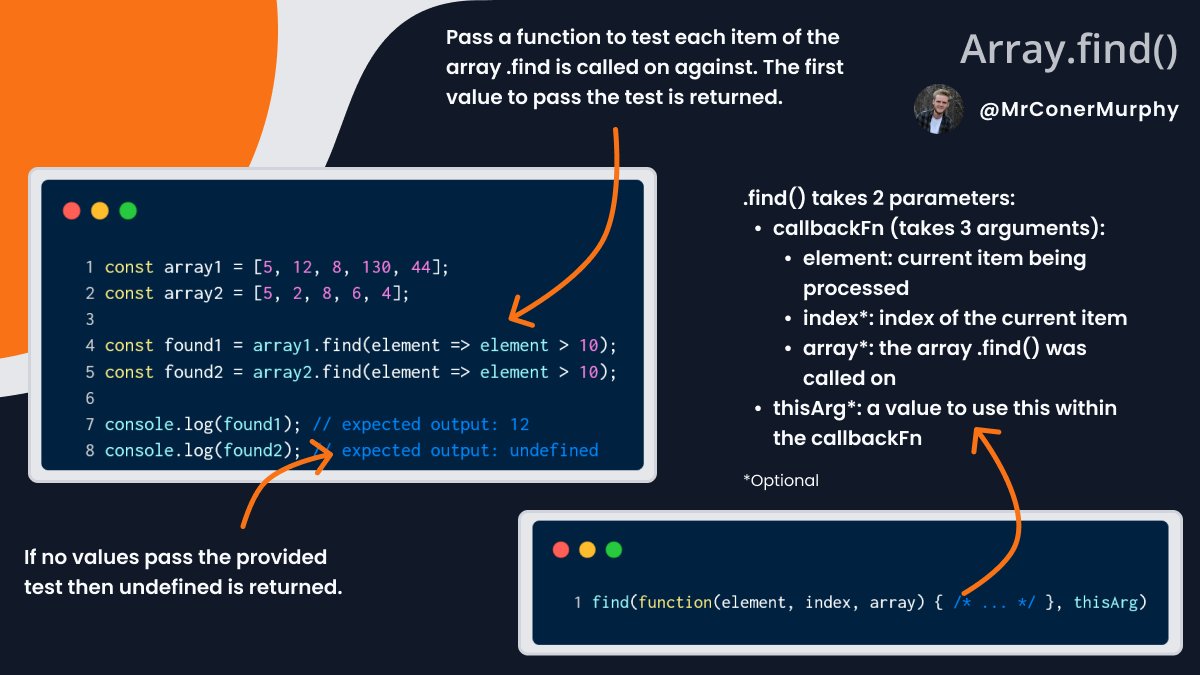
8️⃣ Array .find()
.find() allow us to test each item in an array, the first value that passes the test is returned. 👇
.find() allow us to test each item in an array, the first value that passes the test is returned. 👇
9️⃣ Array .findIndex()
Similar to .find() but this time instead of returning the first element that passes the test, we return the index of it. 👇
Similar to .find() but this time instead of returning the first element that passes the test, we return the index of it. 👇

1️⃣0️⃣ Array .flat()
.flat() lets us flatten nested arrays down levels. We can control the number of levels falttened by using the depth parameter. 👇
.flat() lets us flatten nested arrays down levels. We can control the number of levels falttened by using the depth parameter. 👇

1️⃣1️⃣ Array .flatMap()
.flatMap() is like calling a .map() followed by a .flat() but it will only let us flatten one level of arrays. 👇
.flatMap() is like calling a .map() followed by a .flat() but it will only let us flatten one level of arrays. 👇

1️⃣2️⃣ Array .forEach()
.forEach() allows us to iterate over an array. .forEach() does not return any values from the array, only undefined. 👇
.forEach() allows us to iterate over an array. .forEach() does not return any values from the array, only undefined. 👇

1️⃣3️⃣ Array .from()
.from() lets us create a new array from an array-like value, we can also map over each item as we create the new array 👇
.from() lets us create a new array from an array-like value, we can also map over each item as we create the new array 👇

1️⃣4️⃣ Array .includes()
.includes() lets us search an array for a provided value if it's found in the array, true is returned otherwise false 👇
.includes() lets us search an array for a provided value if it's found in the array, true is returned otherwise false 👇

1️⃣5️⃣ Array .indexOf()
.indexOf() lets us search an array for a given value, if it's found it's index is returned.
.indexOf() will return on the first occurrence of the value 👇
.indexOf() lets us search an array for a given value, if it's found it's index is returned.
.indexOf() will return on the first occurrence of the value 👇

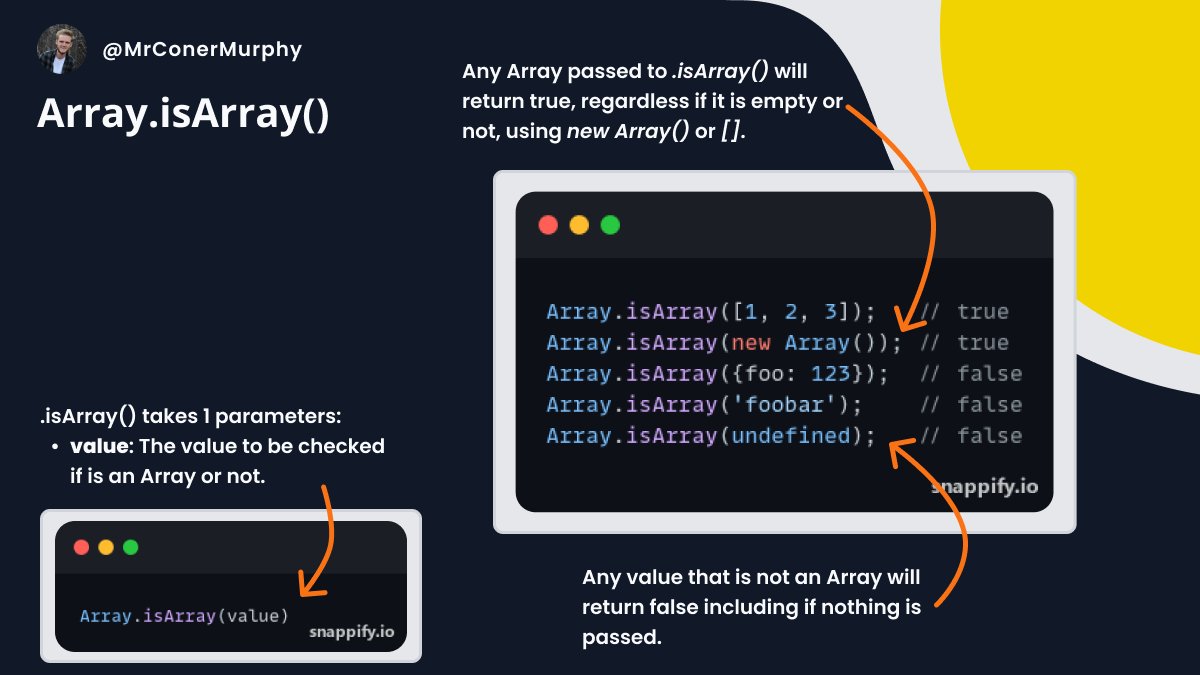
1️⃣6️⃣ Array .isArray()
.isArray() allows us to test if a provided value is an Array or not. 👇
.isArray() allows us to test if a provided value is an Array or not. 👇
1️⃣7️⃣ Array .join()
.join() takes a provided string and joins each element in the array with it. 👇
.join() takes a provided string and joins each element in the array with it. 👇

1️⃣8️⃣ Array .keys()
.keys() creates an iterator that contains all of the indexes in the array, black spaces aren't ignored. 👇
.keys() creates an iterator that contains all of the indexes in the array, black spaces aren't ignored. 👇

1️⃣9️⃣ Array .lastIndexOf()
.lastIndexOf() returns the last index that a provided element is found at in an array. 👇
.lastIndexOf() returns the last index that a provided element is found at in an array. 👇

2️⃣0️⃣ Array .groupBy()
.groupBy() is one of the newest array methods, it allows us to group objects in an array by properties they share. 👇
.groupBy() is one of the newest array methods, it allows us to group objects in an array by properties they share. 👇

2️⃣1️⃣ Array .groupByToMap()
.groupByToMap() was added along with .groupBy(), it allows us to group objects like .groupBy() but it then allows us to add them to a Map object based on a property. 👇
.groupByToMap() was added along with .groupBy(), it allows us to group objects like .groupBy() but it then allows us to add them to a Map object based on a property. 👇

2️⃣2️⃣ Array .map()
.map() lets us iterate over an array and return a new array with the new values from any manipulations we perform. 👇
.map() lets us iterate over an array and return a new array with the new values from any manipulations we perform. 👇

2️⃣3️⃣ Array .of()
.of() allows us to create a new array from the values we pass to it, regardless of the quantity or their type. 👇
.of() allows us to create a new array from the values we pass to it, regardless of the quantity or their type. 👇

2️⃣4️⃣ Array .pop()
.pop() removes the last item from the array and returns it. 👇
.pop() removes the last item from the array and returns it. 👇

2️⃣5️⃣ Array .push()
.push() allows us to add multiple new items to an array, it returns the updated array's length. 👇
.push() allows us to add multiple new items to an array, it returns the updated array's length. 👇

2️⃣6️⃣ Array .reduce()
.reduce() lets us define a custom reducer function to be performed on each element in the array, going from left to right in the array. 👇
.reduce() lets us define a custom reducer function to be performed on each element in the array, going from left to right in the array. 👇

2️⃣7️⃣ Array .reduceRight()
.reduceRight() is the same as .reduce() but instead going from right to left in the array. 👇
.reduceRight() is the same as .reduce() but instead going from right to left in the array. 👇

2️⃣8️⃣ Array .reverse()
.reverse() will reverse an array in place, meaning the first item becomes the last and the last the first. 👇
.reverse() will reverse an array in place, meaning the first item becomes the last and the last the first. 👇

2️⃣9️⃣ Array .shift()
.shift() removes the first item from the array and returns it. 👇
.shift() removes the first item from the array and returns it. 👇

3️⃣0️⃣ Array .slice()
.slice() allows you to take a copy of an array either as a whole or part of it. The original array is left untouched. 👇
.slice() allows you to take a copy of an array either as a whole or part of it. The original array is left untouched. 👇

3️⃣1️⃣ Array .some()
.some() checks if at least one item in an array passes the provided test function, if so it returns true otherwise false. 👇
.some() checks if at least one item in an array passes the provided test function, if so it returns true otherwise false. 👇

3️⃣2️⃣ Array .sort()
.sort() allows you to sort an array based on a provided sorting function. 👇
.sort() allows you to sort an array based on a provided sorting function. 👇

3️⃣3️⃣ Array .splice()
.splice() allows you to remove or replace items in an array and return the removed/replaced items. 👇
.splice() allows you to remove or replace items in an array and return the removed/replaced items. 👇

3️⃣4️⃣ Array .toLocaleString()
.toLocaleString() will convert the array it's called on to a string and then separate the string with a locale-specific string (e.g. ',') 👇
.toLocaleString() will convert the array it's called on to a string and then separate the string with a locale-specific string (e.g. ',') 👇

3️⃣5️⃣ Array .toString()
.toString() will recursively flatten an array until it's one level and convert it to a string separated by a comma. 👇
.toString() will recursively flatten an array until it's one level and convert it to a string separated by a comma. 👇

3️⃣6️⃣ Array .unshift()
.unshift() adds one or more values provided to the beginning of the array and returns the updated length of the array. 👇
.unshift() adds one or more values provided to the beginning of the array and returns the updated length of the array. 👇

3️⃣7️⃣ Array .values()
.values() returns an iterator object containing a value for every index in the array which we can then loop over with a for...of loop. 👇
.values() returns an iterator object containing a value for every index in the array which we can then loop over with a for...of loop. 👇

Did you enjoy this thread/find it helpful?
If so please consider doing one of the below to show your support:
❤️ Like these tweets
🔄 Retweet the 1st tweet in this thread so others can see it.
👤 Follow me ( @MrConerMurphy ) for more content like this.
🔔 Turn on notifications
If so please consider doing one of the below to show your support:
❤️ Like these tweets
🔄 Retweet the 1st tweet in this thread so others can see it.
👤 Follow me ( @MrConerMurphy ) for more content like this.
🔔 Turn on notifications

Loading suggestions...