

About to shred your grant proposal in desperation?
A🧵for you!
Covering:
16 Key mistakes divided in 4 sections
Including: FREE YouTube Tutorials, Infographics, blog post.
@OpenAcademics @YTacademics @AcademicChatter #scicomm #AcademicTwitter
1/36
A🧵for you!
Covering:
16 Key mistakes divided in 4 sections
Including: FREE YouTube Tutorials, Infographics, blog post.
@OpenAcademics @YTacademics @AcademicChatter #scicomm #AcademicTwitter
1/36


2/ MINDSET:
Get into the right mindset to write your grant proposal.
Follow this link from my latest THREAD about how to think about your grant proposal and how to set your mindset to eliminate a lot of issues!
Get into the right mindset to write your grant proposal.
Follow this link from my latest THREAD about how to think about your grant proposal and how to set your mindset to eliminate a lot of issues!
3/ LAYOUT:
Your grant proposal should read like a magazine.
1. Catch & hold your reviewers attention
2. Easy to understand
3. Absolutely certain the reviewer can’t miss key information
4. Easy to sell your proposal to the committee
Your grant proposal should read like a magazine.
1. Catch & hold your reviewers attention
2. Easy to understand
3. Absolutely certain the reviewer can’t miss key information
4. Easy to sell your proposal to the committee
4/ CATEGORIES:
Grant-writing mistakes can be split in 4 categories:
1. Relating to your reviewer
2. Formatting
3. Content
4. Details
Don’t stress if you notice some of the following mistakes, they are easy to fix, and I tell you how to do it!
Grant-writing mistakes can be split in 4 categories:
1. Relating to your reviewer
2. Formatting
3. Content
4. Details
Don’t stress if you notice some of the following mistakes, they are easy to fix, and I tell you how to do it!
5/ Mistake 1:
❌Writing to maximize the information you think is important
✔ The FIX: Have EMPATHY for your reviewer. Like, tons.
Reviewers are busy.
Don’t think about what YOU want to say.
INSTEAD think “Would I want to read this grant?” No? CHANGE IT!
❌Writing to maximize the information you think is important
✔ The FIX: Have EMPATHY for your reviewer. Like, tons.
Reviewers are busy.
Don’t think about what YOU want to say.
INSTEAD think “Would I want to read this grant?” No? CHANGE IT!
7/ Does the reviewer NEED to know this or do I just want to say it?
Reviewers are scientists BUT probably not experts in your field.
So before adding more technical terms, abbreviations or previous research, ASK YOURSELF: Will this help the reviewer to make his decision?
Reviewers are scientists BUT probably not experts in your field.
So before adding more technical terms, abbreviations or previous research, ASK YOURSELF: Will this help the reviewer to make his decision?
8/ Mistake 2:
❌Making reviewers read between lines to find key information
✔ The FIX: Spell out EXACTLY what the reviewer is looking for in its own subheading!
IMPORTANT FOR: Broader impacts, interdisciplinary aspects, potential pitfalls.
❌Making reviewers read between lines to find key information
✔ The FIX: Spell out EXACTLY what the reviewer is looking for in its own subheading!
IMPORTANT FOR: Broader impacts, interdisciplinary aspects, potential pitfalls.
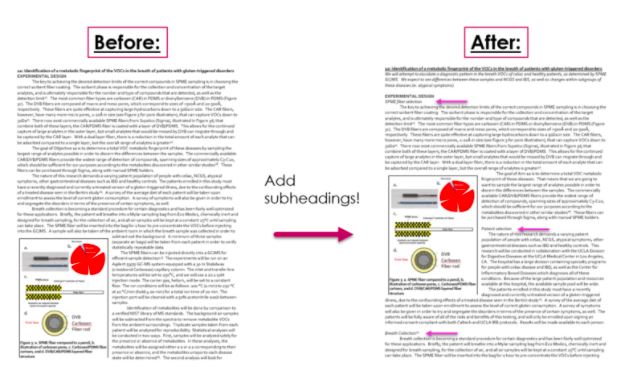
9/ If a test reader misses a key point, fix this by:
1. Making a specific subheading
2. Including exact wording
3. Consider formatting!
1. Making a specific subheading
2. Including exact wording
3. Consider formatting!
10/ Mistake 3:
❌Making the reviewer study – too technically detailed for easy comprehension. The more information the better, right?
✔ The FIX: Ruthlessly sacrifice detail for clarity
The details DON’T MATTER if the reviewer doesn't understand their IMPORTANCE!
❌Making the reviewer study – too technically detailed for easy comprehension. The more information the better, right?
✔ The FIX: Ruthlessly sacrifice detail for clarity
The details DON’T MATTER if the reviewer doesn't understand their IMPORTANCE!
11/ Sacrifice ⚔
1. Anything you don’t have space to expand on
2. Technical terms used <3 times
3. Surrounding text for terms used <3 times (usually definitions of complex terms)
Ask yourself:
Do I need this?
Is this clear enough?
Can I explain it better or more simply?
1. Anything you don’t have space to expand on
2. Technical terms used <3 times
3. Surrounding text for terms used <3 times (usually definitions of complex terms)
Ask yourself:
Do I need this?
Is this clear enough?
Can I explain it better or more simply?

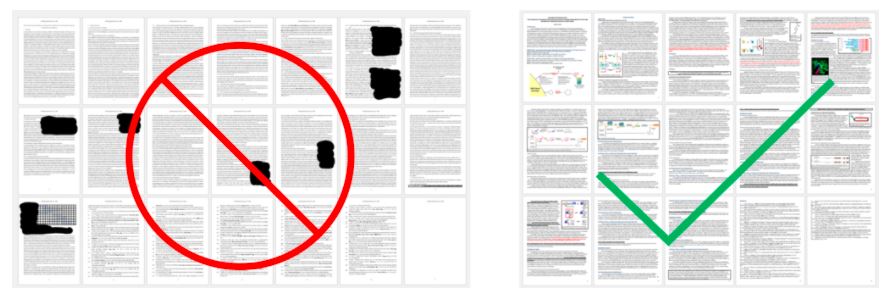
13/ Formatting-based mistakes
Mistake 4:
❌Writing a grant that no one wants to read.
✔The FIX: Make it VISUALLY appealing and have no pages that feel intimidating.
Zoom out in Word! Which pages do your eyes travel to? Which look awful to read? AVOID plain text pages!
Mistake 4:
❌Writing a grant that no one wants to read.
✔The FIX: Make it VISUALLY appealing and have no pages that feel intimidating.
Zoom out in Word! Which pages do your eyes travel to? Which look awful to read? AVOID plain text pages!
14/ TIPS:
-add FIGURES that are easy to digest
-break text up into SUB-HEADINGS
-add text formatting
-change TEXT COLORS
-add FIGURES that are easy to digest
-break text up into SUB-HEADINGS
-add text formatting
-change TEXT COLORS
15/ Mistake 5:
❌Pages contain solid blocks of text.
✔ The FIX: No blocks of solid plain text. That’s right – NONE.
Break up text
Keep it visually interesting
Give readers different things to look/think about
Draw attention to your key points
❌Pages contain solid blocks of text.
✔ The FIX: No blocks of solid plain text. That’s right – NONE.
Break up text
Keep it visually interesting
Give readers different things to look/think about
Draw attention to your key points
16/ What do you do if you turn to a page with BLUE text for one line?
Most readers read that line first.
And then go back and read the whole page, including that line again.
So COLORED text – makes the reader REPEAT text for you without doubling the space!
Most readers read that line first.
And then go back and read the whole page, including that line again.
So COLORED text – makes the reader REPEAT text for you without doubling the space!
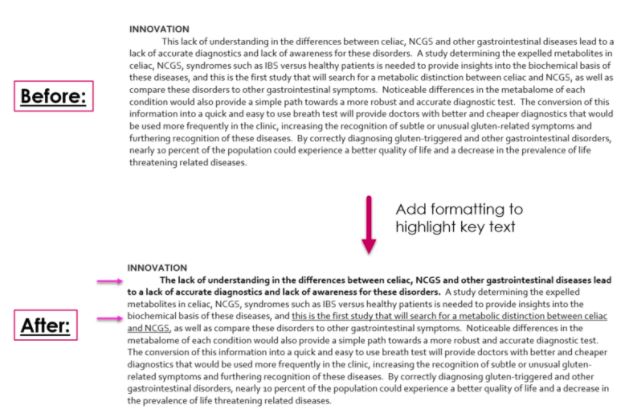
18/ Mistake 7:
❌ Complex figures– anything that needs to be “studied” to be understood.
✔ The FIX: SIMPLIFY grant figures to be understood AT A GLANCE.
Remember: The readers job is not to study your figure to learn what it means! That’s YOUR job!
❌ Complex figures– anything that needs to be “studied” to be understood.
✔ The FIX: SIMPLIFY grant figures to be understood AT A GLANCE.
Remember: The readers job is not to study your figure to learn what it means! That’s YOUR job!
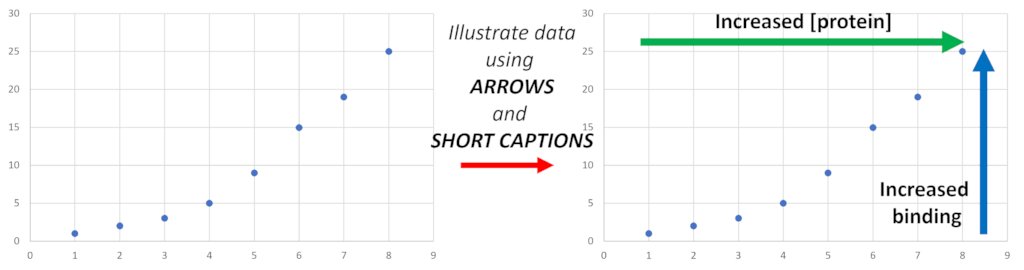
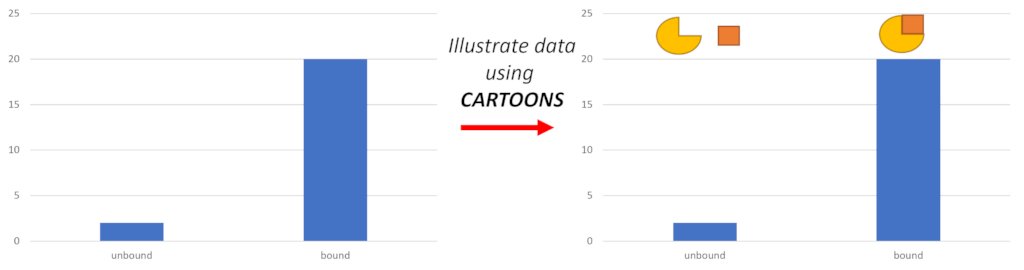
19/ INCREASE understanding of a figure:
-add visual clues, ie, arrow w/“increased signal/binding”
-add cartoon
-add short text explanations
-remove anything extraneous/not discussed (don’t just take your paper figure!)
-think like magazine– flashy, bright, easily digestible.
-add visual clues, ie, arrow w/“increased signal/binding”
-add cartoon
-add short text explanations
-remove anything extraneous/not discussed (don’t just take your paper figure!)
-think like magazine– flashy, bright, easily digestible.
20/ Mistake 8:
❌Formatting into plain paragraphs like it is a research paper
✔ The FIX: add formatting wherever is possible – FORMATTING IS YOUR FRIEND!
Break up text blocks, use bold, italics, underline, and colored text to make different parts stand out.
❌Formatting into plain paragraphs like it is a research paper
✔ The FIX: add formatting wherever is possible – FORMATTING IS YOUR FRIEND!
Break up text blocks, use bold, italics, underline, and colored text to make different parts stand out.
21/ FORMATTING KEY POINTS:
-Break up blocks of texts
-Keep the reader ALERT and FOCUSED
-Pull the readers eye to KEY INFORMATION
-Be CERTAIN your key points are not missed!
-Break up blocks of texts
-Keep the reader ALERT and FOCUSED
-Pull the readers eye to KEY INFORMATION
-Be CERTAIN your key points are not missed!
22/Mistake 9
❌Long sections with no breaks
✔The FIX: Use HEADINGS to break up the text
Visual difference = nice text break, clear + easy for your reader to see how many topics you are covering
The 1 difference between the figures: addition of subheadings + corresponding space
❌Long sections with no breaks
✔The FIX: Use HEADINGS to break up the text
Visual difference = nice text break, clear + easy for your reader to see how many topics you are covering
The 1 difference between the figures: addition of subheadings + corresponding space

24/ CONTENT-based Mistakes – Mistake 10:
❌Too much info
✔ The FIX: Focus literature/previous work by writing ONLY what relates to the problem addressed here
Include LESS than you think - the reviewer doesn’t actually care about what was done - only how feasible your idea is!
❌Too much info
✔ The FIX: Focus literature/previous work by writing ONLY what relates to the problem addressed here
Include LESS than you think - the reviewer doesn’t actually care about what was done - only how feasible your idea is!
25/INTEGRATING your idea!
How? → For every single intro paragraph you MUST:
1. Describe the exact gap still remaining in the field
2. Explain exactly how this work serves as proof-of-concept for your proposed work
→ With this strategy, EVERY paragraph is relevant.
How? → For every single intro paragraph you MUST:
1. Describe the exact gap still remaining in the field
2. Explain exactly how this work serves as proof-of-concept for your proposed work
→ With this strategy, EVERY paragraph is relevant.
26/Mistake 11:
❌The NEED for your proposed work is UNCLEAR
✔The FIX: Make sure the gap in the field is apparent in EVERY PARAGRAPH
The intro is probably lacking direct statements explaining the existing gap and direct statements of how your work will fill it.
❌The NEED for your proposed work is UNCLEAR
✔The FIX: Make sure the gap in the field is apparent in EVERY PARAGRAPH
The intro is probably lacking direct statements explaining the existing gap and direct statements of how your work will fill it.
27/Mistake 12:
❌Reiterating the problem at the end of the proposal
✔The FIX: Paint the reviewer a picture of the world with your research in it.
START with the problem (intro) and END with painting a picture of the world with your completed proposal (conclusion)!
❌Reiterating the problem at the end of the proposal
✔The FIX: Paint the reviewer a picture of the world with your research in it.
START with the problem (intro) and END with painting a picture of the world with your completed proposal (conclusion)!
28/Mistake 13:
❌Reviewer missed the IMPORTANCE of your work.
✔The FIX: Better HIGHLIGHT either GAPS or HOW your proposal will FILL those gaps.
Three major reasons why this is usually missing:
Clear statements, broad openings, missing picture.
❌Reviewer missed the IMPORTANCE of your work.
✔The FIX: Better HIGHLIGHT either GAPS or HOW your proposal will FILL those gaps.
Three major reasons why this is usually missing:
Clear statements, broad openings, missing picture.
29/
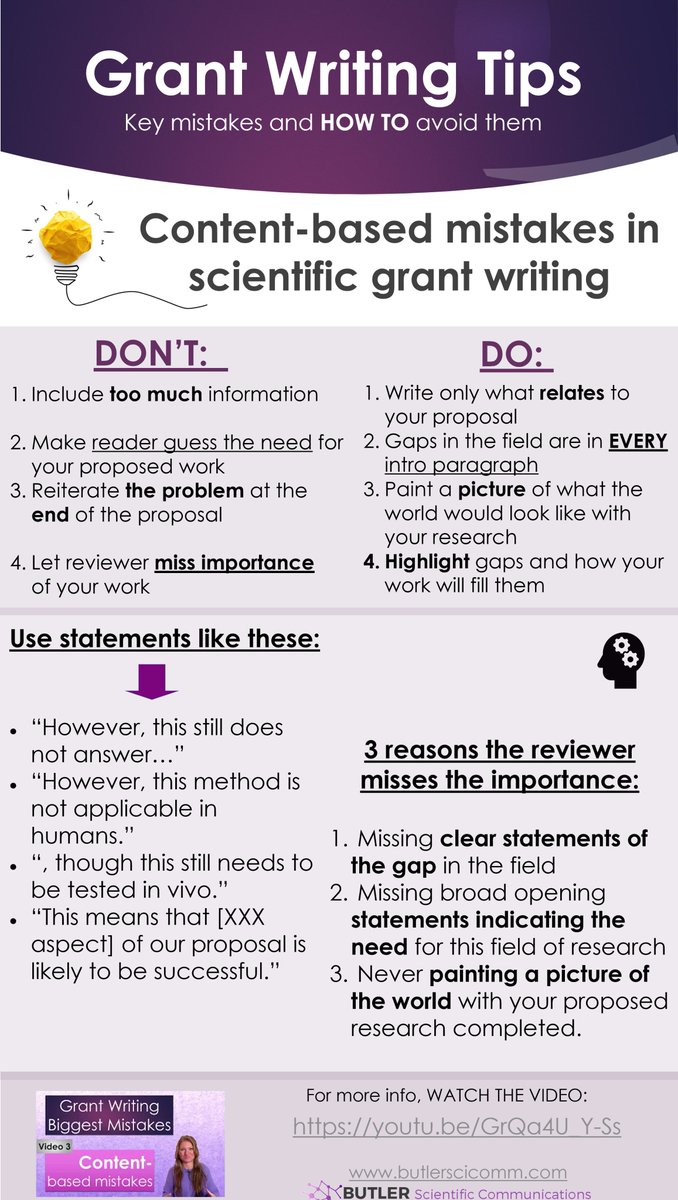
Reader misses importance?
Then you are:
1. Missing clear statements of gap– IMPOSSIBLE for a non-expert to see – ADD THESE
2. Missing broad opening statements indicating the need for research – Add to intro
3. Not showing reader the world-changing impact - PAINT A PICTURE
Reader misses importance?
Then you are:
1. Missing clear statements of gap– IMPOSSIBLE for a non-expert to see – ADD THESE
2. Missing broad opening statements indicating the need for research – Add to intro
3. Not showing reader the world-changing impact - PAINT A PICTURE
31/ DETAIL-BASED Mistakes – Mistake 14:
❌NOT FOLLOWING INSTRUCTIONS
✔The FIX: Read the grant call.. and follow ALL instructions!
Your grant call is going to ask you for specific:
page limits
margins
line spacing
front
front size
These are NOT negotiations – DO THIS!
❌NOT FOLLOWING INSTRUCTIONS
✔The FIX: Read the grant call.. and follow ALL instructions!
Your grant call is going to ask you for specific:
page limits
margins
line spacing
front
front size
These are NOT negotiations – DO THIS!
32/ Mistake 15:
❌Overusing highly technical terms
✔The FIX: Remove any technical terms that are NOT NEEDED for the proposal.
→ Simplify the proposal as much as possible, whenever possible!
❌Overusing highly technical terms
✔The FIX: Remove any technical terms that are NOT NEEDED for the proposal.
→ Simplify the proposal as much as possible, whenever possible!
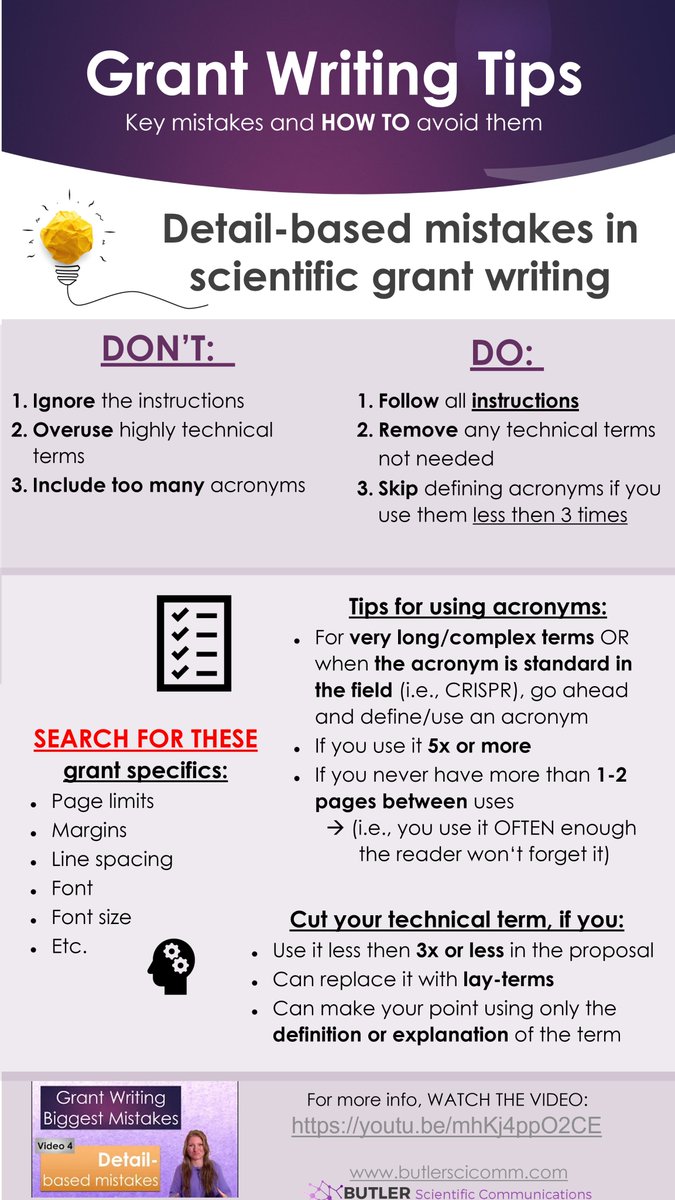
33/ WHEN to CUT OUT your technical term?
If you:
→ Use it 3x or less in the proposal
→ Can replace it with lay-terms
→ Can make your point using only the definition or explanations of the term.
ie, “transgene” vs “gene carrying the Cas9”
If you:
→ Use it 3x or less in the proposal
→ Can replace it with lay-terms
→ Can make your point using only the definition or explanations of the term.
ie, “transgene” vs “gene carrying the Cas9”
34/ Mistake 16:
❌Too many ACRONYMS to easily follow along
✔The FIX: Skip defining an acronym if you use it 3 times or less
They can become challenging – the more you use, the harder it is for your reviewer to follow your proposal.
❌Too many ACRONYMS to easily follow along
✔The FIX: Skip defining an acronym if you use it 3 times or less
They can become challenging – the more you use, the harder it is for your reviewer to follow your proposal.
35/ TIPS to decide if you should use an ACRONYM:
→ If very long, complex or standard (ie, “CRISPR), use acronym
Otherwise,
→ Only if used 5x or more
→ if there is never more than 1-2 pages between uses...don’t make them hunt back 6 pages to find the definition.
→ If very long, complex or standard (ie, “CRISPR), use acronym
Otherwise,
→ Only if used 5x or more
→ if there is never more than 1-2 pages between uses...don’t make them hunt back 6 pages to find the definition.
37/ THE END
Hopefully this huge chunk of information helped you feel better with writing that grant proposal!
And don’t worry if you made these mistakes – now you know what to do to fix them!
Here’s to building a grant proposal from a solid foundation! 💪📝
Hopefully this huge chunk of information helped you feel better with writing that grant proposal!
And don’t worry if you made these mistakes – now you know what to do to fix them!
Here’s to building a grant proposal from a solid foundation! 💪📝
Loading suggestions...