

Here is the thread that can help you in clearing the basics of #Git.
-What is Git?
Git is a free and #OpenSource distributed code management and version control system
owner -#TheLinuxFoundation
Before Git (DVCS)there was CVCS (Centralized Version Control System).
-What is Git?
Git is a free and #OpenSource distributed code management and version control system
owner -#TheLinuxFoundation
Before Git (DVCS)there was CVCS (Centralized Version Control System).
-Difference between CVCS and DVCS(Git)?
CVCS-
1. CVCS is an (old) centralized version control system.
2. CVCS systems do not provide offline access.
3. Client needs to get a local copy of the source from server to change and commit changes back to a central source on the server
CVCS-
1. CVCS is an (old) centralized version control system.
2. CVCS systems do not provide offline access.
3. Client needs to get a local copy of the source from server to change and commit changes back to a central source on the server
Git(DVCS)-
1. DVCS is Distributed version control system.
2. DVCS has the biggest advantage in that it allows you to work offline and gives flexibility.
3. In DVCS client have a copy of the repository in the local system which will then be pushed to the server.
1. DVCS is Distributed version control system.
2. DVCS has the biggest advantage in that it allows you to work offline and gives flexibility.
3. In DVCS client have a copy of the repository in the local system which will then be pushed to the server.
-Advantages of using Git
1. Free and #OpenSource
2. Fast and small
3. Security -git uses a common cryptographic hash function called a secure hash function(SHA1) o name and identify objects with its database.
4. No need of powerful hardware.
5. Easier branching.
1. Free and #OpenSource
2. Fast and small
3. Security -git uses a common cryptographic hash function called a secure hash function(SHA1) o name and identify objects with its database.
4. No need of powerful hardware.
5. Easier branching.
-What is a repository?
A repository is a place where you have all your code or kind of folder.
Changes are personal to that particular repository.
-Types of repositories?
1. Bare repository (Central repository)
2. None-Bare repository (local repository)
A repository is a place where you have all your code or kind of folder.
Changes are personal to that particular repository.
-Types of repositories?
1. Bare repository (Central repository)
2. None-Bare repository (local repository)
-Working directory?
Where you see files physically and do modifications.
At a time, you can work on a particular branch.
-Snapshots?
Represents some data of a particular time.
It is always incremented i.e it stores the changes (appended data) only not the entire copy.
Where you see files physically and do modifications.
At a time, you can work on a particular branch.
-Snapshots?
Represents some data of a particular time.
It is always incremented i.e it stores the changes (appended data) only not the entire copy.
-Commit?
An operation that sends changes to the local repository.
You will get one commit-id which is of 40 alpha-numeric characters.
It also uses the SHA-1 checksum concept.
An operation that sends changes to the local repository.
You will get one commit-id which is of 40 alpha-numeric characters.
It also uses the SHA-1 checksum concept.
-Push?
Push is an operation used to upload local repository content to a remote repository.
-Pull?
Used to fetch and download content from a remote repository and immediately update the local repository to match that content.
Push is an operation used to upload local repository content to a remote repository.
-Pull?
Used to fetch and download content from a remote repository and immediately update the local repository to match that content.
-Branches?
A branch is a version of the repository that diverges from the main working project.
The default branch is the "Master" branch.
A branch is a version of the repository that diverges from the main working project.
The default branch is the "Master" branch.
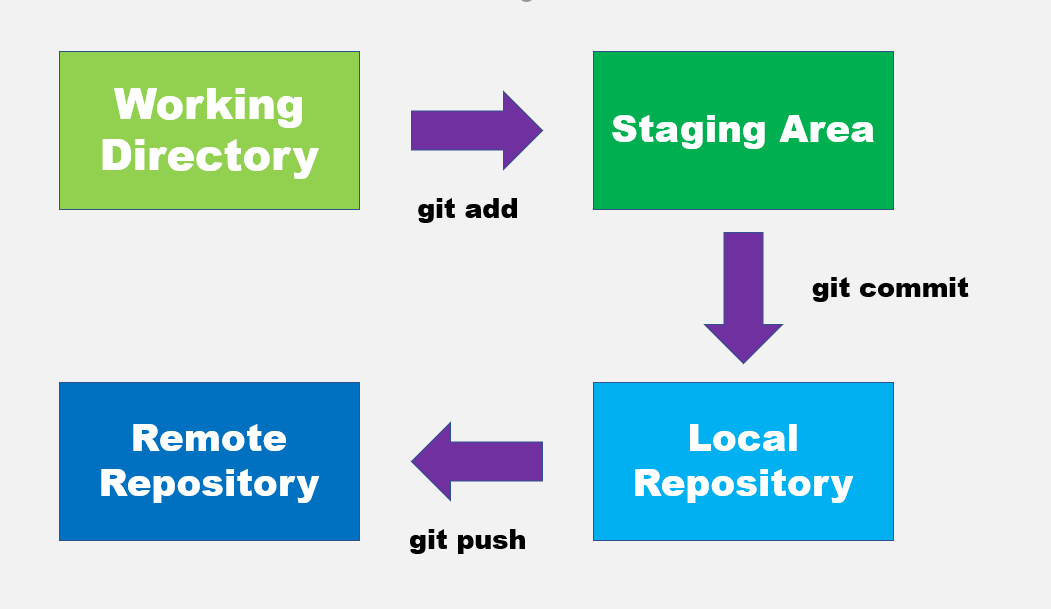
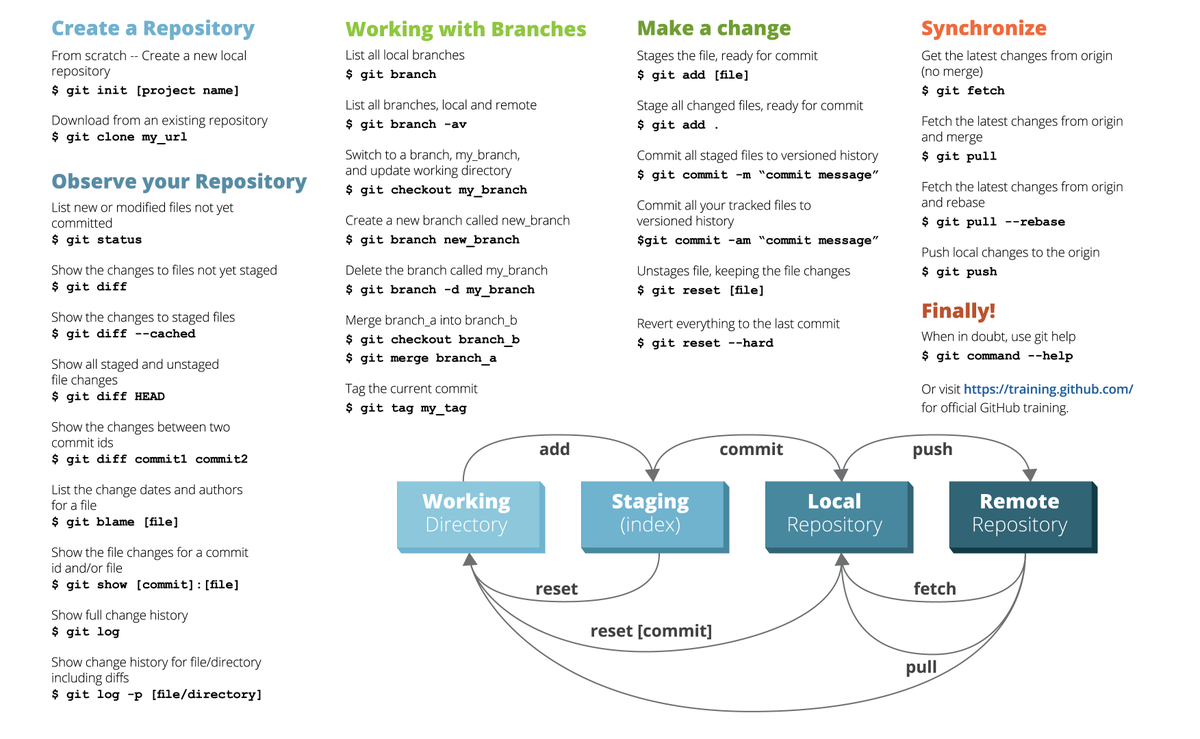
Git cheat sheet #gitcommands
Loading suggestions...