

What are Boolean Data Types and Comparison Operators? (🧵)
true or false
That is it. The boolean data type.
A variable is given a value of true or false is referred to as the variable holding a boolean data type.
For instance, in our example:
That is it. The boolean data type.
A variable is given a value of true or false is referred to as the variable holding a boolean data type.
For instance, in our example:
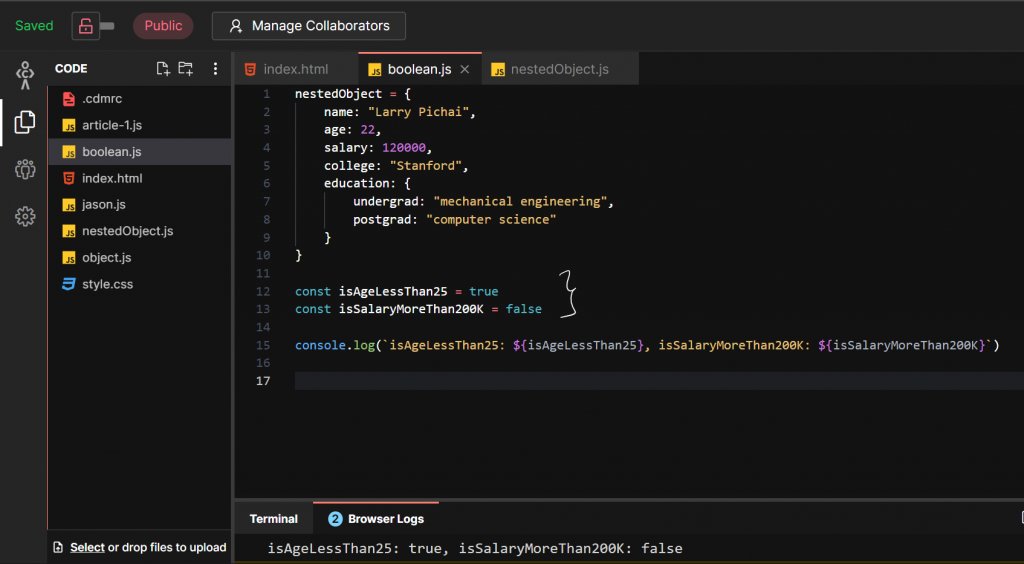
Larry’s age is < 25 years, so we set the variable: isAgeLessThan25 to true, because that's correct.
Similarly, we set : isSalaryMoreThan200K variable to false because the salary is $120,000!
That's it for the boolean data type! Now here's where comparison operators come in.
Similarly, we set : isSalaryMoreThan200K variable to false because the salary is $120,000!
That's it for the boolean data type! Now here's where comparison operators come in.
✨Comparison Operators
Boolean standalone isn't very useful. But they are the output of any comparison you make. They dictate a lot of things & you will see them once you learn loops and control flows. For now, it is imperative that you understand comparisons & what they return.
Boolean standalone isn't very useful. But they are the output of any comparison you make. They dictate a lot of things & you will see them once you learn loops and control flows. For now, it is imperative that you understand comparisons & what they return.
If I ask you, is Larry’s salary equal to $120,000, or more or less than that? How would you do that in JavaScript?
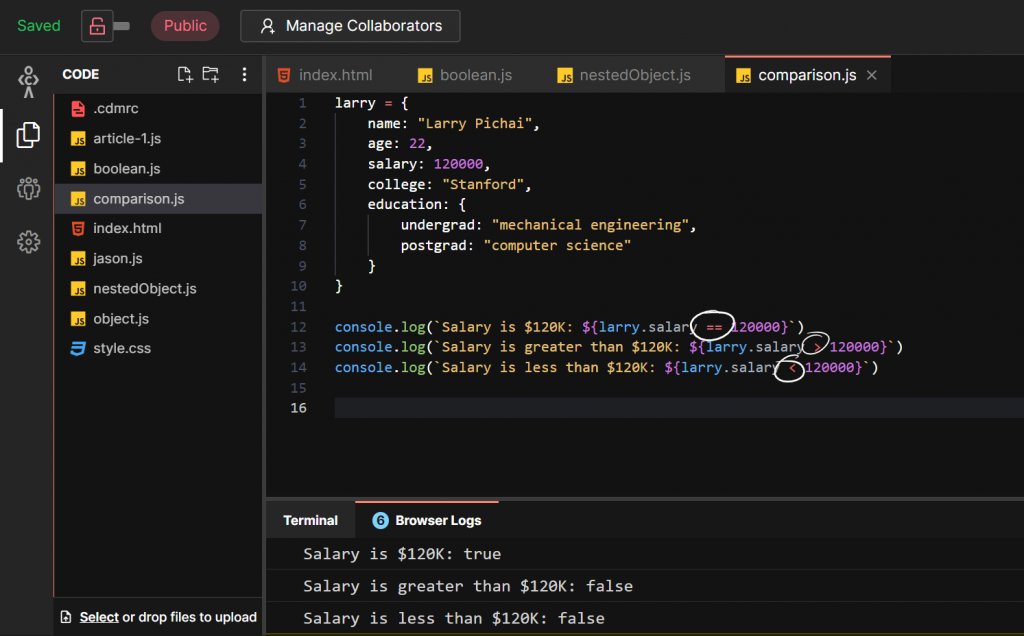
You'd have to use the “>”, "<" symbols for checking more than or less than a certain value.
To check if salary is equal to 120000, you'd have to use the “==” operator. It basically checks whether the value on the LHS is equal to the RHS.
To check if salary is equal to 120000, you'd have to use the “==” operator. It basically checks whether the value on the LHS is equal to the RHS.
Each of these comparisons returns a true or false value! A boolean value.
Okay, then here is another question for you! What do you think will be the output of the following code:
Okay, then here is another question for you! What do you think will be the output of the following code:

Note very carefully that, while in line 12, 120000 is a Number data type, in line 16 it is a String data type because it is inside double-quotes.
If your instinct was to say, that the output will be false because you cannot compare different data types, you'd usually be right!
If your instinct was to say, that the output will be false because you cannot compare different data types, you'd usually be right!
However if JS sees you do something like you did in line 16, it will understand that you actually wanted to compare numbers. It'll convert “120000” into 120000 and the RHS String type into Number type and then return true!
This is called ✨Type Conversion✨. Try it out.
This is called ✨Type Conversion✨. Try it out.
The issue with this is, in many cases, you might not want JS to act all intelligent and do the work for you.
So to avoid that, you can use the “===”
So to avoid that, you can use the “===”

When you use the “===” operator, JS actually compares the type of the object as well. So line 17, returns “false” because a Number type is not the same as a String.
It is a good practice to use “===” wherever possible.
JS provides multiple other comparison operators too!
It is a good practice to use “===” wherever possible.
JS provides multiple other comparison operators too!

Conclusion
In this blog, we saw a lot of detail about the Object. data type. We also learned about Boolean data types and the Comparison operators and we touched upon type conversions. And that’s pretty much it for this thread.
In this blog, we saw a lot of detail about the Object. data type. We also learned about Boolean data types and the Comparison operators and we touched upon type conversions. And that’s pretty much it for this thread.
Loading suggestions...