


1. Learn the fs package
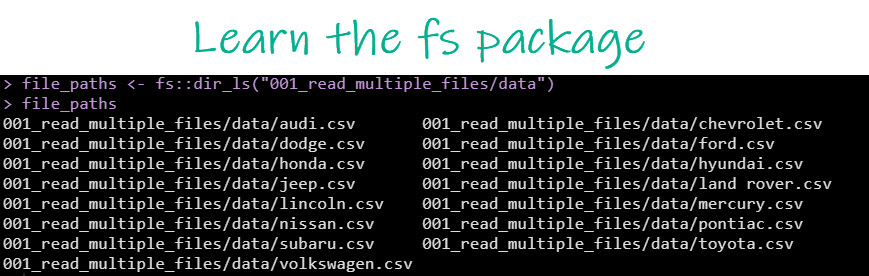
fs gives you access to a suite of tools for working with the file system.
Here I'm getting the file paths for every CSV file in a directory.
Super handy!
fs gives you access to a suite of tools for working with the file system.
Here I'm getting the file paths for every CSV file in a directory.
Super handy!
2. Learn the map() function from the purrr package
map() is used to apply functions to each element of a list.
It's super powerful when combined with the pipe %>%
Here I'm just piping %>% in my file paths from Tip 1 into map() + read_csv()
And it reads all of my CSV files.
map() is used to apply functions to each element of a list.
It's super powerful when combined with the pipe %>%
Here I'm just piping %>% in my file paths from Tip 1 into map() + read_csv()
And it reads all of my CSV files.

3. Learn group_by from the dplyr package
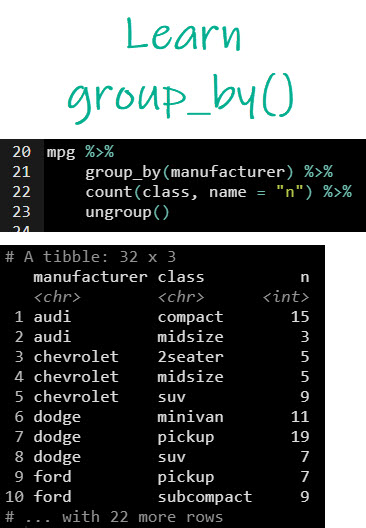
group_by() allows us to group on a categorical column.
I count() the presence of automobile classes by mfger.
Then ungroup() to remove any leftover groups.
And voila, I now have counts by mfger + class.
group_by() allows us to group on a categorical column.
I count() the presence of automobile classes by mfger.
Then ungroup() to remove any leftover groups.
And voila, I now have counts by mfger + class.
Now, before I get a bunch of R snobs saying you shouldn't use group_by() + count()...
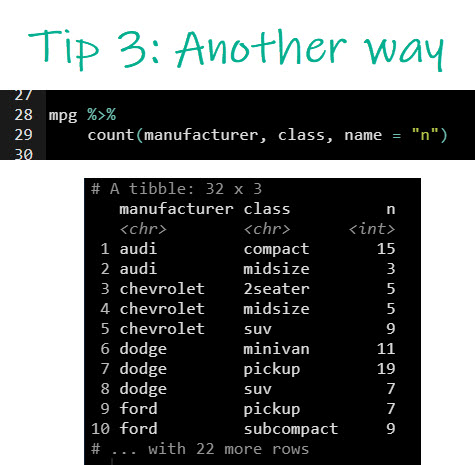
I want to give you the 2nd way to perform Tip 3 with just count()
Keep in mind that the previous way was to explain how group_by() works.
...But you can simplify with just count()
I want to give you the 2nd way to perform Tip 3 with just count()
Keep in mind that the previous way was to explain how group_by() works.
...But you can simplify with just count()
4. Learn pivot_wider() from tidyr
pivot_wider() is a great function (replaces spread() which I also enjoy using)
And we can now make pivot tables that shift our values from the column class into new columns.
Super valuable for creating those pivot table reports.
pivot_wider() is a great function (replaces spread() which I also enjoy using)
And we can now make pivot tables that shift our values from the column class into new columns.
Super valuable for creating those pivot table reports.

5. Learn pivot_longer() from tidyr
Pivot longer reverses the operation by taking a wide data frame and pivoting it into a long "tidy" format.
The "long format" is super important for making visualizations with ggplot2 & doing iteration with purrr::map().
Pivot longer reverses the operation by taking a wide data frame and pivoting it into a long "tidy" format.
The "long format" is super important for making visualizations with ggplot2 & doing iteration with purrr::map().

6. Learn how to combine group_by() + summarise() + across()
I love this quick 3-punch combo. ❤️
group_by() for setting up groups
summarise() for applying summary functions to each group
across() for applying multiple functions to one or more columns
Boom! 💥
I love this quick 3-punch combo. ❤️
group_by() for setting up groups
summarise() for applying summary functions to each group
across() for applying multiple functions to one or more columns
Boom! 💥

7. Learn relocate() from dplyr
relocate() allows us to have complete control on how we move columns.
I still use select() for this, but when I absolutely need fine control, I switch over to relocate()
relocate() allows us to have complete control on how we move columns.
I still use select() for this, but when I absolutely need fine control, I switch over to relocate()

8. Learn group_split() from dplyr
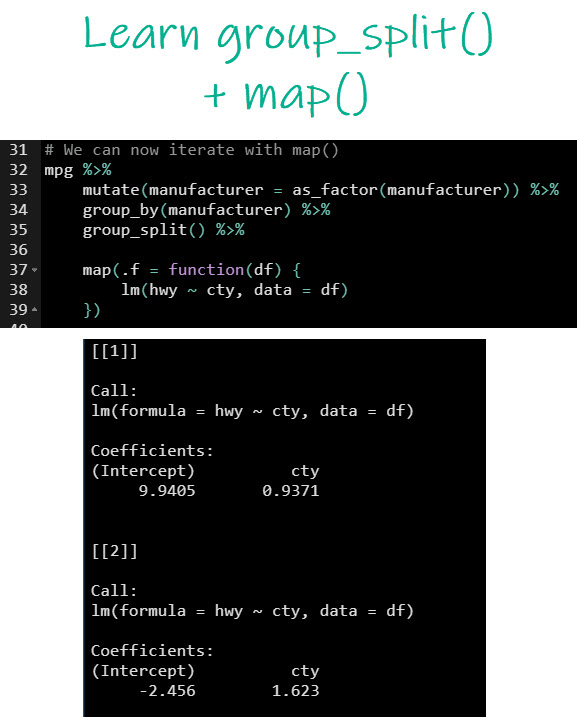
I love group_split() for splitting data frames that are grouped into a list containing sub-data frames as elements❤️
You'll see why in Tip 9.
🏅Pro-Tip: Make sure to convert your grouping column into a factor first, which preserves the order
I love group_split() for splitting data frames that are grouped into a list containing sub-data frames as elements❤️
You'll see why in Tip 9.
🏅Pro-Tip: Make sure to convert your grouping column into a factor first, which preserves the order

9. Learn how to combine group_split() + map()
This is a cool example where I'm splitting the data frame by manufacturer then applying a linear regression model to each data frame.
I get a linear reg model for each car manufacturer!!
Pretty sweet!
This is a cool example where I'm splitting the data frame by manufacturer then applying a linear regression model to each data frame.
I get a linear reg model for each car manufacturer!!
Pretty sweet!
There you have it folks. 9 R-Tips to help make you a more productive R hacker.
And, if you want a continuous stream of new R-tips, hacks & secrets from an #Rstats guru that's been hacking away for 10+ years...
Then sign up for my Free R-Tips Newsletter: learn.business-science.io
And, if you want a continuous stream of new R-tips, hacks & secrets from an #Rstats guru that's been hacking away for 10+ years...
Then sign up for my Free R-Tips Newsletter: learn.business-science.io

Loading suggestions...