
Technology
Business
Marketing
Digital Marketing
Advertising
Location
Profit
Google Ad Extensions
Higher click rate
Lower cost per click
Higher conversion rate
Higher return on ad spend
Phone number

Google Ad Extensions can give you…
- Higher click rate
- Lower cost per click
- Higher conversion rate
- Higher return on ad spend
- The ultimate goal (more profit)
Here are my top 11 types and how to use them:
🧵
- Higher click rate
- Lower cost per click
- Higher conversion rate
- Higher return on ad spend
- The ultimate goal (more profit)
Here are my top 11 types and how to use them:
🧵
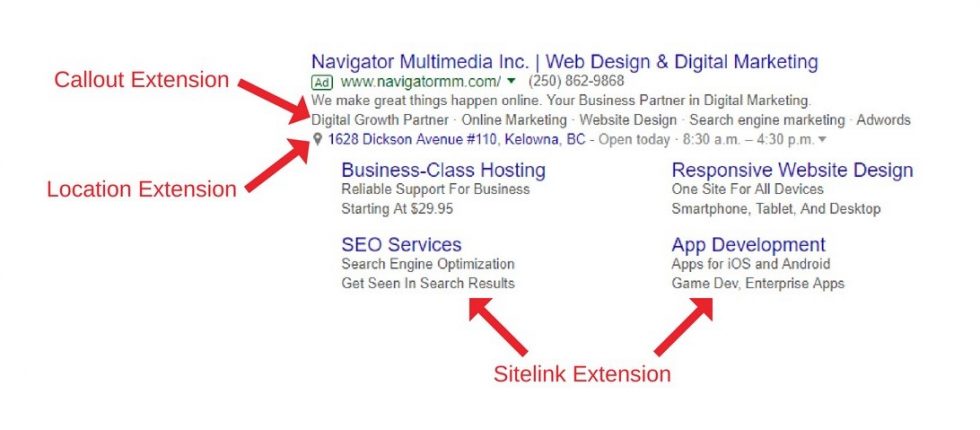
1. Location. This is a great one for local businesses. If it’s beneficial for customers to know your address, try adding it.
2. Phone number. Some businesses rely heavily on phone calls to sell their offers. If yours is one of them, adding your phone number can lead to more leads.
3. Sitelinks. These add links below the main link in your ad. Smart advertisers use them when they have multiple useful or persuasive site pages. A common example is the testimonials page.
4. Average review. Every good marketer knows that social proof is a powerful persuader. Google lets you add an average review if those reviews came from their platform or a trusted third party.
5. Callout. These give you a chance to quickly list easy-to-understand value propositions. Some common ones are free shipping and refund guarantees.
6. Structured snippet. These are similar to callouts, but they let you list products and services. For example, a digital marketing agency might add “Services: SEO, Google Ads, Facebook Ads, and TikTok Ads”.
7. Price. In general, the more information people have, the better. Adding a price extension can give them more information, and if the price is good, get you more clicks.
8. App. If your app is a big part of your business, you can add an extension that lets people download it without having to click through to your website.
9. Promotion. These add sale links beneath your search ads. If you’re running something big like a holiday sale, having “Get 50% Off” as a link can attract clicks.
10. Image. I see these all the time when searching for fashion products. They’re great for catching attention and adding some visual persuasion to your ads.
11. Lead form. If collecting leads is a big part of your business, test the lead form on your site vs the one Google puts on ads. You might find that Google gets you lower cost per lead.
That’s everything.
If you liked this thread:
1. Follow me @blvckledge for more
2. RT the tweet below to show some love
Thanks for reading!
If you liked this thread:
1. Follow me @blvckledge for more
2. RT the tweet below to show some love
Thanks for reading!
Loading suggestions...