

How to create a simple API with Fastify.
Thread 🧵👇
Thread 🧵👇
Fastify is a web framework written in Node.js that claims to be low-latency, high-performance, and extensible.
Let's show how to create a simple API server.
Let's show how to create a simple API server.
1️⃣ Initiate new project and install Fastify
Open your terminal and run the following commands:
Open your terminal and run the following commands:

2️⃣ Server code
Create an index.js file in the project folder.
The code below is a simple Fastify server running on port 3000.
First, we require the package and create an app (saved in the app variable)
Create an index.js file in the project folder.
The code below is a simple Fastify server running on port 3000.
First, we require the package and create an app (saved in the app variable)

Then we use the app.listen method to actually launch the server on port 3000.
We also implemented a GET method that returns a simple JSON response.
You can go to the command line again and run the server with "node index.js"
We also implemented a GET method that returns a simple JSON response.
You can go to the command line again and run the server with "node index.js"
You can access your newly created server at http://localhost:3000
You should receive the following:
You should receive the following:

The example below shows the simple POST request made in Fastify.
As you can see we're using the post method here.
We're also getting the request payload by "request.body" method.
As you can see we're using the post method here.
We're also getting the request payload by "request.body" method.

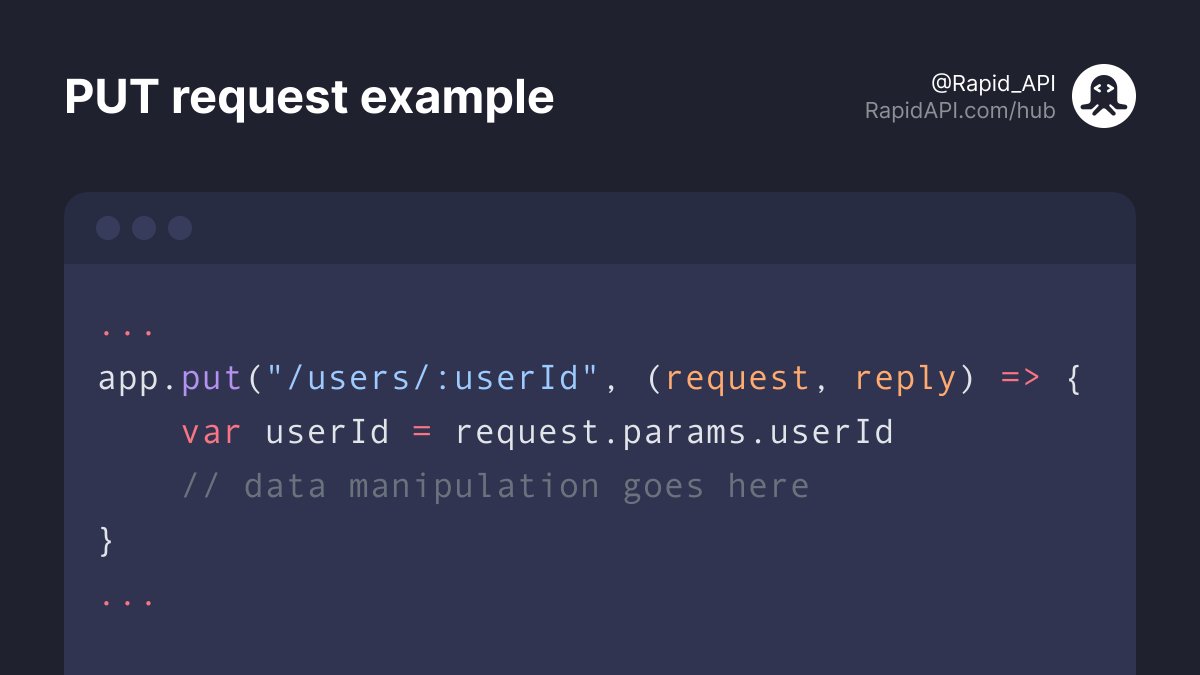
The example below shows the PUT example made in Fastify.
We're getting the User ID from the request parameters.
We're getting the User ID from the request parameters.
Hope you enjoyed this short tutorial.
If you found this thread useful, follow @Rapid_API 🐙💙
If you found this thread useful, follow @Rapid_API 🐙💙
Loading suggestions...