

Getting traffic but no sales?
Here's a dead-simple email strategy I used to instantly boost a client's conversion rate (proof inside):
/// a case study 🧵 ///
Here's a dead-simple email strategy I used to instantly boost a client's conversion rate (proof inside):
/// a case study 🧵 ///
Here’s the sales-producing engine I installed on my client's site:
1. A pop-up form (to collect emails).
2. A simple, 4-part email welcome sequence (to convert leads into sales).
[Screenshot of real client results included at the end.]
Let’s dive in 👇
1. A pop-up form (to collect emails).
2. A simple, 4-part email welcome sequence (to convert leads into sales).
[Screenshot of real client results included at the end.]
Let’s dive in 👇
STEP 1: INSTALL POP-UP FORM
If your site visitors aren't buying right away...
Then you should collect their email address so you can follow up with them later.
To do this, install an opt-in form on your site like this:
If your site visitors aren't buying right away...
Then you should collect their email address so you can follow up with them later.
To do this, install an opt-in form on your site like this:
Use an opt-in form tool like OptinMonster.
(I'm sure there are many others too...)
Make a special offer on the pop-up to compel users to give you their email.
For example:
• Free shipping
• A discount code
• A free resource ("lead magnet")
Next, configure the pop-up...
(I'm sure there are many others too...)
Make a special offer on the pop-up to compel users to give you their email.
For example:
• Free shipping
• A discount code
• A free resource ("lead magnet")
Next, configure the pop-up...
Depending on your business...
You might have requirements for WHEN and for WHOM the form should show up.
Ask yourself:
• Should the form pop up right away?
• Should paid traffic see it? Or only organic?
• Should the form only pop up if the user is about to exit your site?
You might have requirements for WHEN and for WHOM the form should show up.
Ask yourself:
• Should the form pop up right away?
• Should paid traffic see it? Or only organic?
• Should the form only pop up if the user is about to exit your site?
Answer those strategic questions, then configure the pop-up form to meet those conditions.
(OptinMonster lets you restrict who sees the form based on such criteria.)
Now that you have your pop-up launched...
Let's create a welcome sequence to convert your leads into customers:
(OptinMonster lets you restrict who sees the form based on such criteria.)
Now that you have your pop-up launched...
Let's create a welcome sequence to convert your leads into customers:
STEP 2: WRITE AN EMAIL WELCOME SEQUENCE
To keep it simple, let's write a 4-part welcome sequence.
You can (and should) write more than 4 emails, but this gives you an easy launchpad...
Here's a sequence outline you can use.
It works for e-com AND coaching/info products:
To keep it simple, let's write a 4-part welcome sequence.
You can (and should) write more than 4 emails, but this gives you an easy launchpad...
Here's a sequence outline you can use.
It works for e-com AND coaching/info products:
EMAIL 1 - WELCOME EMAIL:
• Deliver the promised special offer.
• If it's a promo code, encourage users to visit shop and buy now.
• If it's a lead magnet, encourage users to consume it. (Optional: soft-sell another low-ticket offer in the welcome email.)
• Deliver the promised special offer.
• If it's a promo code, encourage users to visit shop and buy now.
• If it's a lead magnet, encourage users to consume it. (Optional: soft-sell another low-ticket offer in the welcome email.)
EMAIL 2 - BRAND STORY EMAIL:
• Tell users a bit more about your brand.
Elements to consider including:
• Your origin story
• Your brand's mission
• Your unique selling proposition
Pro tip: don't forget to remind users to buy in this email!
• Tell users a bit more about your brand.
Elements to consider including:
• Your origin story
• Your brand's mission
• Your unique selling proposition
Pro tip: don't forget to remind users to buy in this email!
EMAIL 3 - SOCIAL PROOF EMAIL:
• Show off your social proof!
For example:
• Customer reviews
• Media coverage
• # of customers
• Affiliations
• Etc.
Or...
Dedicate this entire email to sharing the success story of ONE customer.
Social proof = persuasion
• Show off your social proof!
For example:
• Customer reviews
• Media coverage
• # of customers
• Affiliations
• Etc.
Or...
Dedicate this entire email to sharing the success story of ONE customer.
Social proof = persuasion
EMAIL 4 - OBJECTION HANDLING:
By now, some leads should have bought.
But those who haven't bought yet likely have sales objections.
This email addresses those objections like so:
By now, some leads should have bought.
But those who haven't bought yet likely have sales objections.
This email addresses those objections like so:
• Answer the top one or two questions prospects have about your offer.
• Or answer a stack of questions in an FAQ-style format.
I personally prefer the former, but there's a use case for either approach...
Bottom line?
Address objections.
• Or answer a stack of questions in an FAQ-style format.
I personally prefer the former, but there's a use case for either approach...
Bottom line?
Address objections.
STEP 3: CONNECT YOUR POP-UP FORM TO YOUR EMAIL SOFTWARE
If you use OptinMonster to create your pop-up...
Then you can use Zapier to connect the form input data to your email software.
You can program each form subscriber to receive your welcome sequence once they opt in.
If you use OptinMonster to create your pop-up...
Then you can use Zapier to connect the form input data to your email software.
You can program each form subscriber to receive your welcome sequence once they opt in.
This thread won't go into the ins-and-outs of how to configure this connection.
Here's why: the instructions depend on your email service provider and which pop-up tool you use...
But when in doubt, turn to Zapier's help documentation (if you even need Zapier, that is).
Next:
Here's why: the instructions depend on your email service provider and which pop-up tool you use...
But when in doubt, turn to Zapier's help documentation (if you even need Zapier, that is).
Next:
PROOF THAT THIS STRATEGY WORKS:
I implemented this EXACT strategy onto an e-commerce store's website.
In their case, they had a blog with tons of visitors...
But barely any of those blog readers were clicking over to their store to buy...
Until I did this:
I implemented this EXACT strategy onto an e-commerce store's website.
In their case, they had a blog with tons of visitors...
But barely any of those blog readers were clicking over to their store to buy...
Until I did this:
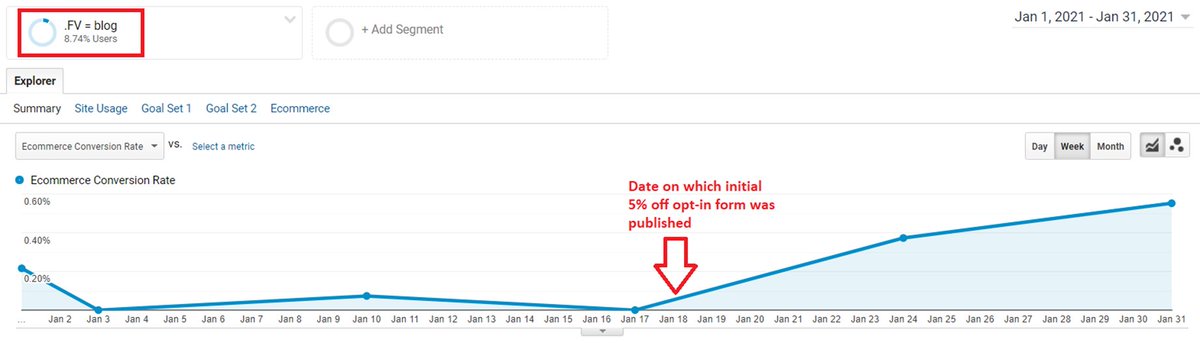
• I offered a 5% off coupon on a pop-up form.
• I configured the pop-up to ONLY show to users whose FIRST visit was via a BLOG post. (Since our data showed that this segment wasn't converting well.)
• Here's what happened to the brand's conversion rate overnight:
• I configured the pop-up to ONLY show to users whose FIRST visit was via a BLOG post. (Since our data showed that this segment wasn't converting well.)
• Here's what happened to the brand's conversion rate overnight:
TL;DR
1. Create a pop-up form.
2. Offer a special incentive on the pop-up in exchange for an email address.
3. Send each new subscriber a 4-part automated email welcome sequence.
4. Enjoy an overnight lift in sales or qualified leads (depending on your business).
1. Create a pop-up form.
2. Offer a special incentive on the pop-up in exchange for an email address.
3. Send each new subscriber a 4-part automated email welcome sequence.
4. Enjoy an overnight lift in sales or qualified leads (depending on your business).
That's a wrap!
If you liked this thread:
1. Follow me @dylan_bridger for email marketing tips and case studies.
2. Please RT the first tweet (below) to share it with your audience.
3. Download my free email swipe file (link in bio).
If you liked this thread:
1. Follow me @dylan_bridger for email marketing tips and case studies.
2. Please RT the first tweet (below) to share it with your audience.
3. Download my free email swipe file (link in bio).
If you like this tweet, you'll love my weekly email newsletter.
Join here and get instant access to my free email swipe file: lp.drawbridgegrowth.com
Join here and get instant access to my free email swipe file: lp.drawbridgegrowth.com
Loading suggestions...