

Google Sheets isn't Excel.
But it's more powerful than you think.
10 things Sheets can do, you'll wish you knew yesterday: 📊
But it's more powerful than you think.
10 things Sheets can do, you'll wish you knew yesterday: 📊
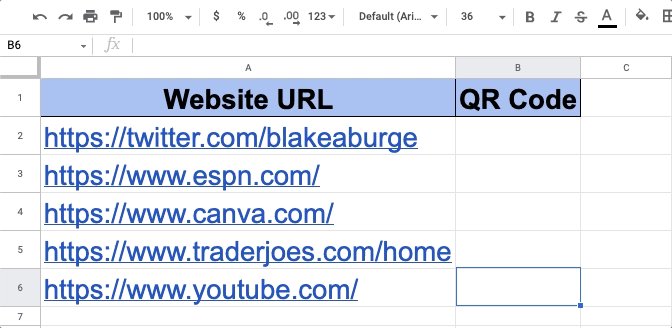
QR CODES
Everyone has a smartphone these days...
Generating an easily scannable image to drive traffic to your site seems like a no-brainer.
•Copy + paste the formula below
•Change "A1" to the cell with your URL
•💥 Free QR code
=IMAGE("chart.googleapis.com"&A1&"")
Everyone has a smartphone these days...
Generating an easily scannable image to drive traffic to your site seems like a no-brainer.
•Copy + paste the formula below
•Change "A1" to the cell with your URL
•💥 Free QR code
=IMAGE("chart.googleapis.com"&A1&"")
SPLIT
Split text from one cell into multiple.
Formula: =SPLIT(B3,“ ”)
This will take the contents of B3 and separate it into C3 & D3 based on the delimiter you place inside " ".
In this case, we'll separate the First & Last names based on the "space" in between.
Split text from one cell into multiple.
Formula: =SPLIT(B3,“ ”)
This will take the contents of B3 and separate it into C3 & D3 based on the delimiter you place inside " ".
In this case, we'll separate the First & Last names based on the "space" in between.

Make your charts stand out:
First, let's make a chart...
Highlit cells then click:
"Insert -> Chart -> Chart Type -> Pie"
Now, double-click one section of the chart and select the "distance from center" option.
Increase the % to make that section stand out from the rest!
First, let's make a chart...
Highlit cells then click:
"Insert -> Chart -> Chart Type -> Pie"
Now, double-click one section of the chart and select the "distance from center" option.
Increase the % to make that section stand out from the rest!

ARRAYFORMULA
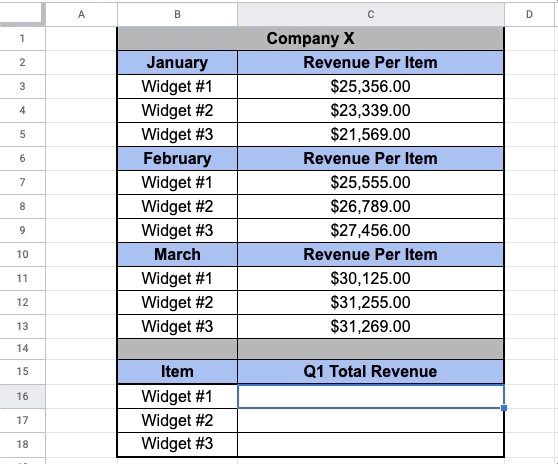
Why enter 3 formulas when 1 will do the trick?
Array formulas allow you to process data in a "batch" rather than individual calculations.
Here we pull the monthly sales for each "widget" & quickly calculate the Q1 total
Formula:=ARRAYFORMULA(C3:C5+C7:C9+C11:C13)
Why enter 3 formulas when 1 will do the trick?
Array formulas allow you to process data in a "batch" rather than individual calculations.
Here we pull the monthly sales for each "widget" & quickly calculate the Q1 total
Formula:=ARRAYFORMULA(C3:C5+C7:C9+C11:C13)
Finance:
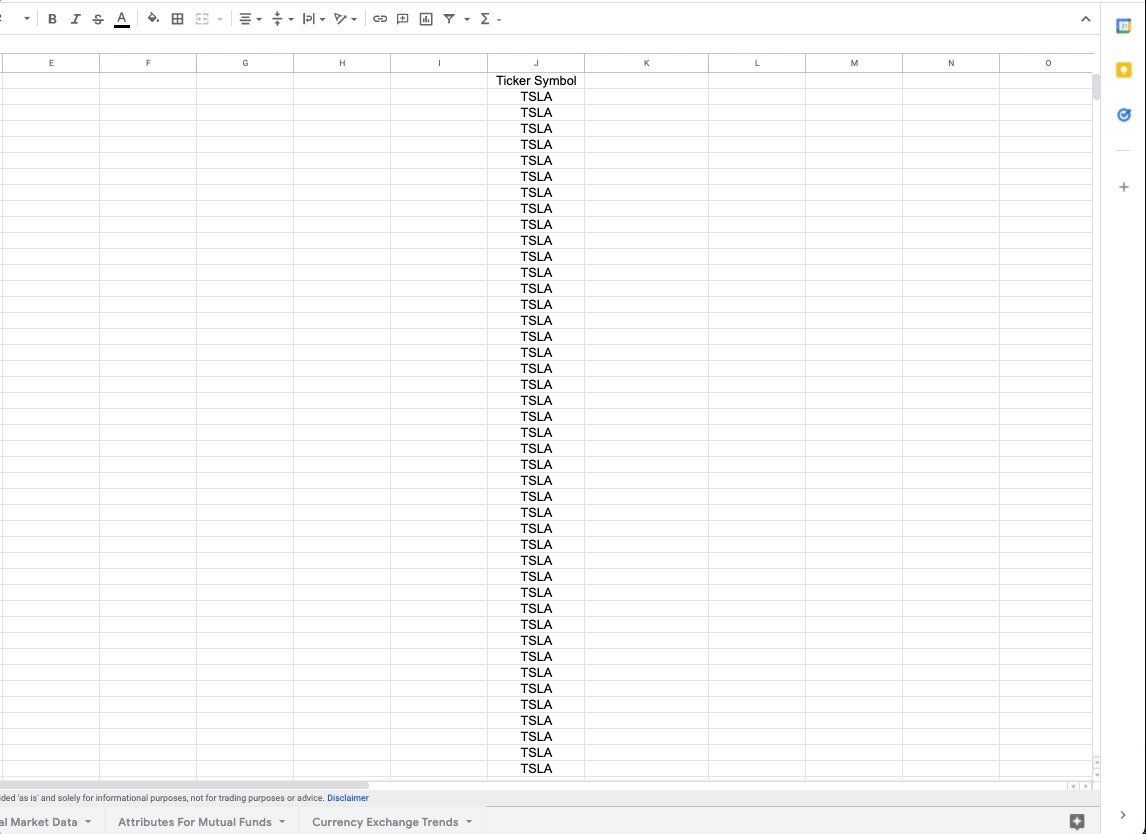
Monitor stock prices, spot trends, & quickly review historical data using =GOOGLEFINANCE.
Want to see the last 60 days of closing prices for a specific ticker symbol?
Paste the formula below & voila!
=GOOGLEFINANCE("NASDAQ:TSLA","price",TODAY()-60,TODAY())
Monitor stock prices, spot trends, & quickly review historical data using =GOOGLEFINANCE.
Want to see the last 60 days of closing prices for a specific ticker symbol?
Paste the formula below & voila!
=GOOGLEFINANCE("NASDAQ:TSLA","price",TODAY()-60,TODAY())
Explore:
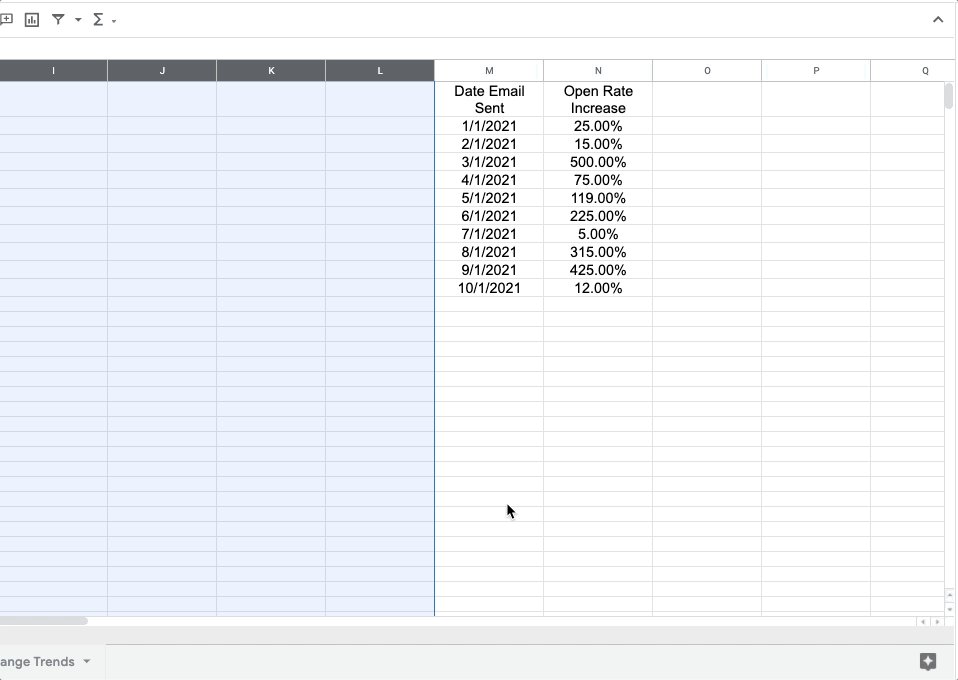
Need to do some number crunching?
Let Google's AI do the work for you.
•Highlight the range of data.
•Move your cursor to the starburst-shaped icon in the bottom right corner.
•Click "Explore" – Complex charts, analytics, & detailed info. generated automatically
Need to do some number crunching?
Let Google's AI do the work for you.
•Highlight the range of data.
•Move your cursor to the starburst-shaped icon in the bottom right corner.
•Click "Explore" – Complex charts, analytics, & detailed info. generated automatically
DETECTLANGUAGE / TRANSLATE
A simple set of formulas you can use to:
• Detect what language is being used
👇🏻
• Translate it into another language of your choice
Formulas:
=DETECT(E2)
=GOOGLETRANSLATE(E2,F2,"en")
Check it out!
A simple set of formulas you can use to:
• Detect what language is being used
👇🏻
• Translate it into another language of your choice
Formulas:
=DETECT(E2)
=GOOGLETRANSLATE(E2,F2,"en")
Check it out!

QUERY
Search large data sets to find & extract items that meet specified criteria.
Formula:=QUERY(B3:C14, "select B where C>50000")
In this example, we'll pull out the names from column B with over 50K followers in column C.
This is only the beginning of what QUERY can do!
Search large data sets to find & extract items that meet specified criteria.
Formula:=QUERY(B3:C14, "select B where C>50000")
In this example, we'll pull out the names from column B with over 50K followers in column C.
This is only the beginning of what QUERY can do!

IMPORTRANGE
This one takes practice, but once you figure it out––it's worth it.
Automatically pull data from one tab (or spreadsheet) into another.
The data in the receiving sheet (a dashboard for example) updates dynamically.
=IMPORTRANGE(spreadsheet_url, range_string)
This one takes practice, but once you figure it out––it's worth it.
Automatically pull data from one tab (or spreadsheet) into another.
The data in the receiving sheet (a dashboard for example) updates dynamically.
=IMPORTRANGE(spreadsheet_url, range_string)

SPARKLINES/Progress Bars
What good are goals if you can't track against them?
Good news––Sheets make it simple to see a visual representation of your progress using SPARKLINES.
Easily embed a miniature bar chart inside any cell.
=SPARKLINE(B2:C2{"charttype","bar";"max",C2})
What good are goals if you can't track against them?
Good news––Sheets make it simple to see a visual representation of your progress using SPARKLINES.
Easily embed a miniature bar chart inside any cell.
=SPARKLINE(B2:C2{"charttype","bar";"max",C2})

Last.
I know this is a thread about Google Sheets, but let's face it:
For now, more people use Excel.
Want to learn more, but can't find the time?
2 emails per week. That's all you need.
excelfoundations1.carrd.co
I know this is a thread about Google Sheets, but let's face it:
For now, more people use Excel.
Want to learn more, but can't find the time?
2 emails per week. That's all you need.
excelfoundations1.carrd.co

Interested in a course on Google Sheets?
If you want it, I'll build it.
Just fill out the form below to be notified pre-launch for special discount pricing.
forms.gle
If you want it, I'll build it.
Just fill out the form below to be notified pre-launch for special discount pricing.
forms.gle
That's it for today.
Follow me at @blakeaburge for weekly threads on business & productivity.
Join 17,000+ others & check out my newsletter––It's free!
•The best of Twitter
•In your Inbox
•Every Sunday
blake.ck.page
Follow me at @blakeaburge for weekly threads on business & productivity.
Join 17,000+ others & check out my newsletter––It's free!
•The best of Twitter
•In your Inbox
•Every Sunday
blake.ck.page
Loading suggestions...