

A prospect replies to your email
You know replying faster increases the likelihood of a sale (time kills all deals)...
You jumble between your 10 google chrome profiles
Find the right email
You reply 15 mins later and never hear from the prospect again
THREAD…
You know replying faster increases the likelihood of a sale (time kills all deals)...
You jumble between your 10 google chrome profiles
Find the right email
You reply 15 mins later and never hear from the prospect again
THREAD…
“Bro i have this google extension that helps me jump between profiles”
Ive seen it…it’s ugly, hard to use and it sucks
“Switching between profiles is not that hard”
You dont send enough emails
“I dont wanna pay for a tool”
NGMI
Ive seen it…it’s ugly, hard to use and it sucks
“Switching between profiles is not that hard”
You dont send enough emails
“I dont wanna pay for a tool”
NGMI

GET A FUCKING CRM YOURE WAY TOO DISORGANIZED
Introducing… Close (close.com)
$29/month for u brokies and $69/month (allows more than 2500 leads)
a unified inbox
email templates for follow ups
tasks/reminders
lead statuses (interested, not interested, no show)
Introducing… Close (close.com)
$29/month for u brokies and $69/month (allows more than 2500 leads)
a unified inbox
email templates for follow ups
tasks/reminders
lead statuses (interested, not interested, no show)
How are you going to manage 61 inboxes…FROM CHROME?
do you know who you need to follow up with?
are you going to recycle your leads after your campaigns are completed?
are you tracking what calls were no shows?
are you tracking what calls were already paid for?
do you know who you need to follow up with?
are you going to recycle your leads after your campaigns are completed?
are you tracking what calls were no shows?
are you tracking what calls were already paid for?
Close let’s you do all of this
Now let’s get technical
You need to use email forwarding
I forward all 61 domains to my main agency email
I use a bunch of filters to keep my inbox clean
The last one is a webhook that forwards to…
Now let’s get technical
You need to use email forwarding
I forward all 61 domains to my main agency email
I use a bunch of filters to keep my inbox clean
The last one is a webhook that forwards to…
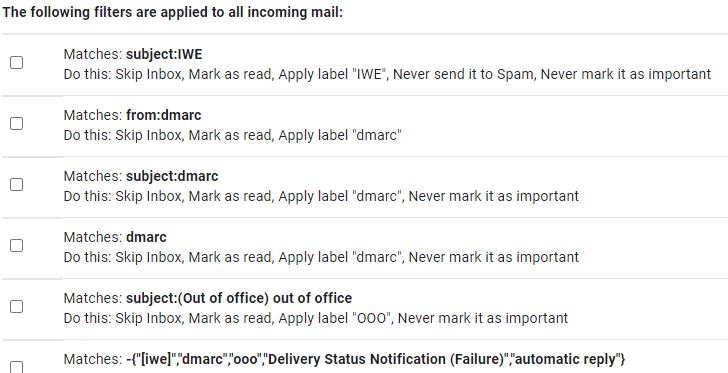
I dont want every email going to my CRM (especially not warmup emails)…only prospects
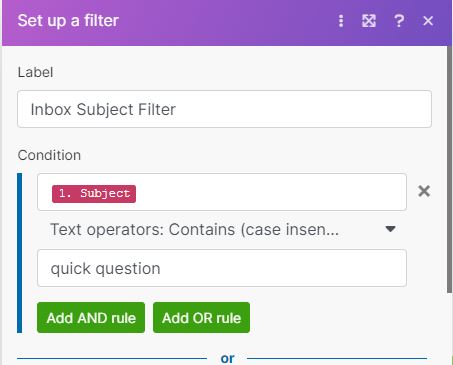
Use a subject line filter
Every time I start a campaign with a new subject line it gets added to this list
Now only replies CONTAINING that subject line are going into Close
Use a subject line filter
Every time I start a campaign with a new subject line it gets added to this list
Now only replies CONTAINING that subject line are going into Close
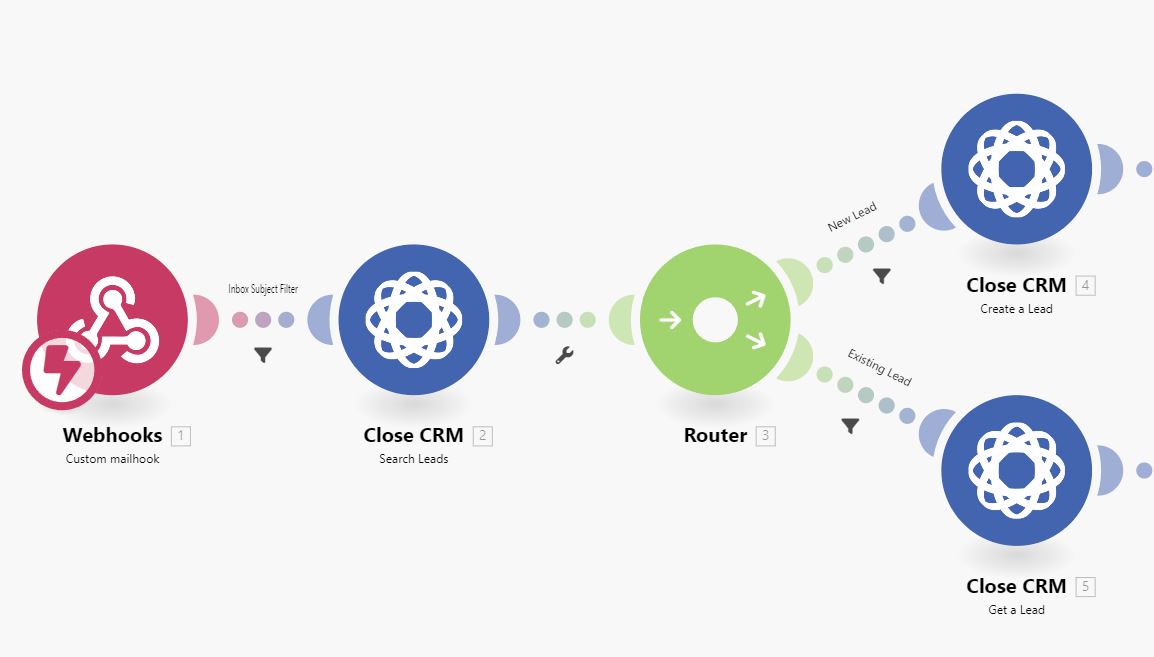
Next step is filtering through leads
The automation searches all the emails already in Close to see if there is a match
If there is NO MATCHES…it creates a new lead (name, email, company, etc.)
If there is a match…it grabs the old lead and inputs the reply to their profile
The automation searches all the emails already in Close to see if there is a match
If there is NO MATCHES…it creates a new lead (name, email, company, etc.)
If there is a match…it grabs the old lead and inputs the reply to their profile
You (or your inbox manager) can literally sit in Close all day and be hit with notifications
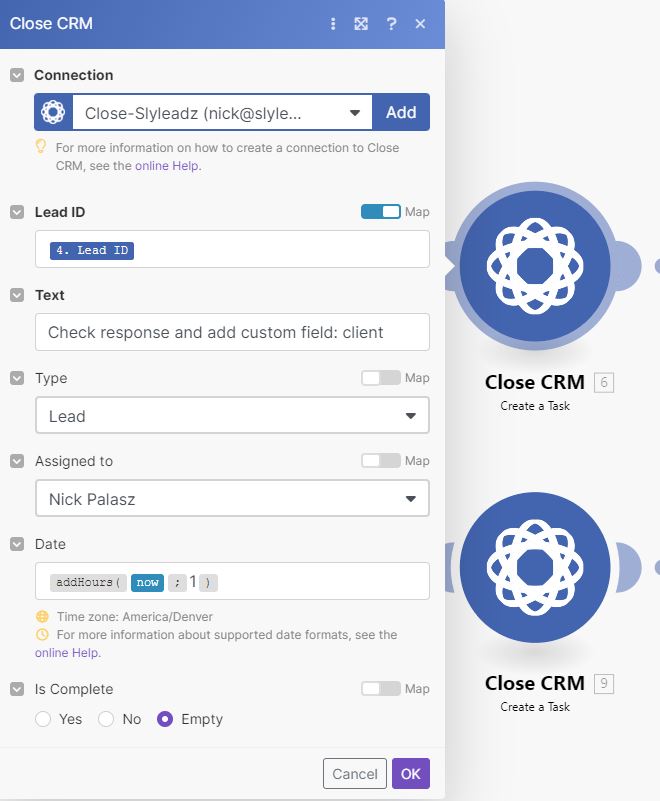
Every time a new lead is created…I have it create a task for me
“Check response and add custom field: client”
Close has custom fields so you can easily organize your prospects
Every time a new lead is created…I have it create a task for me
“Check response and add custom field: client”
Close has custom fields so you can easily organize your prospects
I use custom fields so I know who the prospect belongs to
So whenever I get an email response, from the designated subject lines…
I input the custom field “client”
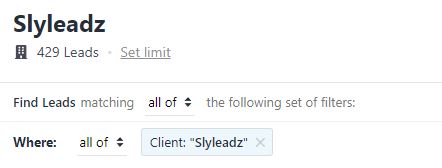
Using the filtering in Close I created smart views for each of my clients
So whenever I get an email response, from the designated subject lines…
I input the custom field “client”
Using the filtering in Close I created smart views for each of my clients
But Nick what if im at the Playboi Carti concert
I cant mosh and be on Close all day…VAMP LYFE
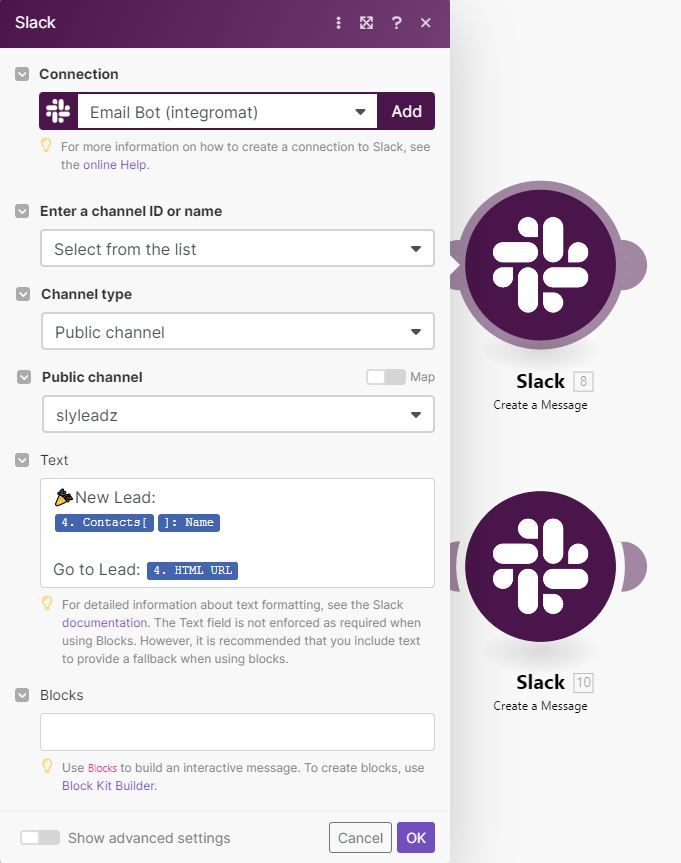
Dont you worry, you can set up automated slack messages
That way, slack will ping you when youre on the go
I include a link to close…and reply on the go
I cant mosh and be on Close all day…VAMP LYFE
Dont you worry, you can set up automated slack messages
That way, slack will ping you when youre on the go
I include a link to close…and reply on the go
I can talk about the benefits of this all day
I literally save 10+ hours a week because of this
So much easier to do client reporting
So much easier to schedule follow ups
So much easier to reply quickly
So much easier to track your pipeline
Go get this money
I literally save 10+ hours a week because of this
So much easier to do client reporting
So much easier to schedule follow ups
So much easier to reply quickly
So much easier to track your pipeline
Go get this money
If you liked this thread hit follow and RT
Here's to the first of many threads
I promised the homies @DavidJacob_1 @cantfaizme @inboundcash @andrehaykaljr and @NickAbraham12 that ill be posting more
Here's to the first of many threads
I promised the homies @DavidJacob_1 @cantfaizme @inboundcash @andrehaykaljr and @NickAbraham12 that ill be posting more
@conortrains THE BIGGEST SHOUTOUT FOR SHOWING ME CLOSE
Loading suggestions...