

Sick of working 12 hr days?
Here is 15 Automations you can use for your agency RIGHT NOW and save HOURS per day.
Bookmark this MASTERCLASS🧵
Here is 15 Automations you can use for your agency RIGHT NOW and save HOURS per day.
Bookmark this MASTERCLASS🧵
1. On Board Automation
Fill in an activation form and have the following automatically done for you.
Contract Signed & sent
CRM updated lead as "Closed Won"
Google drive created
Slack channel created
Tasks assigned to team members
Client emailed onboarding info
Fill in an activation form and have the following automatically done for you.
Contract Signed & sent
CRM updated lead as "Closed Won"
Google drive created
Slack channel created
Tasks assigned to team members
Client emailed onboarding info
2. Notified Of Cold Email Replies
Create a webhook between your email sending tool and slack.
This way you get INSTANT notifications when a lead replies.
This will boost your conversion rate.
Create a webhook between your email sending tool and slack.
This way you get INSTANT notifications when a lead replies.
This will boost your conversion rate.

3. Lead Magnet Flow
Create a landing page with a FREE lead magnet.
Capture the leads details (First name and email)
Setup a flow where they receive weekly emails of you showcasing testimonials and case studies with a call to action at the end of each email.
Create a landing page with a FREE lead magnet.
Capture the leads details (First name and email)
Setup a flow where they receive weekly emails of you showcasing testimonials and case studies with a call to action at the end of each email.
4. Lead added to CRM
When someone snags your lead magnet or even replies to your cold email.
Have that data automatically sent to your CRM.
When someone snags your lead magnet or even replies to your cold email.
Have that data automatically sent to your CRM.
5. Lead Task
After the lead has been added to your CRM have an automated task setup for a team member.
This could be calling the lead.
After the lead has been added to your CRM have an automated task setup for a team member.
This could be calling the lead.
6. Store Drop Off Status
To find bottlenecks in your sales process and have more accurate forecasting store the stage a lead was at before it turned Closed Lost
Automate this data to a spreadsheet
Have a report showing the probability of a lead closing at a certain stage
To find bottlenecks in your sales process and have more accurate forecasting store the stage a lead was at before it turned Closed Lost
Automate this data to a spreadsheet
Have a report showing the probability of a lead closing at a certain stage
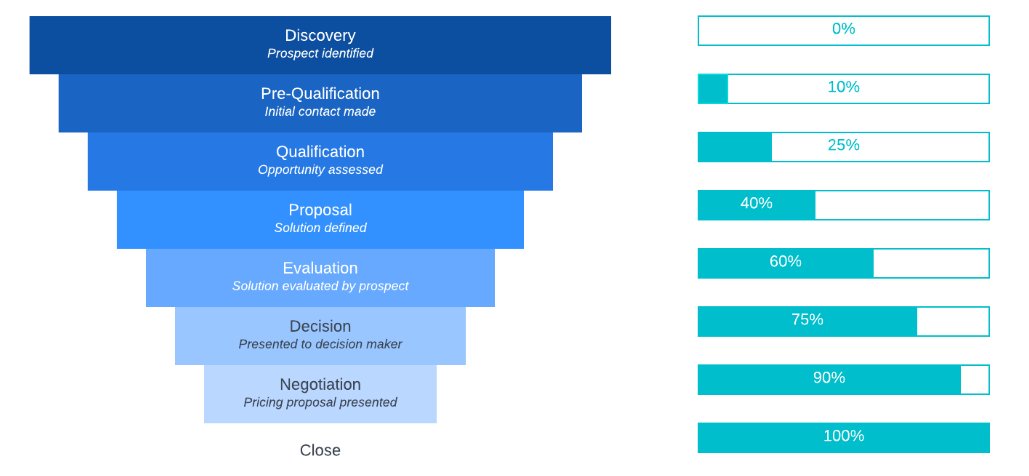
6. Store Drop Off Status Pt 2
This is important because you can identify points that have a lot of friction in your sales process.
To make the report use Google sheets or some analytical tool like Tableau or Power BI
This is important because you can identify points that have a lot of friction in your sales process.
To make the report use Google sheets or some analytical tool like Tableau or Power BI
7. Pipeline Movement
When a lead moves from one stage in your sales process to another, receive an automatic notification in slack.
This way you know exactly whats happening and when.
Here is a thread showing you how to set this up!
When a lead moves from one stage in your sales process to another, receive an automatic notification in slack.
This way you know exactly whats happening and when.
Here is a thread showing you how to set this up!
8. Sales Call No Show Flow
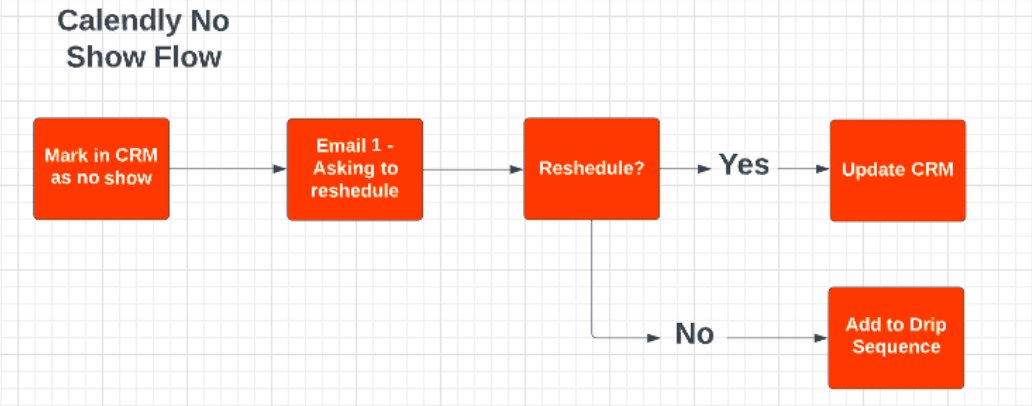
If a lead doesn't show up for a sales call mark them as "No Show" in your CRM and have an automated email sequence that prompts them to reschedule. If they don't, they get added to another email flow sending them weekly emails of social proof and CTAs
If a lead doesn't show up for a sales call mark them as "No Show" in your CRM and have an automated email sequence that prompts them to reschedule. If they don't, they get added to another email flow sending them weekly emails of social proof and CTAs
9. Booked Appointment Flow
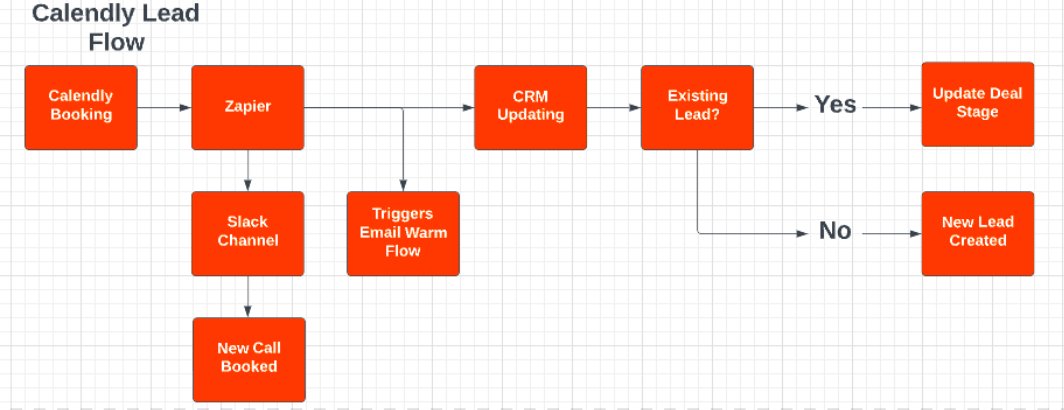
When a lead books a call with you, have a series of automated emails that warm them before the call.
Inside those emails show the following:
- Case Studies
- Testimonials
- Objection Handling
When a lead books a call with you, have a series of automated emails that warm them before the call.
Inside those emails show the following:
- Case Studies
- Testimonials
- Objection Handling
10. Lead Scoring
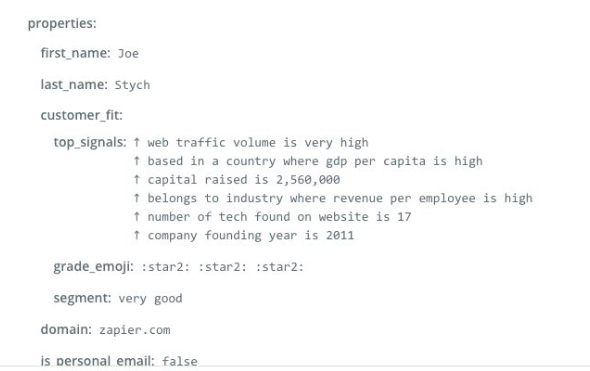
When you receive a new lead use the Zapier score function.
This finds stats on the lead.
When you receive a new lead use the Zapier score function.
This finds stats on the lead.
11. Invoice Organizer
Automatically save invoices of your business expenses and store them in a google drive.
I have a thread showing this step by step.
Automatically save invoices of your business expenses and store them in a google drive.
I have a thread showing this step by step.
12. Recurring tasks
Setup a automation that reminds team members to do a specific task.
Example: Each Friday at 1pm a message goes into slack saying "Reminder to send loom video to client"
Setup a automation that reminds team members to do a specific task.
Example: Each Friday at 1pm a message goes into slack saying "Reminder to send loom video to client"
13. Payment Notifications
When a successful payment is received automatically have that data pushed to a slack channel.
For unsuccessful payments also have a slack notification and an email that sends to the client letting them know its failed and heres a new link to pay.
When a successful payment is received automatically have that data pushed to a slack channel.
For unsuccessful payments also have a slack notification and an email that sends to the client letting them know its failed and heres a new link to pay.
14. Off Boarding
Once a client is marked as "Previous Client" in your CRM this should trigger an off boarding flow.
Sends them meeting for exit interview along with off boarding form.
Once a client is marked as "Previous Client" in your CRM this should trigger an off boarding flow.
Sends them meeting for exit interview along with off boarding form.
15. Off Boarding Pt 2
In the form make sure to have the question "Could you see yourself working with us again?"
If they select "Yes" then automatically add them to an email drip sequence where they get an email down the line asking how they are.
In the form make sure to have the question "Could you see yourself working with us again?"
If they select "Yes" then automatically add them to an email drip sequence where they get an email down the line asking how they are.
Loading suggestions...