

1/ Do you want to know tips & tricks for incorporating technology into teaching?
Here are the take home points from my presentation today at #iMed2022.
Here are the take home points from my presentation today at #iMed2022.
2/ First, remember that technology can *augment* teaching but can't replace good instructional design.
Just like a good stethoscope is helpful to hear a murmur but can't replace the skills and knowledge necessary to diagnose valvular dysfunction.
Just like a good stethoscope is helpful to hear a murmur but can't replace the skills and knowledge necessary to diagnose valvular dysfunction.

3/ So before you think about what technology to use, first think about:
*⃣ WHAT learners should able to do afterwards (i.e., learning objectives)
*⃣ HOW you should teach it to achieve your goals (i.e., teaching methods)
Then, and ONLY then, should you select a tech tool.
*⃣ WHAT learners should able to do afterwards (i.e., learning objectives)
*⃣ HOW you should teach it to achieve your goals (i.e., teaching methods)
Then, and ONLY then, should you select a tech tool.
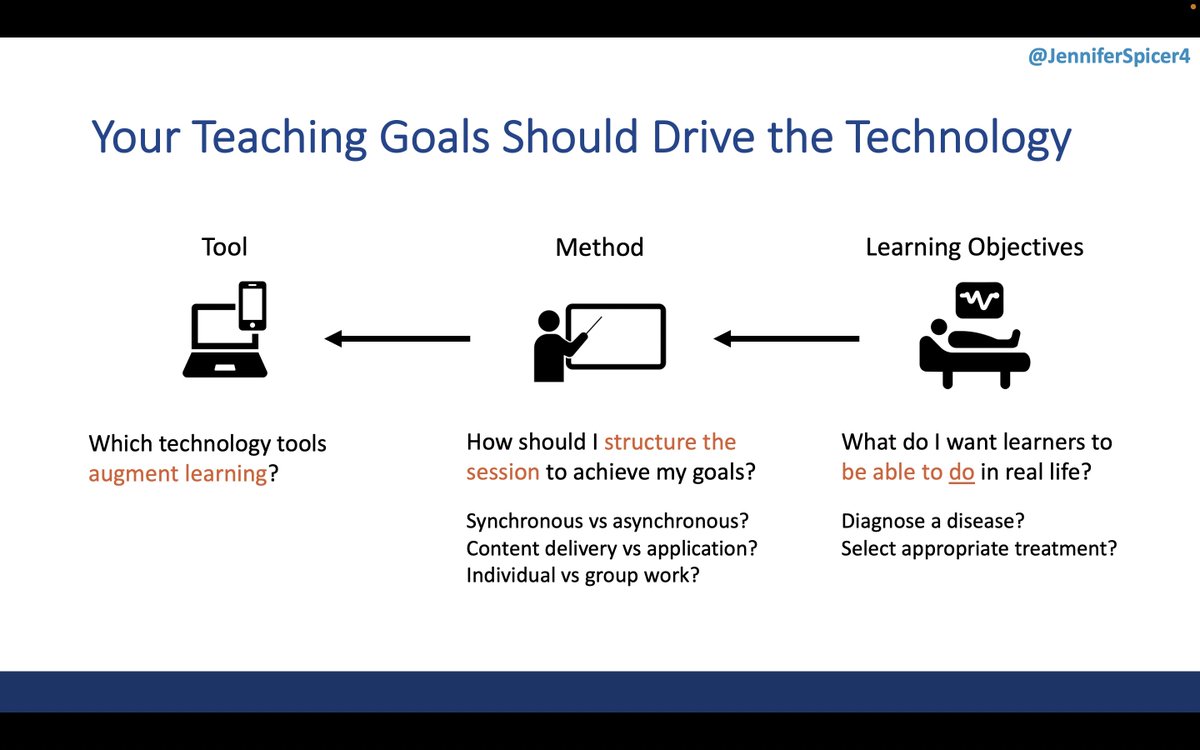
4/ Therefore, I want you to approach integrating technology by considering
WHAT the educational *problem* is....
...and HOW technology provides a *solution*
WHAT the educational *problem* is....
...and HOW technology provides a *solution*

5/ Problem #1: I can't tell if my learners understand what I'm teaching!
Although "raising hands" is a low-tech option, polling provides an opportunity to get more responses since people feel safer answering if they are anonymous, making answers are more representative.
Although "raising hands" is a low-tech option, polling provides an opportunity to get more responses since people feel safer answering if they are anonymous, making answers are more representative.

6/ I use @polleverywhere since our institution has access.
But to use it well, it's important to consider:
*⃣ WHY - create a valuable question (application > recall)
*⃣ WHEN - before, during, or after teaching the concept?
*⃣ HOW - open-ended, close-ended, or combined format?
But to use it well, it's important to consider:
*⃣ WHY - create a valuable question (application > recall)
*⃣ WHEN - before, during, or after teaching the concept?
*⃣ HOW - open-ended, close-ended, or combined format?

7/ Problem #2: I don't have time to prepare a teaching session for the clinical setting.
Another great opportunity to use a quiz software to have 5 pre-made questions (e.g., board-review questions) grouped on a topic.
Answer & discuss as a group (and share with other faculty!)
Another great opportunity to use a quiz software to have 5 pre-made questions (e.g., board-review questions) grouped on a topic.
Answer & discuss as a group (and share with other faculty!)

8/ Problem #3: I can't get people to actively engage in discussions during small groups or case conferences.
Use a collaborative document/board, like @padlet to have learners provide input during class. Then it's easy to jump off of input to start a conversation.
Use a collaborative document/board, like @padlet to have learners provide input during class. Then it's easy to jump off of input to start a conversation.

9/ Problem #4: I have so much to teach in my course, but I don't have time to teach it all!
A great way to reinforce content (or teach facts that you don't want to waste time on during class) is to create electronic flashcards in a spaced repetition platform like @AnkiDroid.
A great way to reinforce content (or teach facts that you don't want to waste time on during class) is to create electronic flashcards in a spaced repetition platform like @AnkiDroid.

10/ Problem #5: I can't get people to engaged in deeper discussions during journal club!
A social annotation platform like @perusall allows you to upload a file, like an article, and then the entire group can annotate, including responding to ?s the facilitator creates.
A social annotation platform like @perusall allows you to upload a file, like an article, and then the entire group can annotate, including responding to ?s the facilitator creates.

11/ Problem #6: I've created so many chalk talks but always forget them when I want to teach again!
Use a note-taking app like @evernote or @NotabilityApp to store images of your chalk talks (and even audio!), then create tags (i.e., "chalk talk", "[topic]") for easy searching.
Use a note-taking app like @evernote or @NotabilityApp to store images of your chalk talks (and even audio!), then create tags (i.e., "chalk talk", "[topic]") for easy searching.

12/ This is just a start...brainstorm your own ideas for using tech to augment teaching and share below
👇👇👇
Consider how you could use:
✅ Polling software
✅ Collaborative documents
✅ Spaced repetition platforms
✅ Social annotation
✅ Note-taking apps
Or share a new one!
👇👇👇
Consider how you could use:
✅ Polling software
✅ Collaborative documents
✅ Spaced repetition platforms
✅ Social annotation
✅ Note-taking apps
Or share a new one!

Loading suggestions...