

🟢 JavaScript Basic Events!
A Thread....... 🧵
A Thread....... 🧵
❍ What is an Event?
➟ JavaScript's interaction with HTML is handled through events that occur when the user or the browser manipulates a page.
➟ JavaScript's interaction with HTML is handled through events that occur when the user or the browser manipulates a page.
➊ Click ➋ Double Click
➌ Right-Click ➍ Mouse Enter
➎ Mouse out ➏ Mouse Down
➐ Mouse Up ➑ Key Press
➒ Key up ➊0 Load
➊➊ Unload ➊➋ Resize
➊➌ Scroll
➌ Right-Click ➍ Mouse Enter
➎ Mouse out ➏ Mouse Down
➐ Mouse Up ➑ Key Press
➒ Key up ➊0 Load
➊➊ Unload ➊➋ Resize
➊➌ Scroll
➊ Click
➟ The onclick event occurs when the user clicks on an element.
➟ The onclick event occurs when the user clicks on an element.

➋ Double Click!
➟ The event fires when an element is clicked twice in a very short span of time. In HTML, we can use the ondblclick attribute to create a double click event.
➟ The event fires when an element is clicked twice in a very short span of time. In HTML, we can use the ondblclick attribute to create a double click event.

➌ Right-Click
➟ Use the oncontextmenu Event to Enable JavaScript Right-Click event, The oncontextmenu event will enable the creation of the `div` element dynamically every time the right click is ensured.
➟ Use the oncontextmenu Event to Enable JavaScript Right-Click event, The oncontextmenu event will enable the creation of the `div` element dynamically every time the right click is ensured.

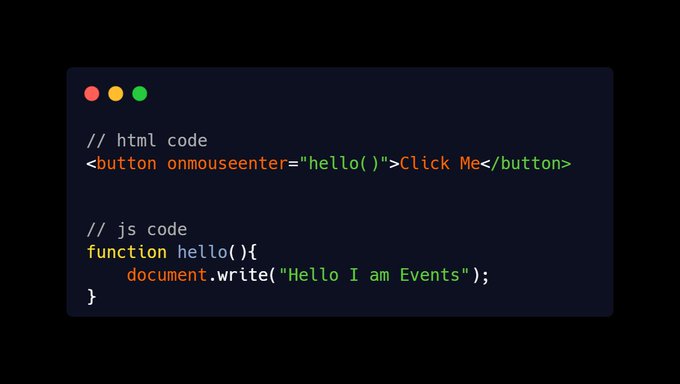
➍ Mouse Enter!
➟ This event is often used together with the onmouseout event, which occurs when a user moves the mouse pointer out of an element.
➟ This event is often used together with the onmouseout event, which occurs when a user moves the mouse pointer out of an element.
➎ Mouse out!
➟ The mouseout event is fired at an `Element` when a pointing device (usually a mouse) is used to move the cursor so that it is no longer contained within the element or one of its children.
➟ The mouseout event is fired at an `Element` when a pointing device (usually a mouse) is used to move the cursor so that it is no longer contained within the element or one of its children.

➏ Mouse Down!
➟ The onmousedown event occurs when a user presses a mouse button over an element
➟ The onmousedown event occurs when a user presses a mouse button over an element

➐ Mouse Up!
➟ The mouseup event is fired at an Element when a button on a pointing device. is released while the pointer is located inside it.
➟ The mouseup event is fired at an Element when a button on a pointing device. is released while the pointer is located inside it.

➑ Key Press!
➟ The keypress event is fired when a key that produces a character value is pressed down.
➟ The keypress event is fired when a key that produces a character value is pressed down.

➒ Key up!
➟ The onkeyup event occurs when the user releases a key (on the keyboard).
➟ The onkeyup event occurs when the user releases a key (on the keyboard).

➊0 Load!
➟ The load event is fired when the whole page has loaded, including all dependent resources such as stylesheets and images
➟ The load event is fired when the whole page has loaded, including all dependent resources such as stylesheets and images

➊➊ unload!
➟ The unload event fires when a document has completely unloaded. Typically, the unload event fires when you navigate from one page to another.
➟ The unload event fires when a document has completely unloaded. Typically, the unload event fires when you navigate from one page to another.
➊➋ Resize!
➟ The resize event fires when the document view (window) has been resized.
➟ The resize event fires when the document view (window) has been resized.
➊➌ Scroll
➟ The `scroll` event allows reacting to a page or element scrolling. There are quite a few good things we can do here.
➟ The `scroll` event allows reacting to a page or element scrolling. There are quite a few good things we can do here.
✅ Remember it!
➊ Click ➋ Double Click
➌ Right-Click ➍ Mouse Enter
➎ Mouse out ➏ Mouse Down
➐ Mouse Up ➑ Key Press
➒ Key up ➊0 Load
➊➊ Unload ➊➋ Resize
➊➌ Scroll
➊ Click ➋ Double Click
➌ Right-Click ➍ Mouse Enter
➎ Mouse out ➏ Mouse Down
➐ Mouse Up ➑ Key Press
➒ Key up ➊0 Load
➊➊ Unload ➊➋ Resize
➊➌ Scroll
📢 That's it for this thread. If you found it useful!
Follow me
@souravcode
Hey, I am a Web Developer From India, Helping people learn web development. I Tweet Around. ⇩⇩⇩
🟢 HTML
🟢 CSS
🟢 JavaScript React, & More Tips & Web Development Content.
✅ Like
⚡Retweet
Follow me
@souravcode
Hey, I am a Web Developer From India, Helping people learn web development. I Tweet Around. ⇩⇩⇩
🟢 HTML
🟢 CSS
🟢 JavaScript React, & More Tips & Web Development Content.
✅ Like
⚡Retweet
Loading suggestions...