
Education
Technology
Data Science
Career Development
Data Analysis
Cloud Computing
Excel
GitHub
SQL
Business Intelligence
Google Cloud
Portfolio Development

Building your Data Analyst/Scientist SQL portfolio - Google Cloud edition
1. Create a @googlecloud account
2. Find a public dataset on BigQuery
3. Use Google BigQuery to write SQL statements to pull the data
4. Create a GitHub repo & add your SQL queries
More 👇🏽
1. Create a @googlecloud account
2. Find a public dataset on BigQuery
3. Use Google BigQuery to write SQL statements to pull the data
4. Create a GitHub repo & add your SQL queries
More 👇🏽
5. Take screenshots of your queries
6. Analyze the data in Excel or any BI tool
7. Do a write-up explaining your process with screenshots
Doing this will prove your exp. in SQL, GCP, GitHub & Excel/BI tool. See 2 links below - a BigQuery project & how to access public datasets.
6. Analyze the data in Excel or any BI tool
7. Do a write-up explaining your process with screenshots
Doing this will prove your exp. in SQL, GCP, GitHub & Excel/BI tool. See 2 links below - a BigQuery project & how to access public datasets.
To access public datasets on Google BigQuery, here’s the doc. It’s really straightforward. If you’re not good with docs, I’m pretty sure YouTube has nice videos on the topic.
cloud.google.com
cloud.google.com

A project I did with a BigQuery public dataset. Feel free to ask questions below.
towardsdatascience.com
towardsdatascience.com

You can do same steps as I highlighted above. Add your datasets to your MySQL database & write your queries. Also, BigQuery is a data warehouse with an engine to process SQL queries. Syntax is similar. Doesn’t take much to get around how to use it.
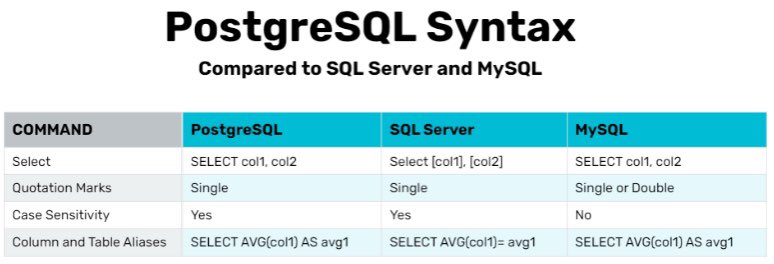
I’m seeing this question a lot. BigQuery uses similar SQL syntax as you’d have in MySQL, PostgreSQL. The only change is the environment, you’re still writing a similar SQL query. Screenshot on the right is a query I wrote in BigQuery Editor for a project last year.

Loading suggestions...