

🟢 Operations On Array in JavaScript!
A thread...⇩
A thread...⇩
✅ we use some methods of JavaScript for array Operations!
✔ here some methods are!
➊ push
➋ length
➌ unshift
➍ pop
➎ shift
➏ splice
➐ Array.isArray
✔ here some methods are!
➊ push
➋ length
➌ unshift
➍ pop
➎ shift
➏ splice
➐ Array.isArray
➊ push
➟ The "push" method Add a new item to an array.
for example ⇩
✔ ["computer science", "math", "bio", "physics"]; ➟ this is an array & stores some methods but if you want to add a new (element) to this array use the "push" method.
➟ The "push" method Add a new item to an array.
for example ⇩
✔ ["computer science", "math", "bio", "physics"]; ➟ this is an array & stores some methods but if you want to add a new (element) to this array use the "push" method.

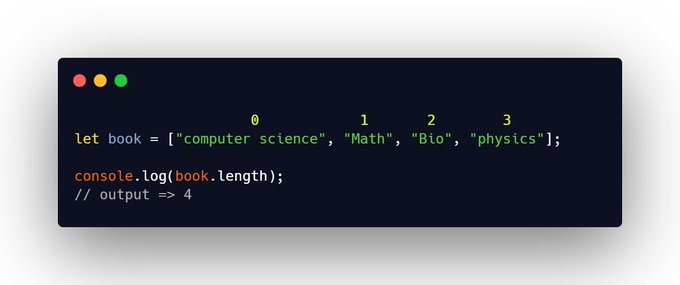
➋ length
➟ The "length" method of arrays in JavaScript. that returns the number of elements in a given array.
➟ The "length" method of arrays in JavaScript. that returns the number of elements in a given array.
➌ unshift
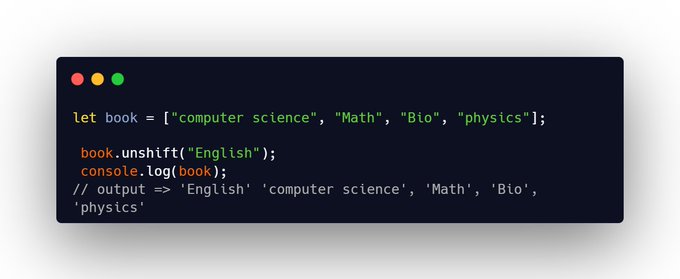
➟ The "unshift" method adds new elements or 'items' to the beginning of an array.
➤ For example, you have created an array & store some elements & you want to add new elements from the beginning of this array.
➟ The "unshift" method adds new elements or 'items' to the beginning of an array.
➤ For example, you have created an array & store some elements & you want to add new elements from the beginning of this array.
➍ pop
➟ The "pop" method is used to remove elements.
➤ For example ["CS", "Math", "Bio"] This is an array & stores 3 elements if you want to remove the last element in this array use the "pop" property.
➟ The "pop" method is used to remove elements.
➤ For example ["CS", "Math", "Bio"] This is an array & stores 3 elements if you want to remove the last element in this array use the "pop" property.
![➍ pop
➟ The "pop" method is used to remove elements.
➤ For example ["CS", "Math", "Bio"] This is a...](https://pbs.twimg.com/media/FfGzs8qVQAAumY0.jpg)
➎ shift
➟The "shift" method works exactly same as the "pop" property but the Difference is only that the "pop" remove the last elements & the "shift" remove the first element in an array.
➟The "shift" method works exactly same as the "pop" property but the Difference is only that the "pop" remove the last elements & the "shift" remove the first element in an array.

➏ splice
let book = ["CS", "Math", "Bio"]; (this is a array)
➟The splice() method removes a particular element in an array.
You can use the splice() method to remove the book names from the 'book'!
let book = ["CS", "Math", "Bio"]; (this is a array)
➟The splice() method removes a particular element in an array.
You can use the splice() method to remove the book names from the 'book'!
![➏ splice
let book = ["CS", "Math", "Bio"]; (this is a array)
➟The splice() method removes a partic...](https://pbs.twimg.com/media/FfGztpNUYAAjVk8.png)
➐ Array.isArray
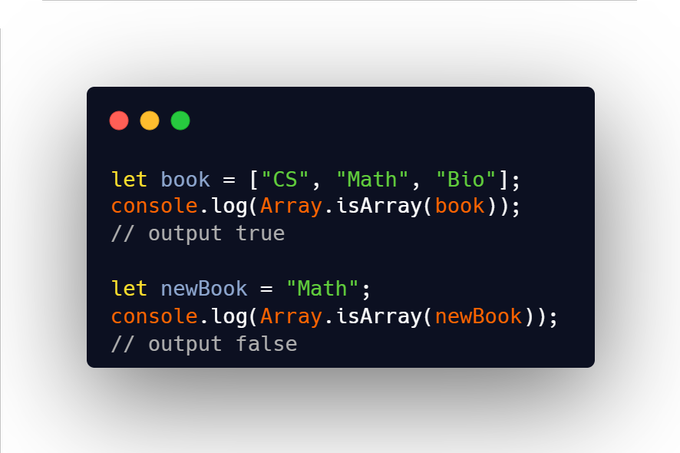
➟ The Array.isArray() method determines whether the passed value is an Array.
For example, if you have created an array or variable & you want to check if it is an array or not you can use this Array.isArray() method.
➟ The Array.isArray() method determines whether the passed value is an Array.
For example, if you have created an array or variable & you want to check if it is an array or not you can use this Array.isArray() method.
That's it for this thread. If you found it useful!
🤝 Follow me
@souravcode
Hey, I am a Web Developer From India, Helping people learn web development. I Tweet Around.
HTML
CSS
JavaScript
React, & More Tips & Web Development Content.
Like 💖
Retweet
🤝 Follow me
@souravcode
Hey, I am a Web Developer From India, Helping people learn web development. I Tweet Around.
HTML
CSS
JavaScript
React, & More Tips & Web Development Content.
Like 💖
Retweet
Loading suggestions...