
Education
Technology
Data Analysis
Excel
Data Processing
Data Manipulation
String Manipulation
Text Functions

4 text functions you need to know:
1. TEXTSPLIT
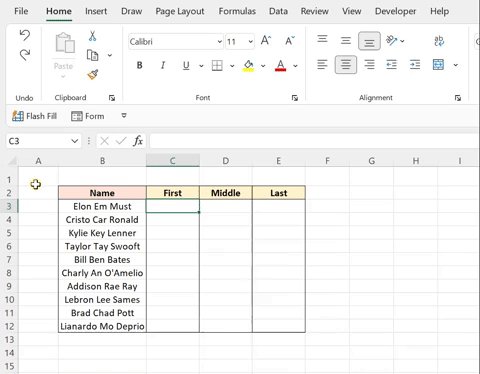
Need to break up data in a text string into multiple rows or columns? Use the TEXTSPLIT function to split up text at a specified delimiter. For example, this function can split full names into first, middle, and last name columns by defining the col_delimiter.
Need to break up data in a text string into multiple rows or columns? Use the TEXTSPLIT function to split up text at a specified delimiter. For example, this function can split full names into first, middle, and last name columns by defining the col_delimiter.
2. TEXTJOIN
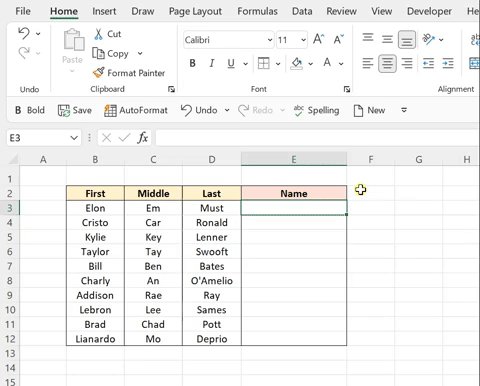
Now that we’ve learned how to split text, let’s learn how to combine it. The TEXTJOIN function combines values into one with a delimiter in between each value. For example, we can combine first, middle, and last name back together with a space in between each name.
Now that we’ve learned how to split text, let’s learn how to combine it. The TEXTJOIN function combines values into one with a delimiter in between each value. For example, we can combine first, middle, and last name back together with a space in between each name.
3. TEXTBEFORE
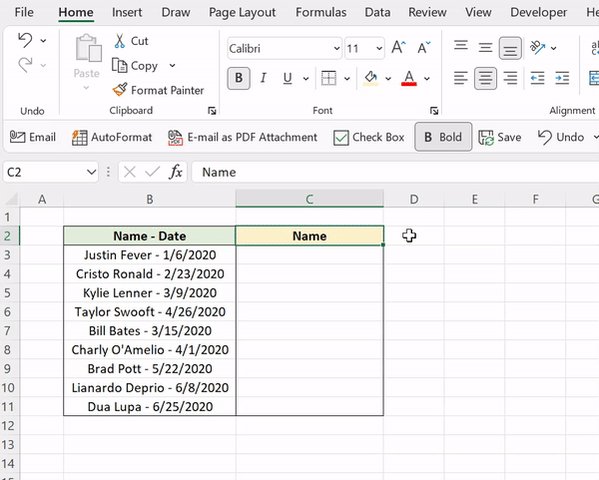
Now let’s say we need to extract text from the beginning of a text string. The TEXTBEFORE function extracts text before a specified delimiter. For example, if we just want the names from this list. We can extract the names by defining the dash as the delimiter.
Now let’s say we need to extract text from the beginning of a text string. The TEXTBEFORE function extracts text before a specified delimiter. For example, if we just want the names from this list. We can extract the names by defining the dash as the delimiter.
4. TEXTAFTER
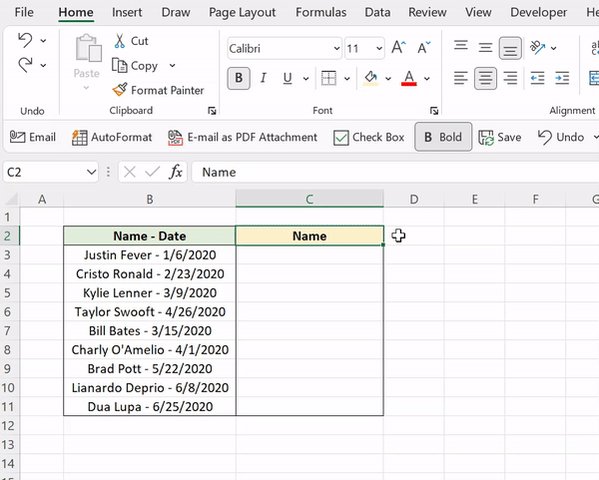
Similarly, we can extract text from the end of a text string using the TEXTAFTER function. TEXTAFTER extracts text after a specified delimiter. If we want to extract the date and omit the names, we can define the dash as the delimiter using the TEXTAFTER function.
Similarly, we can extract text from the end of a text string using the TEXTAFTER function. TEXTAFTER extracts text after a specified delimiter. If we want to extract the date and omit the names, we can define the dash as the delimiter using the TEXTAFTER function.
Break up (or get back together) with these text functions. Who knew all four? #excel
Follow me @exceldictionary for even more Excel tips and tricks.
And if you never want to forget my excel tips at your desk, check out my shortcut merch and ebooks. shop.morningbrew.com
Follow me @exceldictionary for even more Excel tips and tricks.
And if you never want to forget my excel tips at your desk, check out my shortcut merch and ebooks. shop.morningbrew.com
Loading suggestions...