

I had recently covered many...
layer 1 & 2 projects like $ARB, $ZKS, $APT, etc.
Now, it's time to cover another Layer 1 known as "Onomy Protocol".
They will soon launch their native $NOM token.
Here is a testnet and #Airdrop strategy guide...
A thread 🧵
layer 1 & 2 projects like $ARB, $ZKS, $APT, etc.
Now, it's time to cover another Layer 1 known as "Onomy Protocol".
They will soon launch their native $NOM token.
Here is a testnet and #Airdrop strategy guide...
A thread 🧵

Will try to keep it as simple as possible.
• The next 2 tweet covers info about the project and token.
• The guide starts from the 3rd tweet.
• The next 2 tweet covers info about the project and token.
• The guide starts from the 3rd tweet.
Onomy Protocol is an interoperable Layer 1 ecosystem.
Onomy consists of four components:
- Onomy Network: A layer 1 blockchain
- Onomy Exchange: A Dex
- Onomy Access: A wallet
- Onomy Reserve: Governs the minting process of their stablecoin $DENOM by keeping $NOM as collateral.
Onomy consists of four components:
- Onomy Network: A layer 1 blockchain
- Onomy Exchange: A Dex
- Onomy Access: A wallet
- Onomy Reserve: Governs the minting process of their stablecoin $DENOM by keeping $NOM as collateral.
About Token:
Their native token $NOM will be used as/for:
- Collateral for minting $DENOM [Stablecoin]
- Staking
- Governance
- Gas fees
Token Supply: 100M [Expected on genesis]
Detailed tokenomics is yet to be released.
Their native token $NOM will be used as/for:
- Collateral for minting $DENOM [Stablecoin]
- Staking
- Governance
- Gas fees
Token Supply: 100M [Expected on genesis]
Detailed tokenomics is yet to be released.
Let's get started with the guide 🚀
📇Task index:
1. Setting up Goerli testnet on Metamask and claiming test tokens.
2. Creating Keplr wallet.
3. Trying out the beta product:
🅐 Buy/Sell
🅑 Bridge
🅒 Staking
4. Discord activity.
1. Setting up Goerli testnet on Metamask and claiming test tokens.
2. Creating Keplr wallet.
3. Trying out the beta product:
🅐 Buy/Sell
🅑 Bridge
🅒 Staking
4. Discord activity.
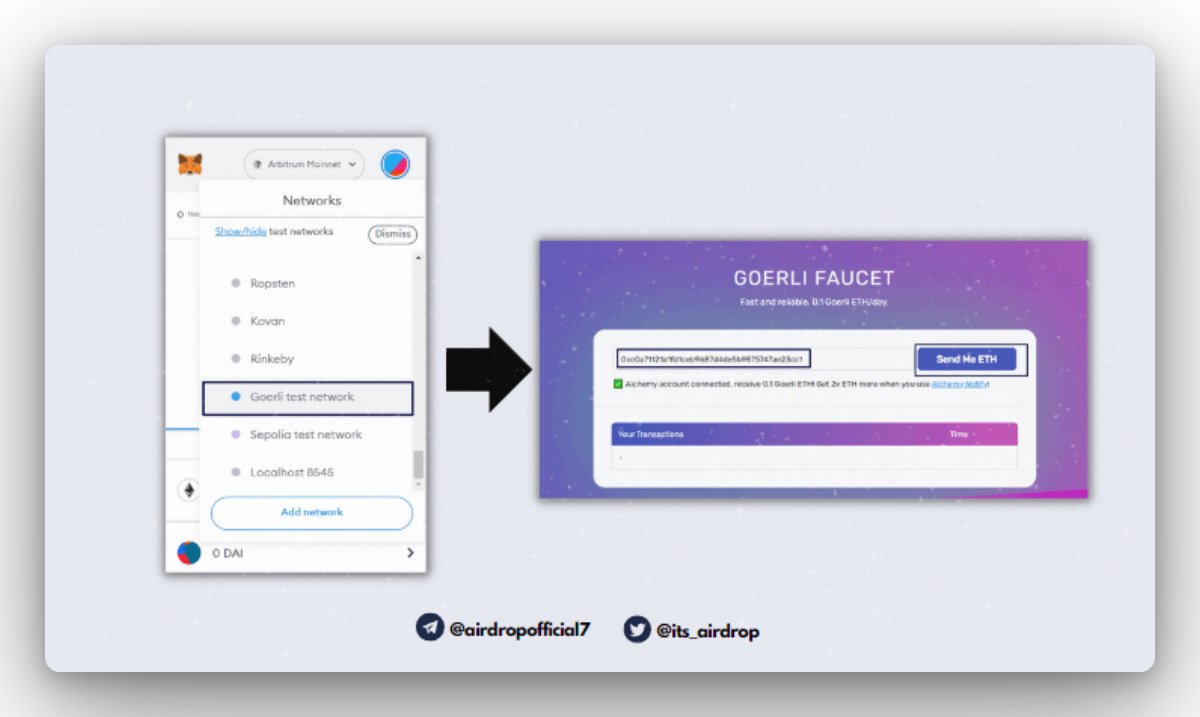
1. Set up Goerli on metamask and claim testnet $ETH.
• Open your metamask extension and select Goerli testnet.
• Signup and Claim some test ETH from this faucet: goerlifaucet.com
• Open your metamask extension and select Goerli testnet.
• Signup and Claim some test ETH from this faucet: goerlifaucet.com


3. Trying out the testnet product.
• Connect your wallet: bonding-curve-testnet.onomy.io
• Connect your wallet: bonding-curve-testnet.onomy.io
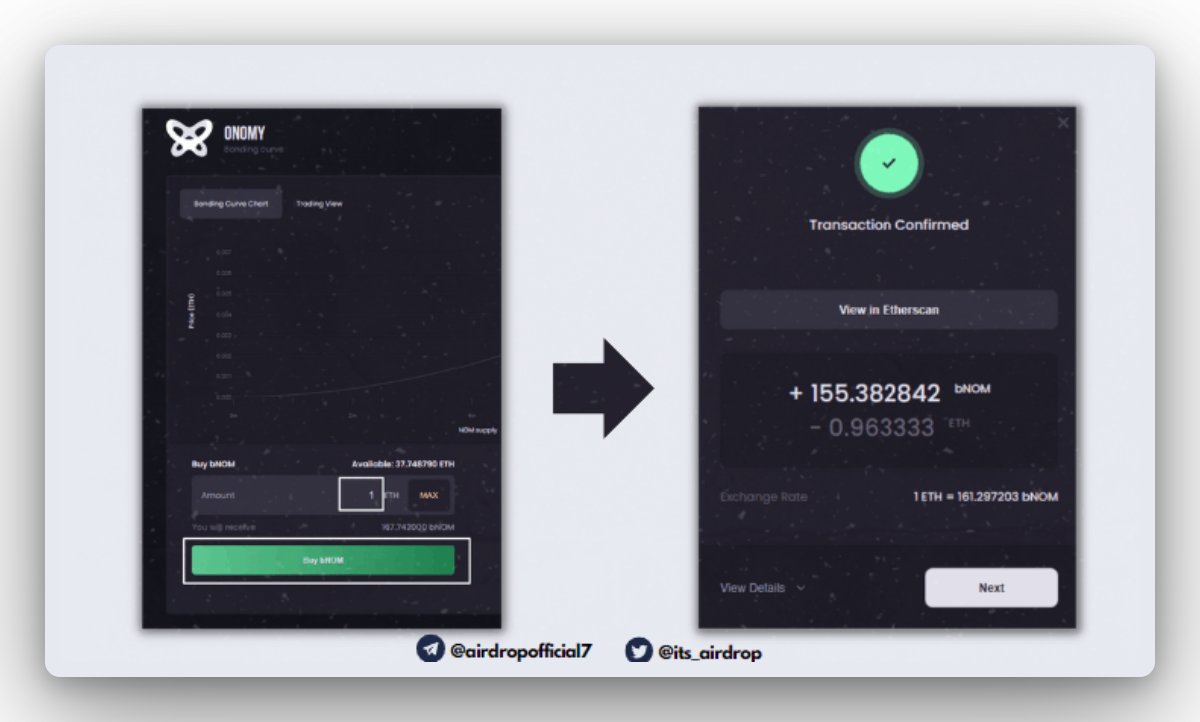
🅐 Buy/Sell:
• For buying, enter the amount of Ethereum, and click on "Buy bNOM".
• Select the gas fees and confirm the transaction.
• In the same way, you can try out the sell transaction.
• For buying, enter the amount of Ethereum, and click on "Buy bNOM".
• Select the gas fees and confirm the transaction.
• In the same way, you can try out the sell transaction.
🅑 Bridge:
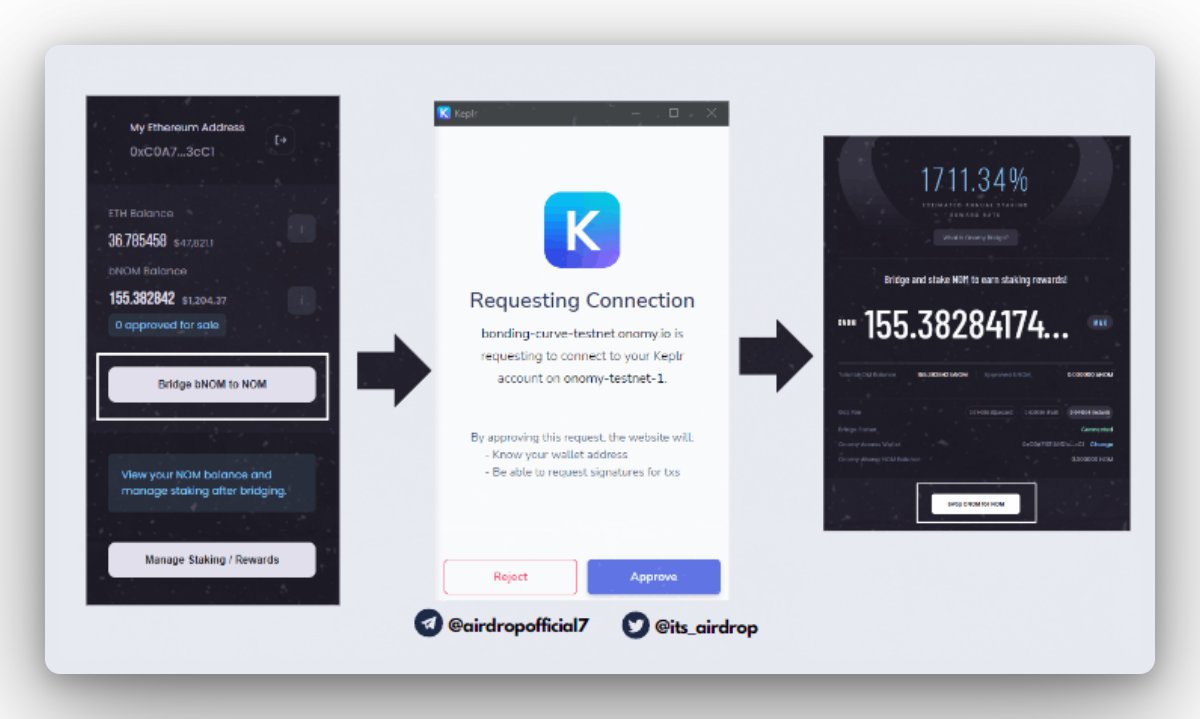
• Click on the "Bridge bNOM to NOM" button.
• Select Keplr Wallet.
• A popup will appear for approving the chain add request on Keplr.
• Approve it.
• On the next popup, enter the number of BNOM tokens you want to bridge and click on "Swap bNOM for NOM".
• Click on the "Bridge bNOM to NOM" button.
• Select Keplr Wallet.
• A popup will appear for approving the chain add request on Keplr.
• Approve it.
• On the next popup, enter the number of BNOM tokens you want to bridge and click on "Swap bNOM for NOM".
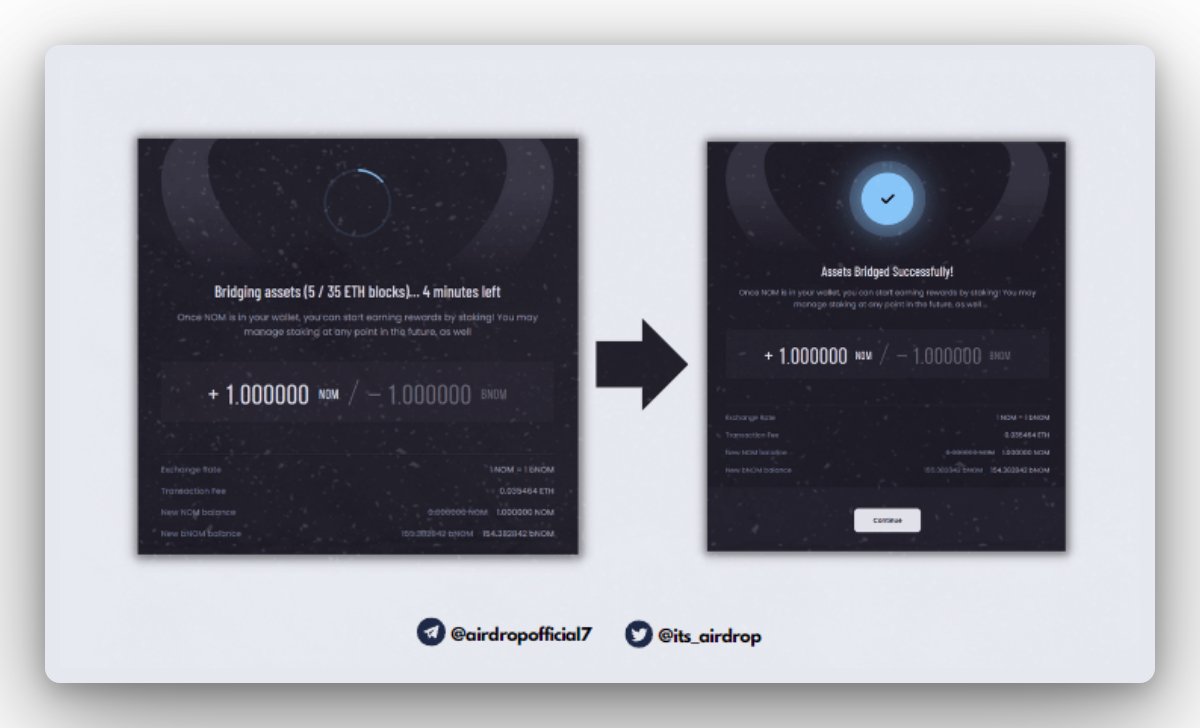
• Click on "Approve for Bridging".
• A metamask popup will appear, to confirm the transactions.
• It might take 5-7 mins for the full process to complete, after the completion move on to the staking step.
• A metamask popup will appear, to confirm the transactions.
• It might take 5-7 mins for the full process to complete, after the completion move on to the staking step.
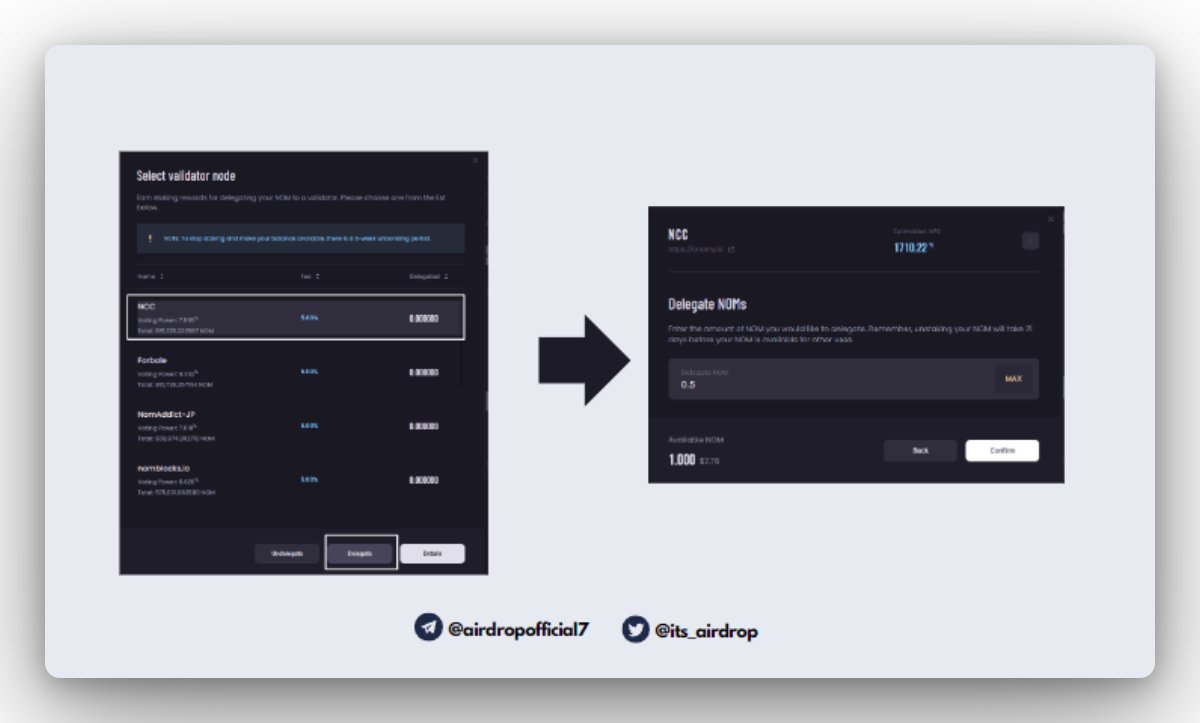
🅒 Staking:
• After bridging, click on the "Manage Staking / Rewards" button.
• Select any validator node and click on "Delegate".
• Enter the amount you want to delegate and confirm.
• Approve the transaction on Keplr wallet popup.
• That's all.
• After bridging, click on the "Manage Staking / Rewards" button.
• Select any validator node and click on "Delegate".
• Enter the amount you want to delegate and confirm.
• Approve the transaction on Keplr wallet popup.
• That's all.
🅓 Discord Activity:
• Try to be active on their Discord community: discord.gg
• Also, drop your keplr testnet wallet address in the "drop-nom-address 👀" channel.
• Try to be active on their Discord community: discord.gg
• Also, drop your keplr testnet wallet address in the "drop-nom-address 👀" channel.
There are many projects that are popping up daily, and it's hard to keep track of them.
So I have created this sheet for you with all the early-stage projects. Check it out: bit.ly
So I have created this sheet for you with all the early-stage projects. Check it out: bit.ly

Like content such as this?
You should definitely follow me here:
Twitter: @its_airdrop
Telegram: t.me
I have this mental condition, where I can only make such posts with the help of retweet/like therapy. So pls help me and retweet-like this tweet.
You should definitely follow me here:
Twitter: @its_airdrop
Telegram: t.me
I have this mental condition, where I can only make such posts with the help of retweet/like therapy. So pls help me and retweet-like this tweet.

Loading suggestions...