
Generate images from text using AI.
This has been in the hype for the last 6-8 months with the launch of OpenAI DALL.E, Midjourney and finally the open-source stable diffusion!
How can you use such AI tools to generate images that stand apart?
(A thread) 👇🧵
This has been in the hype for the last 6-8 months with the launch of OpenAI DALL.E, Midjourney and finally the open-source stable diffusion!
How can you use such AI tools to generate images that stand apart?
(A thread) 👇🧵
Prompt Engineering is the answer to this burgeoning question. In this thread, I will go through the basics of prompt engineering as described by @dailystablediff via @midjourney DreamStudio.
Let's look at it in detail 👇
Let's look at it in detail 👇
@dailystablediff @midjourney A text prompt for generating images has 4 basic components:
1. Raw prompt
2. Style
3. Artist
4. Finishing Touch
1. Raw prompt
2. Style
3. Artist
4. Finishing Touch
@dailystablediff @midjourney 1. Raw prompt
It is the simplest way of describing what you want to generate, for instance:
- Panda
- A warrior with a sword
- Skeleton
This would result in a random and chaotic response and often refer to as the beginner's mistake.
It is the simplest way of describing what you want to generate, for instance:
- Panda
- A warrior with a sword
- Skeleton
This would result in a random and chaotic response and often refer to as the beginner's mistake.
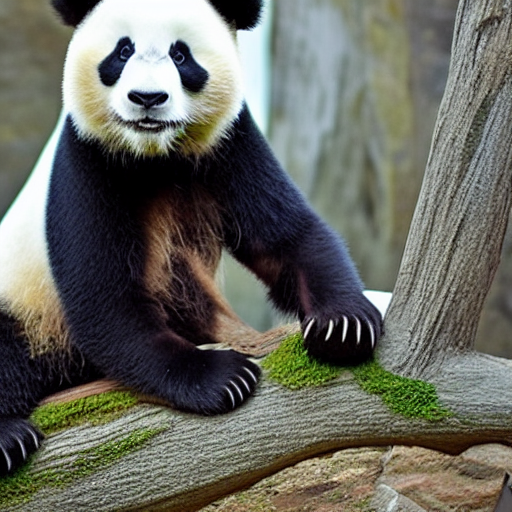
@dailystablediff @midjourney These images are not aesthetically pleasing and far from being considered art.
Pro Tip: Try to be as descriptive as possible with the details when you are writing a text prompt. Here is an example for you to understand the difference between a good prompt and a bad prompt.
Pro Tip: Try to be as descriptive as possible with the details when you are writing a text prompt. Here is an example for you to understand the difference between a good prompt and a bad prompt.
@dailystablediff @midjourney Bad Prompt: Panda
Why is it a bad prompt?
- Less descriptive with no details, inviting random and chaotic results.
Why is it a bad prompt?
- Less descriptive with no details, inviting random and chaotic results.
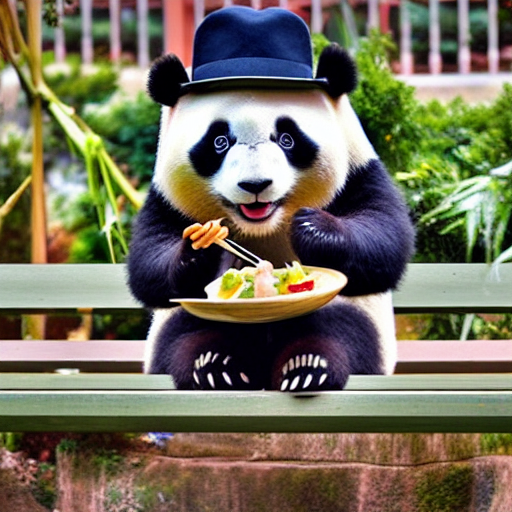
@dailystablediff @midjourney Good Prompt: A cute panda sitting on the bench eating dumplings and wearing a black hat.
Why is it a good prompt?
- Descriptive and detailed so the model understands the nuances behind the image.
Why is it a good prompt?
- Descriptive and detailed so the model understands the nuances behind the image.
@dailystablediff @midjourney 2. Style
Style is a crucial part of the prompt. When you don't specify the style, AI usually chooses the one it has seen the most in the related images. Most of the time "style + raw prompt" is enough, as the style influences the image the most right after the raw prompt.
Style is a crucial part of the prompt. When you don't specify the style, AI usually chooses the one it has seen the most in the related images. Most of the time "style + raw prompt" is enough, as the style influences the image the most right after the raw prompt.
@dailystablediff @midjourney Here are some of the most commonly used styles:
1. Realistic
2. Oil painting
3. Pencil drawing
4. Concept art
These are on a very high level and can be further broken down into sub-styles.
1. Realistic
2. Oil painting
3. Pencil drawing
4. Concept art
These are on a very high level and can be further broken down into sub-styles.
@dailystablediff @midjourney 3. Artist
To make your style more specific, or the image more coherent, you can use artists’ names in your prompt. For instance, if you want a very abstract image, you can add “made by Pablo Picasso” or just simply, “Picasso”.
To make your style more specific, or the image more coherent, you can use artists’ names in your prompt. For instance, if you want a very abstract image, you can add “made by Pablo Picasso” or just simply, “Picasso”.
@dailystablediff @midjourney Here are some famous artists for the given styles:
1. Realistic
- John Singer Sargent
- Edgar Degas
2. Oil painting
- Leonardo DaVinci
- Vincent Van Gogh
3. Pencil drawing
- Albrecht Dürer
- Michelangelo
4. Concept art
- Thomas Moran
- Claude Monet
1. Realistic
- John Singer Sargent
- Edgar Degas
2. Oil painting
- Leonardo DaVinci
- Vincent Van Gogh
3. Pencil drawing
- Albrecht Dürer
- Michelangelo
4. Concept art
- Thomas Moran
- Claude Monet
@dailystablediff @midjourney 4. Finishing Touch
Finishing touches are the final things that you add to your prompt to make it look like you want. For instance, if you want to make your image more artistic, add “trending on artstation”. If you want to add more realistic lighting add “Unreal Engine.”
Finishing touches are the final things that you add to your prompt to make it look like you want. For instance, if you want to make your image more artistic, add “trending on artstation”. If you want to add more realistic lighting add “Unreal Engine.”
@dailystablediff @midjourney Here are some phrases that you can add to the end of your prompt to make it look really interesting:
Highly detailed, surrealism, trending on art station, matte, elegant, the most beautiful image ever seen, illustration, digital paint, 8k, 4k
Highly detailed, surrealism, trending on art station, matte, elegant, the most beautiful image ever seen, illustration, digital paint, 8k, 4k
@dailystablediff @midjourney Again a big thank you to @dailystablediff for coming up with this prompt guide. Here is the link to the prompt guide 👇
beta.dreamstudio.ai
beta.dreamstudio.ai
@dailystablediff @midjourney That's a wrap 👋
If you liked this thread, consider following me @Saboo_Shubham_ to access more such NLP, ML related content.
Jump to the first tweet and RT it:
If you liked this thread, consider following me @Saboo_Shubham_ to access more such NLP, ML related content.
Jump to the first tweet and RT it:
Loading suggestions...