

Hiring a virtual assistant is life-changing.
My VA saves me ~40 hours of my time per month.
Here's exactly how we work together in 6 simple steps:
My VA saves me ~40 hours of my time per month.
Here's exactly how we work together in 6 simple steps:
Audit what distracts you the most:
I pay close attention to my schedule to understand when I am most distracted, by what, and how often.
I keep a running tally each week to make sure I'm identifying any new distractions that have crept up.
Awareness is your first step.
I pay close attention to my schedule to understand when I am most distracted, by what, and how often.
I keep a running tally each week to make sure I'm identifying any new distractions that have crept up.
Awareness is your first step.
Record Process videos:
Your VA won't always have the background to understand what they’re solving & why.
So, record a video where you walk through every single step.
Share these with a few people who have no context & see if they can complete the tasks you teach on video.
Your VA won't always have the background to understand what they’re solving & why.
So, record a video where you walk through every single step.
Share these with a few people who have no context & see if they can complete the tasks you teach on video.
Store the videos in Notion:
Upload videos to a Notion page with additional instructions.
The most common instructions:
- Email templates to respond to prospects and customers
- Links to other resources to support their work
- Tone and etiquette guides
Upload videos to a Notion page with additional instructions.
The most common instructions:
- Email templates to respond to prospects and customers
- Links to other resources to support their work
- Tone and etiquette guides
Spend quality 1:1 time:
Spend your first few weeks or a month, working together 1:1
Meet regularly, give direct feedback, and listen if they have suggestions.
Some VAs are so experienced that they make your processes 10x better.
Spend your first few weeks or a month, working together 1:1
Meet regularly, give direct feedback, and listen if they have suggestions.
Some VAs are so experienced that they make your processes 10x better.
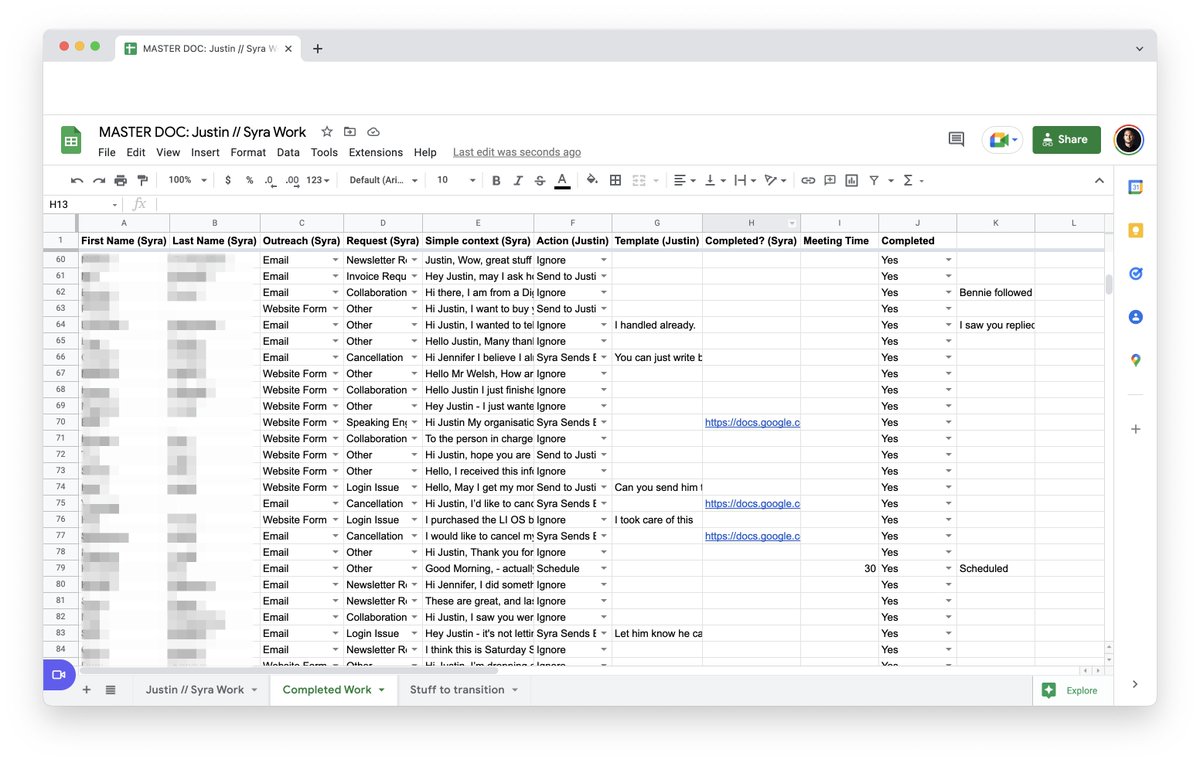
Move to a trigger-based system:
Once we had worked together for a month, I introduced a trigger system.
1: Grant access to my email
2: She puts each email into a spreadsheet
3: I select the intended action from a drop-down
4: She sees the trigger and takes appropriate action
Once we had worked together for a month, I introduced a trigger system.
1: Grant access to my email
2: She puts each email into a spreadsheet
3: I select the intended action from a drop-down
4: She sees the trigger and takes appropriate action
Review weekly:
Every single week, we catch something that we aren't prepared for.
A new type of inquiry leads to a new video, new instructions, new templates, and new triggers.
So we build them out together.
It's an iterative process that gets better every single week!
Every single week, we catch something that we aren't prepared for.
A new type of inquiry leads to a new video, new instructions, new templates, and new triggers.
So we build them out together.
It's an iterative process that gets better every single week!
The Outcome:
Rather than context switching & losing time, I review our worksheet 1x in the AM and in the PM.
This has saved me ~2 hours per day.
That's 40 hours per month.
And with firms like Zirtual charging $750 per month for a VA, it's a great way to get your time back.
Rather than context switching & losing time, I review our worksheet 1x in the AM and in the PM.
This has saved me ~2 hours per day.
That's 40 hours per month.
And with firms like Zirtual charging $750 per month for a VA, it's a great way to get your time back.
TL;DR:
1. Audit your time
2. Record process videos
3. Store videos in Notion
4. Work together 1:1 for a month
5. Introduce workflow triggers
6. Review weekly
1. Audit your time
2. Record process videos
3. Store videos in Notion
4. Work together 1:1 for a month
5. Introduce workflow triggers
6. Review weekly
That's a wrap!
If you enjoyed this thread:
1. Follow me @thejustinwelsh for more of these
2. RT the tweet below to share this thread with your audience
If you enjoyed this thread:
1. Follow me @thejustinwelsh for more of these
2. RT the tweet below to share this thread with your audience
If anyone wants to save some time, head into my GDrive and make a copy of this Excel sheet.
docs.google.com
docs.google.com
If you like Tweets like this, you might enjoy my weekly newsletter, The Saturday Solopreneur.
1 actionable tip for growing your online business. Always 4 minutes or less.
Join 50,000+ subscribers here:
justinwelsh.me
1 actionable tip for growing your online business. Always 4 minutes or less.
Join 50,000+ subscribers here:
justinwelsh.me
Loading suggestions...