

Every Brand should be utilizing Countdown Timers in their Responsive Search Ads before Black Friday
It will Boost your ROAS & Provide REAL Urgency!
Heres how you can Copy & Paste my Strategy >>>🧵
It will Boost your ROAS & Provide REAL Urgency!
Heres how you can Copy & Paste my Strategy >>>🧵
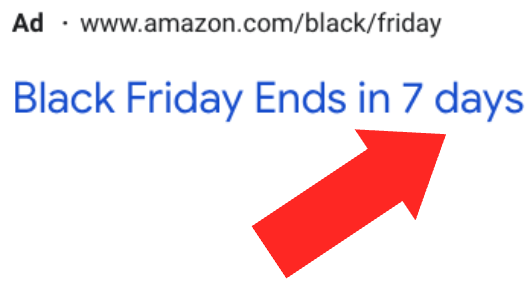
What are Dynamic Countdown Timers:
Timers allow you to Run Ads like this⤵️
"Black Friday ends in ___________"
With the Underline Dynamically Changing
Countdown Timers are important for Brands to avoid "lying" to prospects which could potentially tarnish your Brands reputation
Timers allow you to Run Ads like this⤵️
"Black Friday ends in ___________"
With the Underline Dynamically Changing
Countdown Timers are important for Brands to avoid "lying" to prospects which could potentially tarnish your Brands reputation
How to Enable Countdown Timers:
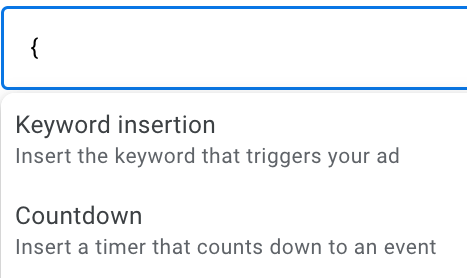
Create a New Response Search Ad & type in the Following Phrase in your Headline 1
{
This syntax will trigger the dropdown "Countdown" which enables the ability to create a Countdown Timer
Select "Countdown" then proceed to the next steps
Create a New Response Search Ad & type in the Following Phrase in your Headline 1
{
This syntax will trigger the dropdown "Countdown" which enables the ability to create a Countdown Timer
Select "Countdown" then proceed to the next steps
Countdown Timer Settings:
Select the Date when your sale ends. If you are running a Black Friday Sale the syntax will look like this
{COUNTDOWN(2022-11-25 23:59:59,7)}
This syntax makes your sale end on the 25th at 11:59:59
You can customize the time to match your sale
Select the Date when your sale ends. If you are running a Black Friday Sale the syntax will look like this
{COUNTDOWN(2022-11-25 23:59:59,7)}
This syntax makes your sale end on the 25th at 11:59:59
You can customize the time to match your sale
Templates to Copy & Paste:
Hurry, sale ends in ____
Black Friday Ends in ___
30% OFF Sale Ends in ____
You can Replace the ___ text with the following syntax:
{COUNTDOWN(2022-11-25 23:59:59,7)}
Get Creative with it & you can even use these countdowns in your descriptions
Hurry, sale ends in ____
Black Friday Ends in ___
30% OFF Sale Ends in ____
You can Replace the ___ text with the following syntax:
{COUNTDOWN(2022-11-25 23:59:59,7)}
Get Creative with it & you can even use these countdowns in your descriptions
I hope you enjoyed my Strategy to Maximize Your Google Ads for Black Friday!
I haven't accepted any new clients in 3 months to focus on existing brands (Quality, over Quantity)
If you spend $1k per day & need help maximizing Your Google Ads for Black Friday, DM me "ADS"
I haven't accepted any new clients in 3 months to focus on existing brands (Quality, over Quantity)
If you spend $1k per day & need help maximizing Your Google Ads for Black Friday, DM me "ADS"
Loading suggestions...