

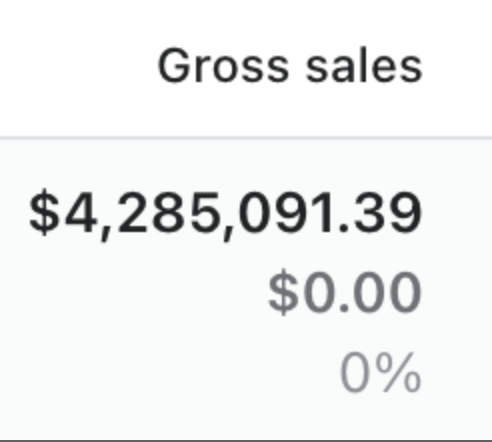
Over $4,250,000 in sales since last October.
I am releasing a completely FREE High Ticket eCom Course on Twitter via threads.
Module 3: Supplier Research 🤝
How to find top-tier suppliers with amazing profit margins.
// THREAD // 🧵
I am releasing a completely FREE High Ticket eCom Course on Twitter via threads.
Module 3: Supplier Research 🤝
How to find top-tier suppliers with amazing profit margins.
// THREAD // 🧵
Where do I find suppliers ❓ You might ask.
Google Shopping - the most important place to find them.
You can use Home Depot & Wayfair as well, however, google shopping really reigns superior.
Google Shopping - the most important place to find them.
You can use Home Depot & Wayfair as well, however, google shopping really reigns superior.
When I google "sauna" for example and select shopping, the first thing I want to do is set the price to over $1,000.
This goes for any product - we're doing high tickets so this part is self-explanatory.
Now to find brands is very simple.
This goes for any product - we're doing high tickets so this part is self-explanatory.
Now to find brands is very simple.
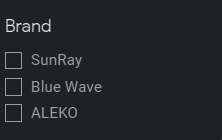
First, on the left side, you will see a list of brands.
You want to write these down somewhere - preferably the supplier research sheet I will give you in the next post.
You want to write these down somewhere - preferably the supplier research sheet I will give you in the next post.
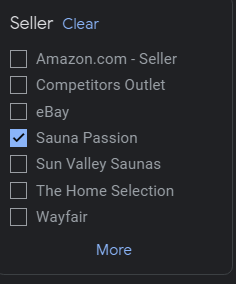
Another way to find brands is to scroll down to the seller tab and look for other dropshipping stores.
Usually, they'll have the product type in the name.
As you can see Sauna Passion & Sun Valley Saunas are two perfect examples.
Usually, they'll have the product type in the name.
As you can see Sauna Passion & Sun Valley Saunas are two perfect examples.
Visiting their websites and looking for a "Brands" or "Our Brands" section is what you want.
As you can see I visited one of their websites and found 16 brands just like that.
Super simple.
Now I'll write these down in my sheet.
As you can see I visited one of their websites and found 16 brands just like that.
Super simple.
Now I'll write these down in my sheet.

After we find all of our brands, around 10 will do, for now, we want to ensure they have MAP in place.
Minimum Advertised Pricing.
MAP is a minimum price that the suppliers set that dealers like us can not go under or face termination.
MAP is a deal breaker and a must.
Minimum Advertised Pricing.
MAP is a minimum price that the suppliers set that dealers like us can not go under or face termination.
MAP is a deal breaker and a must.
How do we find MAP ❓
Search your the product you wish to check in google and click "shopping"
Always set the price to at least above $1,000.
It's easier to find signs of MAP this way.
Search your the product you wish to check in google and click "shopping"
Always set the price to at least above $1,000.
It's easier to find signs of MAP this way.
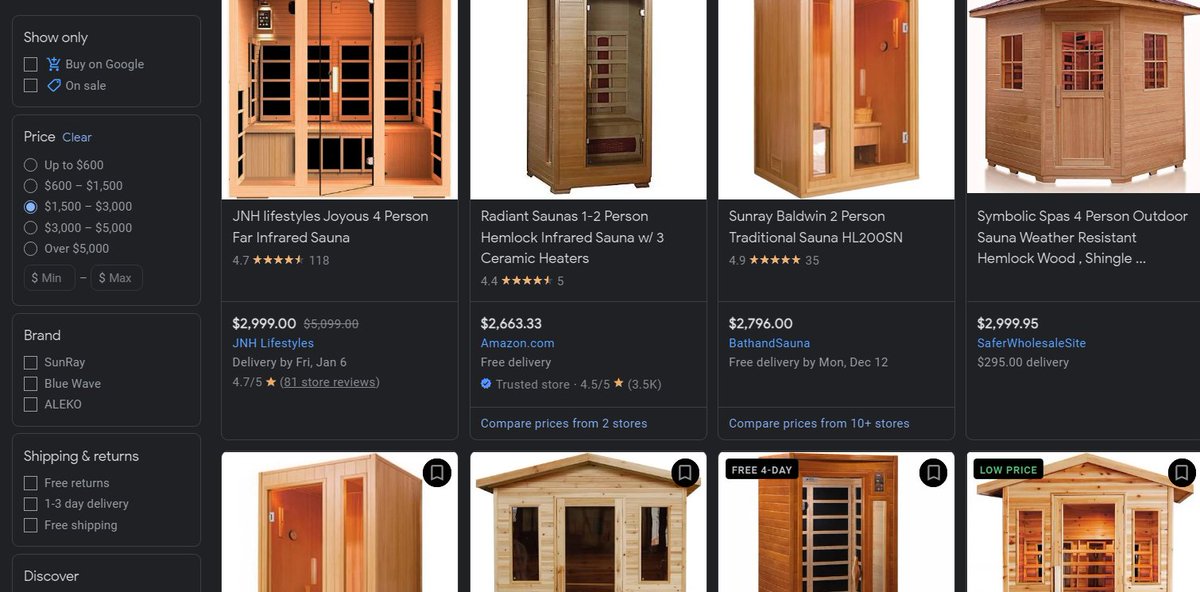
Now, what we want to do is compare prices from other stores.
Trying to find a clear trend of the same exact prices across multiple stores, telling us that there is a MAP in place.
Click the "Compare prices from X stores" to do this.
Trying to find a clear trend of the same exact prices across multiple stores, telling us that there is a MAP in place.
Click the "Compare prices from X stores" to do this.
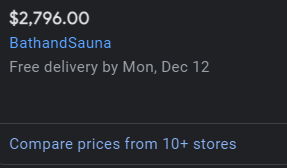
After you've arrived on the compare stores page you want to look for the same product with the same price in multiple stores.
In the screenshot below we can see an obvious MAP - the price being set to $2,796.
In the screenshot below we can see an obvious MAP - the price being set to $2,796.
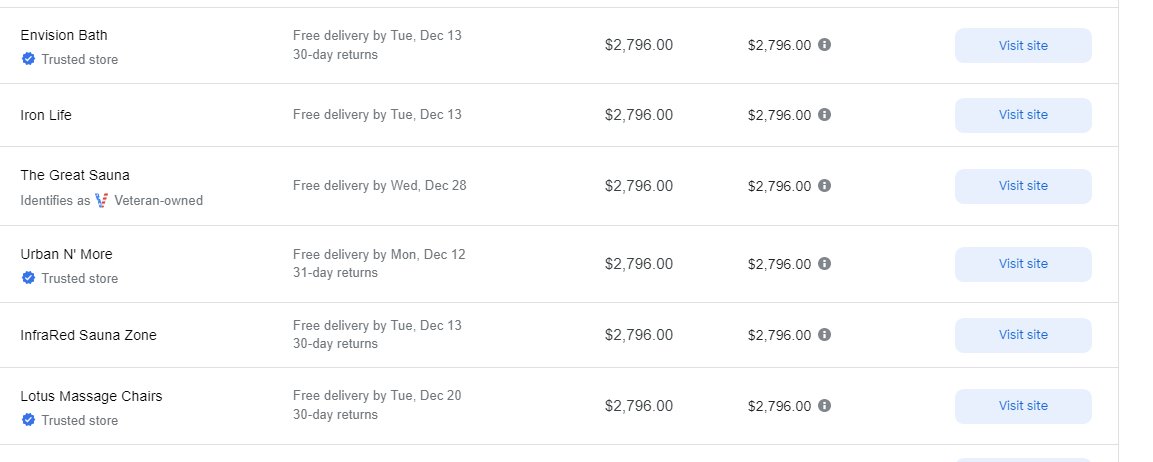
The prices don't have to be the exact same.
What we are looking for is an obvious trend, for example out of 10 listings 7-8 of them are listed at $3,999.
What we are looking for is an obvious trend, for example out of 10 listings 7-8 of them are listed at $3,999.
Alright, now you should have 10 brands that all have MAP enforced.
We're looking solid.
Next step - brand demand.
I personally use "Ahrefs" for checking this, but it has no free trial.
Semrush / Moz / Uber suggest are SEO tools that have free trials
We're looking solid.
Next step - brand demand.
I personally use "Ahrefs" for checking this, but it has no free trial.
Semrush / Moz / Uber suggest are SEO tools that have free trials
The metric we will be using is how many users are searching for the brand per month.
500-3000 is the sweet spot.
Over 500: Ideal
Over 100-150: Solid
Anything above 100-200 is okay.
Higher = Better, but also usually signifies more competition.
500-3000 is the sweet spot.
Over 500: Ideal
Over 100-150: Solid
Anything above 100-200 is okay.
Higher = Better, but also usually signifies more competition.
Keep in mind that brand demand is not a deal breaker, it is more just for your information.
Let's use the same sauna example before, I'm going to go with the brand "Golden Designs" on our above list.
Looks like they have a volume of 400.
Let's use the same sauna example before, I'm going to go with the brand "Golden Designs" on our above list.
Looks like they have a volume of 400.
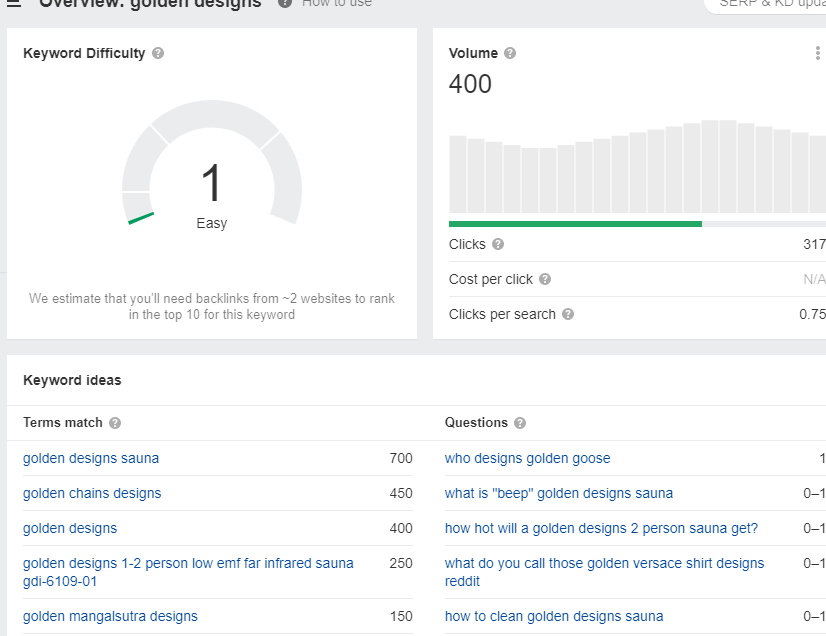
You can see the keyword ideas at the bottom of the above screenshot.
This is critical to check because the volume could be skewed.
How?
Sometimes brand names overlap with other searches, for example:
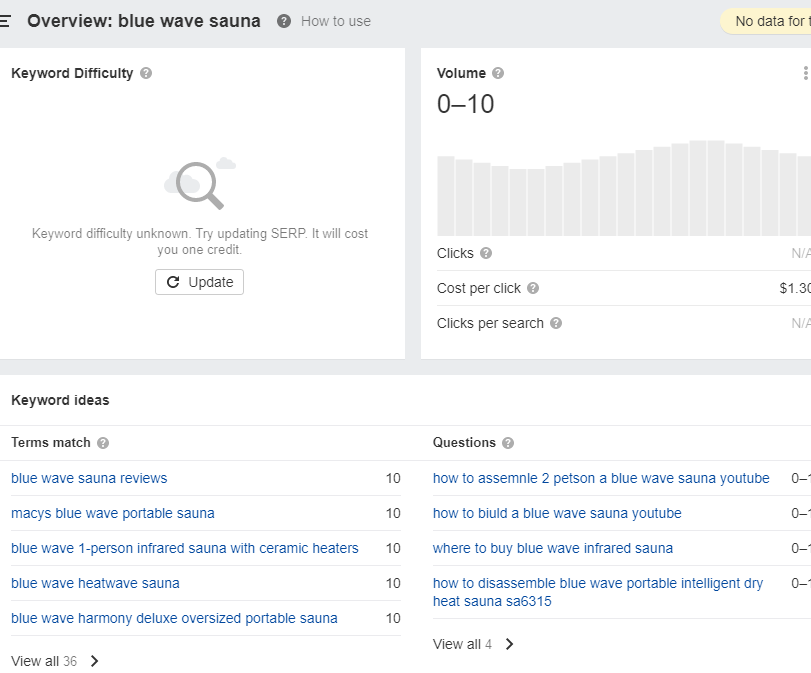
Blue wave is a sauna brand, but check out the keyword ideas and volume.
This is critical to check because the volume could be skewed.
How?
Sometimes brand names overlap with other searches, for example:
Blue wave is a sauna brand, but check out the keyword ideas and volume.
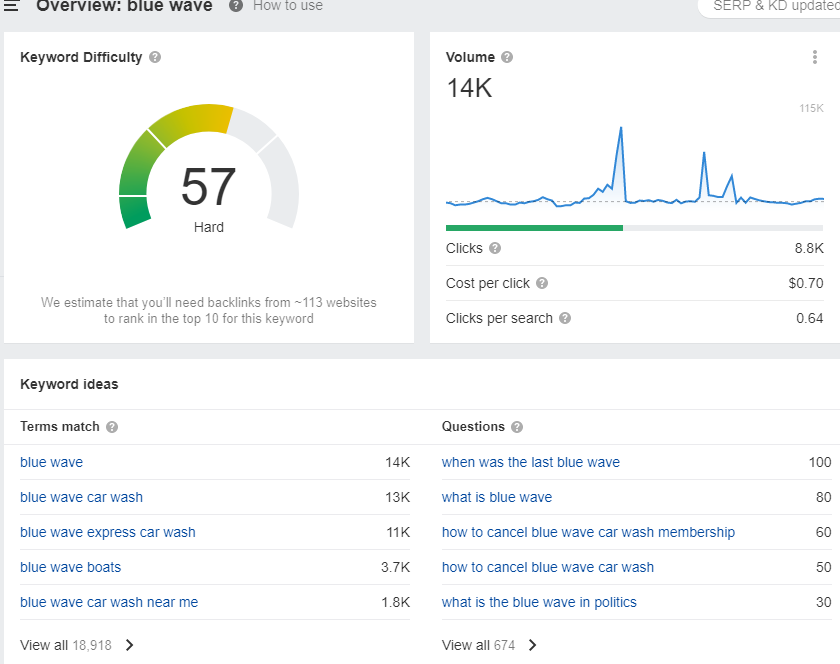
As you can see the data is way higher than it should be.
To solve this, just search "Blue Wave Sauna(s)" or whatever brand you're searching.
Now the volume is completely wrecked, a very unpopular brand it seems.
To solve this, just search "Blue Wave Sauna(s)" or whatever brand you're searching.
Now the volume is completely wrecked, a very unpopular brand it seems.
Take the branded demand for all of your suppliers and input them into the sheet.
Boom.
Just to check, we should now have 10 brand names all with MAP enforced as well as the brand demand listed.
What's next?
Contact information.
Boom.
Just to check, we should now have 10 brand names all with MAP enforced as well as the brand demand listed.
What's next?
Contact information.
The first step is finding a brand's website.
We want an email and a phone number to input into our sheet.
This can be found usually through a "Become a Dealer" button.
But it looks like "Golden Designs" doesn't have one.
Just a phone number, which is fine.
We want an email and a phone number to input into our sheet.
This can be found usually through a "Become a Dealer" button.
But it looks like "Golden Designs" doesn't have one.
Just a phone number, which is fine.
We want to call or email the highest authority figure, working our way from the top instead of the bottom.
Usually, on the website, you will find an info/sales email and a generic customer service phone number.
Which is fine, just takes a lot longer.
Usually, on the website, you will find an info/sales email and a generic customer service phone number.
Which is fine, just takes a lot longer.
We should now have the following:
👉 List of 10 brands
👉 All MAP enforced
👉 Brand demand
👉 Email and number contact
This is by far the most effective way to find high-quality suppliers for your product type(s).
👉 List of 10 brands
👉 All MAP enforced
👉 Brand demand
👉 Email and number contact
This is by far the most effective way to find high-quality suppliers for your product type(s).
Now onto finding the profit margin of a specific brand product.
You want to go to one of your competitors' stores and ask for a discount, a chatbot usually works.
Try and get 10% off.
Keep in mind you will not always get a discount even if the margins are excellent.
You want to go to one of your competitors' stores and ask for a discount, a chatbot usually works.
Try and get 10% off.
Keep in mind you will not always get a discount even if the margins are excellent.
However, if you can get at least a 10% off code it is a very good sign that they have above 25-30% margins.
If you would like, check some or all of your brand's margins to get an idea of them.
If you would like, check some or all of your brand's margins to get an idea of them.
If you learned any amount of information from this thread:
1️⃣ - Like and retweet the first tweet to share this so others can check it out.
2️⃣ - Follow for more e-commerce-related content
1️⃣ - Like and retweet the first tweet to share this so others can check it out.
2️⃣ - Follow for more e-commerce-related content
🧙eCom Coaching: invictadigital.io
✅ One-off consulting: linktr.ee
📹 Youtube Content: youtube.com
📷 Personal IG: instagram.com
✅ One-off consulting: linktr.ee
📹 Youtube Content: youtube.com
📷 Personal IG: instagram.com
Loading suggestions...