

Day of #60daysOfMachineLearning
🔷 Pandas - Cleaning Data of Wrong Format 🔷
Cells with data of wrong format can make it difficult, or even impossible, to analyze data. To fix it, you have two options: remove the rows, or convert all cells in the columns into the same format
🔷 Pandas - Cleaning Data of Wrong Format 🔷
Cells with data of wrong format can make it difficult, or even impossible, to analyze data. To fix it, you have two options: remove the rows, or convert all cells in the columns into the same format
🟦 Convert Into a Correct Format
In our Data Frame, we have two cells with the wrong format. Check out row 22 and 26, the 'Date' column should be a string that represents a date:
In our Data Frame, we have two cells with the wrong format. Check out row 22 and 26, the 'Date' column should be a string that represents a date:

Let's try to convert all cells in the 'Date' column into dates.
Pandas has a to_datetime() method for this:
Pandas has a to_datetime() method for this:

As you can see from the result, the date in row 26 was fixed, but the empty date in row 22 got a NaT (Not a Time) value, in other words an empty value. One way to deal with empty values is simply removing the entire row.
🟦 Removing Rows
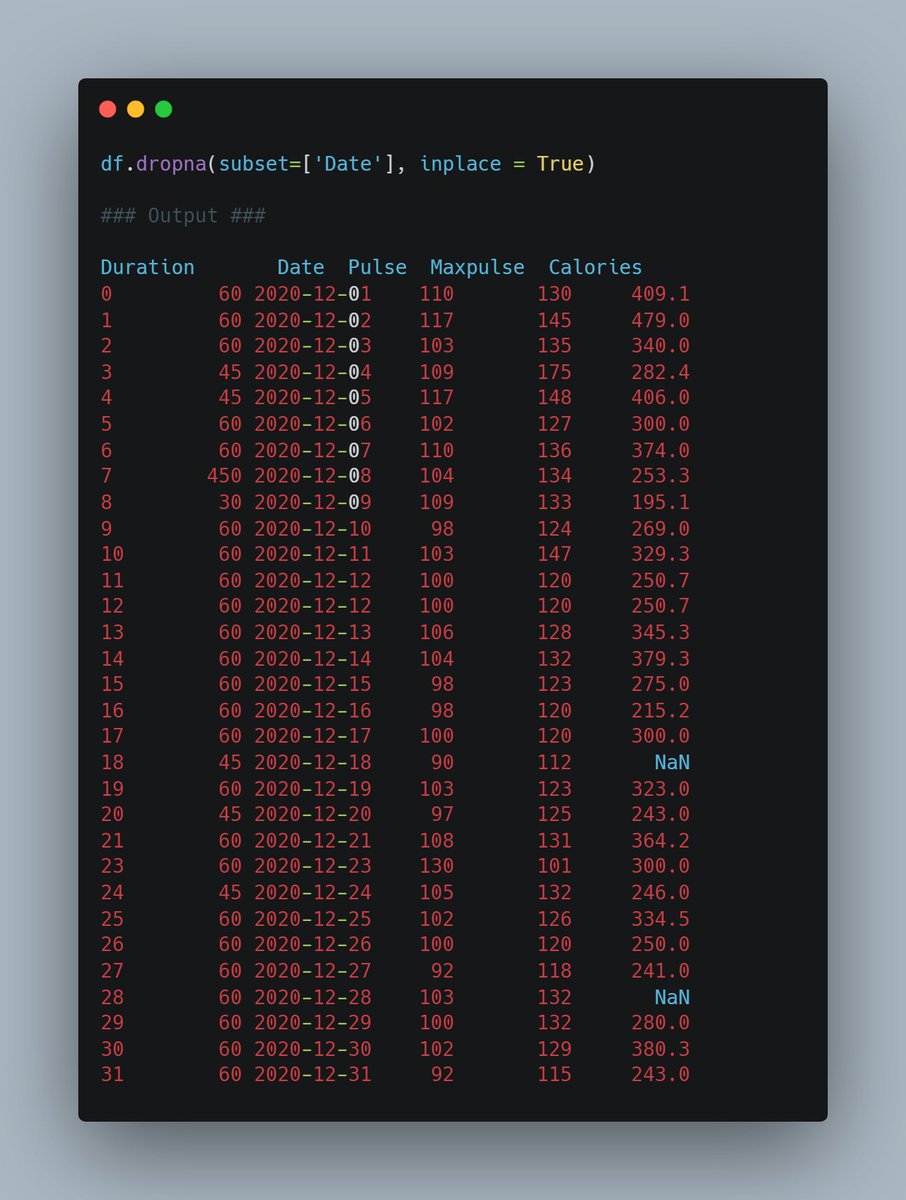
The result from the converting in the example above gave us a NaT value, which can be handled as a NULL value, and we can remove the row by using the dropna() method.
The result from the converting in the example above gave us a NaT value, which can be handled as a NULL value, and we can remove the row by using the dropna() method.
If you missed the previous days, don't worry! You can follow along and go back to day 1 by going to this link 👇
Forgot to add, this is day 36 😅
Loading suggestions...