

It's not about getting better at a spreadsheet.
It's about getting better at your job.
8 Excel tips to help you work faster, get promoted, and earn more $$: 📊
It's about getting better at your job.
8 Excel tips to help you work faster, get promoted, and earn more $$: 📊
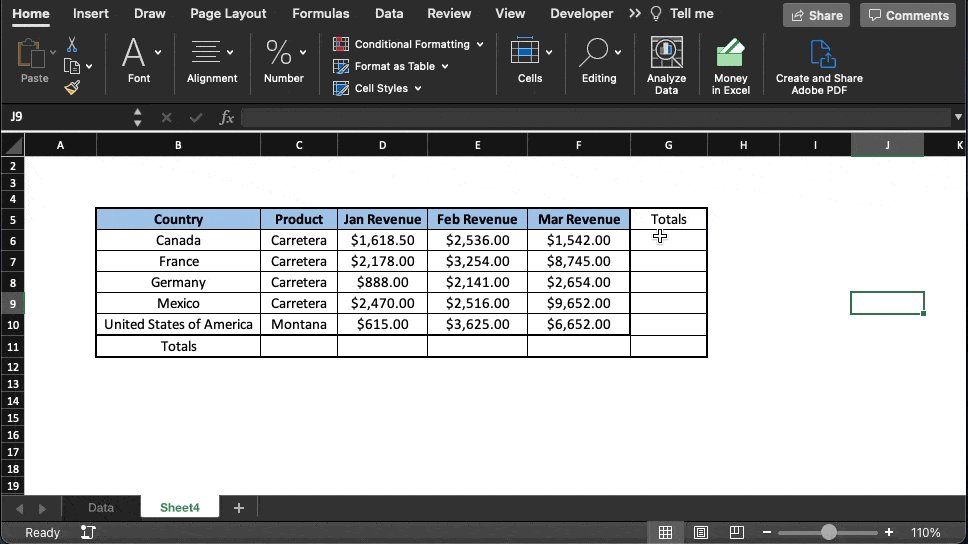
Speedy SUM Shortcuts:
Using the SUM function is about as basic as it gets.
That said, like many things in Excel, there's a faster way to do it if you know a couple of tricks.
Just select the cell where you want the total to go and...
PC: ALT+=
Mac: Shift+CMD+T
Check it out:
Using the SUM function is about as basic as it gets.
That said, like many things in Excel, there's a faster way to do it if you know a couple of tricks.
Just select the cell where you want the total to go and...
PC: ALT+=
Mac: Shift+CMD+T
Check it out:
Print Titles:
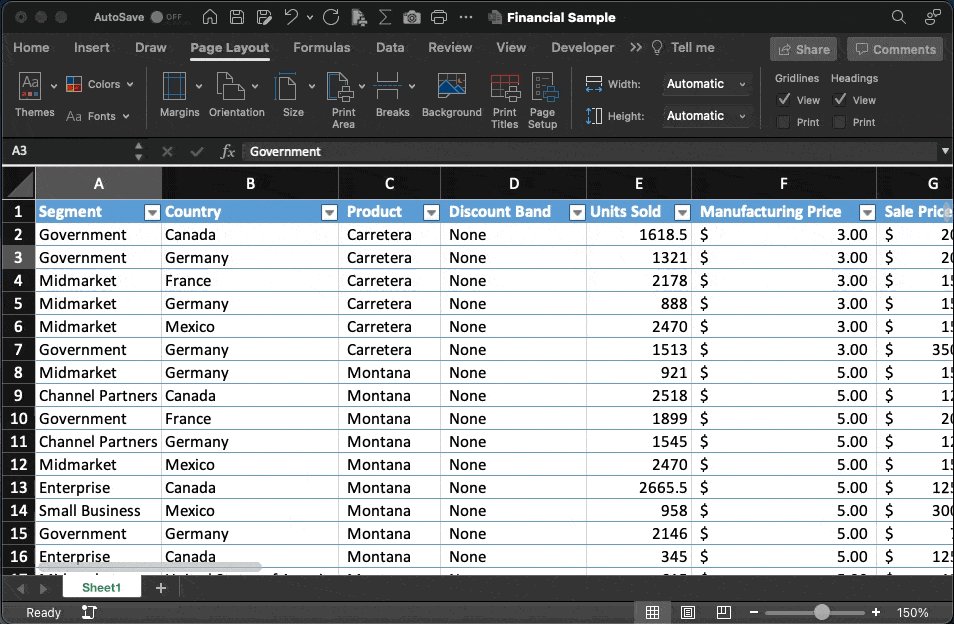
Printing a worksheet with several pages?
Want the header to repeat at the top?
You could go to:
Page Layout-> Page Setup-> Sheet-> Rows to repeat at the top-> Select rows
Slooowww!
Instead, select the top row & type:
'print_titles' in the cell name box
Done!
Printing a worksheet with several pages?
Want the header to repeat at the top?
You could go to:
Page Layout-> Page Setup-> Sheet-> Rows to repeat at the top-> Select rows
Slooowww!
Instead, select the top row & type:
'print_titles' in the cell name box
Done!
New Window:
I bet you've had times when you wanted to compare items within the same sheet side by side...
There are a few different ways to do this, but my favorite is the 'New Window' feature.
Open 2 instances of the same file & review and edit as you like.
I bet you've had times when you wanted to compare items within the same sheet side by side...
There are a few different ways to do this, but my favorite is the 'New Window' feature.
Open 2 instances of the same file & review and edit as you like.

Fast Filters:
Most people know how to create a filter based on a cell's value (the slow way).
What if I told you that you can:
Apply a filter to an entire sheet & filter by a selected cell at the same time?
You can
Select the cell->right click->filter by selected cell value.
Most people know how to create a filter based on a cell's value (the slow way).
What if I told you that you can:
Apply a filter to an entire sheet & filter by a selected cell at the same time?
You can
Select the cell->right click->filter by selected cell value.

Center Across Multiple Cells:
Merged cells are notorious for creating problems.
Here's a quick trick I use to still get the look I want while retaining individual cells behind the scenes.
Select the range
Right-click->Format Cells
Horizontal Alignment
Center Across Selection
Merged cells are notorious for creating problems.
Here's a quick trick I use to still get the look I want while retaining individual cells behind the scenes.
Select the range
Right-click->Format Cells
Horizontal Alignment
Center Across Selection

Slicer:
Here's one of my favorite filtering tools.
The Slicer
•Click anywhere inside a table
•Go to table ⇢ insert slicer
•Select the fields you want
A dialog box will appear.
Click any slicer button & data is filtered accordingly.
Here's one of my favorite filtering tools.
The Slicer
•Click anywhere inside a table
•Go to table ⇢ insert slicer
•Select the fields you want
A dialog box will appear.
Click any slicer button & data is filtered accordingly.

Dynamic Numbered Lists:
Work faster in Excel by automatically numbering your lists using a combination of the "Sequence" and "Counta" formulas.
Type in your to-do's and the numbered list generates automatically.
Like this:
Work faster in Excel by automatically numbering your lists using a combination of the "Sequence" and "Counta" formulas.
Type in your to-do's and the numbered list generates automatically.
Like this:

Dependant Dropdowns:
Here's how to make dropdown list options depend on an item selected in another:
•Create a filtered list using XLOOKUP.
•Select the cell for your dropdown
•Data Validation->List
Select the 1st item in your source list & place a # at the end.
Like this:
Here's how to make dropdown list options depend on an item selected in another:
•Create a filtered list using XLOOKUP.
•Select the cell for your dropdown
•Data Validation->List
Select the 1st item in your source list & place a # at the end.
Like this:

Thanks for reading!
If you enjoy these threads:
1. Follow me @blakeaburge for more.
2. Check out my free Newsletter below.
Join 23K+ others leveling up and learning new skills every Sunday.
blakeburge.com
If you enjoy these threads:
1. Follow me @blakeaburge for more.
2. Check out my free Newsletter below.
Join 23K+ others leveling up and learning new skills every Sunday.
blakeburge.com
Loading suggestions...