

Congratulations, you are seeing this Tweet; here is a life-changing opportunity to transition into tech this year; we will be starting our coding journey.
Course: HTML, CSS & JAVASCRIPT
I'll explain like you are 5 years old; please retweet for others, and let's begin!!
Course: HTML, CSS & JAVASCRIPT
I'll explain like you are 5 years old; please retweet for others, and let's begin!!
Welcome to your first class on HTML. To avoid missing subsequent classes, kindly follow me and turn on the post notification.
I have Tweeted many threads on the ocean of opportunities flowing in tech at the moment; we are taking a big step Today.
I have Tweeted many threads on the ocean of opportunities flowing in tech at the moment; we are taking a big step Today.
Before we begin, let's discuss what you will be needing to go on this journey. -
🚀 Tutorial will take place every Monday & Wednesday using the Twitter thread
🚀 You need a PC or mobile phone in good condition
🚀 Internet access
🚀 An IDE
Then determination and InshAllah.
🚀 Tutorial will take place every Monday & Wednesday using the Twitter thread
🚀 You need a PC or mobile phone in good condition
🚀 Internet access
🚀 An IDE
Then determination and InshAllah.
An IDE simply means "Integrated Development Environment" these are tools majorly used to write and run codes, and we have various types.
1️⃣ XCODE { Develop iOS apps/softwares }
2️⃣ Android Studio { Develop Android Apps }
3️⃣ VsCode { Web Development }
4️⃣ aptLearn Playground
1️⃣ XCODE { Develop iOS apps/softwares }
2️⃣ Android Studio { Develop Android Apps }
3️⃣ VsCode { Web Development }
4️⃣ aptLearn Playground
Since we are currently starting with web development, we will be using VS-Code as external IDE and aptLearn playground IDE as online IDE.
The aptLearn IDE will provide us quick access to writing and executing our code without external software, this tool was deployed to help
The aptLearn IDE will provide us quick access to writing and executing our code without external software, this tool was deployed to help
people without laptop to be able to also follow this course using their phone
VsCode is a more advanced software and will be used mostly in your future development. You must sign up on aptLearn and read or follow the video in this lesson for setup guide
aptlearn.io
VsCode is a more advanced software and will be used mostly in your future development. You must sign up on aptLearn and read or follow the video in this lesson for setup guide
aptlearn.io

To properly assess you with quizzes, track your course progress, answer your questions directly using Q/A option and catch up with all videos explanations that will not be uploaded here on Twitter, you must enrol in this course which cost 5GPB or NGN3750
aptlearn.io
aptlearn.io

𝗪𝗵𝗮𝘁 𝗲𝘅𝗮𝗰𝘁𝗹𝘆 𝗶𝘀 𝗛𝗧𝗠𝗟𝟱?
We humans can tell the difference between a header and a paragraph by looking at a page; computers lack this intuition. To successfully display a web page, a browser must be explicitly told what each piece of content is.
We humans can tell the difference between a header and a paragraph by looking at a page; computers lack this intuition. To successfully display a web page, a browser must be explicitly told what each piece of content is.
By looking through the document below, you can tell which is the title, heading, sub-heading, and cover picture right away. Your computer isn’t nearly as intelligent.

So how exactly do we tell the browser what’s what? This is where HyperText Markup Language (or HTML for short) comes in handy.
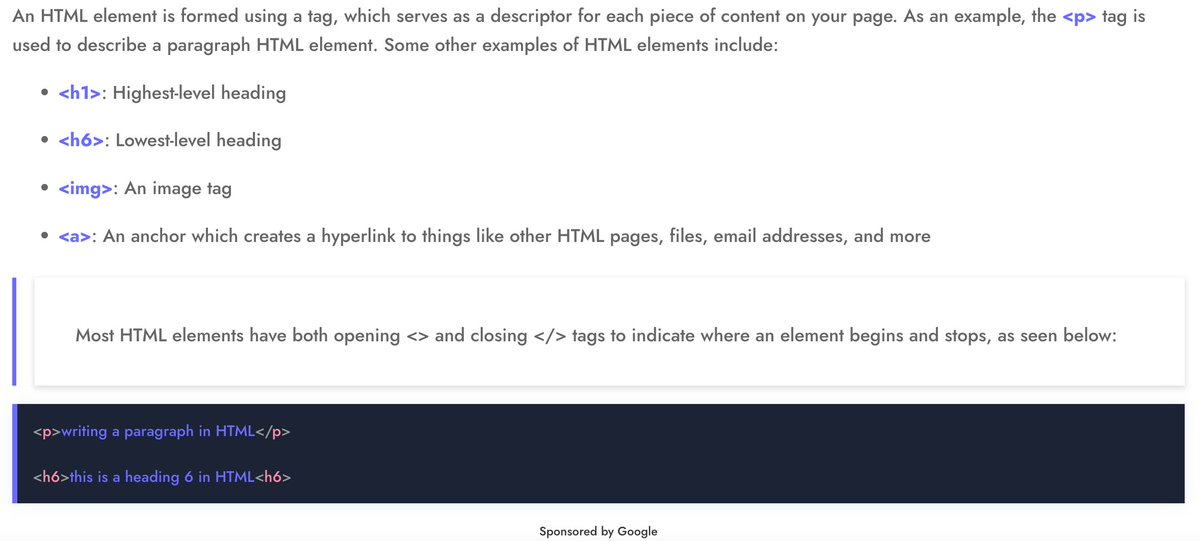
HTML is a markup language that describes the structure/layout of your web page. We define this structure by wrapping elements.
HTML is a markup language that describes the structure/layout of your web page. We define this structure by wrapping elements.
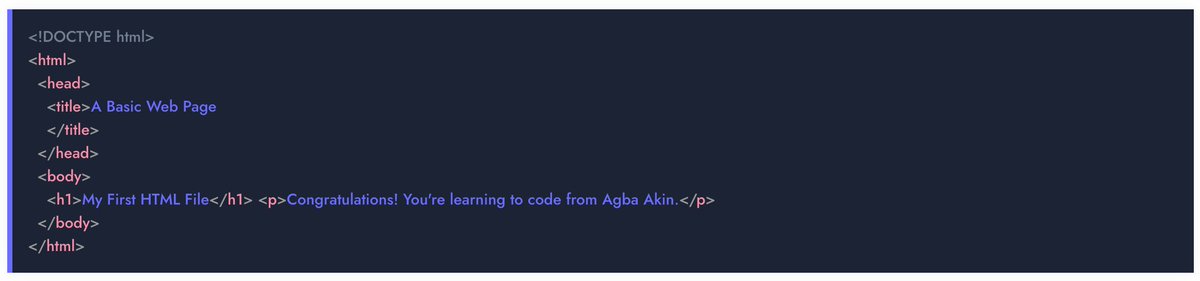
𝗦𝗼 𝗹𝗲𝘁 𝗺𝗲 𝘀𝗵𝗼𝘄 𝘆𝗼𝘂 𝗵𝗼𝘄 𝗮 𝗯𝗮𝘀𝗶𝗰 𝗛𝗧𝗠𝗟 𝗳𝗶𝗹𝗲 𝗹𝗼𝗼𝗸𝘀 𝗼𝗻 𝗮𝗻 𝗜𝗗𝗘.
If you want, you can run this code yourself on aptLearn playground here: playground.aptlearn.io
If you want, you can run this code yourself on aptLearn playground here: playground.aptlearn.io


𝗟𝗲𝘁 𝗺𝗲 𝗲𝘅𝗽𝗹𝗮𝗶𝗻 𝘁𝗵𝗶𝘀 𝗳𝘂𝗿𝘁𝗵𝗲𝗿
<!𝗗𝗢𝗖𝗧𝗬𝗣𝗘 𝗵𝘁𝗺𝗹> — This tag determines the language in which the page will be written. HTML 5 is used in this instance.
<𝗵𝘁𝗺𝗹> — This tag indicates that we will now write in HTML code.
<!𝗗𝗢𝗖𝗧𝗬𝗣𝗘 𝗵𝘁𝗺𝗹> — This tag determines the language in which the page will be written. HTML 5 is used in this instance.
<𝗵𝘁𝗺𝗹> — This tag indicates that we will now write in HTML code.
<𝗵𝗲𝗮𝗱> — This section contains all of the page’s metadata — information that is primarily intended for search engines and other computer programs. The code we insert on this page will not be visually displayed to users.
<𝗯𝗼𝗱𝘆> — This section contains the page’s content.
<𝗯𝗼𝗱𝘆> — This section contains the page’s content.
𝗕𝗮𝘀𝗶𝗰 𝗛𝗧𝗠𝗟 𝗦𝘁𝗿𝘂𝗰𝘁𝘂𝗿𝗲
To properly define an HTML file, we must place <𝗵𝗲𝗮𝗱> and <𝗯𝗼𝗱𝘆> elements within the root <𝗵𝘁𝗺𝗹> element.
To properly define an HTML file, we must place <𝗵𝗲𝗮𝗱> and <𝗯𝗼𝗱𝘆> elements within the root <𝗵𝘁𝗺𝗹> element.
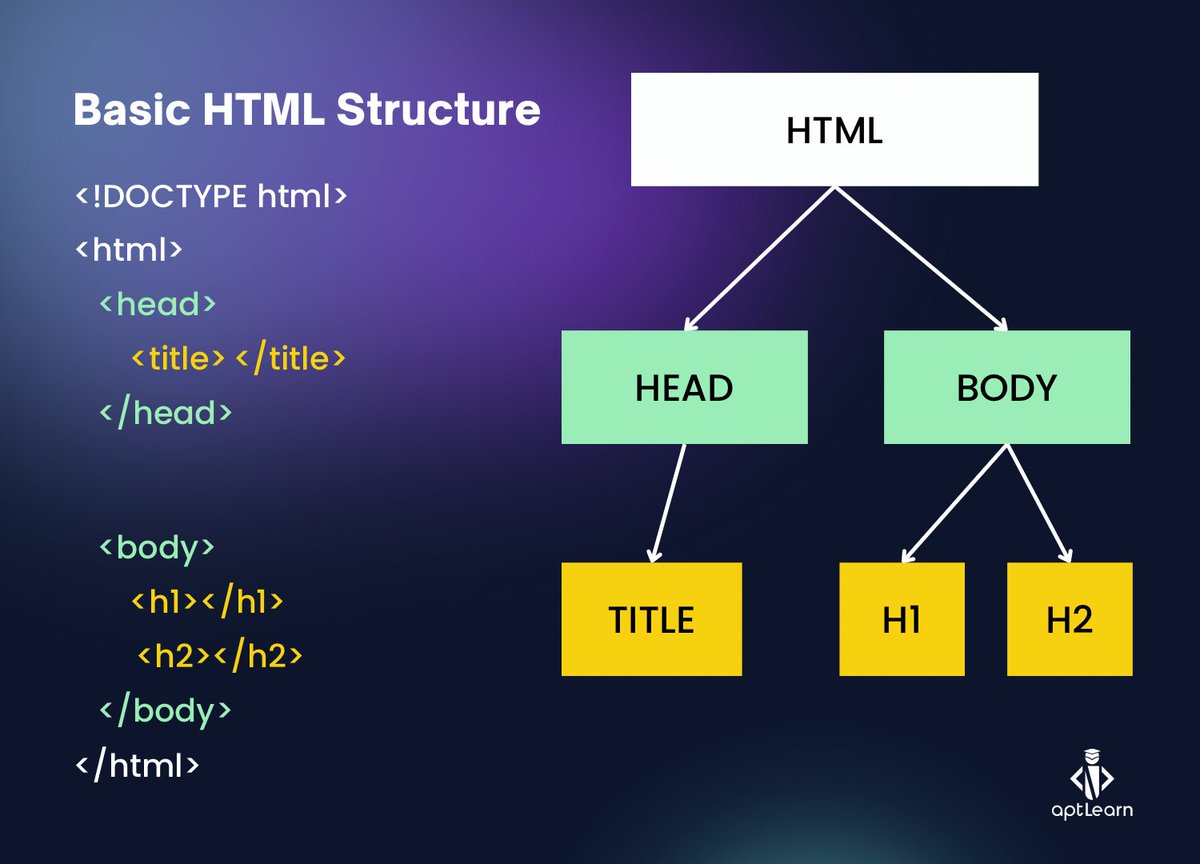
The primary material of an HTML file is contained in the <body> element. This is the element that contains the data displayed by your web browser.
For absolute clarity, I provided a clearer explanation with video in the Basic HTML Structure lesson: aptlearn.io
For absolute clarity, I provided a clearer explanation with video in the Basic HTML Structure lesson: aptlearn.io
So with the basic HTML we wrote earlier, let's run the code in this video and see our result in real time, I will add another paragraph tag <𝗽> within the <𝗯𝗼𝗱𝘆> of my code

This is a journey, and I want to take you along, so understanding the basics is very important. What we've have done above with HTML is more of an introduction, as I assumed everyone on this thread is a beginner.
To aid better understanding, we will not rush things.
To aid better understanding, we will not rush things.
Now you assignment
Using aptLearn IDE or VSCODE. Run the HTML codes in the screenshot and quote the original tweet or post them in the comment. See you on Wednesday. Do not borrow anyone your laptop, or we will fight. Also, purchase/enrol the course before the next class
Using aptLearn IDE or VSCODE. Run the HTML codes in the screenshot and quote the original tweet or post them in the comment. See you on Wednesday. Do not borrow anyone your laptop, or we will fight. Also, purchase/enrol the course before the next class
Our learning aid and platform has been provided on an extremely subsidized level by @aptlearn_io compare to what you have on other foreign website. Let's support our local company by following them and the actual best way to support is knowing what I'm teaching. See you soon
Loading suggestions...