

Congratulations, you are seeing this Tweet; here is another life-changing opportunity to transition into tech this year. Another programming class on
Course: HTML, CSS & JAVASCRIPT
I'll explain to you like you are 4 years old; kindly retweet for others, and join below
1/18
Course: HTML, CSS & JAVASCRIPT
I'll explain to you like you are 4 years old; kindly retweet for others, and join below
1/18
Welcome to your 2nd class on HTML. Kindly follow me and switch on my tweet notification to avoid missing subsequent classes.
If you are finding this for the first time, the previous classes are on my pinned tweet, and you might want to check and catch up with us.
2/18
If you are finding this for the first time, the previous classes are on my pinned tweet, and you might want to check and catch up with us.
2/18
Today, We will be discussing 𝗛𝗧𝗠𝗟 𝗔𝗧𝗧𝗥𝗜𝗕𝗨𝗧𝗘𝗦, 𝗠𝗘𝗧𝗔𝗗𝗔𝗧𝗔 and 𝗛𝗬𝗣𝗘𝗥𝗟𝗜𝗡𝗞𝗦, so let's get started.
𝗛𝗧𝗠𝗟 𝗮𝘁𝘁𝗿𝗶𝗯𝘂𝘁𝗲𝘀:
Provides additional information about an HTML element. Attributes can be considered as properties of the element.
3/18
𝗛𝗧𝗠𝗟 𝗮𝘁𝘁𝗿𝗶𝗯𝘂𝘁𝗲𝘀:
Provides additional information about an HTML element. Attributes can be considered as properties of the element.
3/18
HTML attributes can also be used to offer more information about an HTML element. Attributes may be thought of as elemental characteristics. Furthermore, an element might have a single attribute, several attributes, or none at all. 4/18
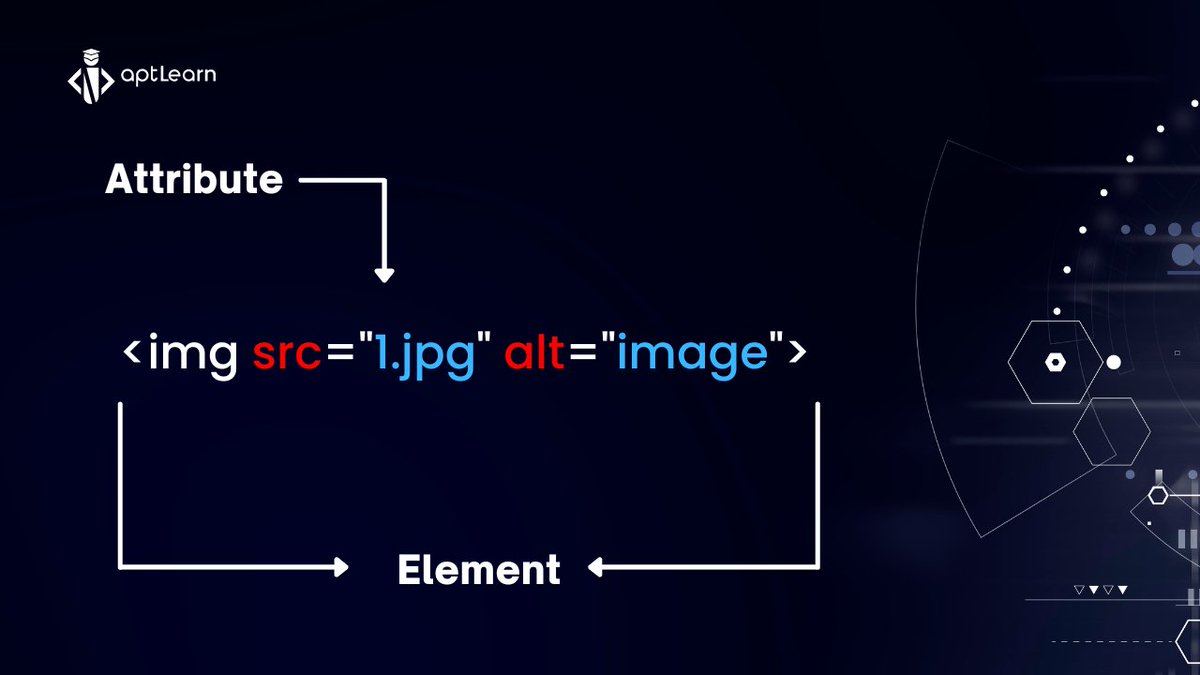
A hyperlink is defined using the <a> (Also known as Anchor) tag. The href property defines the URL of the page to which the link directs users: For example:
<𝗮 𝗵𝗿𝗲𝗳="𝗮𝗽𝘁𝗹𝗲𝗮𝗿𝗻.𝗶𝗼">𝗟𝗲𝗮𝗿𝗻 𝗧𝗲𝗰𝗵 𝗖𝗼𝘂𝗿𝘀𝗲𝘀</𝗮>
What do you think is the attribute?
5/18
<𝗮 𝗵𝗿𝗲𝗳="𝗮𝗽𝘁𝗹𝗲𝗮𝗿𝗻.𝗶𝗼">𝗟𝗲𝗮𝗿𝗻 𝗧𝗲𝗰𝗵 𝗖𝗼𝘂𝗿𝘀𝗲𝘀</𝗮>
What do you think is the attribute?
5/18
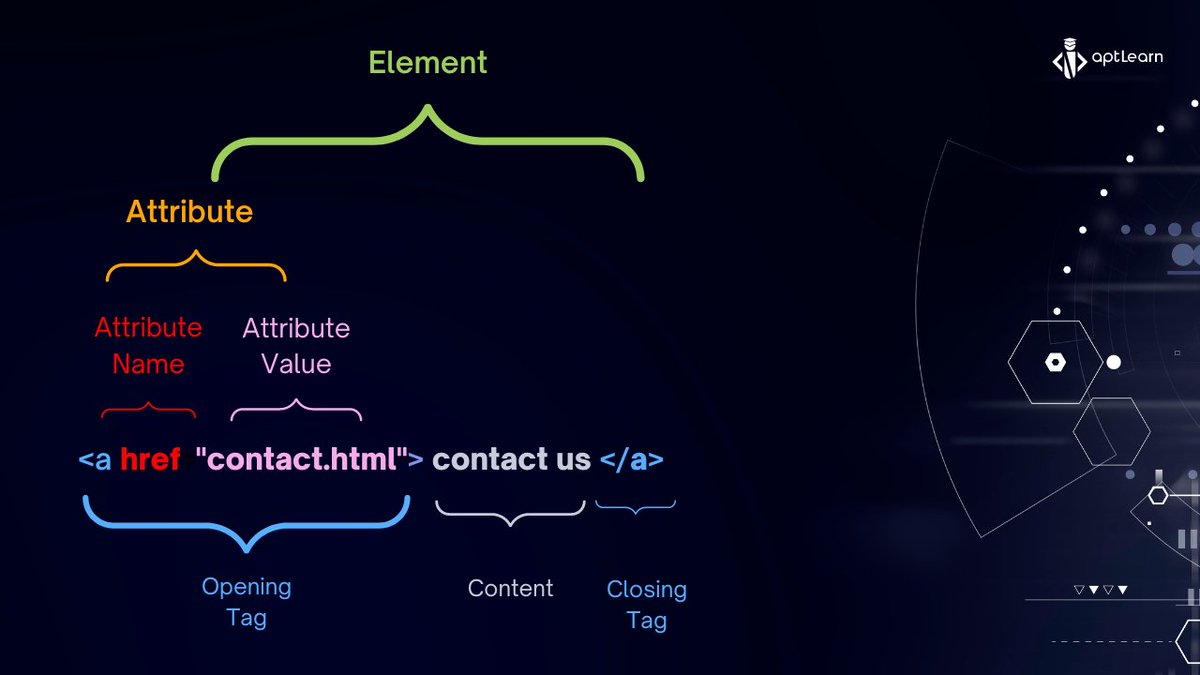
Alright enough theory, let's get practical. If you enrol in the course, there's a more clearer explanation with 7 minutes video of me explaining the HTML attributes in lesson aptlearn.io
6/18
6/18
If you are already enrolled, please follow the link above, read and watch more videos provided and mark the lesson as complete.
Let's continue, here is more context on HTML attributes
7/18
Let's continue, here is more context on HTML attributes
7/18

𝗛𝗧𝗠𝗟 𝗠𝗲𝘁𝗮𝗱𝗮𝘁𝗮
Hmm, so you probably think the <title> tag is the only tag that belongs in the head section of an HTML file. Recalling that in the previous video, I mentioned other tags that may be inserted within an HTML file’s <head> section.
8/18
Hmm, so you probably think the <title> tag is the only tag that belongs in the head section of an HTML file. Recalling that in the previous video, I mentioned other tags that may be inserted within an HTML file’s <head> section.
8/18
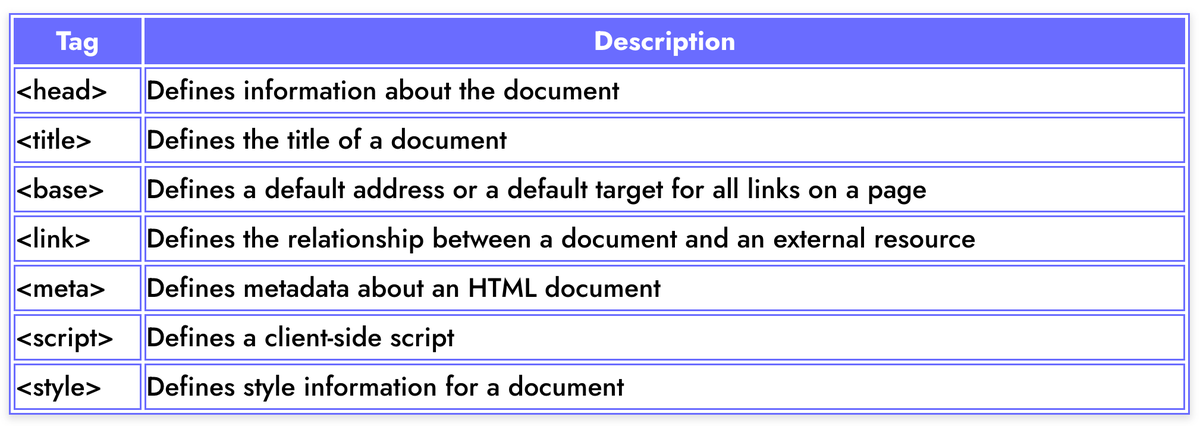
Please use the link below to understand more on HTML meta data with videos and examples. For those already enrolled, kindly take the next assessment. Ensure you pass if you are interested in getting certified after we are done
aptlearn.io
9/18
aptlearn.io
9/18
𝗔𝗻𝗰𝗵𝗼𝗿 𝗘𝗹𝗲𝗺𝗲𝗻𝘁𝘀/𝗛𝘆𝗽𝗲𝗿𝗹𝗶𝗻𝗸𝗶𝗻𝗴
One of the essential characteristics of the World Wide Web (WWW) is the capability to connect to other web segments. Without an easy means to redirect our HTML page, there would be no such thing as a “web.”
10/18
One of the essential characteristics of the World Wide Web (WWW) is the capability to connect to other web segments. Without an easy means to redirect our HTML page, there would be no such thing as a “web.”
10/18

We can connect an HTML page to other web pages by creating a hyperlink using the anchor <a> tag; check this example:
<𝗮 𝗵𝗿𝗲𝗳="𝗽𝗮𝗴𝗲-𝘂𝗿𝗹">𝗹𝗶𝗻𝗸 𝘁𝗲𝘅𝘁</𝗮> 11/18
<𝗮 𝗵𝗿𝗲𝗳="𝗽𝗮𝗴𝗲-𝘂𝗿𝗹">𝗹𝗶𝗻𝗸 𝘁𝗲𝘅𝘁</𝗮> 11/18

𝗛𝗧𝗠𝗟 𝗛𝗲𝗮𝗱𝗶𝗻𝗴
HTML headings specify 6 heading elements: H1, H2, H3, H4, H5, and H6. The H1 element is the most crucial, whereas the H6 element is the least essential. These various heading levels aid in communicating the order and hierarchy of material on a page. 12/18
HTML headings specify 6 heading elements: H1, H2, H3, H4, H5, and H6. The H1 element is the most crucial, whereas the H6 element is the least essential. These various heading levels aid in communicating the order and hierarchy of material on a page. 12/18

𝗛𝗧𝗠𝗟 𝗟𝗶𝘀𝘁 𝗘𝗹𝗲𝗺𝗲𝗻𝘁
If we compose or develop a web page, we often need to add a bulleted or numbered list to the text. This can be done with HTML lists.
We have two types
1️⃣ Ordered List
2️⃣ Unordered List
13/18
If we compose or develop a web page, we often need to add a bulleted or numbered list to the text. This can be done with HTML lists.
We have two types
1️⃣ Ordered List
2️⃣ Unordered List
13/18
𝗢𝗿𝗱𝗲𝗿𝗲𝗱 𝗟𝗶𝘀𝘁
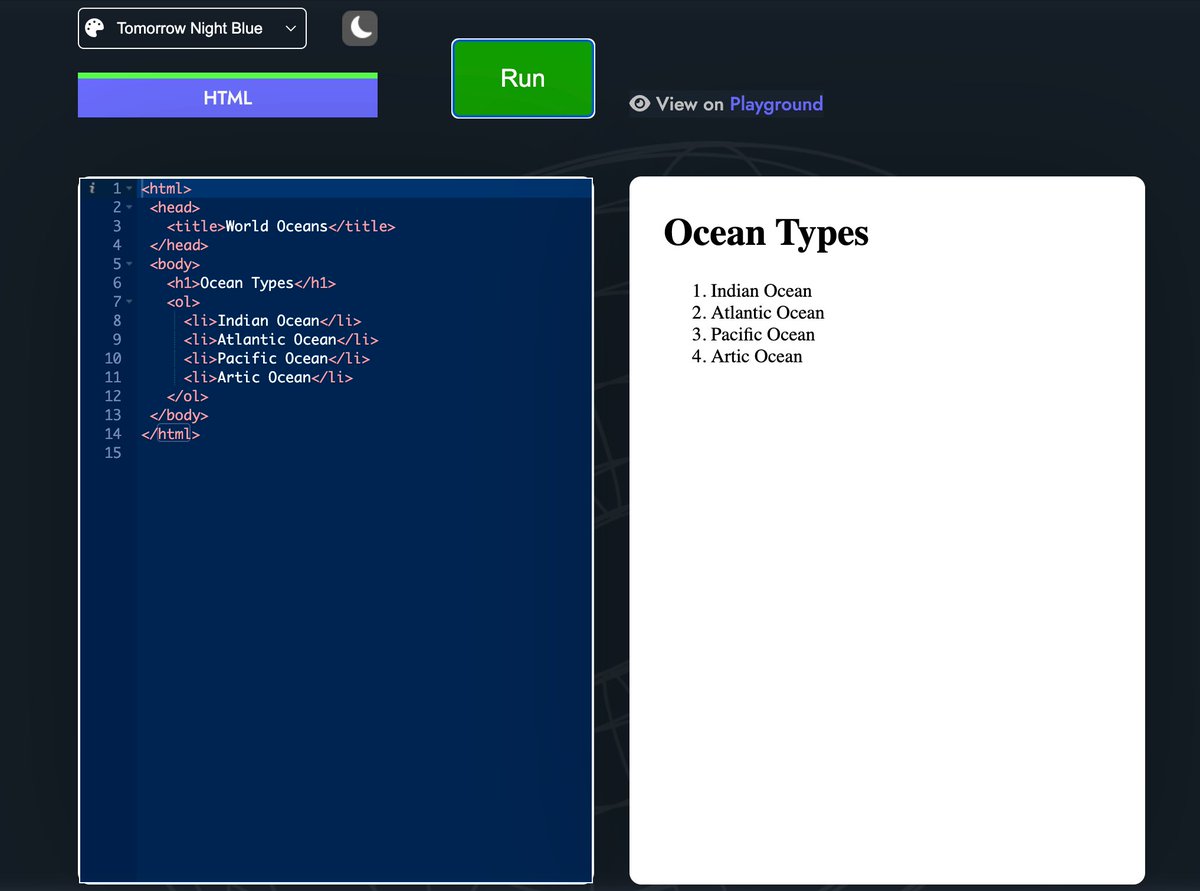
An ordered list is fairly similar to an unordered list, except we will want to use the <ol> tag to declare the list. List items are still wrapped in a <li> tag. The list items will be numbered rather than the bulleted items. 14/18
An ordered list is fairly similar to an unordered list, except we will want to use the <ol> tag to declare the list. List items are still wrapped in a <li> tag. The list items will be numbered rather than the bulleted items. 14/18
𝗨𝗻𝗼𝗿𝗱𝗲𝗿𝗲𝗱 𝗟𝗶𝘀𝘁
We must use the <𝘂𝗹> tag with nested <𝗹𝗶> tags for the list of items to do this. The <𝘂𝗹> tag in the code means “unordered lists”; It indicates your list items be rendered in an unorderly manner, by default, the bullet icon is used 15/18
We must use the <𝘂𝗹> tag with nested <𝗹𝗶> tags for the list of items to do this. The <𝘂𝗹> tag in the code means “unordered lists”; It indicates your list items be rendered in an unorderly manner, by default, the bullet icon is used 15/18

More explanation with video tutorial is provided in this lesson on HTML List elements
aptlearn.io
16/18
aptlearn.io
16/18
That will be all for today. Please don't miss out, kindly enrol and ensure you have at least track your progress with the course to this exact point we stop or learn ahead.
Join other 400 learners already enrolled. aptlearn.io
17/18
Join other 400 learners already enrolled. aptlearn.io
17/18
Your Class assignment and Progress Report
Using aptLearn IDE or External write all the HTML elements you've learnt so far, execute/run your code and post screenshot quoting the original tweet or in the comment section. See you on Monday
Using aptLearn IDE or External write all the HTML elements you've learnt so far, execute/run your code and post screenshot quoting the original tweet or in the comment section. See you on Monday
Loading suggestions...