

19 Useful Linux Listing Commands 99.9% of you might not know about (but should know):
1. lsmem
The lsmem command displays the available memory ranges as well as their online status. The memory blocks listed correspond to the sysfs memory block representation.
The lsmem command displays the available memory ranges as well as their online status. The memory blocks listed correspond to the sysfs memory block representation.
The command also displays the memory block size as well as the amount of memory in both the online and offline states.
$ lsmem
$ lsmem

2. lsusb
lsusb is a utility for displaying information about USB buses in the system and the devices connected to them. It uses udev's hardware database to associate a full human-readable name to the vendor ID and the product ID.
$ lsusb
lsusb is a utility for displaying information about USB buses in the system and the devices connected to them. It uses udev's hardware database to associate a full human-readable name to the vendor ID and the product ID.
$ lsusb

3. lsb_release
The lsb_release command displays LSB (Linux Standard Base) information about your specific Linux distribution, including version number, release codename, and distributor ID.
$ lsb_release -a
The lsb_release command displays LSB (Linux Standard Base) information about your specific Linux distribution, including version number, release codename, and distributor ID.
$ lsb_release -a

4. lsfd
The lsfd command list the file descriptors on Linux systems, lsfd is intended to be a modern replacement for lsof. Unlike lsof, lsfd is tailored to the Linux kernel; it supports Linux-specific features such as namespaces while using less code.
$ lsfd
The lsfd command list the file descriptors on Linux systems, lsfd is intended to be a modern replacement for lsof. Unlike lsof, lsfd is tailored to the Linux kernel; it supports Linux-specific features such as namespaces while using less code.
$ lsfd

lsfd is not a drop-in replacement for lsof; their command line interface and output formats differ.
5. lsof
The command lsof stands for List Of Open Files. This command displays a list of files that have been opened. Essentially, it provides information to determine which files are opened by which process.
The command lsof stands for List Of Open Files. This command displays a list of files that have been opened. Essentially, it provides information to determine which files are opened by which process.
It can list a directory, a block special file, a shared library, a character special file, a regular pipe, a named pipe, an internet socket, a UNIX domain socket, and many other things. Here is an example listing LISTENING sockets.
$ sudo lsof -i -P -n | grep "LISTEN"
$ sudo lsof -i -P -n | grep "LISTEN"

6. lscpu
lscpu command gathers CPU architecture information from sysfs, /proc/cpuinfo, and any architecture-specific libraries that are applicable (e.g. librtas on Powerpc).
The command output can be optimized for parsing or human readability.
lscpu command gathers CPU architecture information from sysfs, /proc/cpuinfo, and any architecture-specific libraries that are applicable (e.g. librtas on Powerpc).
The command output can be optimized for parsing or human readability.
The data includes the number of CPUs, threads, cores, sockets, and Non-Uniform Memory Access (NUMA) nodes, among other things. There is also information about CPU caches and cache sharing, as well as the family, model, bogoMIPS, byte order, and stepping.
$ lscpu
$ lscpu

7. lslogins
Displays information about known users in the system. It examines the wtmp and btmp logs, shadow file (if necessary), and passwd file and outputs the desired data.
$ lslogins
Displays information about known users in the system. It examines the wtmp and btmp logs, shadow file (if necessary), and passwd file and outputs the desired data.
$ lslogins

8. lspci
A utility for displaying information about PCI buses in the system and devices connected to them.
A utility for displaying information about PCI buses in the system and devices connected to them.
By default, it shows a brief list of devices. But you can use different options to request either a more verbose output or output intended for parsing by other programs.
$ lspci
$ lspci

9. lsipc
lsipc shows the information on the System V inter-process communication facilities for which the calling process has read access.
$ lsipc
lsipc shows the information on the System V inter-process communication facilities for which the calling process has read access.
$ lsipc

10. lsd
This tool is a rewrite of GNU ls command with many new features such as colors, icons, a tree-view, more formatting options, and so on:
$ sudo apt install lsd
$ lsd -lah
This tool is a rewrite of GNU ls command with many new features such as colors, icons, a tree-view, more formatting options, and so on:
$ sudo apt install lsd
$ lsd -lah

11. lslocks
lslocks lists information about all the currently held file locks in a Linux system.
$ lslocks
lslocks lists information about all the currently held file locks in a Linux system.
$ lslocks
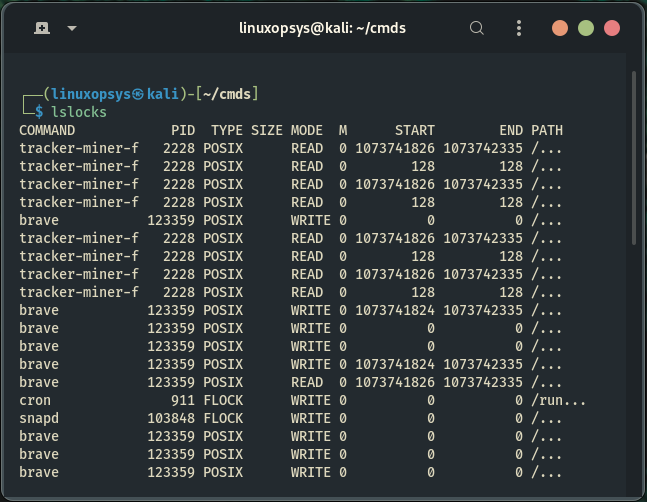
It is worth noting that lslocks also list OFD (Open File Description) locks, which are not associated with any process (PID is -1). OFD locks are linked to the open file description from which they were obtained.
12. lsmod
lsmod shows the status of modules in the Linux Kernel. lsmod is a simple program that nicely formats the contents of the proc//modules directory, displaying which kernel modules are currently loaded.
$ lsmod
lsmod shows the status of modules in the Linux Kernel. lsmod is a simple program that nicely formats the contents of the proc//modules directory, displaying which kernel modules are currently loaded.
$ lsmod

13. lsirq
The lsirq utility is used to display kernel interrupt information.
$ lsirq
The lsirq utility is used to display kernel interrupt information.
$ lsirq

14. lsns
The lsns command lists information about all currently accessible namespaces or a given namespace. A namespace identifier is an inode number.
$ lsns
The lsns command lists information about all currently accessible namespaces or a given namespace. A namespace identifier is an inode number.
$ lsns

15. lstopo
lstopo command is used to show the topology of the system. It gives information about the NUMA memory nodes, shared caches, CPU packages, processor cores and threads, and much more.
$ sudo lstopo
lstopo command is used to show the topology of the system. It gives information about the NUMA memory nodes, shared caches, CPU packages, processor cores and threads, and much more.
$ sudo lstopo


16. exa
exa is a cool replacement for the venerable file-listing command-line program ls that comes with Unix and Linux operating systems, adding features and improving defaults. It uses colors to differentiate between file types and metadata.
$ exa --long --tree --level 2
exa is a cool replacement for the venerable file-listing command-line program ls that comes with Unix and Linux operating systems, adding features and improving defaults. It uses colors to differentiate between file types and metadata.
$ exa --long --tree --level 2

17. lsattr
lsattr lists the file attributes on a second extended file system.
$ lsattr -la
lsattr lists the file attributes on a second extended file system.
$ lsattr -la

18. lsblk
Lsblk is used to display information about block devices, which are basically files that represent devices connected to the computer (except ram disk). Hard disks, flash drives, optical media, and other block devices are examples of block devices.
$ lsblk
Lsblk is used to display information about block devices, which are basically files that represent devices connected to the computer (except ram disk). Hard disks, flash drives, optical media, and other block devices are examples of block devices.
$ lsblk

19. lsinitramfs
lsinitramfs command lists the content of given initramfs images. It allows one to quickly check the content of one (or multiple) specified initramfs files.
lsinitramfs command lists the content of given initramfs images. It allows one to quickly check the content of one (or multiple) specified initramfs files.
Incase you don't know:
initramfs is a root filesystem embedded in the kernel and loaded early in the boot process. It is the heir to initrd. It provides early userspace, which can perform tasks that the kernel cannot easily perform during the boot process.
initramfs is a root filesystem embedded in the kernel and loaded early in the boot process. It is the heir to initrd. It provides early userspace, which can perform tasks that the kernel cannot easily perform during the boot process.
EXAMPLE
List initramfs content of current running kernel:
$ lsinitramfs /boot/initrd.img-$(uname -r)
List initramfs content of current running kernel:
$ lsinitramfs /boot/initrd.img-$(uname -r)

That's it!
Thank you for making it this far. Hopefully, you will find this thread useful.
Additions are welcomed.
Thank you for making it this far. Hopefully, you will find this thread useful.
Additions are welcomed.
If you found this thread valuable:
1. Toss us a follow for more daily threads on Linux, sysadmin and DevOps →
@linuxopsys
2. Like and RT the first tweet so other Linux folks can find it too.
1. Toss us a follow for more daily threads on Linux, sysadmin and DevOps →
@linuxopsys
2. Like and RT the first tweet so other Linux folks can find it too.
Loading suggestions...