

How to calculate the 6 month COT-Index from Larry Williams
1.Go to barchart.com
2.Pick a currency/Commodity or whatever.
I use Crude Oil WTI in this example.
1.Go to barchart.com
2.Pick a currency/Commodity or whatever.
I use Crude Oil WTI in this example.


3.
Open the chart:
Open the chart:
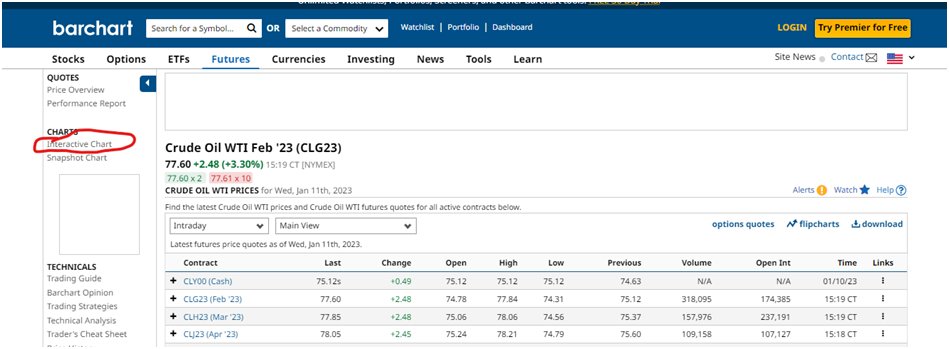
4.
Click on +Study
Click on +Study

5.
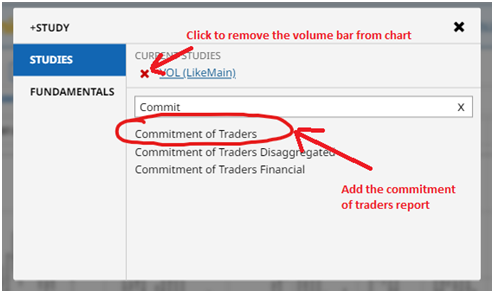
6.
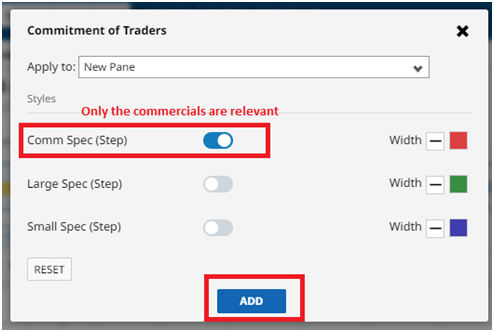
7.
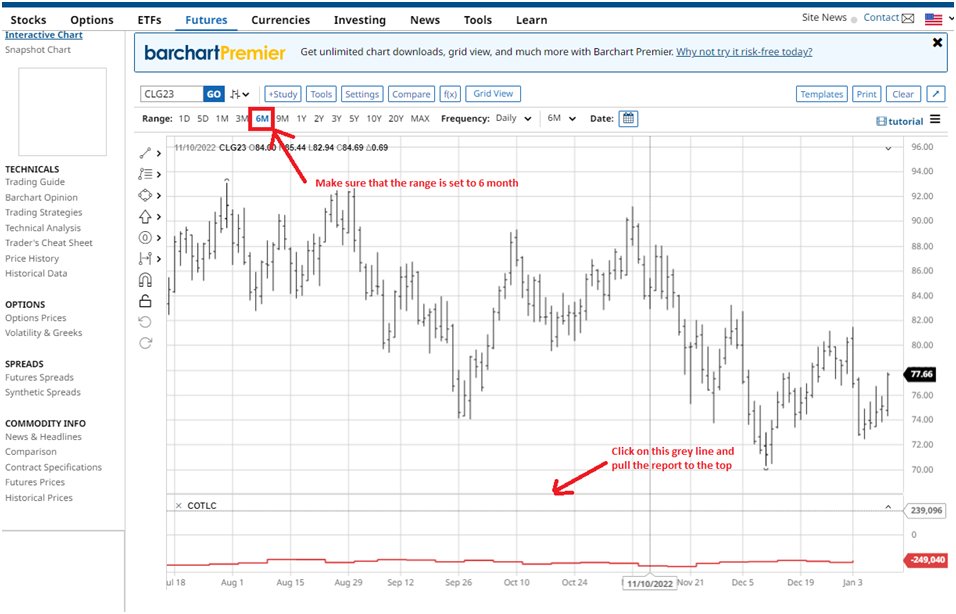
8.
The COT-Index equation from the book Commitment of Traders Bible:
COT Index = 100 × (Current Net − Minimum Net) ÷ (Maximum Net − Minimum Net)
The COT-Index equation from the book Commitment of Traders Bible:
COT Index = 100 × (Current Net − Minimum Net) ÷ (Maximum Net − Minimum Net)

9.

10.
Current net = -249040
Minimum net = -308795
Maximum net = -236808
COT Index = 100 × (-249040 – (-308795) ) ÷ (-236808− (-308795) ) = 83%
Current net = -249040
Minimum net = -308795
Maximum net = -236808
COT Index = 100 × (-249040 – (-308795) ) ÷ (-236808− (-308795) ) = 83%
11.
It´s sometimes not so easy to get the exact numbers from the barchart chart. Accordingly to
insider-week.com the current COT-Index for Crude Oil is 84%.
It´s sometimes not so easy to get the exact numbers from the barchart chart. Accordingly to
insider-week.com the current COT-Index for Crude Oil is 84%.

13.
After this iterate through the 6 month of data and calculate the current net position for every single month and save the results in memory.
Now you just need to sort the data from lowest to highest net position. That gives you the net minimum and net maxium.
After this iterate through the 6 month of data and calculate the current net position for every single month and save the results in memory.
Now you just need to sort the data from lowest to highest net position. That gives you the net minimum and net maxium.
14.
Use the current net from the latest COT report. Put everything in the equation and calculate it.
Use the current net from the latest COT report. Put everything in the equation and calculate it.
14.
Use the current net from the latest COT report. Put everything in the equation and calculate it.
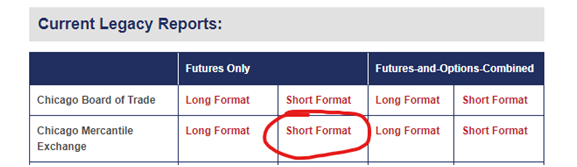
Use the „Chicago Mercantile Exchange“ report short format futures only for currencies:
Latest COT report: cftc.gov
The Chicago Mercantile report is for currencies.
Use the current net from the latest COT report. Put everything in the equation and calculate it.
Use the „Chicago Mercantile Exchange“ report short format futures only for currencies:
Latest COT report: cftc.gov
The Chicago Mercantile report is for currencies.
15. How to calculate the current net position from a COT-report.
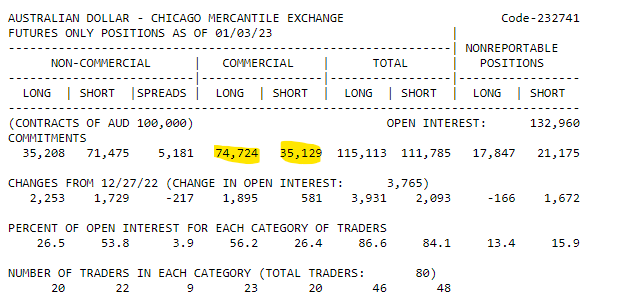
Current net = commercial long - commerical short
74724 - 35129 = 39595 current net
Current net = commercial long - commerical short
74724 - 35129 = 39595 current net
16.
Books regarding to the Commitment of traders report:
By Larry Williams:
Trade Stocks and Commodities with the Insiders: Secrets of the COT Report
By Stephen Briese:
The Commitments of Traders Bible
Books regarding to the Commitment of traders report:
By Larry Williams:
Trade Stocks and Commodities with the Insiders: Secrets of the COT Report
By Stephen Briese:
The Commitments of Traders Bible
Loading suggestions...