

So many Geegpay users have been experiencing this minor issue while trying to login into their account 😪🥲💔..
For those that will receive future payments this month and beyond,
Here’s how to rectify it…😉
An informative 🧵🚨 >>>
For those that will receive future payments this month and beyond,
Here’s how to rectify it…😉
An informative 🧵🚨 >>>
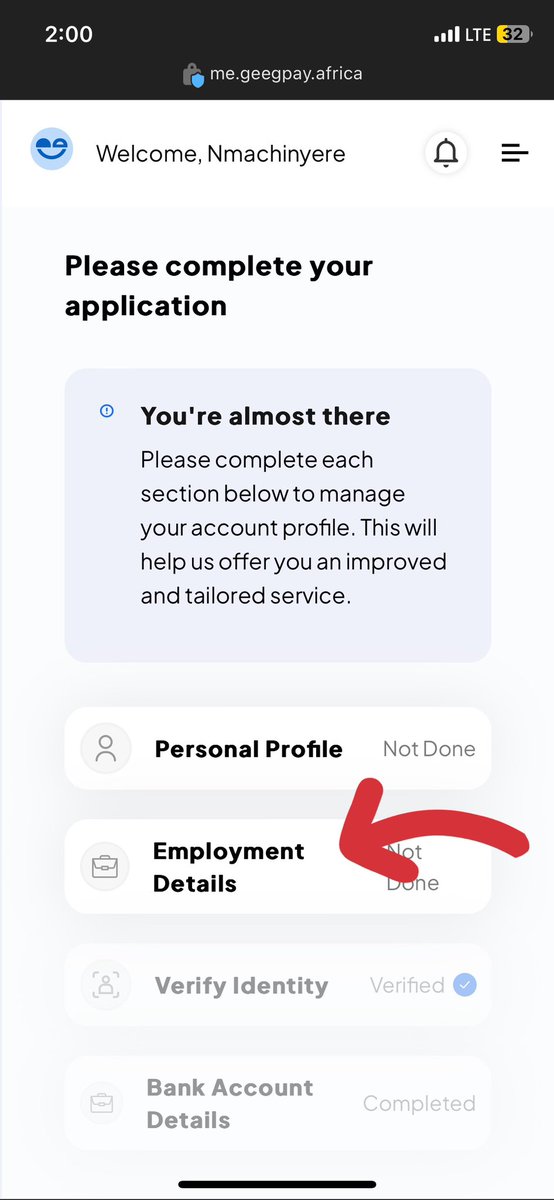
When you click on “Employment Details”, you are to fill this out
Employer name: Amazon Kindle Direct Publishing
Employer country: United States
Employer website: amazonkdp.com
Occupation: Independent Author/publisher
Employer name: Amazon Kindle Direct Publishing
Employer country: United States
Employer website: amazonkdp.com
Occupation: Independent Author/publisher
Monthly salary: Choose a reasonable amount as to what you currently earn from the options given (e.g 50-500 dollars if you make within that range or more…)
Offer letter or proof of Employment:
1. Go to your KDP dashboard
2. Click on “My Account”
Offer letter or proof of Employment:
1. Go to your KDP dashboard
2. Click on “My Account”
3. At the bottom of the page you'll see Amazon terms and conditions, click on it
OR
Click on this link below to get the terms and Conditions directly to your browser: tinyurl.com
OR
Click on this link below to get the terms and Conditions directly to your browser: tinyurl.com
4. Copy the document & paste to Google docs; then format it.
Font: Georgia
Font size:14
Paragraph: Justify & add name as signature below. Download as pdf and upload the file as requested in your geegpay account.
Font: Georgia
Font size:14
Paragraph: Justify & add name as signature below. Download as pdf and upload the file as requested in your geegpay account.
Linkedin profile Url: Go online and create a LinkedIn account if you don’t have one yet. Copy the Url on the account and paste on the space given.
Click on SAVE and voilà, you are good to go 😊
Click on SAVE and voilà, you are good to go 😊
Hope you found this tweet helpful.✍🏾
Kindly like, retweet the first tweet aggressively to get the word out there and follow for more😉
Kindly like, retweet the first tweet aggressively to get the word out there and follow for more😉
Loading suggestions...