

Understanding the "/ etc/shadow" file in Linux 🐧↓
As a Linux super user understanding the "/ etc/shadow" file is very crucial for managing Linux users.
The "/ etcs/hadow" file is a plain text file that stores information about the passwords of the system's users. It has 640 permissions and is owned by user root and group shadow
The "/ etcs/hadow" file is a plain text file that stores information about the passwords of the system's users. It has 640 permissions and is owned by user root and group shadow
This file is only readable by the root user, so you must be root or have root privileges to view its contents.
Any file viewer on Linux can be used to view the contents of this file, such as cat, more, less, etc. Alternatively, you can use the "sudo getent shadow" command.
Any file viewer on Linux can be used to view the contents of this file, such as cat, more, less, etc. Alternatively, you can use the "sudo getent shadow" command.
Here is an example of what the contents of the "/ etc/shadow" file looks like:
$ sudo getent shadow
$ sudo getent shadow

Understanding "/ etc/shadow" format
Each line in the "/ etc/shadow" file represents a different user account. The root user is generally described on the first line, followed by the system accounts and normal user accounts.
Any new entry is always append at the end of the file.
Each line in the "/ etc/shadow" file represents a different user account. The root user is generally described on the first line, followed by the system accounts and normal user accounts.
Any new entry is always append at the end of the file.
Each "/ etc/shadow" file record includes nine fields which are separated by collons:
$ sudo getent shadow | grep root
$ sudo getent shadow | grep root

1. Username or Login name
The first field stores a username or unique login name. The login process compares the value stored in this field with the value we entered into the Username field at the login prompt.
The first field stores a username or unique login name. The login process compares the value stored in this field with the value we entered into the Username field at the login prompt.
2. Encrypted Password
The second field contains the encrypted password in the $type$salt$hashed format. The method cryptographic hash algorithm is represented by $type, which can take the following values:
• $1$ – MD5
• $2a$ – Blowfish
The second field contains the encrypted password in the $type$salt$hashed format. The method cryptographic hash algorithm is represented by $type, which can take the following values:
• $1$ – MD5
• $2a$ – Blowfish
• $2y$ – Eksblowfish
• $5$ – SHA-256
• $6$ – SHA-512
• $5$ – SHA-256
• $6$ – SHA-512
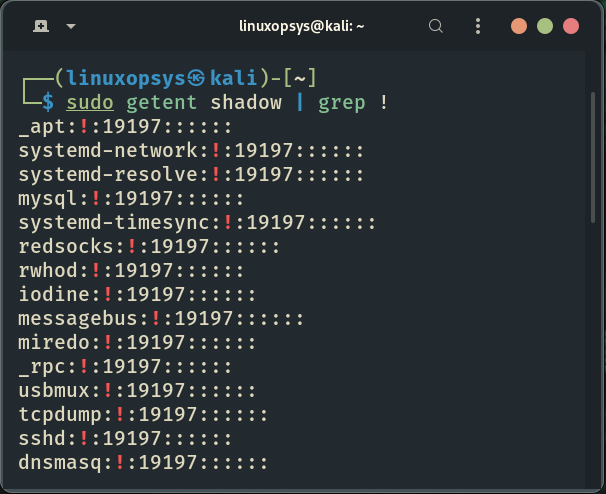
If the password field contains an asterisk (*) or an exclamation character (! ), the user will be unable to log in using password authentication.
$ sudo getent shadow | grep !
$ sudo getent shadow | grep !
3. Last password change
The third field stores the last time the password was changed, which is represented as the number of days since January 1, 1970.
The third field stores the last time the password was changed, which is represented as the number of days since January 1, 1970.
4. Minimum password age
This field stores the minimum number of days before the password can be changed. It is usually set to zero, indicating that there is no minimum password age.
This field stores the minimum number of days before the password can be changed. It is usually set to zero, indicating that there is no minimum password age.
5. Maximum password age
The number of days before the password must be changed. By default, this number is set to `99999`
The number of days before the password must be changed. By default, this number is set to `99999`
6. Warning period
The number of days before password expiration that the user is warned to change the password.
7. Inactivity period
The number of days after a password expires before the account will be disabled.
The number of days before password expiration that the user is warned to change the password.
7. Inactivity period
The number of days after a password expires before the account will be disabled.
8. Expiration date
The date (stored as the number of days since January 1, 1970) since the user account was disabled
9. Unused
This field is reserved for future use.
The date (stored as the number of days since January 1, 1970) since the user account was disabled
9. Unused
This field is reserved for future use.
That's all for this thread! Thank you for getting this far. I hope you find this thread useful.
If you found this thread valuable:
1. Toss us a follow for more daily threads on Linux, sysadmin and devops → @linuxopsys
2. Like and RT the first tweet so other Linux folks can find it too.
1. Toss us a follow for more daily threads on Linux, sysadmin and devops → @linuxopsys
2. Like and RT the first tweet so other Linux folks can find it too.
Loading suggestions...