

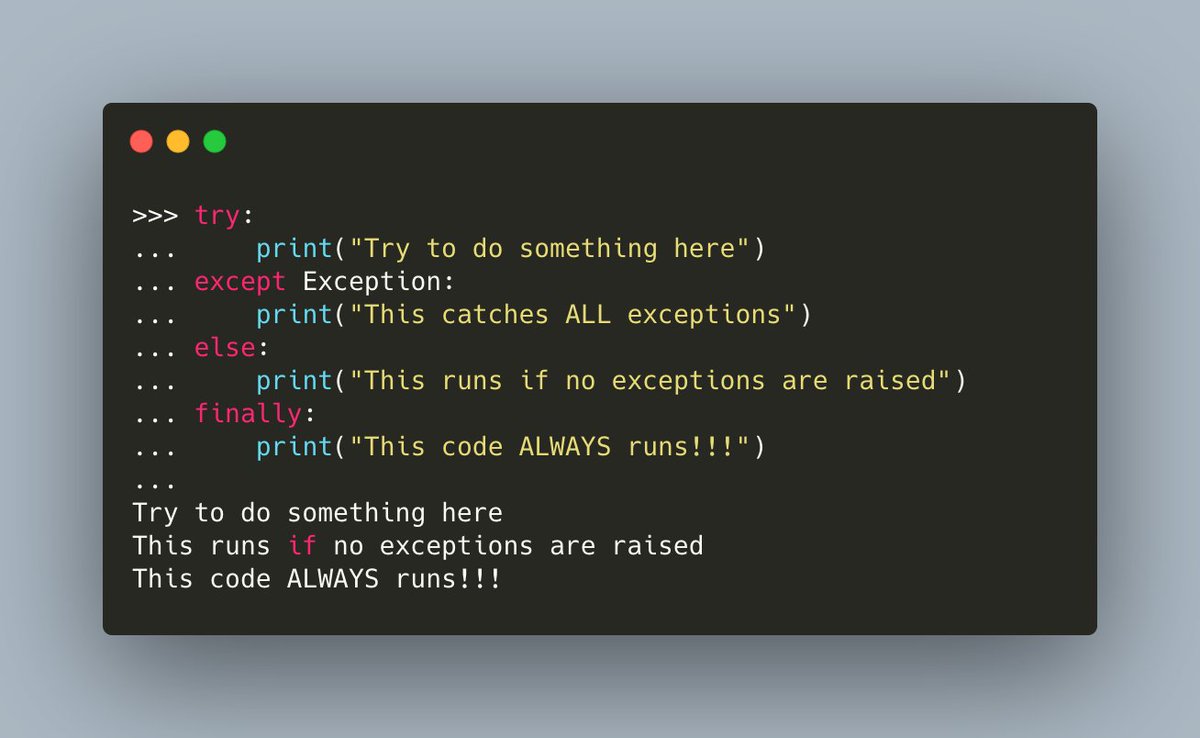
#Python handles exceptions using the `try/except` keywords.
You can optionally add `finally` and `else` to the mix too!
Here's an example that uses all of them:
You can optionally add `finally` and `else` to the mix too!
Here's an example that uses all of them:
#Python has the concept of the "bare except". What that means is that you catch ALL exceptions.
You can do this by catching Exception, which is the base class of ALL other exceptions.
Or you can just not specify an exception type all!
You can do this by catching Exception, which is the base class of ALL other exceptions.
Or you can just not specify an exception type all!

#Python Pro Tip: Do NOT do this! ⚠️
When you catch all the exceptions, you can hide bugs that you want to actually catch!
This leads to difficult and frustrating debugging.
You should ALWAYS use specific exception types whenever possible!
When you catch all the exceptions, you can hide bugs that you want to actually catch!
This leads to difficult and frustrating debugging.
You should ALWAYS use specific exception types whenever possible!

What happens when #Python catches an exception? That's up to you.
Here you catch the `ZeroDivisionError`. You handle it by printing out that you caught it.
In a production application, you might close a database connection, log the issue or rollback a transaction
Here you catch the `ZeroDivisionError`. You handle it by printing out that you caught it.
In a production application, you might close a database connection, log the issue or rollback a transaction

Now let's rewrite the code to catch an `OSError`.
Does that catch a zero division exception?
No! Of course not!
So this time, you get a traceback and your code fails!
Does that catch a zero division exception?
No! Of course not!
So this time, you get a traceback and your code fails!

You can fix this problem by catching both `OSError` and `ZeroDivisionError` though!
But now you have a new problem! How do you know which exception was thrown here?
But now you have a new problem! How do you know which exception was thrown here?

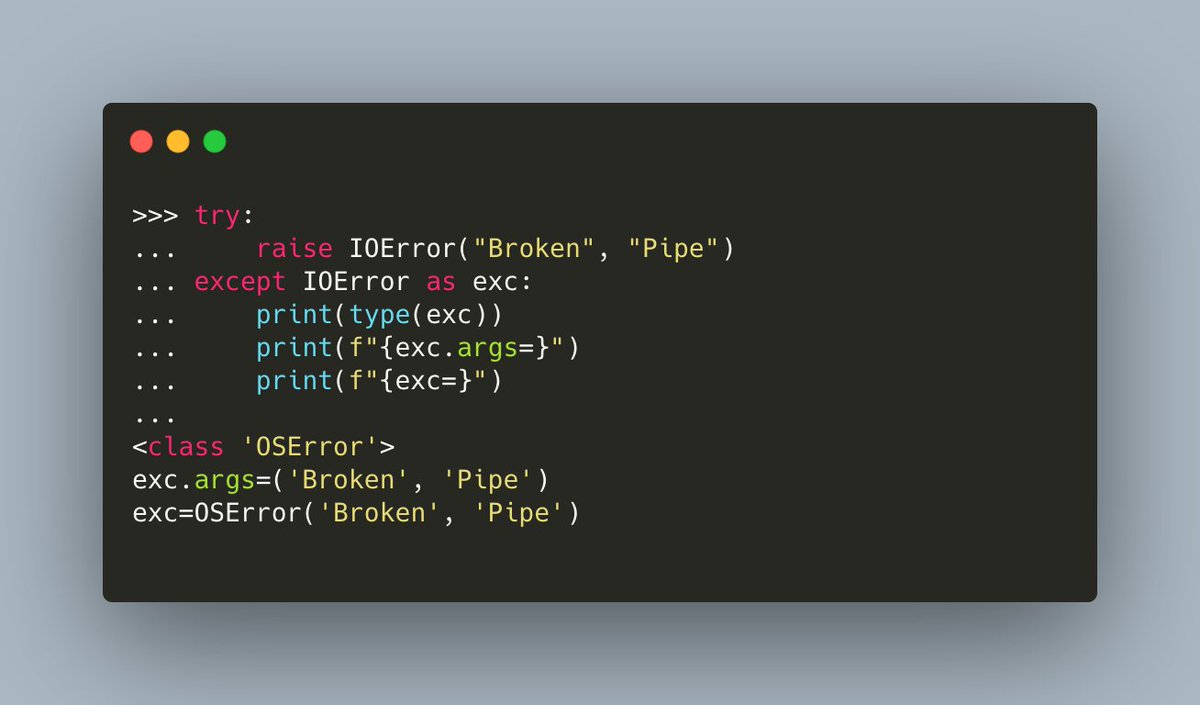
One way to figure out which exception is thrown is to use #Python's `as` keyword to give us access to the `exception` object.
Then you can print out which exception was thrown! 🐍🔥
Then you can print out which exception was thrown! 🐍🔥

You can extract additional information about the exception from the `exception` argument, such as what arguments were passed to it:
#Python lets you use `finally` to run code every time the `try/except` is run, regardless of whether or not you catch the exception.
In this example, you use the `finally` statement to close the file handler
In this example, you use the `finally` statement to close the file handler

You might want to catch an exception in #Python and log it and do some cleanup.
But you don't want the program to continue. In those situations, you could call `sys.exit()` or you could re-raise the exception.
In this example, you do the latter:
But you don't want the program to continue. In those situations, you could call `sys.exit()` or you could re-raise the exception.
In this example, you do the latter:

#Python will do a special type of traceback when an exception is thrown during the handling of another exception.
This is what that looks like:
This is what that looks like:

Want to create your own exception in #Python? You can do that by subclassing `Exception`! 🐍🔥
Here's an example:
Here's an example:

Thanks for joining me in this thread on #Python exception handling!
Follow me for more great content on the Python programming language! 🐍
Follow me for more great content on the Python programming language! 🐍
Loading suggestions...