

NFTs are all about community and token gated access.
Do you authenticate your holdings via @Collab_Land_?
You're either camp:
✅ Yes
or
❌ Hell No
I think you can join camp ✅ - even on a hardware wallet.
Here's why:
Do you authenticate your holdings via @Collab_Land_?
You're either camp:
✅ Yes
or
❌ Hell No
I think you can join camp ✅ - even on a hardware wallet.
Here's why:
2/ What is collab(.)land?
A Discord bot, that is used to token gate communities.
You verify yourself as the owner of a wallet address with a signature ONE SINGLE time - that's all.
Your Discord ID will be linked to the wallet address, and can be used without further signing.
A Discord bot, that is used to token gate communities.
You verify yourself as the owner of a wallet address with a signature ONE SINGLE time - that's all.
Your Discord ID will be linked to the wallet address, and can be used without further signing.
3/ Collabland states, they verified over 6 million wallet addresses in over 41k communities.
Pretty big numbers, eh?
So how can we make sure, the ONE signature we're signing for them will not be our downfall?
Pretty big numbers, eh?
So how can we make sure, the ONE signature we're signing for them will not be our downfall?
4/ The verification is, and probably always will be, a read-only connection. It will NEVER cost a gas fee to authenticate yourself to the REAL collabland.
Neither should you EVER be entering your seed phrase or your private keys into any of these requests.
Neither should you EVER be entering your seed phrase or your private keys into any of these requests.
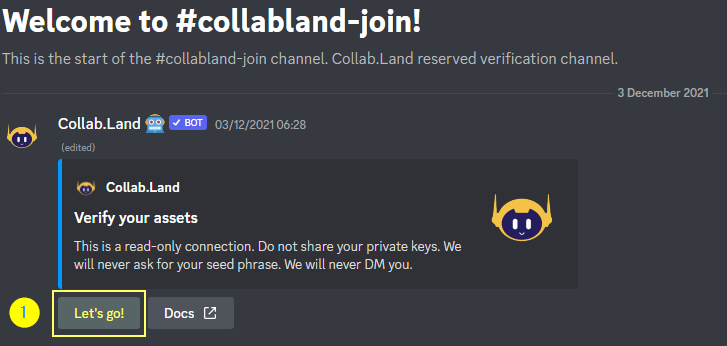
5/ This is how a typical collabland-join channel in a Discord looks like.
To get your sweet roles and perks as a member of the given community - there's no way around validating you're the owner of an asset that lets you take part.
Click on Let's go (1)!
To get your sweet roles and perks as a member of the given community - there's no way around validating you're the owner of an asset that lets you take part.
Click on Let's go (1)!
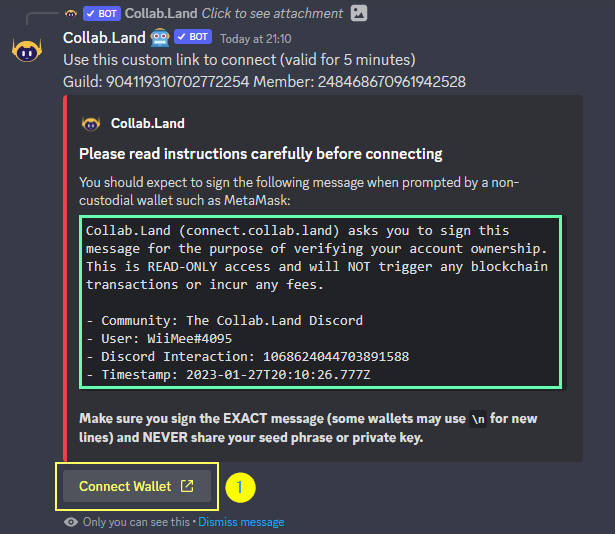
6/ This will bring up a message, in the same discord channel you clicked on, containing some message like this.
The green box displays the EXACT message, that should show up in your Metamäsk 🦊 to sign this signature.
Click "Connect Wallet" (1) (or right click, copy link)
The green box displays the EXACT message, that should show up in your Metamäsk 🦊 to sign this signature.
Click "Connect Wallet" (1) (or right click, copy link)
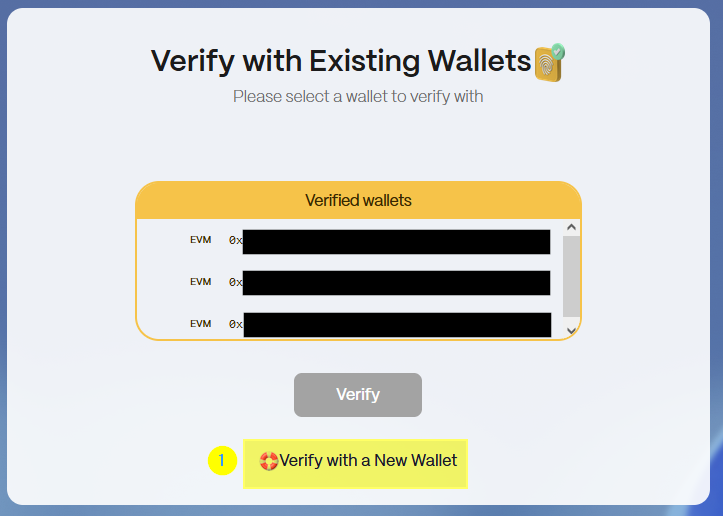
7/ The copied link, api(.)collab(.)land/slugs/RANDOMchars should take you to connect(.)collab(.)land - double check! 💡
From here, you can:
- Choose and existing wallet and click on Verify.
OR
- For first timers:
Click on "Verify with a New Wallet" (1).
From here, you can:
- Choose and existing wallet and click on Verify.
OR
- For first timers:
Click on "Verify with a New Wallet" (1).
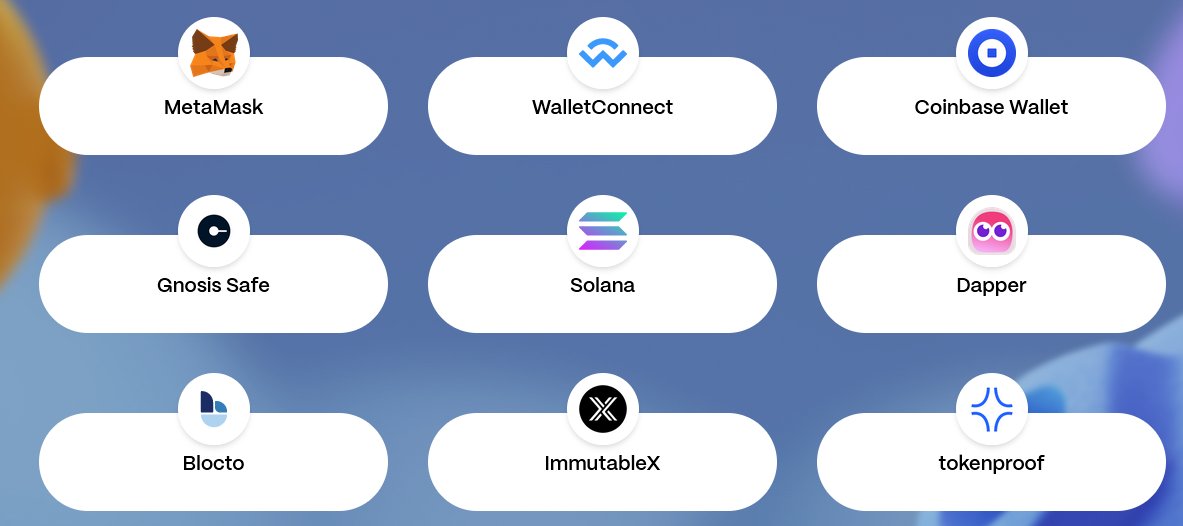
8/ This guide is tailored to people who never used collabland, because they were too afraid to sign anything.
Chose your wallet provider by clicking on their logo.
Pro-tip: "Show All" shows you a lot of options, including one's like:
- Tokenproof
- Gnosis Safe
Chose your wallet provider by clicking on their logo.
Pro-tip: "Show All" shows you a lot of options, including one's like:
- Tokenproof
- Gnosis Safe
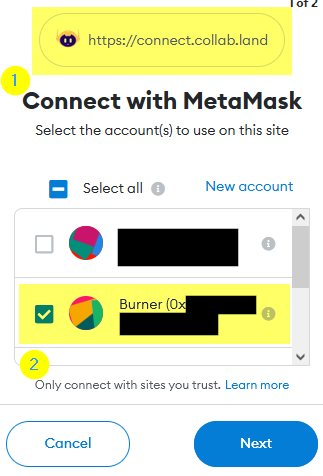
9/ This will ask you to connect your Metamäsk 🦊 / tokenproof or whatever service you chose.
DOUBLE-CHECK the origin URL (1) (see tweet 7). Make sure you're on the wallet address you want to confirm (2).
Hit next. Click Connect.
DOUBLE-CHECK the origin URL (1) (see tweet 7). Make sure you're on the wallet address you want to confirm (2).
Hit next. Click Connect.
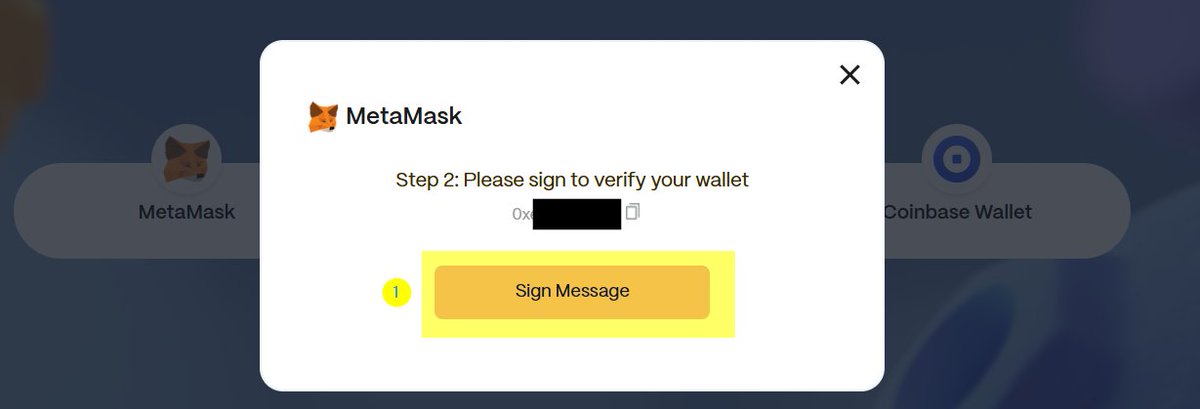
10/ Now, let's do the final step that people are too afraid to do with their hardware wallets or vaults.
Why? Because they're afraid they're going to lose their stuff.
Let's find out how the LEGIT message from collabland should look like. Click that "sign message" (1) button.
Why? Because they're afraid they're going to lose their stuff.
Let's find out how the LEGIT message from collabland should look like. Click that "sign message" (1) button.
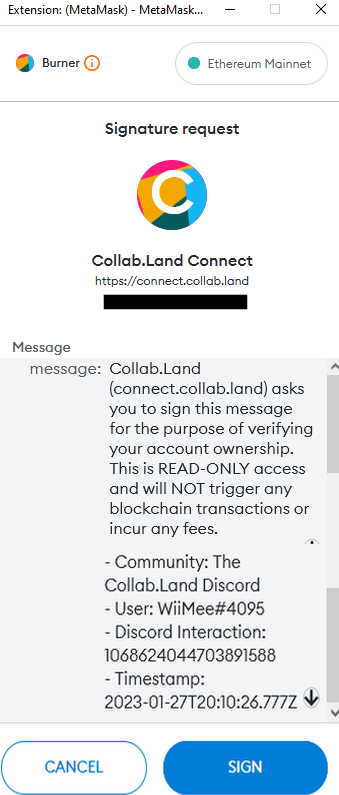
11/ See the signature request?
It's just a plain text, human-readable signature request written in EIP 712.
Looks familiar? Remember the message from collabland in the Discord channel?
It's just a plain text, human-readable signature request written in EIP 712.
Looks familiar? Remember the message from collabland in the Discord channel?
12/ Let's compare them side by side.
Do they match?
Looks good?
Do they match?
Looks good?
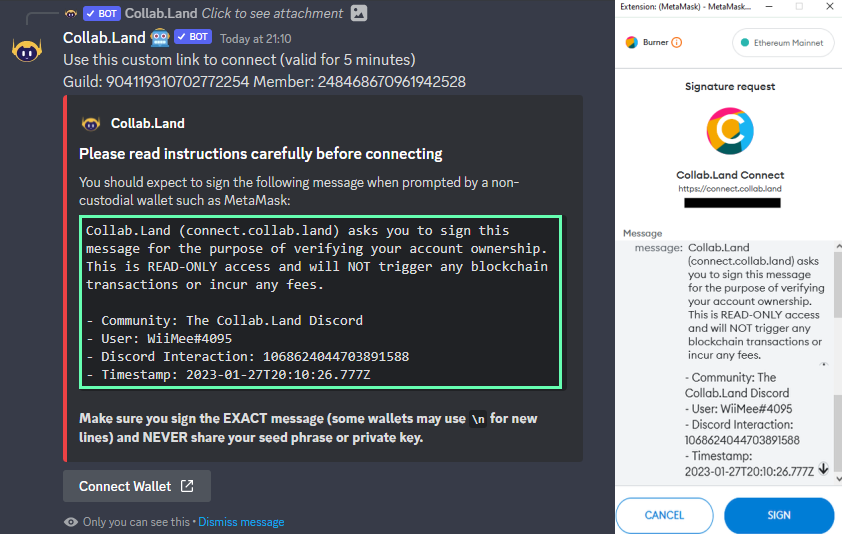
13/ If these two match, you are safe to sign this request - even with your hardware wallet.
If you should do it from your vault?
Up to you and your personal risk awareness.
If you never interact with:
- Approvals
- Smart contracts
on your vault, this signature is NOT an issue.
If you should do it from your vault?
Up to you and your personal risk awareness.
If you never interact with:
- Approvals
- Smart contracts
on your vault, this signature is NOT an issue.
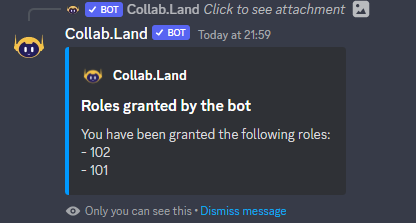
14/ If you took the leap and signed it, @Collab_Land_ should grant you some of the roles you were looking for in your server. 🎉
Like in our @BoringSecDAO Discord granting my me awesome 101 and 102 NFT Security badges.
Like in our @BoringSecDAO Discord granting my me awesome 101 and 102 NFT Security badges.
15/ That's it! ✅
The next time you enter a community that uses collabland as their token gate, you can choose the wallet you just verified as a prefilled option.
The best thing: You can verify that address without having to sign anything (e.g. on phone) again.
Stay safe! 🛡
The next time you enter a community that uses collabland as their token gate, you can choose the wallet you just verified as a prefilled option.
The best thing: You can verify that address without having to sign anything (e.g. on phone) again.
Stay safe! 🛡
Got a message that this tweet should say, it's always safe to sign the screenshotted message - even with approvals.
Agree. But can't edit.
Agree. But can't edit.
One extra, cause I can't edit:
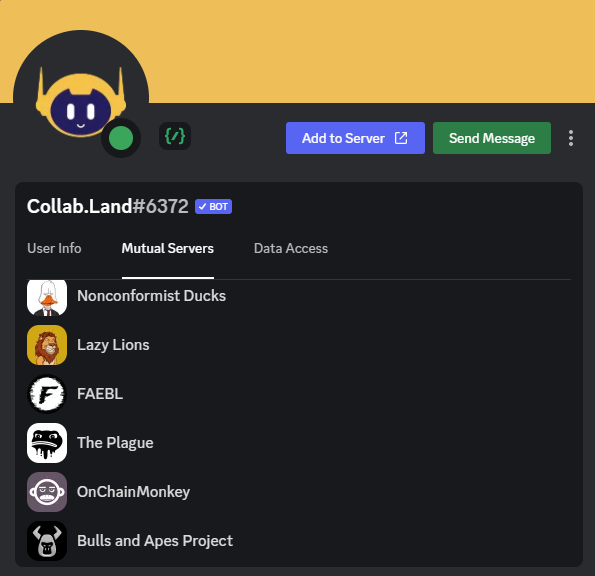
THIS is the legit collabland Bot. Check for Mutual Servers, and make sure there are a few in there!
Collab.Land#6372
Discord ID: 704521096837464076
THIS is the legit collabland Bot. Check for Mutual Servers, and make sure there are a few in there!
Collab.Land#6372
Discord ID: 704521096837464076
Loading suggestions...