

The Linux filesystem and directory structure every Linux user should know 🐧
It's a long but bookmark worthy thread
🧵👇
It's a long but bookmark worthy thread
🧵👇
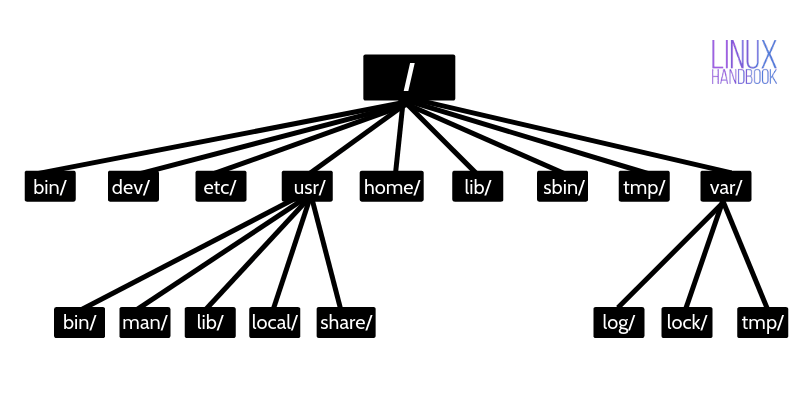
👉 / – The root directory
All the files and directories in Linux are located under ‘root’ represented by ‘/’.
If you look at the directory structure, you’ll realize that it is similar to a plant’s root.
All the files and directories in Linux are located under ‘root’ represented by ‘/’.
If you look at the directory structure, you’ll realize that it is similar to a plant’s root.
Since all other directories or files are descended from root, the absolute path of any file is traversed through root.
For example, if you have a file in /home/user/documents, you can guess that the directory structure goes from root->home->user->documents.
For example, if you have a file in /home/user/documents, you can guess that the directory structure goes from root->home->user->documents.
👉 /bin – Binaries
The ‘/bin’ directly contains the executable files of many basic shell commands like ls, cp, cd etc.
Mostly the programs are in binary format here and accessible by all the users in the Linux system.
The ‘/bin’ directly contains the executable files of many basic shell commands like ls, cp, cd etc.
Mostly the programs are in binary format here and accessible by all the users in the Linux system.
👉 /dev – Device files
This directory only contains special files, including those relating to the devices.
These are virtual files, not physically on the disk.
This directory only contains special files, including those relating to the devices.
These are virtual files, not physically on the disk.
Some interesting examples of these files are:
/dev/null: can be sent to destroy any file or string
/dev/zero: contains an infinite sequence of 0
/dev/random: contains an infinite sequence of random values
/dev/null: can be sent to destroy any file or string
/dev/zero: contains an infinite sequence of 0
/dev/random: contains an infinite sequence of random values
👉 /etc – Configuration files
The /etc directory contains the core configuration files of the system, use primarily by the administrator and services, such as the password file and networking files.
The /etc directory contains the core configuration files of the system, use primarily by the administrator and services, such as the password file and networking files.
👉 /usr – User binaries and program data
In ‘/usr’ go all the executable files, libraries, source of most of the system programs.
For this reason, most of the files contained therein are readonly (for the normal user)
In ‘/usr’ go all the executable files, libraries, source of most of the system programs.
For this reason, most of the files contained therein are readonly (for the normal user)
‘/usr/bin’ contains basic user commands
‘/usr/sbin’ contains additional commands for the administrator
‘/usr/lib’ contains the system libraries
‘/usr/share’ contains documentation or common to all libraries, for example ‘/usr/share/man’ contains the text of the manpage
‘/usr/sbin’ contains additional commands for the administrator
‘/usr/lib’ contains the system libraries
‘/usr/share’ contains documentation or common to all libraries, for example ‘/usr/share/man’ contains the text of the manpage
👉 /home – User personal data
Home directory contains personal directories for the users. It contains the user data and user-specific configuration files.
As a user, you’ll put your personal files, notes, programs etc in your home directory.
Home directory contains personal directories for the users. It contains the user data and user-specific configuration files.
As a user, you’ll put your personal files, notes, programs etc in your home directory.
👉 /lib – Shared libraries
Libraries are basically codes that can be used by the executable binaries. The /lib directory holds the libraries needed by the binaries in /bin (for user) and /sbin (for superuser) directories.
Libraries are basically codes that can be used by the executable binaries. The /lib directory holds the libraries needed by the binaries in /bin (for user) and /sbin (for superuser) directories.
👉 /sbin – System binaries
This is similar to the /bin directory. The only difference is that is contains the binaries that can only be run by root or a sudo user.
You can think of the ‘s’ in ‘sbin’ as super or sudo.
This is similar to the /bin directory. The only difference is that is contains the binaries that can only be run by root or a sudo user.
You can think of the ‘s’ in ‘sbin’ as super or sudo.
👉 /tmp – Temporary files
This directory holds temporary files. Many applications use this directory to store temporary files.
/tmp directory is emptied when system restarts. Some Linux systems also delete old files automatically
Don’t store anything important here.
This directory holds temporary files. Many applications use this directory to store temporary files.
/tmp directory is emptied when system restarts. Some Linux systems also delete old files automatically
Don’t store anything important here.
👉 /var – Variable data files
Var, short for variable, is where programs store runtime information like system logging, user tracking, caches, and other files that system programs create and manage.
Var, short for variable, is where programs store runtime information like system logging, user tracking, caches, and other files that system programs create and manage.
The files stored in /var are NOT cleaned automatically and hence it provides a good place for sysadmins to look for information.
For example, if you want to check the login history in your Linux system, just check the content in /var/log/wtmp.
For example, if you want to check the login history in your Linux system, just check the content in /var/log/wtmp.
👉 /boot – Boot files
The ‘/boot’ directory contains the files of the kernel and boot image, in addition to LILO and Grub.
It is often advisable that the directory resides in a partition at the beginning of the disc.
The ‘/boot’ directory contains the files of the kernel and boot image, in addition to LILO and Grub.
It is often advisable that the directory resides in a partition at the beginning of the disc.
👉 /proc – Process and kernel files
The ‘/proc’ directory contains the information about currently running processes and kernel parameters.
The content of the proc directory is used by tools like lscpu to get runtime system information.
The ‘/proc’ directory contains the information about currently running processes and kernel parameters.
The content of the proc directory is used by tools like lscpu to get runtime system information.
👉 /opt – Optional software
Traditionally, the /opt directory is used for installing/storing the files of third-party applications that are not available from the distribution’s repository.
Traditionally, the /opt directory is used for installing/storing the files of third-party applications that are not available from the distribution’s repository.
👉 /media – Mount point for removable media
When you connect a removable media such as USB disk, SD card or DVD, a directory is automatically created under the /media directory for them. You can access the content of the removable media from this directory.
When you connect a removable media such as USB disk, SD card or DVD, a directory is automatically created under the /media directory for them. You can access the content of the removable media from this directory.
👉 /mnt – Mount directory
This is similar to the /media directory but instead of automatically mounting the removable media, mnt is used by system administrators to manually mount a filesystem.
This is similar to the /media directory but instead of automatically mounting the removable media, mnt is used by system administrators to manually mount a filesystem.
👉 /srv – Service data
The /srv directory contains data for services provided by the system. For example, if you run a HTTP server, it’s a good practice to store the website data in the /srv directory.
The /srv directory contains data for services provided by the system. For example, if you run a HTTP server, it’s a good practice to store the website data in the /srv directory.
There are more such directories but I think this is enough to understand the Linux directory structure and its usage.
Save this image for quick reference to the directory structure in Linux systems.
Save this image for quick reference to the directory structure in Linux systems.

If you find this useful, please follow us @LinuxHandbook for more such educational Linux content 🙏
Loading suggestions...