

How to prepare a course syllabus in 15 min with ChatGPT:
This will save underpaid teachers a lot of time and labor.
This will save underpaid teachers a lot of time and labor.
1. Start by establishing context (prompt in ALT).
Your role: a professor
Your task: design a syllabus for [course title]
ChatGPT's role: Act as your assistant
ChatGPT's task: Follow your step by step instructions
Ask ChatGPT a yes/no question if the instructions are clear.
Your role: a professor
Your task: design a syllabus for [course title]
ChatGPT's role: Act as your assistant
ChatGPT's task: Follow your step by step instructions
Ask ChatGPT a yes/no question if the instructions are clear.

2. Give ChatGPT specific details about:
• How long the course is
• How often your classes will meet
• How long the course is
• How often your classes will meet
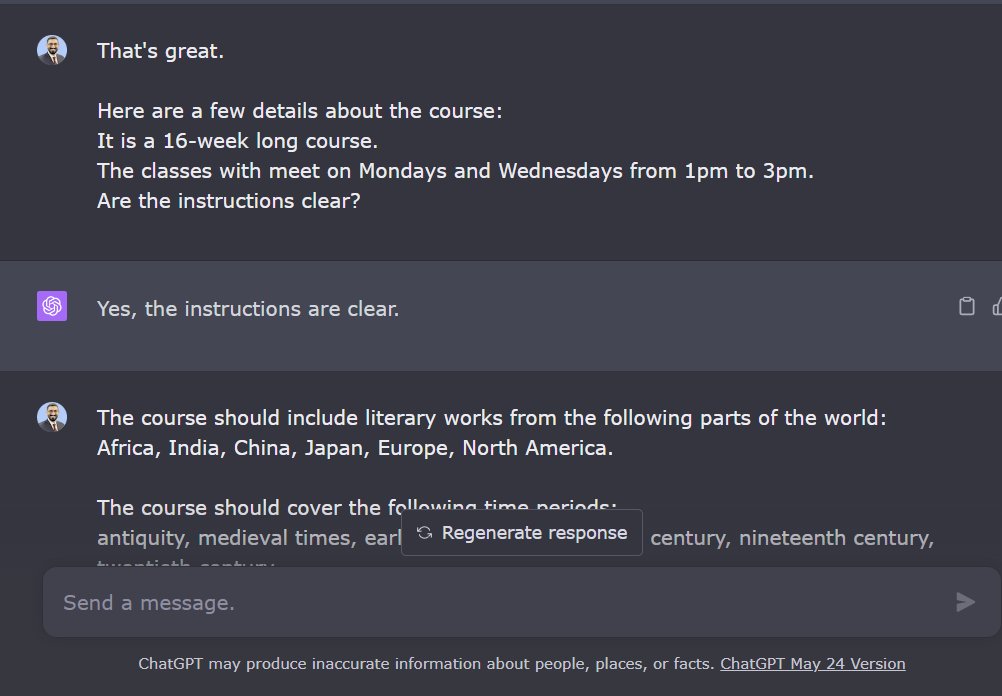
3. Tell ChatGPT your preferences
Example: My course on World Literature should cover literatures from various parts of the world and time periods.
Preference should be given to non-European liteatures.
Example: My course on World Literature should cover literatures from various parts of the world and time periods.
Preference should be given to non-European liteatures.

4. Ask ChatGPT to give you a week-by-week reading plan.
This is a great first draft of the syllabus with an impressive collection of primary texts.
This is a great first draft of the syllabus with an impressive collection of primary texts.

5. Ask ChatGPT to give you secondary/supplementary sources.
To ensure ChatGPT doesn't give you fake references, enable a plugin called ScholarAI.
ChatGPT has given me secondary sources for every primary text with clickable links.
To ensure ChatGPT doesn't give you fake references, enable a plugin called ScholarAI.
ChatGPT has given me secondary sources for every primary text with clickable links.

6. Tell ChatGPT if you want to conduct any workshops for your students.
I usually run two workshops for students to help them with their essays.
Then ask ChatGPT to give you a revised outline with the schedule for the workshops incorporated.
I usually run two workshops for students to help them with their essays.
Then ask ChatGPT to give you a revised outline with the schedule for the workshops incorporated.

7. Tell ChatGPT about the schedule of assignments.
I usually divide the essay writing process in five steps.
I spread these steps over the course of the semester to make the writing process manageable.
Ask ChatGPT to incorporate the assignment schedule in course outline.
I usually divide the essay writing process in five steps.
I spread these steps over the course of the semester to make the writing process manageable.
Ask ChatGPT to incorporate the assignment schedule in course outline.

8. Ask ChatGPT to give you discussion questions for every primary text in the syllabus.
Not all questions would be useful, but they will give you a great starting point.
Not all questions would be useful, but they will give you a great starting point.

9. Now ask ChatGPT to consolidate all the above details in the form of a table.
The table should have columns for:
Week; Primary Reading; Supplementary Reading; Essay Steps; Discussion Questions
The table should have columns for:
Week; Primary Reading; Supplementary Reading; Essay Steps; Discussion Questions

Want to learn more about how to supercharge your academic writing with AI-powered apps?
I have a complete tutorial (250+ slides) for you.
It's being used by 1900 academics including those at Harvard, Princeton, Yale, and Stanford.
You can get it here:
efficientacademicwriter.carrd.co
I have a complete tutorial (250+ slides) for you.
It's being used by 1900 academics including those at Harvard, Princeton, Yale, and Stanford.
You can get it here:
efficientacademicwriter.carrd.co

10. Copy the table into an MS Word file.
Please note it won't look like a table in Word.
Please note it won't look like a table in Word.

11. Start editing and organizing.
Below is a sample syllabus for Week 1-2 with primary and supplementary readings and discussion questions.
This would've taken me at least a couple hours. Now I can spend that time reading these texts.
Below is a sample syllabus for Week 1-2 with primary and supplementary readings and discussion questions.
This would've taken me at least a couple hours. Now I can spend that time reading these texts.

Final words:
1. I used GPT-4 for this thread. Output will be different for ChatGPT 3.5.
2. Keep iterating if you don't get your desired response
3. Do incremental prompting.
Here's a thread on incremental prompting:
1. I used GPT-4 for this thread. Output will be different for ChatGPT 3.5.
2. Keep iterating if you don't get your desired response
3. Do incremental prompting.
Here's a thread on incremental prompting:
Found this thread helpful?
1. Scroll to the top and hit the "Like" button on the first tweet.
2. Bookmark it so you can come back to it later.
3. Follow me for regular threads on how to use AI apps for academic purposes.
1. Scroll to the top and hit the "Like" button on the first tweet.
2. Bookmark it so you can come back to it later.
3. Follow me for regular threads on how to use AI apps for academic purposes.
Loading suggestions...